
Introduction
This manual provides instructions for the PZL RC-22 Replacement Remote Control. This remote is designed as a direct replacement for the original remote controls of various Topping audio devices, ensuring seamless compatibility and functionality.
The PZL RC-22 is compatible with the following Topping models: DX3 PRO+, EX5, D90SE, D70S, E30, E50, D50S, D30.

Image: Comparison of the original remote (right) and the PZL RC-22 replacement remote (left). The replacement offers similar button layout and functionality.
Setup
The PZL RC-22 Replacement Remote Control is designed for immediate use without any complex programming or pairing procedures. Simply install the battery, and it will be ready to operate your compatible Topping device.
Battery Installation
- Locate the battery compartment on the back of the remote control.
- Open the battery compartment cover.
- Insert one CR2032 button cell battery, ensuring the correct polarity (+/-) as indicated inside the compartment.
- Close the battery compartment cover securely.
Note: Batteries are not included with the remote control. Please purchase a CR2032 battery separately.
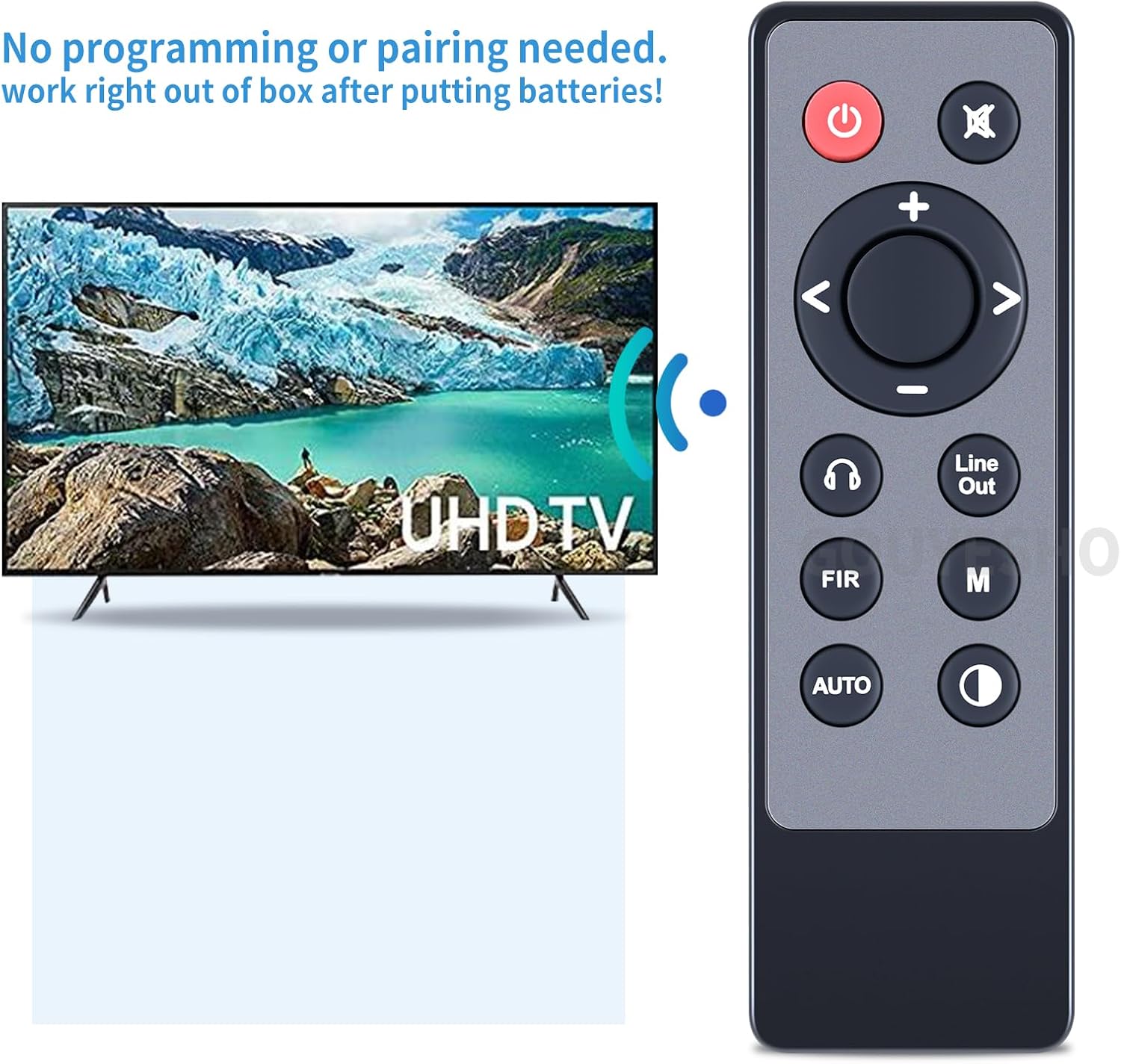
Image: The PZL RC-22 remote control in use with a display, demonstrating its out-of-the-box functionality without requiring programming or pairing.

Image: A diagram illustrating the dimensions of the RC-22 remote control and specifying the battery type as CR2032x1.
Operating Instructions
The RC-22 remote control utilizes infrared (IR) technology for precise control of your Topping audio device. Ensure a clear line of sight between the remote and the device's IR receiver for optimal performance. The remote offers a control range of up to 12 meters (40 feet).
Button Functions
Refer to the image below for the layout of the remote control buttons. Each button corresponds to a specific function on your compatible Topping device.
- Power Button (⏻): Turns the device on or off.
- Mute Button (🔇): Mutes or unmutes the audio output.
- Volume Up/Down (+ / -): Adjusts the audio volume level.
- Navigation Buttons (< / > / ^ / ^): Used for menu navigation and selection.
- Headphone Button (🎧): Toggles headphone output or related settings.
- Line Out Button: Selects or controls the line output.
- FIR Button: Controls FIR filter settings.
- M Button: Accesses or cycles through various modes or memory settings.
- AUTO Button: Activates automatic settings or input selection.
- Brightness/Mode Button (☼): Adjusts display brightness or cycles through display modes.

Image: A hand holding the PZL RC-22 remote control, illustrating its capability for long-distance and precise control over a compatible device.
Maintenance
To ensure the longevity and optimal performance of your PZL RC-22 remote control, follow these maintenance guidelines:
- Cleaning: Wipe the remote control regularly with a soft, dry cloth. For stubborn dirt, slightly dampen the cloth with water or a mild cleaning solution, then wipe dry immediately. Avoid using abrasive cleaners or solvents.
- Battery Replacement: Replace the CR2032 battery when the remote's response becomes sluggish or stops working. Always dispose of used batteries responsibly according to local regulations.
- Storage: Store the remote control in a cool, dry place away from direct sunlight, extreme temperatures, and high humidity.
- Avoid Drops: Protect the remote from physical impact, as drops can damage internal components or the casing.
Troubleshooting
If you encounter issues with your PZL RC-22 remote control, please refer to the following common troubleshooting steps:
- Remote Not Responding:
- Check the battery: Ensure the CR2032 battery is correctly inserted with the proper polarity and is not depleted. Replace the battery if necessary.
- Line of Sight: Make sure there is a clear path between the remote control's IR emitter and the IR receiver on your Topping audio device. Obstructions can block the signal.
- Distance: Confirm you are within the effective operating range of 12 meters (40 feet).
- Intermittent Functionality:
- Environmental Interference: Strong light sources (like direct sunlight or certain types of fluorescent lighting) can interfere with IR signals. Try operating the remote in a different environment.
- Battery Connection: Ensure the battery is making good contact within its compartment.
- Remote Buttons Not Working:
- Clean Buttons: Ensure there is no dirt or debris lodged around the buttons, which might prevent them from being pressed correctly.
- Device Not Listed as Compatible:
- The RC-22 is specifically designed for the listed Topping models. If your device is not on the compatible list (DX3 PRO+, EX5, D90SE, D70S, E30, E50, D50S, D30), this remote may not function correctly.
Specifications
| Model Number | RC-22 |
| Brand | PZL |
| Compatible Devices | Topping DX3 PRO+, EX5, D90SE, D70S, E30, E50, D50S, D30 |
| Connectivity Technology | Infrared (IR) |
| Maximum Range | 12 meters (40 feet) |
| Battery Type | 1 x CR2032 Button Cell (not included) |
| Color | Black |
| Special Feature | No Programming Required |
| Dimensions (Approximate) | Length: 4.92 inches (12.5 cm) Width: 1.54 inches (3.9 cm) Thickness: 0.42 inches (1.07 cm) |
Support
For any questions regarding your PZL RC-22 Replacement Remote Control, including compatibility inquiries or operational assistance, please contact our customer support. We aim to respond to all inquiries within 12 hours on weekdays.
Please refer to your purchase documentation or the retailer's website for specific contact information.