
1. Important Safety Instructions
Please read all instructions carefully before operating the dehumidifier. Keep this manual for future reference.
- Ensure the power supply matches the voltage specified on the rating label.
- Do not operate the unit with a damaged power cord or plug.
- Always place the dehumidifier on a level, stable surface.
- Maintain at least 8 inches (20 cm) of clearance around the unit for proper airflow.
- Do not insert objects into the air inlet or outlet.
- Unplug the unit before cleaning or performing any maintenance.
- This appliance is not intended for use by persons (including children) with reduced physical, sensory or mental capabilities, or lack of experience and knowledge, unless they have been given supervision or instruction concerning use of the appliance by a person responsible for their safety.
2. Product Overview
The EUHOMY 35 Pint Dehumidifier is designed to remove excess moisture from the air, improving comfort and preventing issues related to high humidity.
2.1 Components
- Control Panel
- Air Outlet
- Air Inlet / Filter
- Water Tank
- Drainage Port (for continuous drainage)
- Universal Wheels
- Side Handles
2.2 Control Panel
The control panel allows you to manage all functions of the dehumidifier.

Image: The control panel features buttons for Timer, Mode, Fan, and On/Off, along with a digital display for humidity and indicators for various modes and tank status.
- TIMER Button: Sets the auto-on or auto-off timer (up to 24 hours).
- MODE Button: Cycles through SET, COMFORT, DRYER, and CONT modes.
- Up/Down Buttons (∧/∨): Adjusts desired humidity level or timer settings.
- FAN Button: Selects fan speed (Low/High) and resets the filter indicator.
- ON/OFF Button: Powers the unit on or off.
- 'Full' Indicator: Illuminates when the water tank is full and needs emptying.
3. Setup and Installation
3.1 Placement
Place the dehumidifier in a location where it can effectively circulate air. Ensure there is at least 8 inches (20 cm) of space around the unit to avoid obstructing airflow.

Image: The dehumidifier is suitable for various rooms including bedrooms, kitchens, bathrooms, living rooms, basements, and laundry rooms.
3.2 Power Connection
Plug the power cord into a grounded electrical outlet. The unit will enter standby mode.
4. Operating Instructions
4.1 Power On/Off
Press the ON/OFF button to turn the dehumidifier on or off.
4.2 Mode Selection
Press the MODE button to cycle through the following operation modes:
- SET Mode: Allows manual adjustment of the desired humidity level from 35% to 80%.
- COMFORT Mode: Automatically maintains a comfortable humidity level for the human body.
- DRYER Mode: Operates continuously at high fan speed to dry clothes quickly.
- CONT Mode: Operates continuously regardless of the humidity level, ideal for constant moisture removal.
4.3 Humidity Setting (SET Mode)
In SET mode, use the ∧ or ∨ buttons to set your desired humidity level. The unit will operate until the ambient humidity reaches the set level.
4.4 Fan Speed
Press the FAN button to switch between Low and High fan speeds.
4.5 Timer Function
Press the TIMER button to set an auto-on or auto-off time from 1 to 24 hours. Use the ∧ or ∨ buttons to adjust the time. The unit will automatically turn on or off after the set duration.
4.6 Drainage Options
The dehumidifier offers two methods for water drainage:
4.6.1 Manual Drainage (Water Tank)
When the water tank is full, the 'Full' indicator will light up, and the unit will automatically stop operating. To empty the tank:
- Gently pull out the water tank from the front of the unit.
- Carefully pour out the collected water.
- Slide the empty water tank back into the unit until it clicks into place. The unit will resume operation.

Image: Visual guide for emptying the water tank.
4.6.2 Continuous Drainage (Drain Hose)
For continuous operation without emptying the tank, use the included drain hose.
- Locate the drainage port on the back of the unit.
- Remove the rubber plug from the drainage port.
- Connect the provided 39.37-inch drain hose to the port, ensuring a secure fit.
- Direct the other end of the hose to a suitable drain (e.g., floor drain, sink) ensuring it is sloped downwards for gravity drainage.
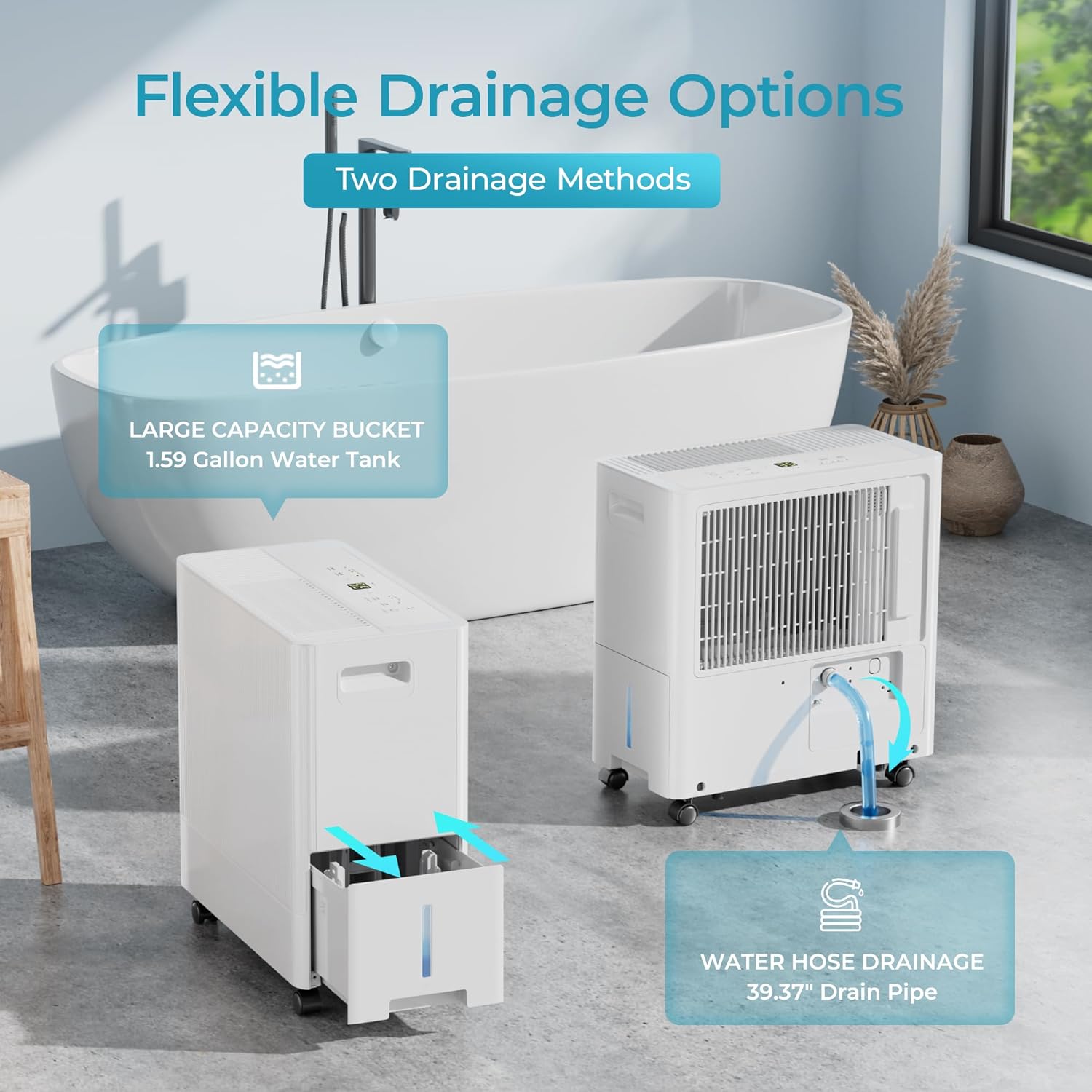
Image: The dehumidifier illustrating both the internal water tank and the continuous drainage hose connection.

Image: Visual guide for setting up continuous drainage with the hose.
5. Maintenance
5.1 Cleaning the Air Filter
Regular cleaning of the air filter is essential for efficient operation. It is recommended to clean the filter once a month.
- Turn off and unplug the dehumidifier.
- Remove the filter from the back of the unit.
- Wash the filter with clean water. Do not use harsh detergents.
- Allow the filter to air dry completely before reinserting it.
- Once the filter is reinserted, press and hold the FAN button for 3 seconds to reset the filter indicator.

Image: The 'Considerate Design' image highlights the washable and removable filter, along with other features like wheels and the water tank.
5.2 Storage
If the unit will not be used for an extended period:
- Empty the water tank and ensure it is clean and dry.
- Clean the air filter.
- Wrap the power cord and secure it with the provided strap.
- Store the unit upright in a cool, dry place.
6. Troubleshooting
| Problem | Possible Cause | Solution |
|---|---|---|
| Dehumidifier does not turn on. | No power supply; Power cord not plugged in; Water tank full. | Check power connection; Empty water tank. |
| Unit is running but not dehumidifying. | Air filter clogged; Room temperature too low; Humidity setting too high. | Clean air filter; Ensure room temperature is above 41°F (5°C); Lower desired humidity setting. |
| Water is leaking. | Water tank not properly installed; Drain hose not connected correctly or clogged. | Reinstall water tank; Check drain hose connection and clear any blockages. |
| Unit is noisy. | Unit not on a level surface; Air filter clogged. | Place on a level surface; Clean air filter. |
| Frost appears on coils. | Room temperature too low. | The unit has an automatic defrost function. If frost persists, increase room temperature. |
7. Specifications
| Feature | Specification |
|---|---|
| Brand | EUHOMY |
| Model Number | B0D69KSKK1 |
| Dehumidification Capacity | 35 Pints/Day (DOE 2012 Standard) |
| Coverage Area | Up to 3000 Sq.Ft |
| Water Tank Capacity | 1.32 Gallons (5 Liters) |
| Product Dimensions (D x W x H) | 18.5" x 8.86" x 15.94" |
| Special Features | Adjustable Humidity Control, Auto Shut-off, Auto Restart, Defrost Function, Timer |
| Drainage Options | Water Tank, Continuous Drain Hose |
| Material | Plastic |
| Color | White |
8. Product Demonstration Video
Video: This video provides a visual overview of the EUHOMY Dehumidifier, demonstrating its features such as portability with universal wheels, control panel operation (mode selection, humidity adjustment, timer), fan speed options, filter removal for cleaning, water tank capacity, and continuous drainage setup. It showcases the unit in various home environments like the living room, laundry room, and kitchen.
9. Warranty and Support
The EUHOMY 35 Pint Dehumidifier comes with a one-year warranty. For any questions, technical assistance, or warranty claims, please contact EUHOMY customer support. Refer to your purchase documentation for specific contact details.