
Introduction
This manual provides detailed instructions for the proper use and care of your Kodak PIXPRO FZ55 Digital Camera. Please read this manual thoroughly before using your camera to ensure optimal performance and longevity. Keep this manual for future reference.
The Kodak PIXPRO FZ55 is a compact digital camera featuring a 16-megapixel sensor, 5x optical zoom, and 1080p Full HD video recording capabilities. It is designed for ease of use, making it suitable for capturing everyday moments.
What's in the Box
Verify that all items listed below are included in your package:
- Kodak PIXPRO FZ55 Digital Camera
- Rechargeable Lithium-Ion Battery
- USB Cable
- AC Adapter
- Wrist Strap
- 64GB High-Speed SD Card
- Memory Card Reader
- Memory Card Wallet
- Tabletop Tripod
- Cleaning Bundle (includes brush, spray bottle, squeegee card, cotton swabs)
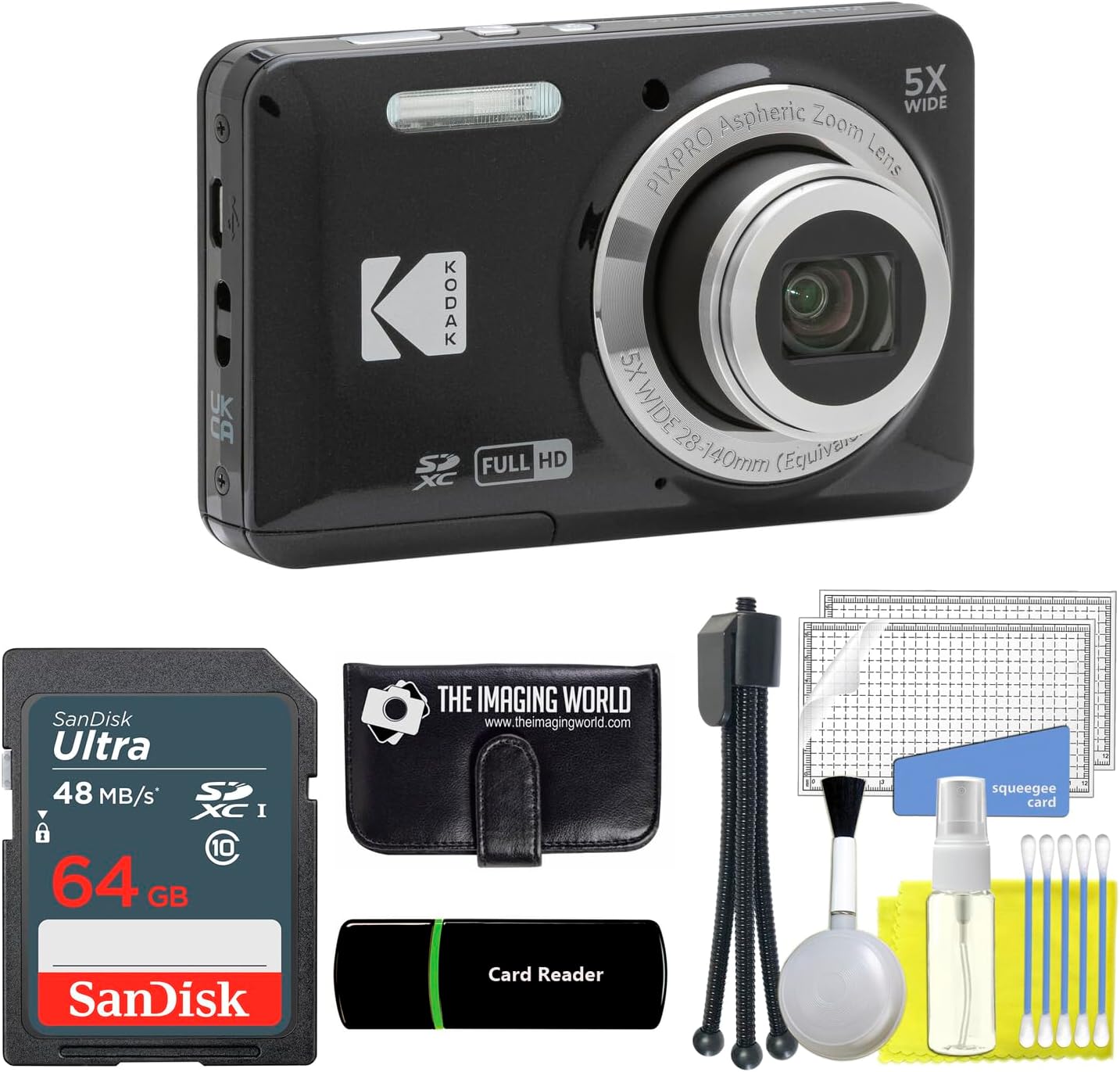
Figure 1: Kodak PIXPRO FZ55 Digital Camera with the complete accessory bundle.
Camera Overview
Familiarize yourself with the main components of your Kodak PIXPRO FZ55 camera.
Front View

Figure 2: Front view of the Kodak PIXPRO FZ55 camera, showing the lens, flash, and brand logo.
- Lens: 28mm wide-angle lens with 5x optical zoom.
- Built-in Flash: Provides illumination in low-light conditions.
- Shutter Button: Press halfway to focus, fully to capture an image.
Rear View

Figure 3: Rear view of the Kodak PIXPRO FZ55 camera, displaying the 2.7-inch LCD and control buttons.
- 2.7" LCD Screen: For framing shots, navigating menus, and reviewing photos/videos.
- Zoom Lever (W/T): Controls optical zoom (Wide/Telephoto).
- Playback Button: Enters playback mode to view captured media.
- Menu/Set Button: Accesses camera settings and confirms selections.
- Directional Pad: Navigates menus and selects options.
- Delete Button: Deletes selected photos or videos.
- Mode Button: Switches between shooting modes (Auto, Program, Scene, Movie, etc.).
Side and Top Views


Figure 4: Angled and top views of the Kodak PIXPRO FZ55 camera, showing the power button and USB port.
- Power Button: Turns the camera on or off.
- USB Port: For charging the battery and transferring data to a computer.
- Battery/Memory Card Compartment: Located at the bottom of the camera.
Setup
1. Charging the Battery
- Insert the rechargeable Lithium-Ion battery into the battery compartment at the bottom of the camera. Ensure it is inserted correctly according to the polarity indicators.
- Connect the camera to the AC adapter using the provided USB cable.
- Plug the AC adapter into a power outlet. The charging indicator light will illuminate.
- Charging is complete when the indicator light turns off. A full charge typically takes approximately 2-3 hours.
Note: The camera supports in-camera charging via USB.
2. Inserting a Memory Card
- Open the battery/memory card compartment cover on the bottom of the camera.
- Insert the 64GB SD card (SDHC or SDXC compatible) into the memory card slot with the metal contacts facing the front of the camera. Push until it clicks into place.
- Close the compartment cover securely.
Note: Always ensure the camera is turned off before inserting or removing the memory card.
Operating the Camera
1. Turning On/Off
Press the Power Button located on the top of the camera to turn it on or off.
2. Basic Photography (Auto Mode)
- Turn on the camera. It will typically start in Auto mode.
- Frame your shot using the 2.7" LCD screen.
- Use the Zoom Lever (W/T) to adjust the optical zoom.
- Press the Shutter Button halfway down to allow the camera to focus. The focus frame will turn green when focus is achieved.
- Press the Shutter Button fully down to capture the image.
3. Recording Videos
- Press the Mode Button and select "Movie" mode.
- Frame your subject.
- Press the Shutter Button to start recording. A red indicator will appear on the screen.
- Press the Shutter Button again to stop recording. The camera records in 1080p Full HD at 30 frames per second.
Advanced Features
Shooting Modes
The FZ55 offers various shooting modes to optimize your photos for different situations. Press the Mode Button to cycle through or select from the following:
- Auto: Camera automatically adjusts settings for most situations.
- Program (P): Allows more control over settings while the camera handles exposure.
- Scene (SCN): Pre-set modes for specific scenarios like Landscape, Sport, Beach, Sunset, Fireworks, Night Landscape, Snow, Children, Portrait, Party, Night Portrait, and Pet.
- Movie: For recording video.
- Panorama: Captures a wide panoramic image by stitching multiple shots.
- Face Beautifier: Enhances facial features in portraits.
- Intelligent Scene Detection (ASCN): Automatically detects the scene type and applies optimal settings.
Smart Detection Features
The camera includes smart detection features to assist in capturing well-timed shots:
- Face Detection: Automatically detects and focuses on faces.
- Smile Detection: Captures a photo automatically when a smile is detected.
- Blink Detection: Warns if a subject blinked, allowing for a retake.
- Cat/Dog Detection: Optimizes settings for photographing pets.
Flash Modes
Adjust the flash mode according to your lighting conditions. Access flash settings via the menu or a dedicated button (if available):
- Auto Flash: Fires automatically when needed.
- Red-Eye Reduction: Fires a pre-flash to reduce red-eye effect.
- Fill Flash: Forces the flash to fire regardless of ambient light.
- Force Off: Disables the flash.
- Slow Synchro: Combines flash with a slow shutter speed for balanced exposure in low light.
- Red-Eye Reduction + Slow Synchro: Combines both effects.
Playback and Transferring Files
Viewing Photos and Videos
- Press the Playback Button to enter playback mode.
- Use the Directional Pad to navigate through your captured images and videos.
- To delete an unwanted file, select it and press the Delete Button. Confirm your selection.
Transferring Files to a Computer
- Ensure the camera is turned off.
- Connect the camera to your computer using the provided USB cable.
- Turn on the camera. It should be recognized as a removable disk or media device by your computer.
- Open the camera's folder on your computer and copy the desired photos and videos to your computer's hard drive.
- Alternatively, you can remove the SD card from the camera and insert it into the provided card reader, then connect the card reader to your computer for direct file transfer.
Maintenance
- Cleaning the Lens: Use a soft, lint-free cloth or the provided cleaning brush to gently wipe the lens. Avoid touching the lens with your fingers.
- Cleaning the LCD Screen: Use a soft, dry cloth to clean the LCD screen. For stubborn smudges, lightly dampen the cloth with water or a screen cleaner.
- Camera Body: Wipe the camera body with a soft, dry cloth. Do not use harsh chemicals or solvents.
- Storage: When not in use for extended periods, remove the battery and store the camera in a cool, dry place away from direct sunlight and extreme temperatures.
- Battery Care: Recharge the battery regularly, even if not fully depleted, to maintain its lifespan. Avoid fully discharging the battery frequently.
Troubleshooting
If you encounter issues with your camera, refer to the following common solutions:
| Problem | Solution |
|---|---|
| Camera does not turn on. | Ensure the battery is fully charged and correctly inserted. Try charging the battery for a few hours. |
| Cannot take pictures. | Check if the memory card is inserted correctly and has sufficient free space. The battery might also be too low. |
| Images are blurry. | Ensure the lens is clean. Press the shutter button halfway to allow the camera to focus before fully pressing. Check lighting conditions; use flash if necessary. |
| Flash does not fire. | Check the flash mode settings. Ensure it is not set to "Force Off". The battery level might also be too low. |
| Camera freezes or malfunctions. | Turn off the camera, remove the battery for a few seconds, then reinsert it and turn the camera back on. |
Specifications
Key technical specifications for the Kodak PIXPRO FZ55 Digital Camera:
| Sensor Type | 16 MP 1/2.3-inch CMOS Sensor |
| Lens | 28mm Wide-Angle Lens, 5x Optical Zoom |
| Display | 2.7-inch LCD Screen |
| Video Resolution | 1080p Full HD at 30 fps |
| Image Stabilization | Digital Image Stabilization |
| ISO Sensitivity | Expanded ISO Minimum 1600, Expanded ISO Maximum 3200 |
| Flash | Built-In Flash with Multiple Modes |
| Storage Media | SDHC/SDXC Card (up to 64GB supported) |
| Connectivity | USB |
| Battery | Rechargeable Lithium-Ion Battery |
| Dimensions (Approx.) | Compact Form Factor |
| Weight (Approx.) | Lightweight |
| Supported File Formats | JPEG (Stills), MP4 (Video), AAC (Audio) |
| Shutter Speed | Up to 1/2000 seconds |
| Aperture | F2.8-F5.6 |
Warranty and Support
Your Kodak PIXPRO FZ55 Digital Camera comes with a Limited 1-Year Manufacturer Warranty. This warranty covers defects in materials and workmanship under normal use.
For warranty claims or technical support, please refer to the contact information provided with your purchase documentation or visit the official Kodak PIXPRO support website.
Please retain your proof of purchase for warranty service.


