
Introduction
This manual provides detailed instructions for the installation, operation, and maintenance of your Memphis Audio SRXP62WTV2 SRX Pro 6.5-inch 2-way coaxial speaker system. Please read this manual thoroughly before installation and use to ensure proper function and safety. This system includes six (6) SRXP62WTV2 speakers, designed for high-performance car audio applications.
Safety Information
Always observe the following safety precautions during installation and operation:
- Disconnect the vehicle's battery negative terminal before beginning any electrical installation to prevent short circuits.
- Ensure all wiring is properly insulated and secured to prevent damage from vibration or sharp edges.
- Do not install speakers in locations that obstruct vehicle operation or safety features.
- Use appropriate personal protective equipment (PPE) such as safety glasses and gloves during installation.
- Avoid prolonged exposure to high volume levels, which can cause hearing damage.
- Consult a professional installer if you are unsure about any part of the installation process.
Package Contents
Verify that all items are present in your package:
- Six (6) Memphis Audio SRXP62WTV2 6.5-inch Coaxial Speakers
- Mounting hardware (screws, clips)
- Wiring harnesses (for audio and RGB LED)
- User Manual (this document)
Setup and Installation
Proper installation is crucial for optimal performance. Follow these steps carefully.
1. Speaker Placement and Mounting
Select a suitable location in your vehicle that accommodates the speaker's dimensions. The SRXP62WTV2 speakers require a mounting depth of 2.87 inches (approximately 7.3 cm).

Figure 1: Front view of the Memphis Audio SRXP62WTV2 6.5-inch coaxial speaker, showing the cone and central horn tweeter.
a. Prepare Mounting Location: Carefully remove existing speakers or trim panels. Use a template (if provided, or create one) to mark cutting lines if new openings are required. Ensure there is sufficient clearance behind the mounting surface for the speaker's magnet and wiring.
b. Secure Speakers: Place the speaker into the opening. Align the mounting holes and secure the speaker using the provided screws. Do not overtighten.

Figure 2: Example of plastic pry tools, useful for safely removing vehicle trim panels during speaker installation.
2. Wiring Connections
The SRXP62WTV2 speakers have a 4-ohm impedance. Ensure your amplifier is stable at this impedance. Connect the speaker wires to your amplifier's output terminals, observing correct polarity (positive to positive, negative to negative).
- Audio Wiring: Connect the main speaker terminals to your amplifier. Incorrect polarity can lead to poor sound quality and reduced bass response.
- RGB LED Wiring: The speakers feature an RGB LED illuminated horn tweeter. Connect the dedicated RGB wiring to a compatible RGB controller (sold separately) or a 12V power source for a single color. Refer to your RGB controller's manual for specific wiring instructions.
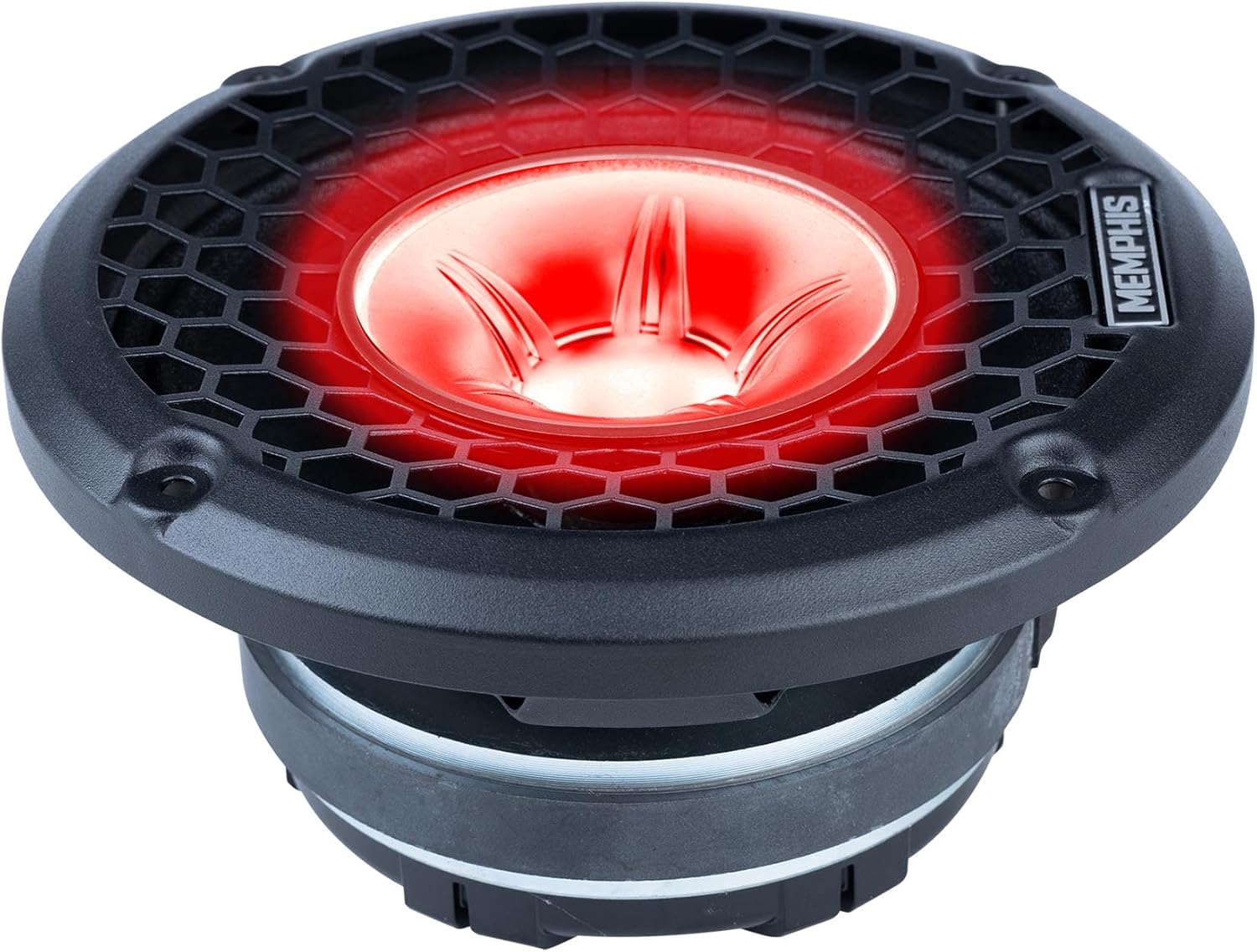
Figure 3: Detailed view of the SRX Pro speaker's horn tweeter, which includes RGB LED lighting.
c. Test Connections: Before reassembling vehicle panels, perform a quick test of the audio and RGB LED functions to ensure all connections are secure and working correctly.
Operating Instructions
Once installed, operate your speaker system as follows:
- Initial Power-Up: Turn on your car audio system at a low volume level. Gradually increase the volume to ensure all speakers are functioning properly and without distortion.
- Volume Control: These speakers are designed for high output. Adjust volume levels responsibly to avoid hearing damage and to comply with local noise regulations.
- RGB LED Control: If an RGB controller is connected, use its interface to select desired colors, patterns, or brightness levels for the speaker's illuminated tweeter.
- Audio Settings: Adjust your head unit or amplifier's equalizer and crossover settings to optimize sound quality for your vehicle's acoustics and personal preference. The speakers feature an efficient 6dB Mylar crossover for precise audio signal flow.
Maintenance
To ensure longevity and optimal performance of your speakers:
- Cleaning: Use a soft, dry cloth to gently wipe the speaker grilles and surrounds. Avoid using harsh chemicals or abrasive cleaners.
- Inspection: Periodically check speaker connections for tightness and inspect wiring for any signs of wear or damage.
- Environmental Factors: Protect speakers from excessive moisture, direct sunlight, and extreme temperatures, which can degrade materials over time.
Troubleshooting
If you encounter issues, refer to the following common problems and solutions:
| Problem | Possible Cause | Solution |
|---|---|---|
| No sound from speaker(s) | Loose wiring connection; amplifier off or in protect mode; incorrect head unit settings. | Check all speaker and amplifier connections. Verify amplifier power and status. Confirm head unit output settings. |
| Distorted or unclear sound | Over-driven amplifier; incorrect gain settings; damaged speaker wire; speaker cone damage. | Reduce amplifier gain or head unit volume. Inspect speaker wires for damage. Check speaker cones for tears or dents. |
| RGB LED not illuminating | Loose RGB wiring; faulty RGB controller; no power to RGB circuit. | Check RGB wiring connections. Ensure RGB controller is powered and functioning. |
| Weak or no bass | Incorrect speaker polarity; phase issues; inadequate enclosure. | Verify speaker wire polarity. Check phase settings on amplifier/head unit. Ensure speakers are properly sealed in their mounting location. |
If problems persist after attempting these solutions, contact Memphis Audio customer support or a qualified car audio technician.
Specifications
Key technical specifications for the Memphis Audio SRXP62WTV2 speakers:
| Feature | Detail |
|---|---|
| Speaker Size | 6.5 inches |
| Speaker Type | 2-Way Coaxial |
| RMS Power Handling | 125 Watts per speaker |
| Peak Power Handling | 250 Watts per speaker |
| Impedance | 4 Ohms |
| Sensitivity | 94 dB |
| Mounting Depth | 2.87 inches (7.3 cm) |
| Voice Coil | 1.5 inches |
| Tweeter | Oversized 3-inch horn tweeter with 1-inch diaphragm, RGB LED illuminated |
| Crossover | Efficient 6dB Mylar crossover |
| Magnet Size | 20 oz |
| Item Model Number | MemphisBDL240524-03 |
| Approx. Item Weight (Bundle) | 60 pounds |
| Approx. Package Dimensions | 19 x 15 x 9 inches |
Warranty Information
Memphis Audio provides a 1-Year Manufacturer Warranty for the SRXP62WTV2 speaker system from the date of purchase. This warranty covers defects in materials and workmanship under normal use. It does not cover damage caused by improper installation, accident, misuse, abuse, negligence, or unauthorized modification. Please retain your proof of purchase for warranty claims.
Support
For technical assistance, warranty claims, or further inquiries, please contact Memphis Audio customer support. You can find more information and contact details on the official Memphis Audio website or through your authorized dealer.
Visit the Memphis Audio Store on Amazon for additional product information and resources.


