
1. Introduction
This manual provides essential instructions for the safe and effective use of your AENBUSLM 10W Output Power 80W Laser Module. This module is designed for precision engraving and cutting tasks, featuring a fixed-focus design, built-in air assist, and a double ultra-fine compressed spot for detailed work. Please read this manual thoroughly before operation.
Safety Information
- This is a Class 4 laser product. Direct exposure to the laser beam can cause severe eye injury and skin burns.
- Always wear appropriate laser safety goggles when operating the module.
- Ensure the work area is well-ventilated to dissipate fumes and smoke.
- Keep children and unauthorized personnel away from the operating laser machine.
- Never leave the laser module unattended during operation.
2. Package Contents
Verify that all items listed below are included in your package:
- AENBUSLM 80W Laser Module (10W Optical Output)
- External Power Cord
- First to Second External Power Cord
- 3P Line
- Focus Fixing Plate
- Replaceable Protective Lens
- Snap Accessories
- Lens Replacement Tool (1.5mm L wrench)
- Slide Rail Fixing Screws

The image displays the AENBUSLM 80W Laser Module alongside its various components, including connection cables, a focus fixing plate, and other small accessories.

A comprehensive display of all accessories accompanying the laser module, including power cords, 3P line, focus fixing plate, replaceable protective lens, snap accessories, lens replacement tool, and slide rail fixing screws.
3. Specifications
| Feature | Specification |
|---|---|
| Product Dimensions | 1.57 x 1.57 x 5.71 inches |
| Item Model Number | DLC-JG-3.0 |
| Item Weight | 2 pounds |
| Manufacturer | AENBUSLM |
| Machine Power | 80W |
| Optical Output Power | 10W (10000mW) |
| Laser Type | Diode Laser, Fixed-Focus |
| Laser Beam Size | 0.08*0.08mm (Ultra-Fine Compressed Spot) |
| Air Assist | Built-in |
| Power Input | 12V |
4. Setup
4.1 Connecting the Laser Module
Proper connection of the laser module to your engraving machine's motherboard is crucial for operation. The module supports two connection methods to accommodate different voltage requirements.
This video demonstrates two methods for connecting the AENBUSLM laser module to an engraving machine's motherboard, addressing scenarios where voltage matches or requires an adapter.
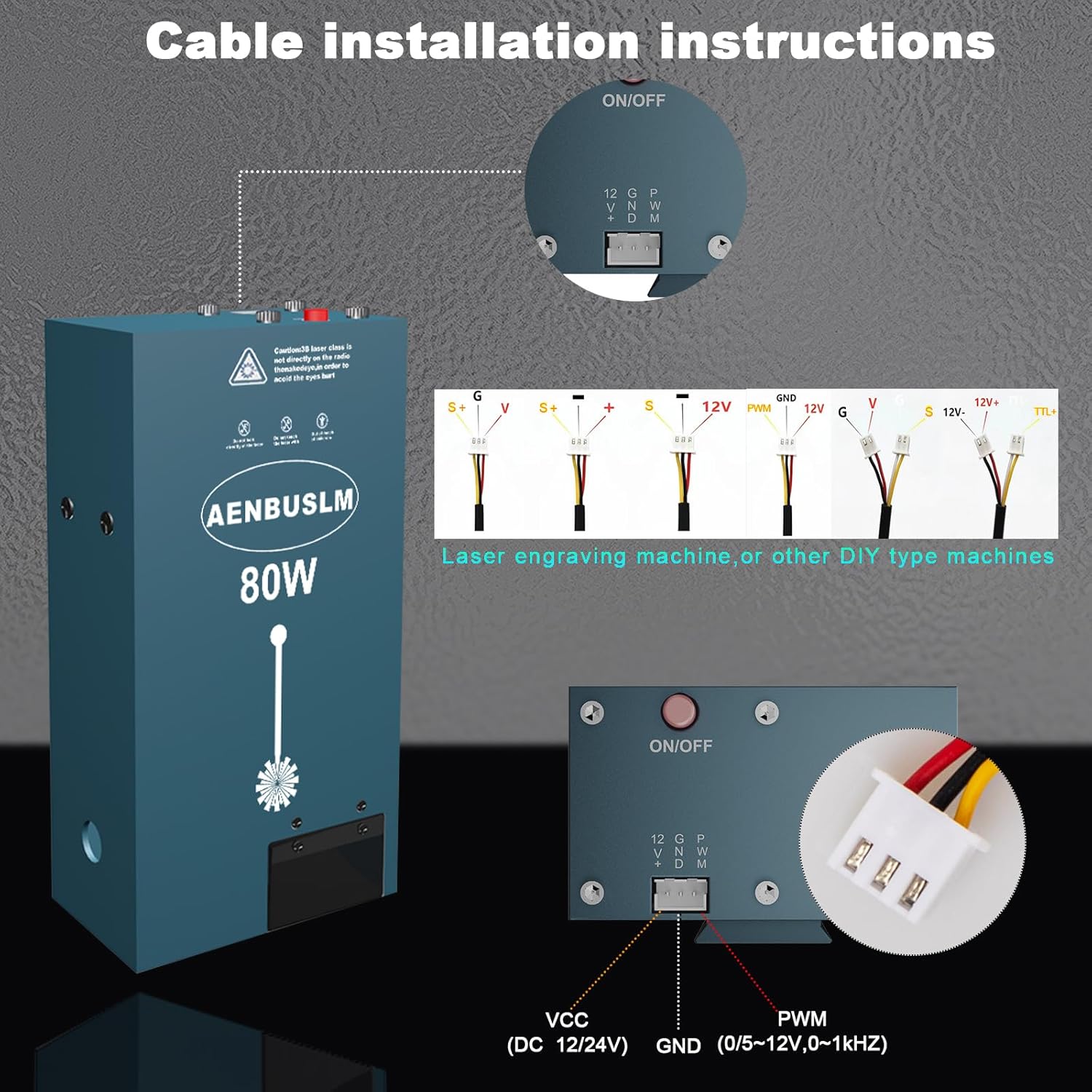
A visual guide demonstrating how to correctly connect the laser module's cables to a compatible engraving machine motherboard, indicating VCC, GND, and PWM connections.
4.2 Built-in Air Assist
The AENBUSLM laser module features an integrated air assist system, eliminating the need for an external air pump. This design enhances cutting and engraving performance by clearing debris and reducing heat buildup at the focal point.
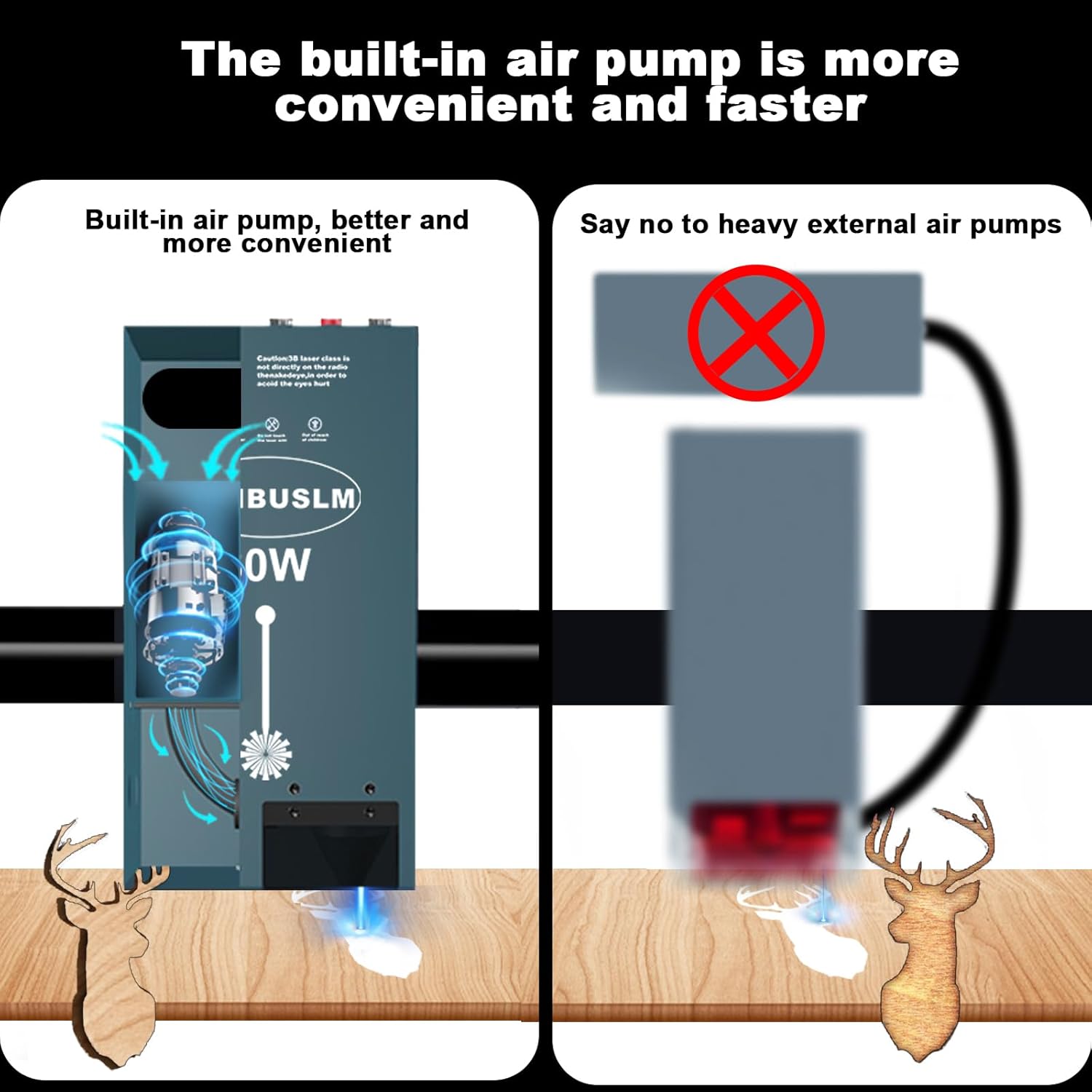
This diagram highlights the integrated air pump system of the AENBUSLM laser module, emphasizing its compact design and eliminating the need for bulky external air pumps.

This image provides a closer look at the internal components of the laser module, specifically showcasing the integrated air pump and cooling fan designed for efficient operation.
4.3 Protective Cover
The module includes a protective cover designed to filter blue light during engraving or cutting, offering an additional layer of safety.
5. Operating Instructions
5.1 Engraving and Cutting Capabilities
The AENBUSLM laser module offers robust performance for various materials:
- Direct Engraving on Mirror Stainless Steel: No pre-treatment (e.g., painting black) is required.
- Fast Engraving Speed: Achieves up to 300mm/s on 304 stainless steel with a 45mm focus length.
- Remarkable Cutting Ability: Capable of cutting through 8mm thick plywood in a single pass at 1.5mm/s with a 46mm focus length.

This image illustrates the cutting performance of the laser module on different materials, showing precise cuts through 20mm pine wood, 12mm black acrylic, and 12mm basswood, along with measurement details.
5.2 Software Compatibility
The laser module is compatible with widely used laser control software and various operating systems:
- Software: SRWOR, LaserGRBL, LightBurn
- File Formats: JPEG, BMP, TIF, SVG
- Supported Systems: Windows (WIN7, WIN8, WIN10), Android, macOS, iOS

This graphic outlines the broad compatibility of the laser module with various operating systems (Windows, macOS, Android, iOS) and popular laser control software like SRWOR, LaserGRBL, and LightBurn, supporting JPEG, BMP, TIF, and SVG file formats.
5.3 Engraving Demonstrations
Observe the laser module in action:
A demonstration video showcasing the AENBUSLM 80W Laser Module engraving a design onto a piece of cardboard, highlighting the precision and speed of the engraving process.
This video illustrates the AENBUSLM 80W Laser Module's capability to engrave a design onto a stainless steel surface, demonstrating its performance on metal materials.
6. Maintenance
To ensure optimal performance and longevity of your laser module, regular maintenance is recommended:
- Lens Cleaning: Periodically clean the protective lens using a soft, lint-free cloth and appropriate lens cleaning solution.
- Lens Replacement: The module includes a replaceable protective lens. Replace it if it becomes scratched or damaged to maintain laser quality.
- General Cleaning: Keep the module and surrounding work area free of dust and debris.
7. Troubleshooting
If you encounter any issues with your AENBUSLM laser module, consider the following basic troubleshooting steps:
- No Laser Output: Verify all power and signal connections are secure. Check the power supply voltage.
- Poor Engraving/Cutting Quality: Ensure the focus is correctly set. Clean the protective lens. Adjust laser power and speed settings in your software.
- Module Overheating: Ensure the built-in cooling fan is operating correctly and not obstructed.
For persistent issues, please refer to the support information in the next section.
8. Warranty and Support
AENBUSLM is committed to providing high-quality after-sales service. If you experience any problems with your product, our professional technicians are available to provide solutions and assistance.
- After-Sales Service: Contact our support team for assistance.
- Manufacturer: AENBUSLM
- Brand Store: Visit the AENBUSLM Store on Amazon