
WESEARY WG1
WESEARY WG1 2.4GHz Wireless Gaming Headset User Manual
Model: WG1 | Brand: WESEARY
Introduction
Thank you for choosing the WESEARY WG1 Wireless Gaming Headset. This manual provides comprehensive instructions for setting up, operating, and maintaining your headset to ensure an optimal gaming and audio experience. The WG1 headset offers versatile connectivity, superior sound quality, and comfortable design for extended use across multiple platforms.

The WESEARY WG1 Wireless Gaming Headset, featuring its sleek white design, accompanying 2.4GHz USB dongle, and charging cable.
Package Contents
Please check the box for the following items:
- 1 x WESEARY WG1 Wireless Gaming Headset
- 1 x 2.4GHz USB Dongle
- 1 x USB Charging Cable
- 1 x User Manual
Product Features
Immersive Audio Experience
The WESEARY WG1 headset features 50mm titanium-coated drivers that deliver deep bass and clear treble, capturing every detail from in-game footsteps to weapon fire. With 3D cinematic stereo surround sound in game mode, you can fully immerse yourself in your audio environment.

Detailed view of the 50mm titanium-plated drivers, engineered for unparalleled sound clarity and a potent auditory journey.
Dual EQ Modes: Gaming & Music
Switch between two optimized EQ modes: Game Mode and Music Mode. Game Mode utilizes ultra-low latency 2.4G technology (under 20ms delay on PS5/PS4/PC) for precise in-game audio. Music Mode provides rich, detailed audio quality for an enhanced listening experience.
Crystal Clear Voice Communication
Equipped with dual beamforming microphones and a rotatable microphone, the headset features exclusive ENC noise reduction technology. This ensures your voice is accurately captured while suppressing up to 95% of background noise, allowing for clear communication with teammates.
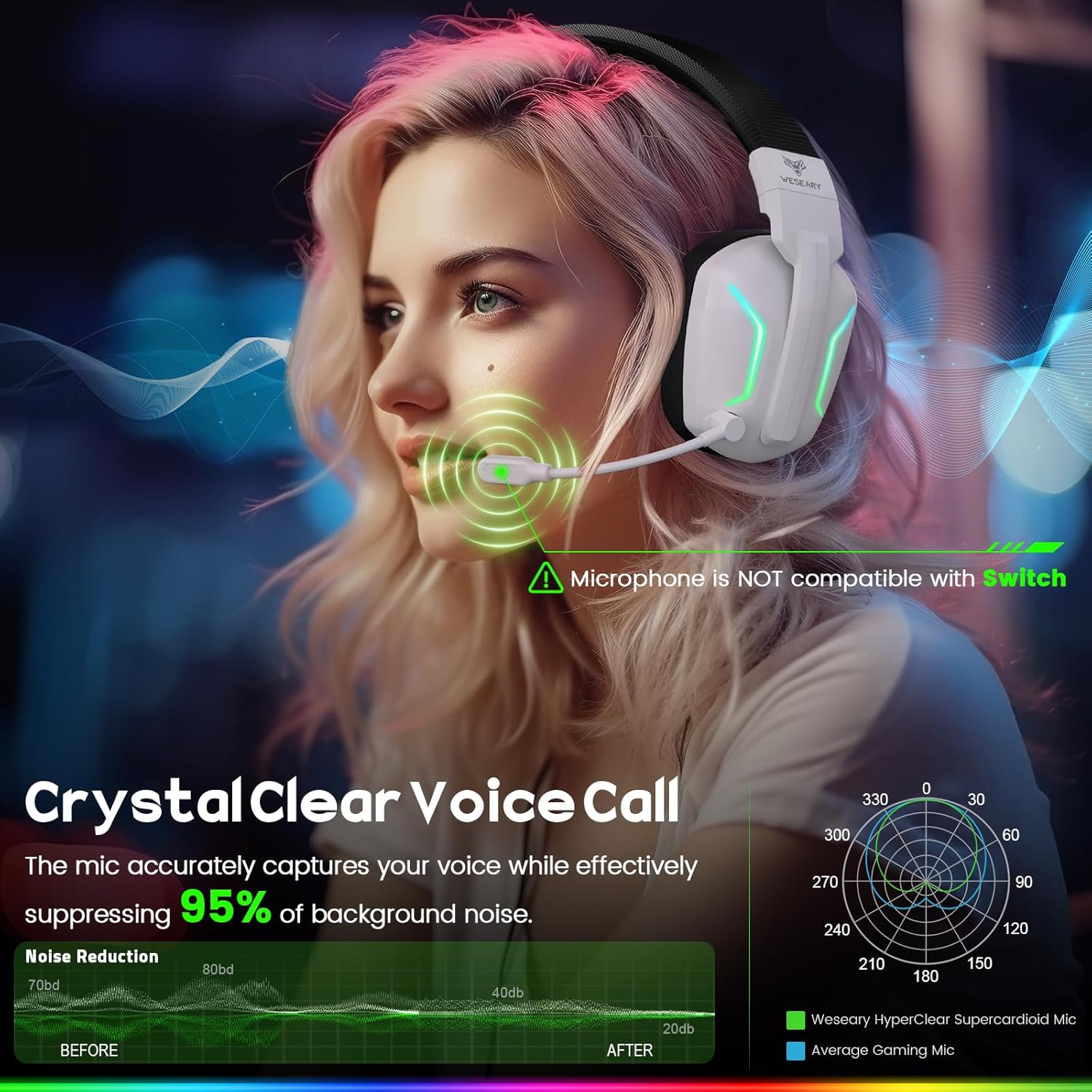
The headset's microphone with ENC noise reduction technology, ensuring crystal clear voice calls by suppressing background noise.
Ergonomic Design and Comfort
Designed for extended wear, the WG1 features adjustable headbands and luxuriously soft, breathable ear cushions. Its foldable design enhances portability, allowing you to enjoy maximum gaming comfort anywhere.

The WESEARY WG1 headset's ergonomic design, featuring lightweight, breathable mesh earcups and adjustable headbands for universal comfort.
Setup Guide
Connecting via 2.4GHz Dongle (for PS5, PS4, PC, Mac)
- Insert the 2.4GHz USB dongle into an available USB port on your PS5, PS4, PC, or Mac.
- Power on the headset by long-pressing the power button (1) for 3 seconds.
- The headset will automatically connect to the dongle. The LED indicator on the dongle will turn solid blue, and the headset's LED will indicate a successful connection.
- Adjust audio settings on your device if necessary to ensure the headset is selected as the input/output device.
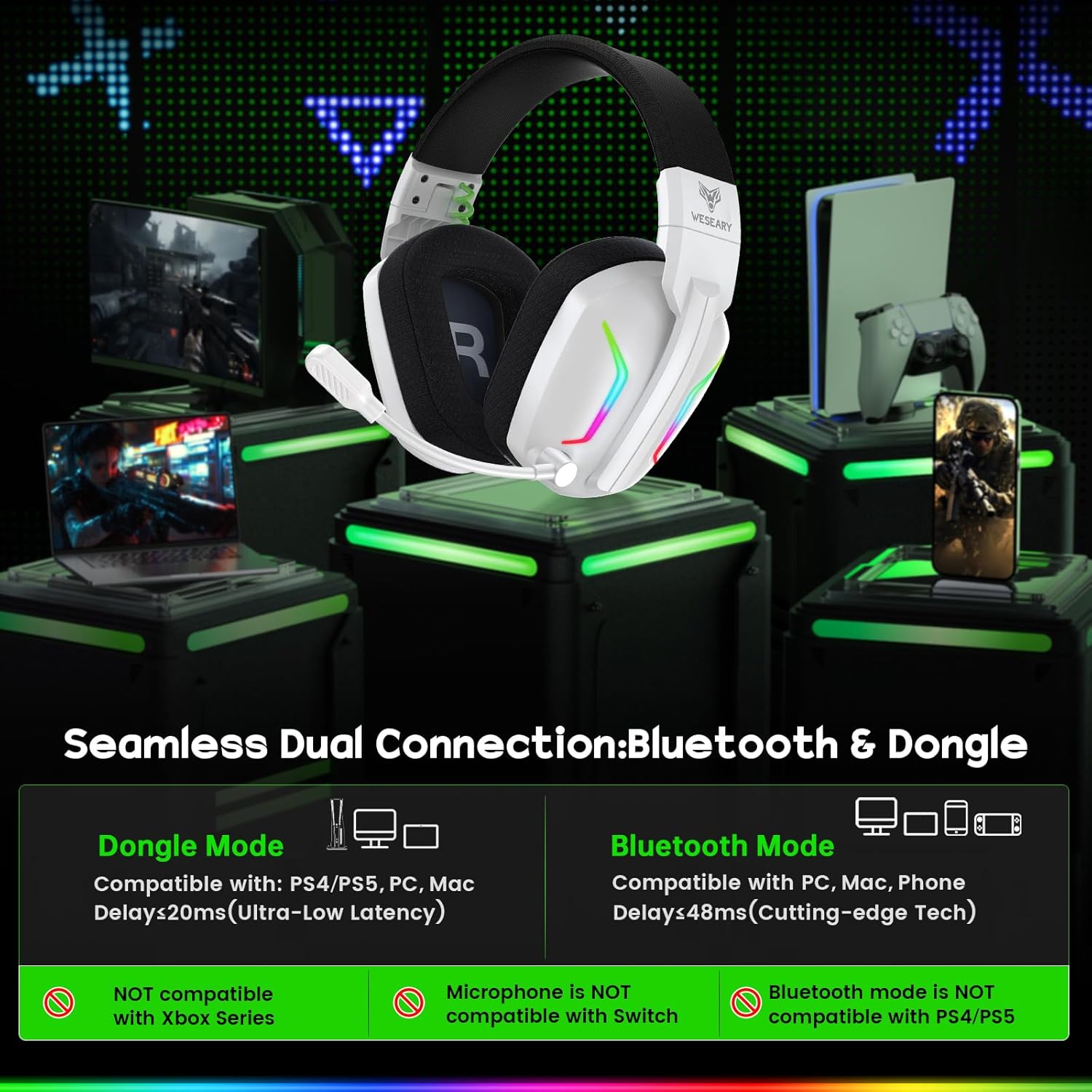
The headset's seamless dual connection capability, showing compatibility with various devices via 2.4GHz dongle and Bluetooth.
Connecting via Bluetooth (for Mobile, Tablets, iPad)
- Ensure the headset is powered on.
- Long-press the microphone button (4) for 2 seconds to switch to Bluetooth mode. The headset's LED will flash, indicating pairing mode.
- On your mobile device, tablet, or iPad, go to Bluetooth settings and search for "WESEARY WG1".
- Select the headset to pair. Once connected, the headset's LED will turn solid.
Note: Bluetooth mode is not compatible with PS4 or PS5. The microphone is not available when connected to Nintendo Switch via Bluetooth.
Operating Instructions
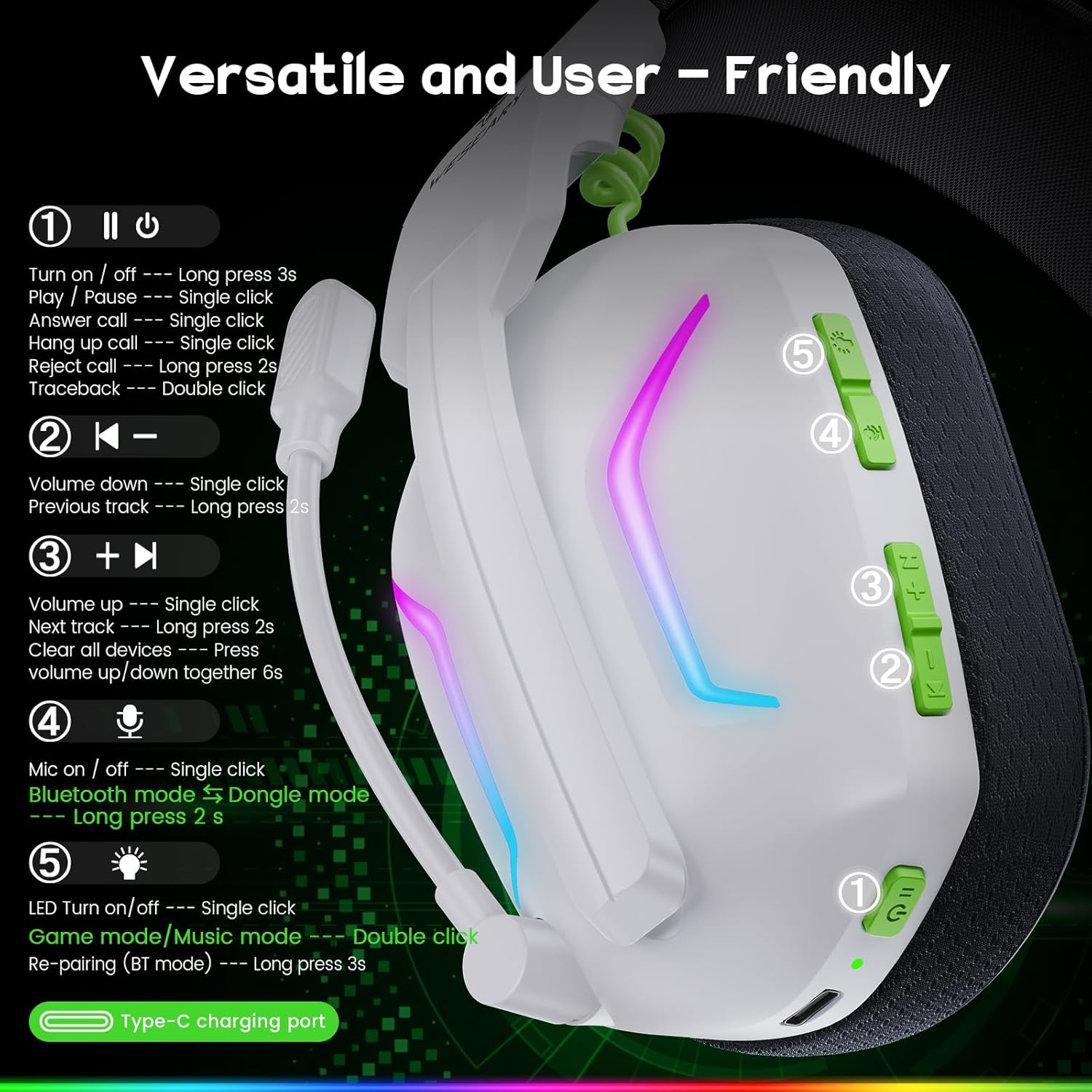
Overview of the versatile and user-friendly controls located on the headset.
Controls Overview
- (1) Power/Multi-function Button:
- Long press 3s: Power On/Off
- Single click: Play/Pause, Answer Call, Hang Up Call
- Long press 2s: Reject Call
- Double click: Traceback
- (2) Volume Down Button:
- Single click: Volume Down
- Long press 2s: Previous Track
- (3) Volume Up Button:
- Single click: Volume Up
- Long press 2s: Next Track
- Press together (Volume Up + Volume Down) for 6s: Clear all devices (reset pairing)
- (4) Microphone Button:
- Single click: Mic On/Off
- Long press 2s: Switch to Bluetooth Mode (from Dongle mode)
- (5) LED Light Button:
- Single click: LED Turn On/Off
- Double click: Switch Game mode/Music mode
- Long press 3s: Re-pairing (Bluetooth mode)
Compatibility
The WESEARY WG1 headset offers broad compatibility:
- 2.4GHz Dongle Mode: Compatible with PS5, PS4, PC, Mac, and Laptops.
- Bluetooth Mode: Compatible with mobile phones, tablets, and iPads.
- Nintendo Switch: Audio is compatible, but the microphone function is not available.
- Not Compatible: Xbox Series (All Xbox consoles).
Battery and Charging
The headset is equipped with a 900mAh battery, providing an impressive 50 hours of playtime on a single charge. A low battery reminder function is included for timely recharging. Full charge takes approximately 2.5 hours via the Type-C charging port.

The WESEARY WG1 headset offers up to 50 hours of playtime on a single charge, providing extended use for gaming and music.
Charging Instructions
- Connect the provided USB charging cable to the Type-C charging port on the headset.
- Connect the other end of the cable to a USB power source (e.g., computer USB port, wall adapter).
- The LED indicator on the headset will show charging status and turn off when fully charged.
Maintenance
To ensure the longevity and optimal performance of your WESEARY WG1 headset, follow these maintenance guidelines:
- Cleaning: Use a soft, dry cloth to wipe down the headset. For ear cushions, a slightly damp cloth can be used, but ensure they are completely dry before use. Do not use harsh chemicals or abrasive cleaners.
- Storage: Store the headset in a cool, dry place away from direct sunlight and extreme temperatures. Utilize its foldable design for compact storage.
- Battery Care: Avoid fully discharging the battery frequently. For long-term storage, charge the headset to about 50% to preserve battery health.
- Cable Care: Handle the charging cable gently. Avoid sharp bends or excessive pulling to prevent damage.
Troubleshooting
| Problem | Possible Cause | Solution |
|---|---|---|
| No sound from headset | Headset not powered on; Volume too low; Incorrect audio output selected on device; Dongle/Bluetooth not connected. | Ensure headset is powered on. Increase volume. Check device's audio settings. Reconnect dongle or re-pair Bluetooth. |
| Microphone not working | Microphone muted; Incorrect input device selected; Compatibility issue (e.g., Switch Bluetooth). | Press the Microphone button (4) to unmute. Check device's sound input settings. Note microphone limitations for Switch Bluetooth. |
| Connection issues (2.4GHz) | Dongle not properly inserted; Interference; Out of range. | Ensure dongle is fully inserted. Move closer to the dongle. Avoid strong Wi-Fi signals or other 2.4GHz devices. |
| Connection issues (Bluetooth) | Headset not in pairing mode; Device's Bluetooth off; Already connected to another device. | Long-press Mic button (4) for 2s to enter Bluetooth pairing mode. Ensure device's Bluetooth is on. Disconnect from other devices or clear pairing history (Volume Up + Down for 6s). |
| Short battery life | Not fully charged; LED lights constantly on. | Ensure headset is fully charged (2.5 hours). Turn off LED lights (single click LED button 5) to conserve battery. |
Technical Specifications
| Feature | Specification |
|---|---|
| Brand | WESEARY |
| Model Name | WG1 |
| Connectivity Technology | Wireless (2.4GHz, Bluetooth) |
| Driver Size | 50mm |
| Impedance | 32 ohms |
| Frequency Range | 20 Hz - 20,000 Hz |
| Microphone Type | Dual Beamforming, Rotatable, ENC Noise Reduction |
| Battery Capacity | 900 mAh Lithium-ion |
| Charging Time | Approx. 2.5 hours |
| Playtime | Up to 50 hours |
| Material | Acrylonitrile Butadiene Styrene (ABS) Plastic |
| Ear Placement | Over-Ear |
| Special Features | With Microphone, Noise Isolation, Foldable, LED Light |
Warranty and Support
The WESEARY WG1 Wireless Gaming Headset comes with a 12-month warranty. In case of any quality issues or concerns, please contact the seller or WESEARY customer support for assistance, refund, or replacement.
For further support, please refer to the contact information provided with your purchase or visit the official WESEARY website.
Related documentsWG1


Ask a question about this manual
Ask about setup, troubleshooting, compatibility, parts, safety, or missing instructions. Manuals+ will review the question and use this page’s manual context to help answer it.