
Introduction
Thank you for choosing the BOMATA B614 Dual Platform Digital Kitchen Scale. This manual provides essential information for the safe and efficient operation of your new scale. Please read it thoroughly before use and keep it for future reference.
Safety Information
- Do not immerse the scale in water or other liquids.
- Clean the scale with a damp cloth; do not use abrasive cleaners.
- Place the scale on a stable, flat surface to ensure accurate readings.
- Avoid exposing the scale to extreme temperatures or humidity.
- Do not overload the scale beyond its maximum capacity (Large Platform: 15kg/33lb, Small Platform: 500g/1.1lb).
- Keep out of reach of children.
Package Contents
- BOMATA B614 Dual Platform Digital Kitchen Scale
- 2 x AAA Batteries (pre-installed or included)
- User Manual
Product Overview
The BOMATA B614 features two independent weighing platforms and a clear LCD display for simultaneous measurements. Its compact design and stainless steel surfaces ensure durability and ease of cleaning.

Image: Key features of the BOMATA B614 scale, including its touch buttons, backlit display, anti-slip pads, and battery compartment.

Image: Dimensions of the BOMATA B614 Dual Platform Digital Kitchen Scale, illustrating its overall size and the size of each platform.

Image: Detail of the 304 food-grade stainless steel surface, emphasizing its quality and suitability for kitchen use.
Setup
- Unpacking: Carefully remove the scale from its packaging.
- Battery Installation: If batteries are not pre-installed, open the battery compartment on the underside of the scale and insert the 2 AAA batteries, ensuring correct polarity.
- Protective Film Removal: Peel off any blue protective films from both stainless steel platforms before first use.
- Placement: Place the scale on a hard, flat, and stable surface to ensure accurate weighing.
Operating Instructions
1. Power On/Off
- Press the ON/OFF button to turn the scale on.
- Press and hold the ON/OFF button for 3 seconds to turn the scale off. The scale also features an auto-off function after a period of inactivity.
2. Unit Conversion
- Press the UNIT button to cycle through the available units: g, kg, lb, oz, lb:oz, ml, ml (MILK).
- The selected unit will be displayed on the LCD screen.

Image: The scale's display highlighting the unit conversion feature and other multi-functions.
3. Tare Function (Zeroing)
The tare function allows you to subtract the weight of a container, so you only measure the ingredients.
- Place an empty container on either the large or small platform.
- Press the corresponding 1 TARE (for large platform) or 2 TARE (for small platform) button. The display will reset to zero.
- Add your ingredients to the container; the scale will display only the weight of the ingredients.

Image: Step-by-step demonstration of using the tare function for both the large and small weighing platforms.
4. Accumulation Function
This function sums the weights from both platforms.
- Weigh items on both the large and small platforms.
- Press the = button. The display will show the total accumulated weight from both platforms.
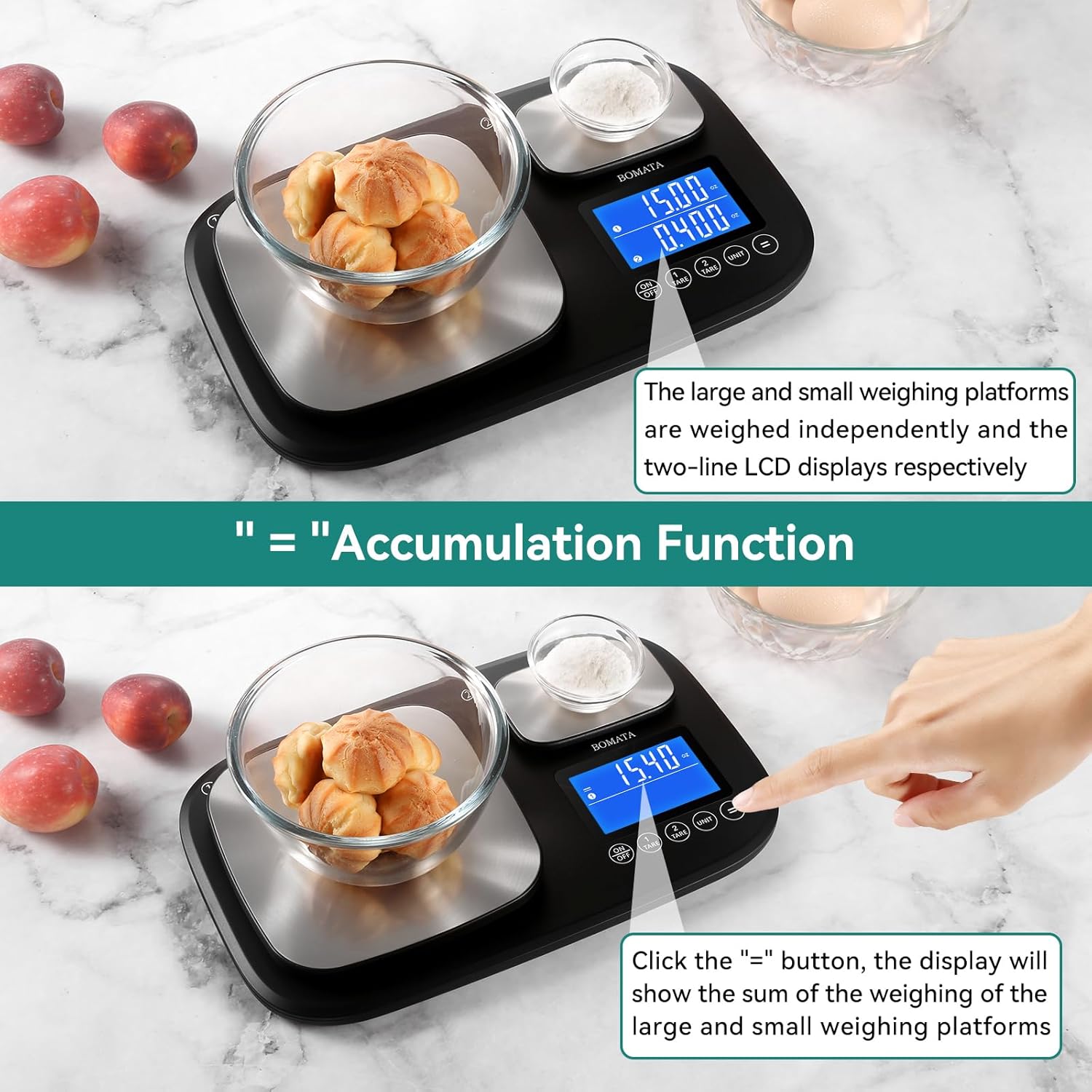
Image: The accumulation function in use, displaying the sum of weights from both platforms.
5. Using Both Platforms Simultaneously
The dual platforms allow for simultaneous weighing of different ingredients with varying precision requirements.
- The large platform (1g/15kg) is suitable for bulk ingredients like flour, water, or meat.
- The small platform (0.01g/500g) is ideal for precise measurements of spices, yeast, or jewelry.
- Both platforms can be tared independently and their weights can be accumulated.

Image: The dual platforms in use, showcasing the large capacity and high precision capabilities for different ingredients.
Video: An official product video demonstrating the BOMATA Dual Platform Digital Kitchen Scale's features, including its dual precision and independent tare function.
Maintenance
- Cleaning: Wipe the scale surfaces with a soft, damp cloth. For stubborn stains, use a mild detergent. Ensure the scale is completely dry before storage.
- Storage: Store the scale in a cool, dry place away from direct sunlight and extreme temperatures.
- Battery Replacement: Replace batteries when the low battery indicator appears on the display to ensure continued accuracy.
- Avoid Impact: Do not drop the scale or subject it to heavy impact, as this can damage the internal sensors.
Image: The stainless steel surface, highlighting its food-grade quality and ease of cleaning.
Troubleshooting
| Problem | Possible Cause | Solution |
|---|---|---|
| Inaccurate readings | Unstable surface, overloaded scale, low battery, or calibration needed. | Place on a flat, stable surface. Do not exceed max capacity. Replace batteries. Refer to calibration instructions (if applicable, not detailed in this manual). |
| Scale does not turn on | Dead batteries or incorrect battery installation. | Check battery polarity and replace batteries if necessary. |
| Display shows 'EEEE' | Scale is overloaded. | Remove items immediately to prevent damage. Ensure weight is within capacity. |
| Display shows 'Lo' | Low battery. | Replace batteries. |
Specifications
| Feature | Detail |
|---|---|
| Model | B614 |
| Brand | BOMATA |
| Large Platform Capacity | 15 kg / 33 lb (1 g / 0.05 oz resolution) |
| Small Platform Capacity | 500 g / 1.1 lb (0.01 g / 0.001 oz resolution) |
| Units | g, kg, lb, oz, lb:oz, ml, ml (MILK) |
| Material | 304 Food-grade Stainless Steel |
| Display | LCD with backlight |
| Power Source | 2 x AAA Batteries |
| Dimensions | 11.3 x 7.01 x 1.1 inches (28.7 x 17.8 x 2.8 cm) |
| Special Features | Dual Platform, Tare Function, Accumulation Function, Auto-off |
Warranty and Support
BOMATA products are designed for reliability and performance. For any questions, technical support, or warranty claims, please contact BOMATA customer service through the retailer where the product was purchased. Please retain your proof of purchase for warranty purposes.