
Introduction
Thank you for choosing Topsung M920 Walkie Talkies. This manual provides essential information for setting up, operating, and maintaining your new two-way radios. Please read it thoroughly before use to ensure optimal performance and safety. These FRS radios are designed for clear communication over long distances, featuring rechargeable batteries, VOX hands-free operation, and NOAA weather alerts, making them ideal for family activities and outdoor adventures.
Package Contents
Verify that all items are present in your package:
- 3 x Topsung M920 Walkie Talkies
- 3 x 3000mAh AA Rechargeable Batteries
- 3 x Detachable Lanyards & Belt Clips
- 1 x Multi-port USB Charging Cable
- 1 x User Manual

The image above displays the complete set of items included with your purchase: three walkie talkie units, three sets of rechargeable AA batteries, three lanyards with belt clips for easy carrying, a multi-port USB charging cable for simultaneous charging, and this user manual.
Product Overview
Familiarize yourself with the components and controls of your Topsung M920 Walkie Talkie.
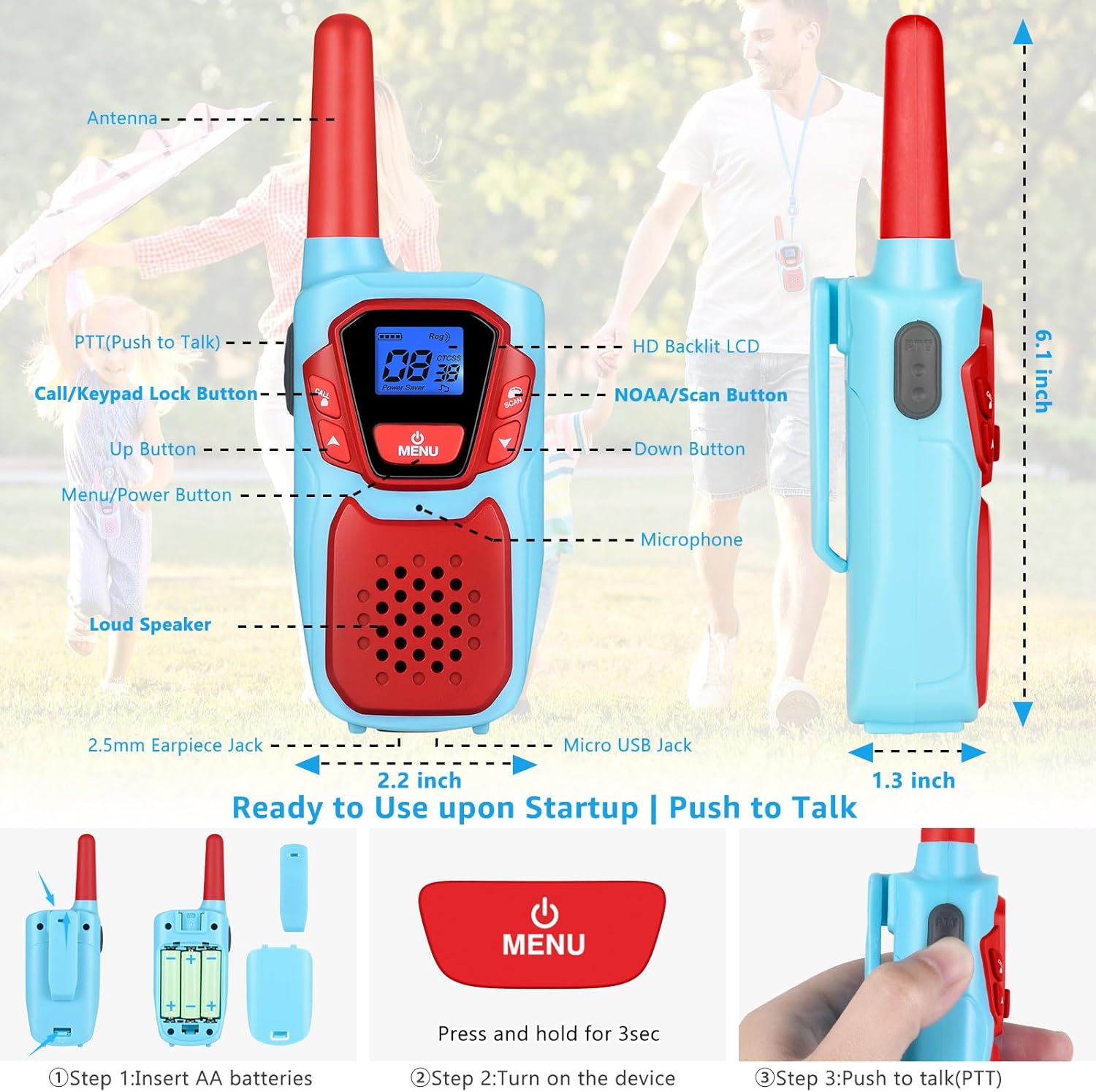
This diagram highlights the key features of the walkie talkie, including the antenna for signal transmission, the Push-to-Talk (PTT) button for communication, the Call/Keypad Lock button, Up and Down buttons for navigation, the Menu/Power button, an HD Backlit LCD display, NOAA/Scan button for weather alerts, microphone, loud speaker, 2.5mm earpiece jack, and Micro USB charging port. Dimensions are also indicated for reference.
Setup
1. Battery Installation
- Open the battery compartment cover on the back of the walkie talkie.
- Insert the three provided 3000mAh AA rechargeable batteries, ensuring correct polarity (+/-).
- Close the battery compartment cover securely.
The image demonstrates the process of opening the battery cover and correctly inserting the AA rechargeable batteries into the compartment. Ensure the cover is firmly closed after installation to protect the batteries.
2. Charging the Batteries
Use the included multi-port USB charging cable to charge all three walkie talkies simultaneously. The original charging kit is designed for efficiency and environmental friendliness.
- Connect the multi-port USB cable to the Micro USB Jack on each walkie talkie.
- Plug the USB end of the cable into a compatible USB power source (e.g., PC, car charger, power bank, or wall adapter).
- The battery icon on the LCD display will indicate charging status.
- A full charge provides approximately 72 hours of average battery life.

This image illustrates a walkie talkie being charged using the USB cable. It highlights the rechargeable nature of the device, emphasizing the 3000mAh battery capacity and features like auto power saving and low battery alerts to extend usage time and reduce the need for frequent battery replacements.
Basic Operation
1. Power On/Off
Press and hold the MENU/POWER button for 3 seconds to turn the device ON or OFF.
2. Adjusting Volume
Use the UP and DOWN buttons to adjust the speaker volume.
3. Push-to-Talk (PTT)
To transmit, press and hold the PTT button. Speak clearly into the microphone. Release the PTT button to listen.
4. Channel Selection
- Press the MENU button once. The channel number will flash.
- Use the UP or DOWN buttons to select one of the 22 available FRS channels.
- Press PTT or MENU again to confirm your selection.
5. Keypad Lock
To prevent accidental changes, press and hold the CALL/KEYPAD LOCK button for 3 seconds to lock or unlock the keypad.
Advanced Features
1. VOX (Voice Operated Exchange)
The iVOX feature allows for hands-free communication. When activated, the radio transmits automatically when you speak, without needing to press the PTT button. This is useful for activities like climbing, cycling, or cooking.
- Press the MENU button multiple times until the VOX icon appears.
- Use the UP or DOWN buttons to select a VOX sensitivity level (1-3, with 3 being most sensitive).
- Press PTT or MENU to confirm.
2. NOAA Weather Alert
Stay informed about weather conditions with the integrated NOAA All Hazards Weather Service. This feature provides real-time weather alerts, crucial for outdoor safety, especially in areas without cell service.
- Press the NOAA/SCAN button to activate the weather scan.
- The radio will scan for active NOAA weather channels.
- Press the NOAA/SCAN button again to exit weather mode.

This image illustrates the NOAA Weather Service functionality, emphasizing its role in keeping users informed about various weather hazards such as snow storms, tsunamis, fires, and earthquakes, even when cellular service is unavailable.
3. Privacy Codes (CTCSS/DCS)
The M920 supports 121 privacy codes (38 CTCSS codes and 83 DCS codes) per channel. These codes help filter out unwanted transmissions from other radios on the same channel, ensuring more private conversations.
- After selecting a channel, press the MENU button twice (for CTCSS) or three times (for DCS). The privacy code will flash.
- Use the UP or DOWN buttons to select your desired code.
- Press PTT or MENU to confirm. All radios in your group must use the same channel and privacy code for communication.
Maintenance
- Keep the walkie talkies dry. Do not expose them to rain or moisture.
- Clean the devices with a soft, damp cloth. Avoid harsh chemicals or abrasive cleaners.
- Store in a cool, dry place when not in use.
- Ensure batteries are fully charged before long periods of storage to maintain battery health.
- The walkie talkies feature a drop-proof design (ABS material) for enhanced durability.
Troubleshooting
| Problem | Possible Cause | Solution |
|---|---|---|
| No power | Batteries are low or incorrectly installed. | Charge batteries or re-install them with correct polarity. |
| Cannot communicate with other radios | Radios are on different channels or privacy codes. Out of range. | Ensure all radios are on the same channel and privacy code. Move closer to other radios. |
| Poor sound quality / Static | Interference. Out of range. Low battery. | Move to an open area. Charge batteries. The auto squelch system helps suppress noise. |
| Keypad is unresponsive | Keypad lock is active. | Press and hold the CALL/KEYPAD LOCK button for 3 seconds to unlock. |
Specifications
- Model Number: M920
- FCC ID: 2ACVFM-920B
- Number of Channels: 22 FRS Channels
- Privacy Codes: 121 (38 CTCSS, 83 DCS)
- Frequency Range: FRS
- Talking Range Maximum: Up to 3 miles (actual range varies based on terrain and conditions)
- Battery: 3000mAh AA Rechargeable Batteries (included)
- Battery Average Life: 72 Hours
- Voltage: 3.6 Volts
- Water Resistance Level: Not Water Resistant (IP5X rated for dust resistance)
- Special Features: Keypad Lock, iVOX Hands-free, Drop Protection, Adjustable Lanyards, NOAA Hazards Weather Service, Auto Power Saver, Auto Squelch System, Auto Scan FRS Channels, Auto Low Battery Alert, Auto Memory Function, LCD Screen with Backlight, License-free Communication, Compatible with Most Brands' FRS Devices, Crystal-clear Sound (Noise Reduction, Loud Speaker)

The image provides a visual guide to the expected communication range under different real-world conditions. It shows that the maximum range can be achieved in open areas like mountain-to-valley (3-5 miles), reduced over open water (2-3 miles), and further reduced in urban or neighborhood settings (up to 1 mile) due to obstacles.
Official Product Videos
Easy to use, and fun! Full review of Walkie Talkies!
This video provides a comprehensive review of the Topsung M920 Walkie Talkies, demonstrating their ease of use and various features in a practical setting. It highlights how the devices can be fun and functional for users.
Topsung Walkie Talkies
A brief overview video showcasing the Topsung Walkie Talkies, focusing on their design and basic functionality. This video offers a quick visual introduction to the product.
Warranty and Support
Topsung offers a 3-year manufacturer service for the M920 Walkie Talkies. For any product-related inquiries, technical assistance, or warranty claims, please contact Topsung Technology directly. Seller customer service can provide personalized after-sales support, including single piece or accessory replacement.
To contact the seller:
- Go to the product detail page on Amazon.
- Click on the store name "topsung technology" located below the "Add to Cart" button.
- Click "Ask a question" and follow the Messaging Assistant instructions: select "An item for sale" → "Something else" → "Other", then send your message.


