
Introduction
This manual provides comprehensive instructions for the installation, operation, and maintenance of your Moman RS-S Motorcycle Helmet Headset and PMS1 Bike Motorcycle Phone Holder. Please read this manual thoroughly before use to ensure proper functionality and safety.
Product Overview
The Moman RS-S is a motorcycle helmet headset designed for solo riders, featuring Hi-Fi stereo sound, advanced noise cancellation, AI voice assistant, auto-answer functionality, and an integrated FM radio. The PMS1 is a bike motorcycle phone holder with a thoughtful half-wrapped structure, ensuring camera accessibility and full screen visibility, compatible with a wide range of smartphones.

Image: Moman RS-S Helmet Headset and PMS1 Phone Holder. This image displays both the headset unit and the phone holder, illustrating the complete product package.
Package Contents
Upon opening the package, verify that all components are present:
- Moman RS-S Helmet Headset Unit
- PMS1 Bike Motorcycle Phone Holder
- Audio Speakers (integrated with headset)
- Microphone (integrated with headset)
- Charging Cable
- Mounting Accessories for Headset
- Mounting Accessories for Phone Holder (Bike Mount)
- User Manual (this document)
Safety Information
Always prioritize safety when operating a motorcycle or bicycle. Ensure the headset and phone holder are securely installed and do not obstruct your vision or control of the vehicle. Adhere to all local traffic laws and regulations regarding the use of electronic devices while riding.
- Do not attempt to install or adjust the devices while riding.
- Ensure the phone holder does not interfere with steering or braking.
- Keep volume at a level that allows you to hear ambient traffic sounds.
- Avoid prolonged exposure to loud sounds to prevent hearing damage.
- Do not expose the devices to extreme temperatures or direct water immersion.
Setup and Installation
1. Moman RS-S Helmet Headset Installation
The Moman RS-S headset is designed for easy installation inside most motorcycle helmets.
- Speaker Placement: Identify suitable locations inside your helmet for the speakers, typically within the ear pockets. Ensure they are positioned directly over your ears for optimal sound quality.
- Microphone Attachment: Attach the microphone to a position near your mouth, ensuring it is clear of obstructions and can pick up your voice effectively.
- Headset Unit Mounting: Secure the main headset unit to the exterior of the helmet using the provided mounting clip or adhesive pad. Ensure it is firmly attached and does not interfere with helmet functionality or aerodynamics.
- Cable Management: Route all cables neatly within the helmet lining to prevent tangling or discomfort.

Image: Moman RS-S Headset Hi-Fi Stereo Sound. This image illustrates the internal components of the headset, specifically highlighting the 40mm dynamic speakers responsible for deep bass and crystal-clear sound.

Image: Moman RS-S Headset Unique Design. This image compares the Moman RS-S headset's design with others, emphasizing its raised, glove-friendly buttons, smaller size, and lighter weight for easier use.
2. PMS1 Phone Holder Installation
The PMS1 phone holder is designed for secure attachment to bicycle or motorcycle handlebars.
- Handlebar Attachment: Securely attach the phone holder's clamp to your handlebar. Ensure the clamp is tightened sufficiently to prevent movement during rides.
- Adjust Angle: Adjust the angle of the phone holder to ensure optimal viewing of your phone screen without obstructing your view of the road.
- Phone Insertion: Place your smartphone into the holder. The holder accommodates phones from 4.5 to 7 inches with a thickness up to 15mm (including cases).
- Secure Phone: Engage the security lock and tighten the knob to firmly secure your phone in place.

Image: Moman PMS1 Phone Holder Camera Friendly. This image demonstrates how the phone holder's design allows for unobstructed use of both front and rear cameras, Face ID/Touch ID, and charging ports.

Image: Moman PMS1 Phone Holder Double Insurance. This image illustrates the two-step securing mechanism: first, locking the security lock, and second, tightening the knob to ensure the phone is firmly held.
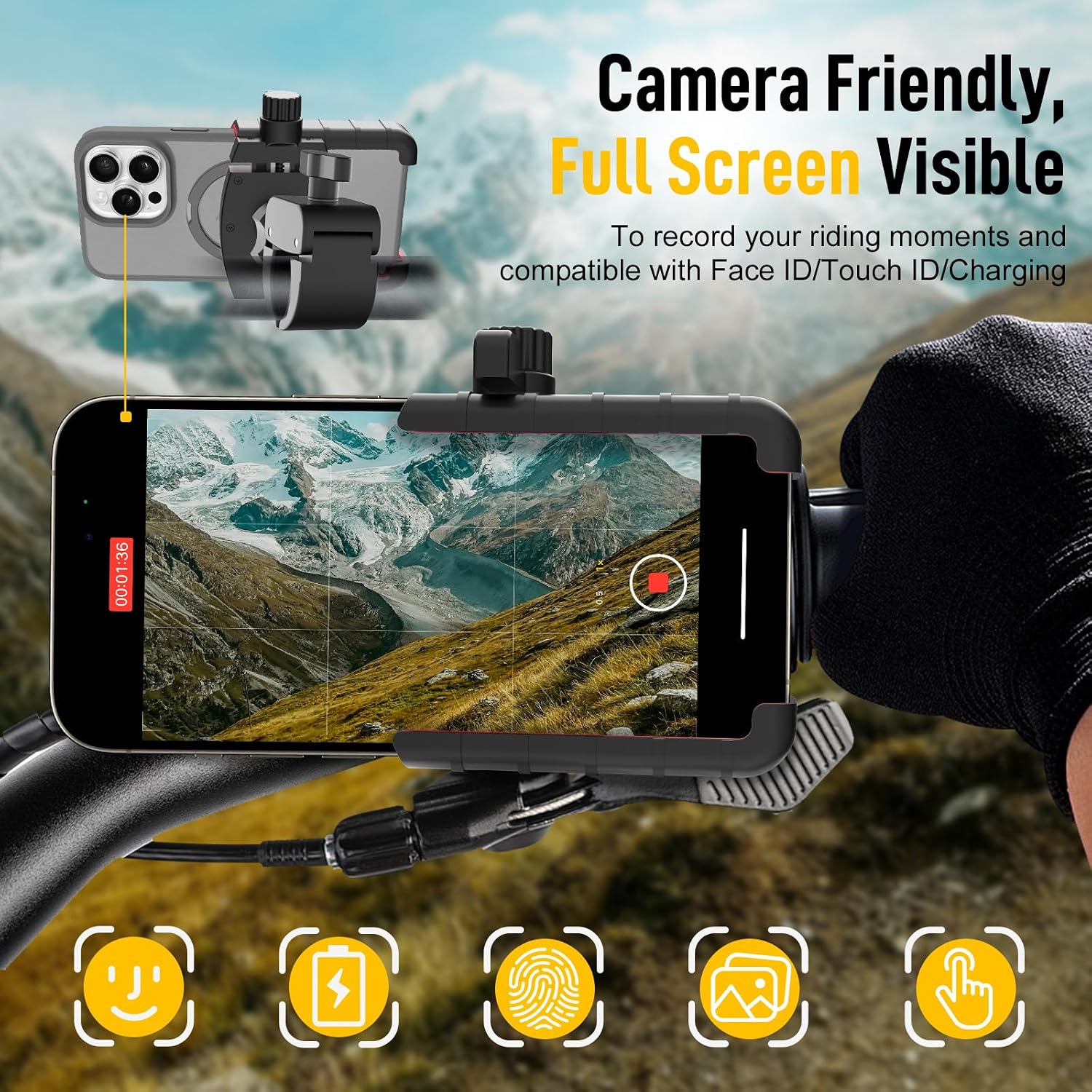
Image: Moman PMS1 Phone Holder Silicone Protection. This image highlights the anti-shake and anti-slip rubber protection within the phone holder, ensuring stability and firmness for the device.

Image: Moman PMS1 Phone Holder Compatibility. This image provides dimensions and examples of compatible phone sizes, ranging from 4.5 to 7 inches, including thick cases.
Operating Instructions
1. Power On/Off
- Power On: Press and hold the Power button (usually the central button) for approximately 3 seconds until you hear an audible prompt or see an indicator light.
- Power Off: Press and hold the Power button for approximately 5 seconds until you hear an audible prompt or the indicator light turns off.
2. Bluetooth Pairing
To connect your Moman RS-S headset to your smartphone:
- Ensure the headset is powered off.
- Press and hold the Power button for approximately 7 seconds until the indicator light flashes rapidly (e.g., red and blue alternately), indicating pairing mode.
- On your smartphone, enable Bluetooth and search for available devices.
- Select "Moman RS-S" from the list of devices.
- Once paired, the indicator light will change (e.g., slow blue flash), and you will hear a confirmation tone.
3. Music Playback
- Play/Pause: Short press the Power button.
- Next Track: Short press the "FM" button.
- Previous Track: Short press the "Microphone" button.
- Volume Up: Long press the "FM" button.
- Volume Down: Long press the "Microphone" button.
4. Phone Calls
- Answer Call: Short press the Power button when a call comes in.
- End Call: Short press the Power button during a call.
- Reject Call: Long press the Power button when a call comes in.
- Auto Answer: The headset features a 10-second auto-answer function for incoming calls.
5. AI Voice Assistant
Activate your smartphone's AI voice assistant (e.g., Siri, Google Assistant) directly from the headset.
- Activate: Short press the "Microphone" button.

Image: Moman RS-S Headset AI Voice Assistant. This image depicts the headset surrounded by icons representing various smartphone functions like music, calls, navigation, and weather, all controllable via the AI voice assistant.
6. FM Radio
The Moman RS-S includes a built-in FM radio for entertainment on the go.
- Turn On/Off FM: Long press the "FM" button.
- Scan Stations: Short press the "FM" button while FM is active to scan for the next available station.

Image: Moman RS-S Headset Stereo FM Radio. This image shows a motorcycle rider with the headset, surrounded by radio frequency indicators and categories like traffic, music, sports, news, and finance, illustrating the stable signal and wide range of stations available.
Charging
To charge your Moman RS-S headset:
- Connect the provided charging cable to the charging port on the headset unit.
- Connect the other end of the cable to a USB power source (e.g., computer USB port, USB wall adapter).
- An indicator light will typically show charging status (e.g., red for charging, blue for fully charged).
- A full charge provides approximately 32 hours of battery life.
Maintenance
Proper maintenance ensures the longevity and optimal performance of your Moman RS-S headset and PMS1 phone holder.
- Cleaning: Use a soft, dry cloth to wipe down the headset and phone holder. Do not use abrasive cleaners or solvents.
- Storage: When not in use for extended periods, store the devices in a cool, dry place away from direct sunlight and extreme temperatures.
- Battery Care: For optimal battery life, avoid fully discharging the headset frequently. Charge it regularly, even if not in constant use.
- Cable Inspection: Periodically inspect all cables for signs of wear or damage. Replace if necessary.
Troubleshooting
| Problem | Possible Cause | Solution |
|---|---|---|
| Device does not power on. | Low battery. | Charge the headset for at least 2 hours. |
| Cannot pair with smartphone. | Headset not in pairing mode; Bluetooth off on phone; previously paired device interfering. | Ensure headset is in pairing mode (flashing red/blue). Turn phone's Bluetooth off and on. Forget/delete previous pairings on phone. |
| No sound or low volume. | Volume too low; speakers not positioned correctly; connection issue. | Increase volume on both headset and phone. Adjust speaker position. Re-pair the device. |
| Microphone not working. | Microphone obstructed; connection issue. | Ensure microphone is clear and positioned correctly. Re-pair the device. |
| Phone holder not secure. | Clamp not tightened; security lock not engaged; knob not tightened. | Ensure handlebar clamp is tight. Engage the security lock. Tighten the knob firmly. |
Specifications
| Feature | Detail |
|---|---|
| Model Name | H4 Plus (RS-S with PMS1) |
| Connectivity Technology | Wireless |
| Wireless Communication Technology | Bluetooth 5.3 |
| Battery Life | Up to 32 Hours |
| Audio Driver Type | Dynamic Driver (40mm) |
| Frequency Range | 20-20,000 Hz |
| Control Type | Voice Control, Touch |
| Special Features | Lightweight, Hi-Fi Stereo, Advanced Noise Cancellation, AI Voice Assistant, Auto Answer, FM Radio |
| Phone Holder Compatibility | 4.5-7 inch phones, up to 15mm thickness (including cases) |
| Included Components | Bike Mount |
Warranty and Support
Moman products are designed for reliability and performance. For warranty information and technical support, please refer to the official Moman website or contact their customer service directly.
- Official Website: www.moman.co
- Customer Service: Refer to the product packaging or official website for contact details.
Please retain your proof of purchase for warranty claims.


