
HOTLIGH zf6771
HOTLIGH Rechargeable Magnetic Flashlight User Manual
Model: zf6771
Introduction
Thank you for choosing the HOTLIGH Rechargeable Magnetic Flashlight. This manual provides essential information for the safe and efficient operation, maintenance, and care of your new flashlight. Please read it thoroughly before use and retain it for future reference.
Safety Information
- Do not look directly into the LED light source to avoid eye injury.
- Keep out of reach of children.
- Do not disassemble or modify the flashlight, as this may void the warranty and pose safety risks.
- Avoid exposing the flashlight to extreme temperatures or direct sunlight for prolonged periods.
- Ensure the charging port cover is securely closed when not charging to maintain water resistance.
Package Contents
Verify that all items are present in your package:
- HOTLIGH Rechargeable Magnetic Flashlight (Model zf6771)
- USB-C Charging Cable
- User Manual (This document)
Product Overview
The HOTLIGH zf6771 flashlight features a dual light source design, offering versatility for various tasks. It includes a powerful LED spotlight and a COB (Chip-on-Board) side light with multiple modes.

Image: The HOTLIGH zf6771 flashlight, showcasing its compact design, dual light sources, USB-C port, and integrated clip.
Key Features:
- Dual Light Source: Front LED spotlight and side COB light.
- High Brightness: Up to 700 lumens.
- Multiple Modes: COB warm light, COB red light, and LED white light.
- Stepless Dimming: Adjustable brightness for COB modes.
- Hands-Free Operation: Strong magnetic base and clip design.
- Fast Charging: USB-C rechargeable, fully charges in approximately 90 minutes.
- Durable Construction: High-quality aluminum alloy, IPX4 water resistance.
Setup
Initial Charging
Before first use, fully charge your flashlight. The device comes with a built-in rechargeable battery.
- Locate the USB-C charging port on the side of the flashlight.
- Open the protective rubber cover of the USB-C port.
- Connect the provided USB-C charging cable to the flashlight and plug the other end into a USB power adapter (not included) or a computer USB port.
- The charging indicator light will illuminate during charging. It typically takes about 90 minutes for a full charge.
- Once fully charged, disconnect the cable and securely close the rubber cover to maintain water resistance.

Image: The HOTLIGH zf6771 flashlight connected to a USB-C charging cable, illustrating the charging process.
Operating Instructions
The flashlight features dual side switches for independent control of the front spotlight and the COB side light.

Image: A close-up of the flashlight highlighting the two distinct control buttons for the front spotlight and the COB main light.
Front LED Spotlight (White Light)
- Press the upper button once to turn on the front LED spotlight.
- Press the upper button again to turn off the front LED spotlight.
COB Side Light (Warm/Red Light)
- Press the lower button once to activate the COB warm light.
- Press the lower button again to switch to COB red light.
- Press the lower button a third time to turn off the COB side light.
Stepless Dimming (COB Modes Only)
- While the COB warm light or COB red light is active, press and hold the lower button.
- The brightness will gradually increase or decrease. Release the button when the desired brightness level is reached.
- The light will blink once it reaches its minimum or maximum brightness.
Hands-Free Use
The flashlight is designed for convenient hands-free operation:
- Magnetic Base: The strong magnetic base allows you to attach the flashlight securely to any ferrous metal surface, such as car hoods, metal shelves, or electrical panels.
- Clip Design: Use the integrated clip to attach the flashlight to pockets, belts, or other gear for easy access and directional lighting.

Image: Demonstrates the flashlight's magnetic base holding it to a metal surface and its clip securing it to a pocket, enabling hands-free use.
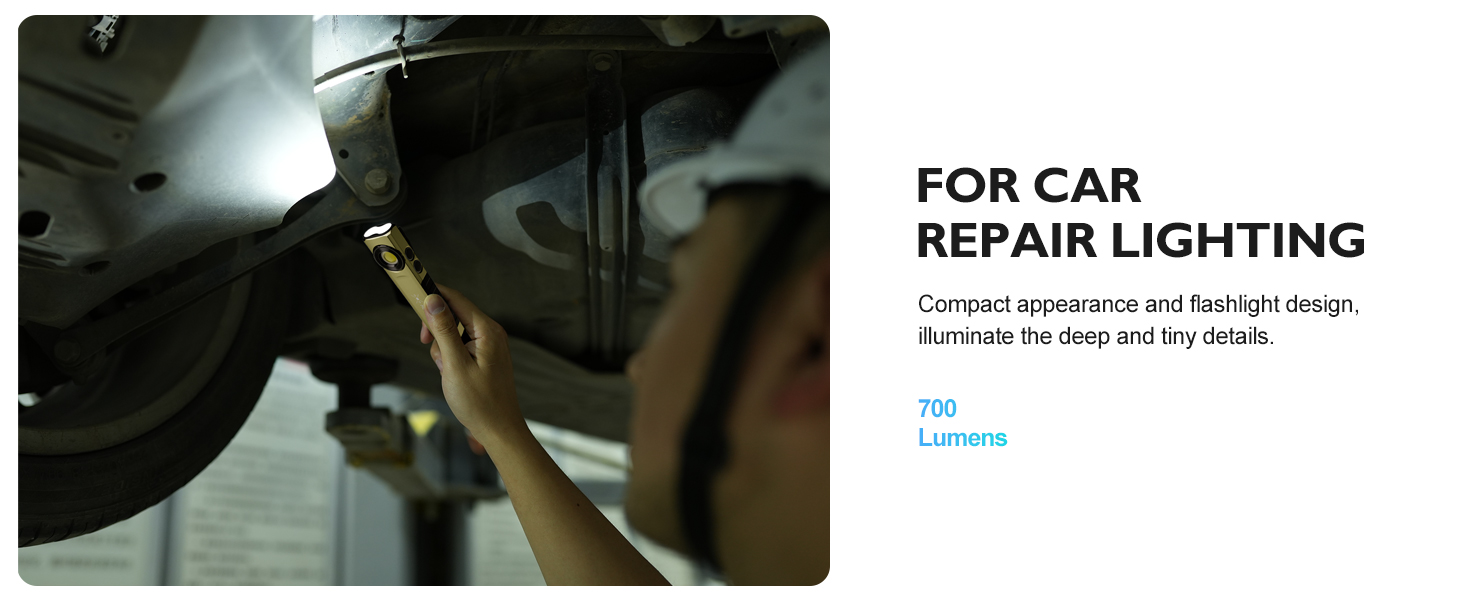
Image: A person using the flashlight to illuminate an engine bay during car repair, showcasing its utility in tight spaces.
Maintenance
Cleaning
- Wipe the flashlight with a soft, damp cloth. Do not use abrasive cleaners or solvents.
- Ensure the charging port is free of dust and debris.
Battery Care
- To prolong battery life, avoid fully discharging the battery frequently.
- Recharge the flashlight regularly, even if not in use, to maintain battery health.
- If storing for an extended period, charge the battery to approximately 50% every 3-6 months.
Storage
- Store the flashlight in a cool, dry place away from direct sunlight and extreme temperatures.
- Keep the charging port cover closed to prevent dust and moisture ingress.
Troubleshooting
| Problem | Possible Cause | Solution |
|---|---|---|
| Flashlight does not turn on. | Battery is depleted. | Charge the flashlight using the provided USB-C cable. |
| Light output is dim. | Low battery level. | Recharge the battery. |
| Charging indicator not lighting up. | Cable or power source issue; port not connected properly. | Ensure the USB-C cable is securely connected to both the flashlight and the power source. Try a different USB port or adapter. |
| Flashlight gets warm during extended use. | Normal operation for high-lumen devices. | This is normal. If it becomes excessively hot, turn it off and allow it to cool down. |
Specifications
| Feature | Detail |
|---|---|
| Model Number | zf6771 |
| Brightness | Up to 700 Lumens (White Light) |
| Light Source | LED (Front), COB (Side) |
| Battery Type | Built-in Lithium Ion |
| Charging Port | USB-C |
| Charging Time | Approx. 90 minutes |
| Runtime | Up to 6 hours (medium brightness), up to 15 hours (red light mode) |
| Material | Aluminum Alloy, Plastic, Rubber |
| Water Resistance | IPX4 |
| Dimensions (L x W x D) | 5.47" x 1.2" x 0.8" (13.9 cm x 3.0 cm x 2.0 cm) |
| Weight | 5.3 ounces (0.15 kg) |
Warranty and Support
Warranty Information
For detailed warranty information, please refer to the official HOTLIGH website or contact their customer support. Keep your purchase receipt as proof of purchase.
Customer Support
If you encounter any issues or have questions regarding your HOTLIGH Rechargeable Magnetic Flashlight, please contact HOTLIGH customer support through their official website or the retailer where the product was purchased.
You can visit the HOTLIGH store on Amazon: HOTLIGH Store
Ask a question about this manual
Ask about setup, troubleshooting, compatibility, parts, safety, or missing instructions. Manuals+ will review the question and use this page’s manual context to help answer it.