
Moman H2 Pro, PMS1
Moman H2 Pro Motorcycle Intercom & PMS1 Phone Holder Instruction Manual
Model: H2 Pro, PMS1
Brand: Moman
Product Overview
This manual provides detailed instructions for the Moman H2 Pro Motorcycle Intercom Headset and the Moman PMS1 Bike Motorcycle Phone Holder. Please read this manual thoroughly before use to ensure proper installation, operation, and maintenance.

Image: The Moman H2 Pro motorcycle intercom headsets (two units) shown alongside the Moman PMS1 bike motorcycle phone holder, illustrating the complete product bundle.
Key Features
- Moman H2 Pro Intercom: 1000m intercom range for 2 riders, 40mm large speakers, DSP&CVC noise suppression, Wireless 5.1, AI voice assistant, music share, FM radio.
- Moman PMS1 Phone Holder: Half-wrapped structure for unobstructed camera use, compatible with Face/Touch ID and charging, supports phones from 4.5-7 inches with up to 15mm thickness (including case).

Image: An infographic detailing the Moman H2 Pro's functions, including Wireless 5.1, Full Duplex Intercom, AI Voice Assistant, Music Share, FM Radio, CVC&DSP Noise Cancellation, IP65 Waterproofing, and 900mAh Battery.
Setup and Installation
Moman H2 Pro Intercom Installation
- Choose Mounting Location: Select a suitable flat surface on the side of your helmet, typically on the left side, ensuring it does not obstruct your vision or movement.
- Attach Clamp/Adhesive Mount:
- Clamp Mount: Loosen the screws on the clamp mount, slide it between the helmet shell and the inner padding, and tighten the screws securely.
- Adhesive Mount: Clean the helmet surface thoroughly. Peel off the protective film from the adhesive mount and firmly press it onto the desired location for at least 30 seconds. Allow 24 hours for the adhesive to cure before use.
- Mount the Intercom Unit: Slide the H2 Pro intercom unit onto the mounted clamp or adhesive base until it clicks into place.
- Install Speakers and Microphone:
- Attach the speakers inside the helmet's ear pockets using the provided hook-and-loop fasteners. Ensure they are positioned directly over your ears for optimal sound.
- Attach the microphone to the inside of the helmet, positioning it close to your mouth. For full-face helmets, use the boom microphone; for open-face helmets, use the soft wire microphone.
- Route Cables: Carefully route all cables under the helmet padding to keep them tidy and secure, preventing interference with your comfort or safety.
Moman PMS1 Phone Holder Installation
- Select Mounting Point: Choose a secure location on your bicycle or motorcycle handlebars. Ensure the chosen spot does not interfere with braking, steering, or other controls.
- Attach to Handlebars: Open the clamp of the PMS1 holder and position it around the handlebar. Tighten the screw until the holder is firmly secured and does not rotate freely.
- Adjust Angle: The PMS1 features a 360° rotatable joint. Adjust the angle to your preferred viewing position, then tighten the locking mechanism to secure it.
- Insert Phone: Gently pull the top jaw of the holder upwards to expand the grip. Insert your phone (4.5-7 inches, up to 15mm thick with case) and release the jaw to secure it. Ensure the phone is centered and stable.
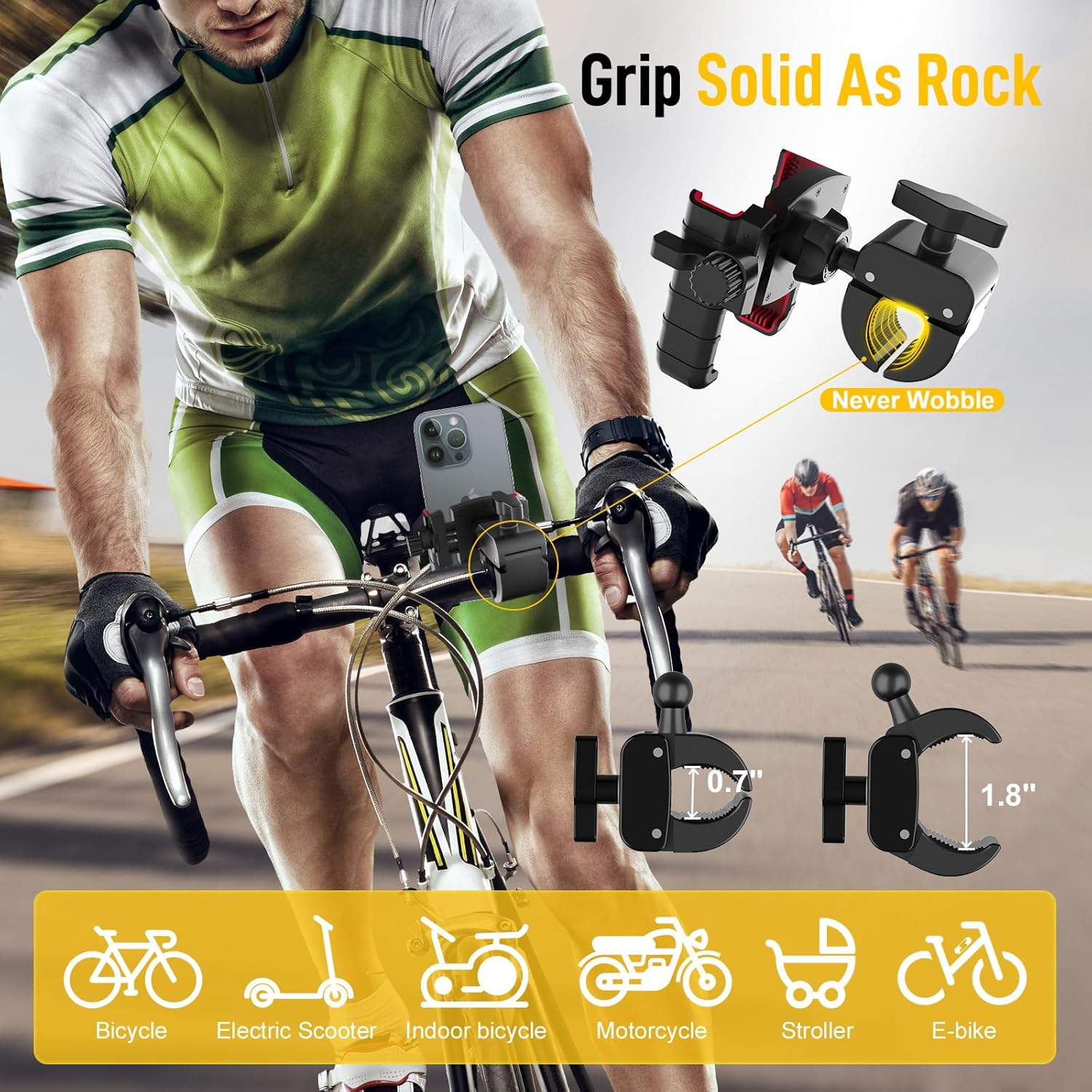
Image: The Moman PMS1 phone holder demonstrating its solid grip and compatibility with various vehicles like bicycles, electric scooters, indoor bicycles, motorcycles, strollers, and e-bikes. It highlights the clamp dimensions (0.7" and 1.8").

Image: A diagram illustrating the Moman PMS1 phone holder's compatibility with phone sizes ranging from 4.5 to 7 inches, including examples like iPhone 13 Mini, 15 Pro, and Samsung S23 Ultra, and showing its thick case friendly design with dimensions.
Operating Instructions
Moman H2 Pro Intercom Operation
The H2 Pro features an intuitive knob and button design for easy control while riding.

Image: A visual guide to the Moman H2 Pro's controls, showing how the knob and button are used for volume control, music control, answering calls, and activating the voice assistant.
- Power On/Off: Press and hold the main button for 3 seconds to power on or off.
- Bluetooth Pairing: With the device off, press and hold the main button until the LED flashes red and blue, indicating pairing mode. Search for "Moman H2 Pro" on your phone's Bluetooth settings and connect.
- Intercom Pairing (2 Riders):
- Ensure both H2 Pro units are powered on and not connected to any other devices.
- On one unit, press and hold the intercom button until the LED flashes green rapidly.
- On the second unit, short press the intercom button. Both units will connect automatically.

Image: A scenic image depicting two riders communicating seamlessly over a long distance, illustrating the Moman H2 Pro's 1000-meter communication range for hands-free and stable conversations.
- Volume Control: Rotate the knob clockwise to increase volume, counter-clockwise to decrease.
- Music Playback: Short press the knob to play/pause music. Rotate the knob to skip tracks.
- Phone Calls: Short press the main button to answer/end calls. Double press to redial.
- AI Voice Assistant: Triple press the main button to activate your phone's voice assistant (Siri, Google Assistant).
- FM Radio: Press the FM button to turn on/off FM radio. Rotate the knob to scan stations.

Image: An illustration of the Moman H2 Pro's upgraded connection technology, highlighting faster transmission, longer distance, more stable connection, and more efficient performance.
Moman PMS1 Phone Holder Usage
- Unobstructed Camera: The half-wrapped design ensures that your phone's front and rear cameras remain unobstructed, allowing you to record videos or take photos while riding.
- Full Screen Visibility: The design also ensures full screen visibility, including access to Face ID/Touch ID and charging ports.
- Secure Grip: The anti-shake and anti-slip rubber protection ensures your phone remains stable and firm even on bumpy rides.
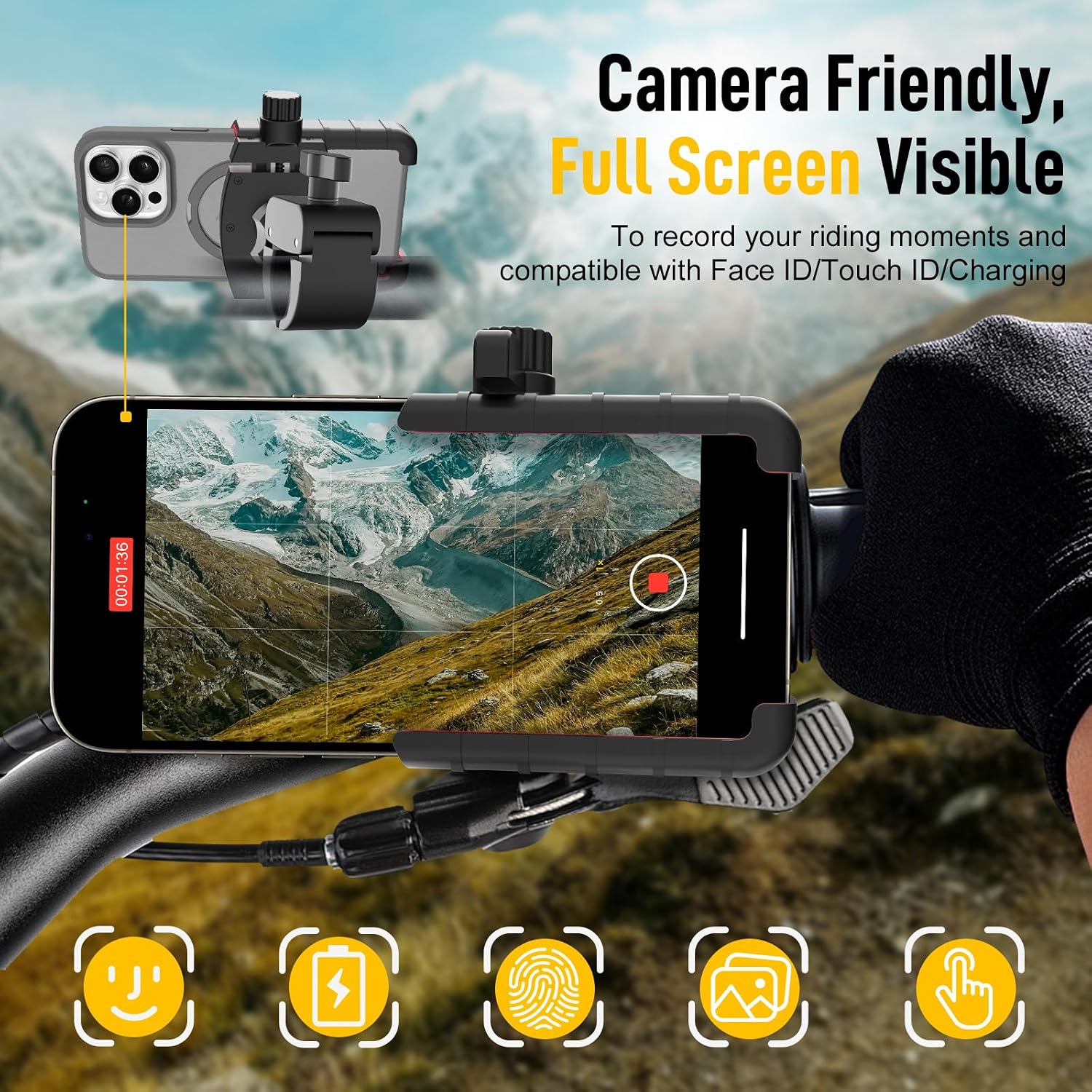
Image: A close-up view of a smartphone mounted in the Moman PMS1 holder on a bicycle, demonstrating how the design allows for unobstructed camera use, Face ID/Touch ID, and charging, making it camera friendly and ensuring full screen visibility.

Image: A comparison showing the Moman PMS1 product's stable and firm grip with silicone protection and anti-shake/anti-slip rubber, contrasted with a generic holder that allows the phone to shake out, emphasizing the superior stability of the PMS1.
Maintenance
- Cleaning: Use a soft, damp cloth to wipe down the intercom unit and phone holder. Do not use harsh chemicals or abrasive cleaners.
- Storage: When not in use for extended periods, store the devices in a cool, dry place away from direct sunlight.
- Battery Care (H2 Pro): To prolong battery life, avoid fully discharging the battery frequently. Charge the unit regularly, even if not in constant use.
- Inspect Mounts: Periodically check the tightness of the intercom and phone holder mounts to ensure they remain secure.
Troubleshooting
- No Power:
- Ensure the H2 Pro is fully charged.
- Press and hold the power button for at least 3 seconds.
- Cannot Pair Bluetooth:
- Ensure the H2 Pro is in pairing mode (LED flashing red and blue).
- Turn off and on your phone's Bluetooth.
- Clear previous Bluetooth connections on both devices and try again.
- Intercom Disconnects:
- Ensure both units are within the 1000m range and have a clear line of sight.
- Re-pair the intercom units if necessary.
- Check for strong electromagnetic interference.
- Poor Sound Quality:
- Ensure speakers are positioned correctly over your ears.
- Check microphone placement and ensure it's close to your mouth.
- Adjust volume levels.
- Verify that the DSP&CVC noise suppression is active.
- Phone Not Secure in PMS1 Holder:
- Ensure the phone is properly seated and the jaws are fully gripping it.
- Check if your phone's dimensions (with case) exceed the holder's capacity (4.5-7 inches, up to 15mm thickness).
- Tighten the handlebar clamp if the entire holder is wobbling.
Specifications
| Feature | Specification |
|---|---|
| Model Name | Moman H2 Pro |
| Connectivity Technology | Wireless (Bluetooth 5.1) |
| Intercom Range | Up to 1000m (for 2 riders) |
| Noise Cancellation | DSP & CVC |
| Speaker Size | 40mm |
| Battery Capacity | 900mAh (H2 Pro) |
| Water Resistance | IP65 Waterproof (H2 Pro) |
| Control Type | Media Control, Voice |
| Material | Carbon Fiber (H2 Pro), Silicone (PMS1 protection) |
| PMS1 Phone Compatibility | 4.5-7 inches, up to 15mm thickness (with case) |
| PMS1 Mount Type | Handlebar Clamp, 360° Rotatable |
Warranty and Support
For warranty claims, technical support, or product inquiries, please contact the seller directly. The seller for this product is MOMAN TECHNOLOGY USA.
Return Policy: This product typically has a 30-day return/replacement policy from the date of purchase. Please refer to your purchase platform's specific return guidelines for detailed information.
For further assistance, you may visit the official Moman store page on Amazon: Moman Store.
Ask a question about this manual
Ask about setup, troubleshooting, compatibility, parts, safety, or missing instructions. Manuals+ will review the question and use this page’s manual context to help answer it.