
1. Introduction
The AiXun PF26 Intelligent Multi-Channel Fast Charger is a versatile charging station designed to efficiently power multiple devices simultaneously. Featuring 4 channels and 8 ports, it delivers a total power output of 260W, with each single port capable of up to 65W. This device supports various fast charging protocols and includes an intuitive 3.5-inch IPS display for monitoring charging status. Its intelligent design incorporates an automatic standby function for energy saving and a 1/4-inch standard screw hole for flexible installation.
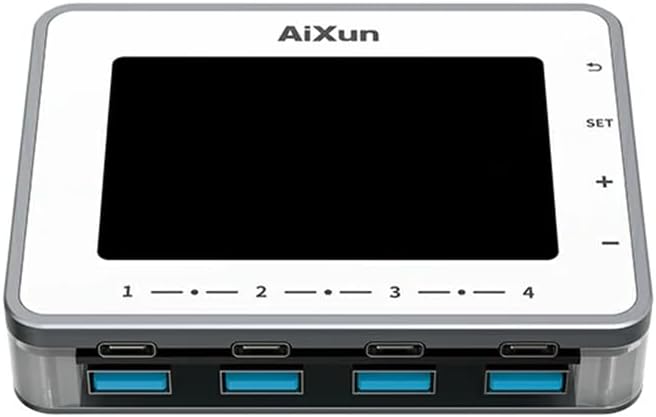
Image 1.1: Front view of the AiXun PF26 Intelligent Multi-Channel Fast Charger, showing the display screen and the eight USB ports (four USB-C and four USB-A).
2. Safety Information
Please read all safety instructions before using this product to prevent injury or damage.
- Do not expose the device to water, moisture, or extreme temperatures.
- Use only compatible power adapters. An external 24V power adapter is required and sold separately.
- Avoid dropping or subjecting the device to severe impact.
- Do not attempt to disassemble or modify the charger. This will void the warranty and may cause damage.
- Keep out of reach of children.
- Ensure proper ventilation during operation to prevent overheating.
3. Package Contents
Verify that all items are present in your package:
- 1x AiXun PF26 Intelligent Multi-Channel Fast Charger (Base Unit)
Note: The power adapter is not included and must be purchased separately. Refer to the specifications for compatible adapter requirements.
4. Product Features
The AiXun PF26 charger offers advanced features for efficient and intelligent charging:
- High Power Output: Total 260W strong power across 4 channels and 8 ports. Each single port can achieve a peak power of 65W.
- Wide Protocol Compatibility: Supports various fast charging protocols including PPS, PD, QC, AFC, FCP, SCP, PE, and SFCP.
- Intelligent Detection: Automatically detects and recognizes connected devices for optimal charging.
- Automatic Standby: Built-in function to reduce energy consumption and prolong device lifespan. Standby time is adjustable from 1 to 60 minutes.
- 3.5-inch IPS Display: Provides a clear view of charging status, voltage, current, and power parameters.
- Flexible Installation: Features a standard 1/4-inch BSP Thread Hole on the bottom, allowing adaptation to various brackets (brackets sold separately).
- Remote Upgrades: Supports firmware upgrades via PC connection.

Image 4.1: The AiXun PF26 charger in use, illustrating its 260W total power and 65W per port capability. An external power adapter is shown connected.
5. Specifications
| Parameter | Value |
|---|---|
| Product Name | Intelligent Multi-channel Fast Charger |
| Brand | AiXun |
| Model | PF26 |
| Input Voltage | 24V DC |
| Total Power Output | 260W |
| Max Single Port Power | 65W |
| Max Dual Port Output (per channel) | 30W |
| Number of Ports | 8 (4x USB-C, 4x USB-A) |
| Display Type | 3.5-inch IPS |
| Communication Interface | Type-C cable |
| Supported Fast Charging Protocols | PPS/PD/QC/AFC/FCP/SCP/PE/SFCP |
| Product Dimensions | 102 x 78 x 7 mm (4.02 x 3.07 x 0.28 inches) |
| Item Weight | 4.4 pounds |
| Mounting Feature | 1/4-inch BSP Thread Hole |
Recommended Power Adapter Specifications:
The AiXun PF26 requires an external 24V DC power adapter with a 5.5*2.5mm DC port. The required current depends on the desired total power output:
| Power | Voltage | Current |
|---|---|---|
| 144W | 24V | 6A |
| 192W | 24V | 8A |
| 260W | 24V | 12A |

Image 5.1: Reference table for selecting a compatible charging power adapter, detailing DC port specifications and power output options.
6. Setup
- Connect Power Adapter: Connect a compatible 24V DC power adapter (purchased separately) to the DC input port on the AiXun PF26 charger. Ensure the adapter meets the power requirements listed in Section 5.
- Power On: Once the power adapter is connected, the device will automatically power on, and the 3.5-inch IPS display will illuminate.
- Optional Mounting: If desired, use the 1/4-inch BSP Thread Hole on the bottom of the unit to attach it to a compatible bracket or stand (sold separately).

Image 6.1: Bottom design of the AiXun PF26 charger, highlighting the 1/4-inch BSP Thread Hole for easy adaptation to various mounting brackets.
7. Operating Instructions
7.1 Charging Devices
- Connect your devices (smartphones, tablets, laptops, etc.) to the available USB-C or USB-A ports using appropriate charging cables.
- The charger will automatically detect the connected device and initiate charging, utilizing compatible fast charging protocols.
- Monitor the charging status, voltage, current, and power for each port on the 3.5-inch IPS display.
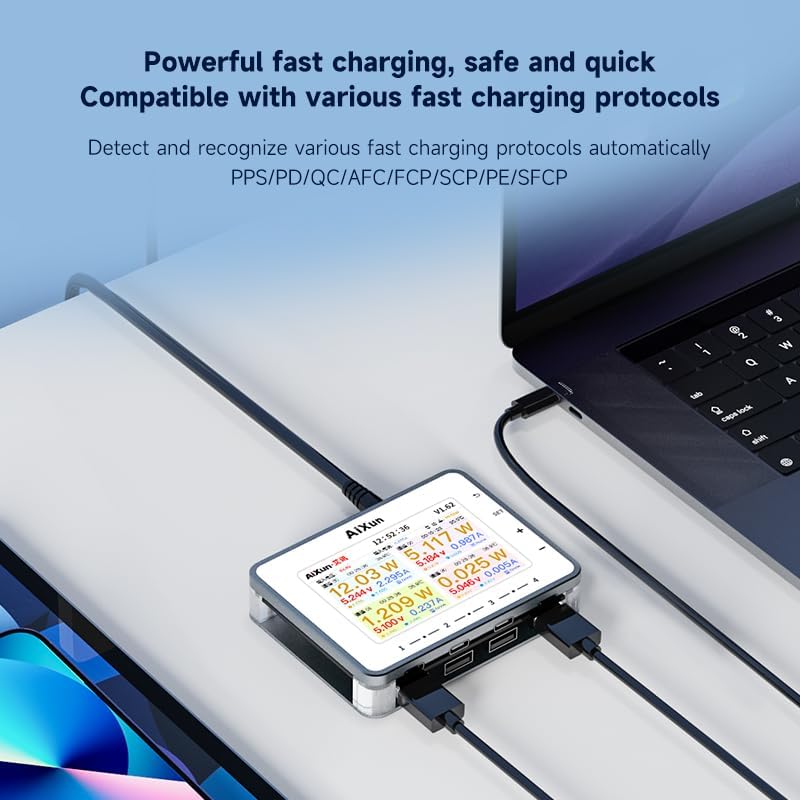
Image 7.1: The AiXun PF26 charger actively charging multiple devices, with its display showing detailed charging parameters for each port.
7.2 Display Navigation and Settings
The charger features a 3.5-inch IPS display and control buttons for navigation:
- SET Button: Access settings menu.
- + / - Buttons: Navigate through menu options or adjust values.
- Return Button: Go back to the previous screen or exit a menu.
Within the settings, you can customize parameters such as standby time (1-60 minutes) and view system information.

Image 7.2: The AiXun PF26 charger's display showing intelligent features and a connected smartphone indicating 36% charge, demonstrating the energy-saving standby function.
7.3 Connecting to AiXun Platform (PC)
The device can be connected to a PC via a Type-C cable to the AiXun platform software. This allows for:
- Real-time monitoring of current and voltage curves.
- Performing remote firmware upgrades to ensure the device has the latest features and improvements.
8. Maintenance
- Cleaning: Use a soft, dry cloth to clean the exterior of the charger. Do not use liquid cleaners or aerosols.
- Storage: Store the device in a cool, dry place away from direct sunlight and extreme temperatures when not in use.
- Cable Management: Ensure charging cables are not excessively bent or tangled to prevent damage.
9. Troubleshooting
- Device not powering on: Ensure the 24V DC power adapter is correctly connected and functioning. Verify the adapter meets the specified voltage and current requirements.
- Device not charging: Check if the charging cable is securely connected to both the charger and the device. Ensure the device supports the fast charging protocols offered by the AiXun PF26. Try a different port or cable.
- Display not working: If the display is blank or unresponsive, try disconnecting and reconnecting the power adapter. If the issue persists, contact customer support.
- Slow charging: Ensure your power adapter provides sufficient wattage for the number of devices being charged. Some devices may not support the highest fast charging speeds.
10. Warranty and Support
For warranty information and technical support, please refer to the documentation provided with your purchase or visit the official AiXun website. You may also contact AiXun customer service directly for assistance with product operation, troubleshooting, or warranty claims.
