
PROTEAR B0D66BQ3Q3
PROTEAR Bluetooth Hearing Protection Earmuffs User Manual
Model: B0D66BQ3Q3
Brand: PROTEAR
1. Product Overview
The PROTEAR Bluetooth Hearing Protection Earmuffs are designed to provide effective noise reduction while allowing for wireless audio streaming and hands-free communication. These earmuffs are suitable for various noisy environments, including workshops, mowing, shooting, and concerts.

Front view of the PROTEAR Bluetooth Hearing Protection Earmuffs in gray.

The earmuffs offer Bluetooth 5.3 connectivity, Hi-Fi sound, hands-free calling, and NRR 25dB noise reduction, as shown with a user on a lawnmower.
Key Features:
- Upgraded Bluetooth 5.3 Wireless Technology: Provides a faster and more stable connection for seamless audio streaming from mobile phones and other Bluetooth-enabled devices.
- Extended Playtime: Offers over 40 hours of playtime in Bluetooth mode and up to 120+ hours in AUX mode, powered by a 1200mAh rechargeable built-in lithium battery.
- Integrated Microphone: Allows for hands-free answering of calls without needing to remove the earmuffs.
- Effective Noise Reduction: Certified with ANSI S3.19 NRR 25dB (US Standard) and CE EN352-1 SNR 30 dB (European Standard) to protect ears from hazardous sound levels.
- Comfortable and Adjustable Design: Features extremely soft ear cups for enhanced comfort, even with glasses, and an adjustable headband with cutouts for long-term wear and compatibility with hats.
- Versatile Application: Ideal for various activities requiring hearing protection, such as sports events, concerts, festivals, studying, woodworking, shooting, mowing, and operating noisy machinery.
2. Setup and Initial Use
2.1. Fitting the Adjustable Headset
To ensure optimal comfort and noise reduction, properly adjust the earmuffs to fit your head.
- Fully extend the sliders on both sides of the earmuffs.
- Place the ear cups over your ears, ensuring they completely cover your ears and create a seal.
- Tighten the headband by sliding the ear cups upwards along the metal wires until a snug, comfortable fit is achieved. The headband should rest comfortably on the top of your head.

Step-by-step guide for fitting the adjustable headset and charging the device.
2.2. Initial Charging
The earmuffs come with a built-in rechargeable battery. Before first use, it is recommended to fully charge the device.
- Locate the Type-C charging port on the right earcup.
- Connect the supplied Type-C USB cable to the charging port.
- Connect the other end of the USB cable to a suitable USB power source (e.g., computer USB port, wall adapter).
- The LED indicator will blink blue while charging and turn solid blue when charging is complete.
- A full charge provides over 40 hours of playtime in Bluetooth mode.
3. Operating Instructions
3.1. Power On/Off
- To power on, press and hold the power button (center button on the control panel) for a few seconds until the LED indicator lights up.
- To power off, press and hold the power button again until the LED indicator turns off.
3.2. Bluetooth Pairing
The earmuffs utilize Bluetooth 5.3 for wireless connectivity.
- Ensure the earmuffs are powered on and in pairing mode (the LED indicator will typically blink rapidly).
- On your mobile device (smartphone, tablet, etc.), enable Bluetooth and search for available devices.
- Select "PROTEAR" or a similar name from the list of found devices.
- Once connected, the LED indicator will turn solid blue or flash slowly, indicating a successful pairing.
3.3. Controls and Functions
The control panel is located on the left earcup for easy access.
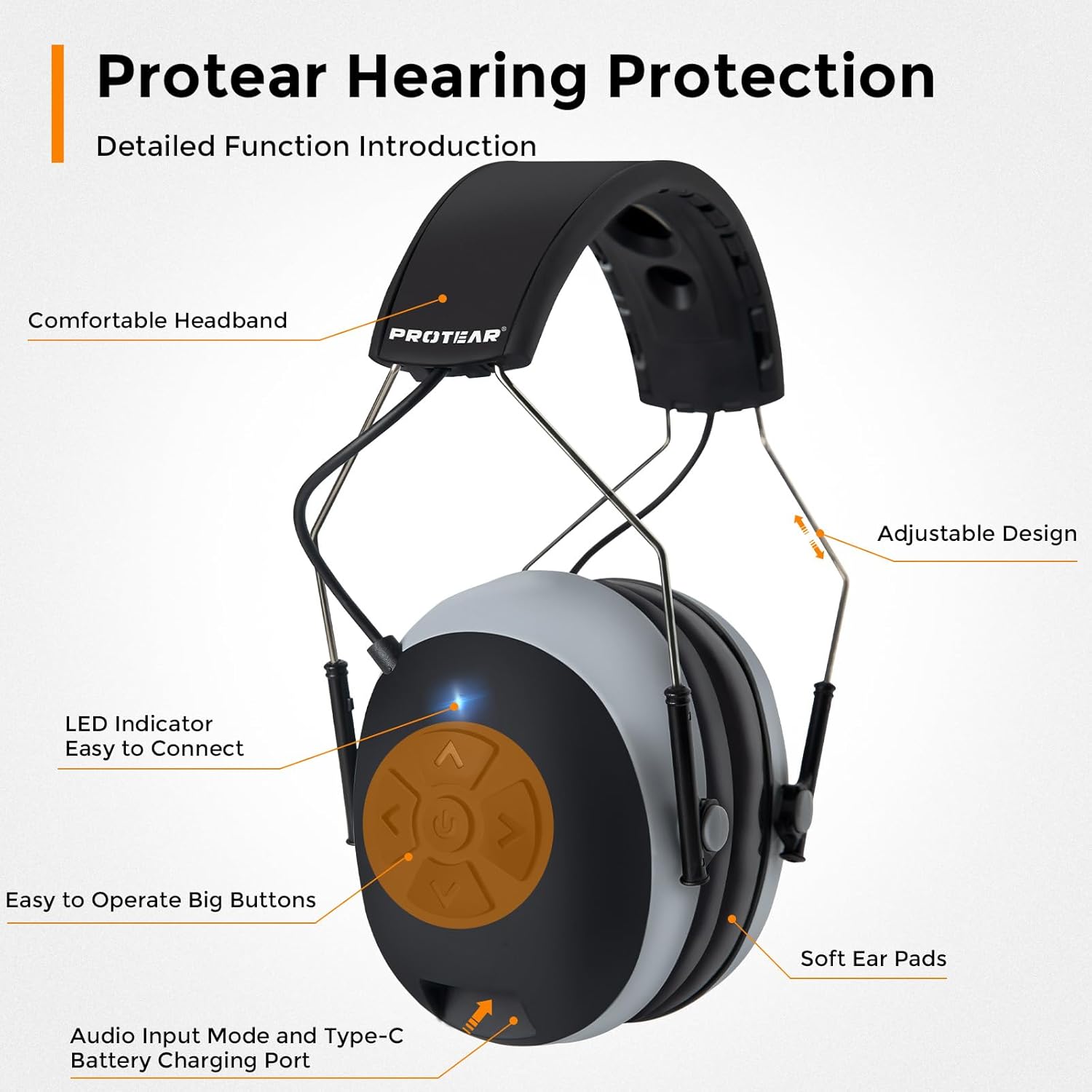
Detailed function introduction of the PROTEAR Hearing Protection earmuffs, highlighting the control panel, LED indicator, and charging port.
- Power Button (Center): Press and hold to power on/off.
- Volume Up (Up Arrow): Short press to increase volume.
- Volume Down (Down Arrow): Short press to decrease volume.
- Next Track (Right Arrow): Short press to skip to the next track.
- Previous Track (Left Arrow): Short press to go to the previous track.
- Play/Pause/Answer Call (Power Button): Short press to play/pause music or answer/end a phone call.
- Reject Call (Power Button): Press and hold to reject an incoming call.
The earmuffs also feature an AUX input for wired connection, providing up to 120+ hours of playtime in this mode.
4. Maintenance and Care
Proper maintenance ensures the longevity and performance of your PROTEAR earmuffs.
- Cleaning: Wipe the earmuffs with a soft, damp cloth. Do not use abrasive cleaners or solvents. Ensure no liquid enters the electronic components.
- Storage: Store the earmuffs in a cool, dry place away from direct sunlight and extreme temperatures.
- Battery Care: To preserve battery life, avoid fully discharging the battery frequently. Charge the earmuffs regularly, even if not in use for extended periods.
- Ear Cup Replacement: Over time, ear cups may wear out. Replace them if they become damaged or lose their sealing capability to maintain effective noise reduction.
5. Troubleshooting
If you encounter issues with your earmuffs, refer to the following common troubleshooting steps:
| Problem | Possible Cause | Solution |
|---|---|---|
| Earmuffs do not power on. | Low battery. | Charge the earmuffs fully using the supplied USB-C cable. |
| Cannot pair with Bluetooth device. | Earmuffs not in pairing mode; device Bluetooth off; too far from device. | Ensure earmuffs are powered on and LED is blinking rapidly. Turn Bluetooth on your device. Move earmuffs closer to the device (within 10 meters). |
| No sound or low volume. | Volume too low; earmuffs not connected; audio source issue. | Increase volume on both earmuffs and connected device. Re-pair Bluetooth. Check audio source. |
| Poor noise reduction. | Improper fit; worn ear cups. | Adjust earmuffs for a snug fit around the ears. Consider replacing ear cups if they are worn or damaged. |
6. Specifications
| Feature | Detail |
|---|---|
| Brand | PROTEAR |
| Model | B0D66BQ3Q3 |
| Noise Reduction Rating (NRR) | 25dB (US Standard - ANSI S3.19) |
| Signal-to-Noise Ratio (SNR) | 30 dB (European Standard - CE EN352-1) |
| Bluetooth Version | 5.3 |
| Battery Capacity | 1200mAh (Built-in Lithium Battery) |
| Playtime (Bluetooth Mode) | Over 40 hours |
| Playtime (AUX Mode) | Up to 120+ hours |
| Charging Port | USB Type-C |
| Material | Acrylonitrile Butadiene Styrene (ABS) |
| Color | Gray |
| Item Weight | 1.06 pounds |
| Country of Origin | China |
7. Warranty and Support
Warranty Information: Specific warranty details for your PROTEAR Bluetooth Hearing Protection Earmuffs are typically provided with the product packaging or on the manufacturer's official website. Please refer to these resources for comprehensive warranty terms and conditions.
Customer Support: For technical assistance, troubleshooting beyond this manual, or warranty claims, please contact PROTEAR customer support. Contact information can usually be found on the product packaging, the manufacturer's website, or the point of purchase.
Ask a question about this manual
Ask about setup, troubleshooting, compatibility, parts, safety, or missing instructions. Manuals+ will review the question and use this page’s manual context to help answer it.