
Introduction
Thank you for choosing the Coucur Power Bank DY-201. This device is designed to provide reliable and fast charging for your electronic devices on the go. With a 10,000 mAh capacity and 22.5W fast charging capabilities, it ensures your devices stay powered throughout the day.
This power bank features advanced charging technologies, including PD 3.0 and QC 4+, for efficient power delivery. It is equipped with multiple ports: two USB-A outputs, one USB-C port (for both input and output), and one Micro USB input, allowing for simultaneous charging of up to three devices. An integrated 8-layer SmartProtect system ensures safety by preventing overcharging, overheating, and short circuits, thereby protecting your devices and extending their battery life.
Package Contents
- 1 x Coucur Power Bank DY-201 (10000mAh, 22.5W)
- 1 x USB-C Charging Cable
- 1 x User Manual
Setup
Initial Charging of the Power Bank
Before first use, fully charge your Coucur Power Bank. This ensures optimal battery performance and longevity.
- Connect the provided USB-C cable to the USB-C input/output port on the power bank.
- Connect the other end of the USB-C cable to a compatible USB wall charger (not included).
- The LED digital display will show the charging progress from 0% to 100%.
- Once 100% is displayed, the power bank is fully charged and ready for use.
Alternatively, you can use a Micro USB cable (not included) to charge the power bank via the Micro USB input port.
Identifying Ports
Familiarize yourself with the various ports on your power bank:

Image: Diagram illustrating the two USB-A output ports, one USB-C input/output port, and one Micro USB input port on the Coucur Power Bank DY-201.
- USB-A Output Ports (22.5W): Used for charging most standard USB-powered devices.
- USB-C Input/Output Port (20W Input, 22.5W Output): Used for both recharging the power bank and charging USB-C compatible devices.
- Micro USB Input Port (18W Input): Used for recharging the power bank with a Micro USB cable.
Operating Instructions
Charging Your Devices
The Coucur Power Bank supports fast charging for compatible devices and can charge up to three devices simultaneously.
- Connect your device's charging cable to one of the power bank's output ports (USB-A or USB-C).
- Connect the other end of the cable to your device.
- The power bank will automatically begin charging your device. The LED display will show the remaining battery percentage of the power bank.
- To stop charging, simply disconnect your device.

Image: A smartphone connected to the Coucur Power Bank DY-201 via a USB-C cable, illustrating the 22.5W fast charging capability. The power bank's LED display shows 100% charge.
The power bank can charge devices up to 60% in approximately 30 minutes, depending on the device and cable used, utilizing PD 3.0 and QC 4+ technologies.
Recharging the Power Bank
You can recharge the power bank using either the USB-C port or the Micro USB port.
- Using USB-C: Connect a USB-C cable to the power bank's USB-C port and to a 20W PD compatible wall charger. A full charge takes approximately 2 hours.
- Using Micro USB: Connect a Micro USB cable to the power bank's Micro USB port and to a standard 2A wall charger. A full charge takes approximately 4 hours.
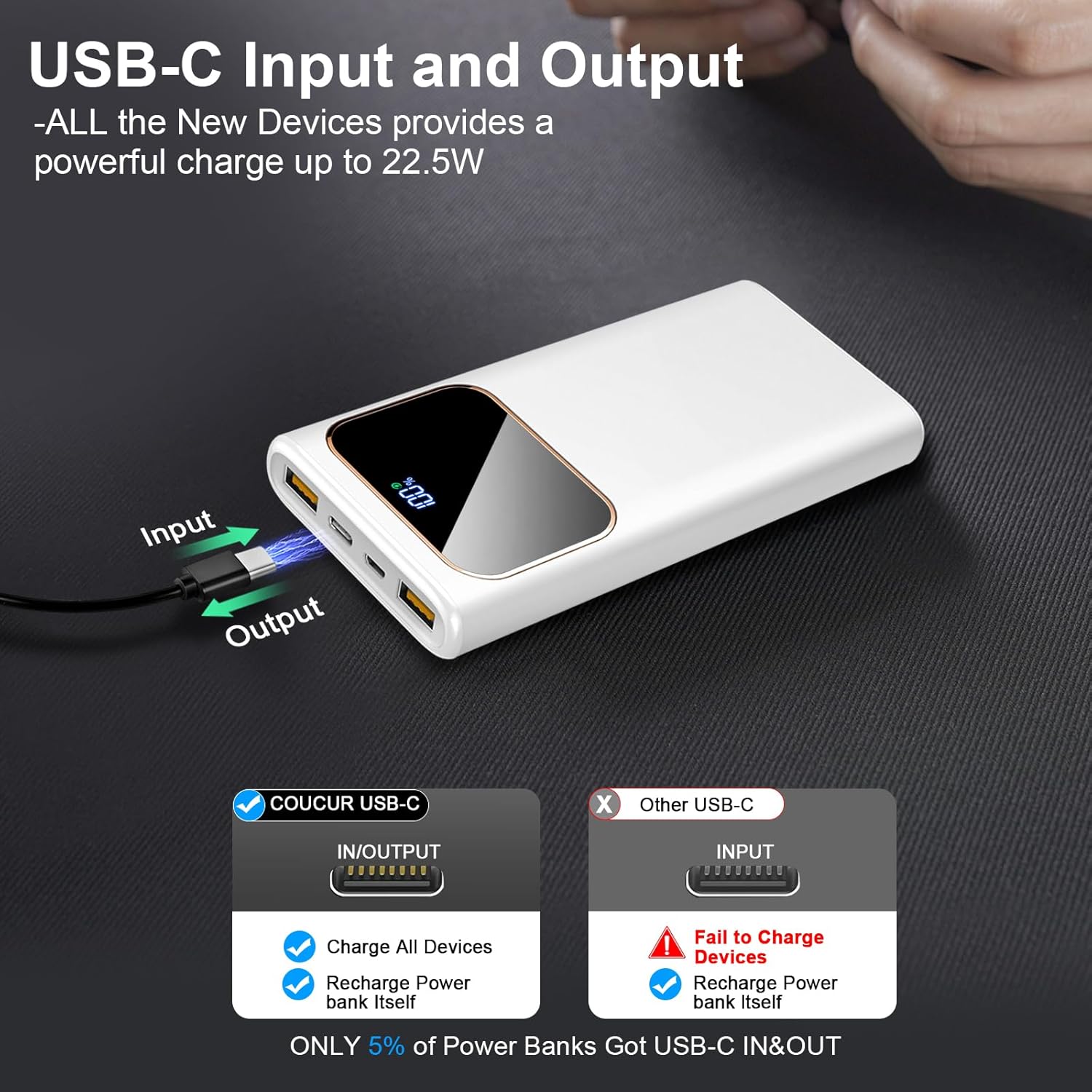
Image: A visual representation of the USB-C port on the Coucur Power Bank DY-201, highlighting its dual functionality for both input (recharging the power bank) and output (charging devices).
LED Digital Display
The power bank features an accurate LED digital display that shows the remaining battery percentage from 0% to 100%. This allows you to monitor the power bank's charge level precisely.

Image: A close-up of the Coucur Power Bank DY-201's LED digital display, clearly showing "100%" indicating a full charge. The image also depicts the power bank being recharged via its USB-C port.
Universal Compatibility
The 10000mAh capacity provides multiple charges for a wide range of devices, including smartphones, tablets, and other USB-powered gadgets.

Image: The Coucur Power Bank DY-201 on a table with various devices like an iPhone, Samsung Galaxy, iPad mini, AirPods Pro, and a Smart Watch, illustrating its universal compatibility and approximate charge cycles for each device type.
Maintenance
Cleaning
- Wipe the power bank with a soft, dry cloth.
- Do not use harsh chemicals or abrasive materials.
Storage
- Store the power bank in a cool, dry place away from direct sunlight and extreme temperatures.
- For long-term storage, it is recommended to charge the power bank to about 50-75% every three months to maintain battery health.
Safety Precautions
- Do not disassemble, modify, or repair the device yourself.
- Keep away from water, fire, and high humidity environments.
- Avoid dropping or subjecting the power bank to strong impacts.
- Do not expose to temperatures above 60°C (140°F).
- The power bank features an 8-layer SmartProtect system to prevent overcurrent, overheating, overcharging, and short circuits. However, always use the device responsibly.
Troubleshooting
Power Bank Not Charging
- Ensure the charging cable is securely connected to both the power bank's input port and the wall charger.
- Verify that the wall charger is functioning correctly and plugged into a live power outlet.
- Try using a different charging cable or wall charger.
- If using the USB-C port for input, ensure your wall charger supports PD (Power Delivery) for optimal charging speed.
Device Not Charging from Power Bank
- Check if the power bank has sufficient charge (refer to the LED display).
- Ensure the charging cable is securely connected to both the power bank's output port and your device.
- Try using a different charging cable or a different output port on the power bank.
- Confirm your device is compatible with the power bank's output specifications.
Slow Charging
- Ensure both the power bank and your device support fast charging protocols (PD, QC).
- Use a high-quality, fast-charging compatible cable.
- Avoid charging multiple devices simultaneously if you require maximum speed for a single device.
Specifications
| Feature | Value |
|---|---|
| Model Name | DY-201 |
| Brand | Coucur |
| Battery Capacity | 10000 mAh |
| Output Power | 22.5W (Max) |
| USB-C Input | 20W (Max) |
| Micro USB Input | 18W (Max) |
| Output Ports | 2 x USB Type-A, 1 x USB Type-C |
| Input Ports | 1 x USB Type-C, 1 x Micro USB |
| Dimensions (L x W x H) | 14.3 x 7 x 1.8 cm (5.63 x 2.76 x 0.71 inches) |
| Weight | 300 g (0.66 lbs) |
| Battery Composition | Lithium-ion |
| Special Features | Fast Charging, USB-C Input/Output, Portable, LED Display, Overcharge Protection, Short-circuit Protection |
Warranty and Support
This Coucur Power Bank includes a 24-month after-sales service. If you have any questions, encounter issues, or require support, please contact our customer service team. Contact information can typically be found on the product packaging or the retailer's website where the product was purchased.