1. Product Overview
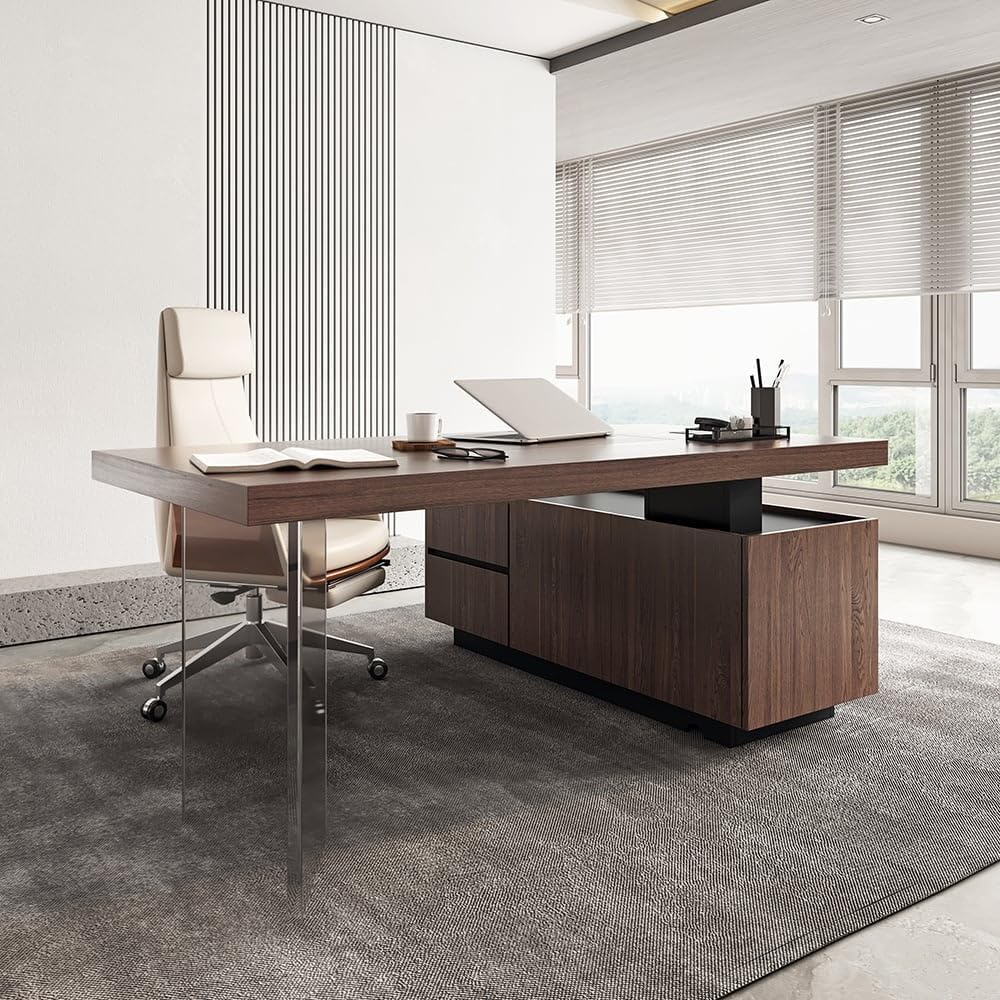
This manual provides detailed instructions for the assembly, operation, and maintenance of your Homary 71.5" Modern L-Shaped Desk. Designed for home office and executive use, this desk features a lift-top mechanism and integrated storage for enhanced productivity and ergonomic comfort.
Key Features:
- Modern Design: Walnut finish with a contemporary L-shape, complementing various office decors.
- Spacious Worktop: Provides ample space for computing and writing tasks. Includes a side cabinet for additional storage.
- Lift-Top Desktop: A dual-tiered platform allows easy transition between sitting and standing positions, promoting ergonomic posture and reducing strain.
- Ergonomic Design: The standing function supports a healthy posture, improves blood flow, and enhances alertness and productivity.
- Easy Care: Simple to clean and maintain with a damp cloth.
2. Safety Instructions
Please read and follow these safety guidelines carefully to prevent injury and ensure proper function of your desk.
- Always ensure the desk is properly assembled and stable before adjusting the height.
- Keep fingers and other body parts away from the moving parts during height adjustment to prevent injury.
- Do not overload the desk or the lift-top mechanism beyond its intended capacity.
- Keep children and pets away from the desk during operation of the lift-top.
3. Product Specifications
| Brand | homary |
| Model Number | JJ84Z5J389 |
| Shape | L-Shape |
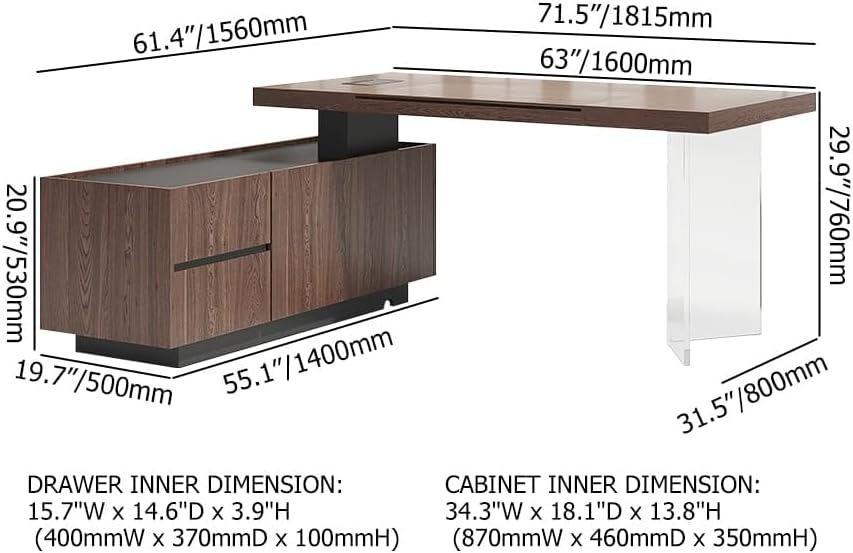
| Product Dimensions (D x W x H) | 61.4"D x 70.9"W x 29.9"H (1560mmD x 1800mmW x 760mmH) |
| Working Surface Diagonal Length | 71.5 Inches |
| Color | Walnut |
| Style | Modern |
| Base Material | Acrylic; MDF; Walnut Veneer |
| Top Material Type | MDF; Walnut Veneer |
| Finish Type | Painted |
| Special Feature | Lift-top Desktop |
| Number of Drawers | 2 |
| Number of Cabinets | 1 |
| Item Weight | 235.9 Pounds |
| Lifting Mechanism | Manual |
| Required Assembly | Yes |
| Recommended People for Assembly | 2 |
4. Setup and Assembly
The Homary L-Shaped Desk requires assembly. Detailed instructions and necessary hardware are included in the product packaging. It is recommended that two people assemble this desk for ease and safety.
Dimensions Overview:

Refer to the provided assembly manual for step-by-step instructions. Ensure all components are present before beginning assembly.
5. Operating Instructions
5.1 Lift-Top Desktop Operation
The desk features a manual lift-top mechanism allowing you to easily switch between sitting and standing positions. Follow these steps to adjust the desktop height:
- To raise the desktop: Loosen the locking mechanism by turning it counter-clockwise. Gently lift the desktop to your desired height.
- To secure the desktop: Once at the desired height, tighten the locking mechanism by turning it clockwise to keep the height constant.
- To lower the desktop: Loosen the locking mechanism counter-clockwise. Gently press the desktop down to the desired lower position. Once lowered, turn the lock clockwise to secure it.

This video demonstrates the operation of the lift-top desktop:
Video 5.1: Demonstration of the Homary L-Shaped Desk's lift-top mechanism, showing how to raise and lower the desktop for ergonomic use.
5.2 Storage Cabinet and Drawers
The integrated side cabinet provides ample storage. It includes two drawers and a cabinet section for organizing files and office supplies.
The cabinet also features a wiring hole for cable management, helping to keep your workspace tidy.
This video illustrates the storage features and cable management system:
Video 5.2: Overview of the Homary L-Shaped Desk's storage cabinet, drawers, and integrated cable management system.
6. Maintenance
To maintain the appearance and longevity of your Homary L-Shaped Desk, follow these simple care instructions:
- Wipe clean with a damp cloth.
- Immediately dry the surface with a clean, dry cloth to prevent water marks or damage.
- Avoid using harsh chemicals or abrasive cleaners, as these can damage the finish.
- Protect the surface from direct sunlight and extreme temperature changes.
7. Troubleshooting
If you encounter any issues with your Homary L-Shaped Desk, please refer to the following common solutions:
- Lift-Top Mechanism Sticking: Ensure the locking mechanism is fully loosened before attempting to adjust the height. Check for any obstructions in the mechanism.
- Desk Instability: Verify that all assembly screws and fasteners are securely tightened. Ensure the desk is placed on a level surface.
- Drawers Not Sliding Smoothly: Check for any obstructions in the drawer glides. Ensure the drawers are properly aligned on their tracks.
For issues not covered here, please contact customer support.
8. Warranty Information
This Homary L-Shaped Desk comes with a 1-year manufacturer's limited warranty. This warranty covers defects in materials and workmanship under normal use. Please retain your proof of purchase for warranty claims.
For detailed warranty terms and conditions, please refer to the documentation included with your product or contact Homary customer service.
9. Customer Support
If you have any questions, require assistance with assembly, or need to report a defect, please contact Homary customer support:
- Email: service@homary.com
- Please provide your order number when contacting via email.
- Customer Care Center is available to assist you.
- Replies are typically provided within 24 hours, excluding public holidays.