
1. Introduction
This manual provides comprehensive instructions for the XOSS Smart Bike Tail Light XR PRO. Please read this manual carefully before using the product to ensure proper operation and safety. The XOSS XR PRO is designed to enhance cycling safety with its intelligent features and durable construction.
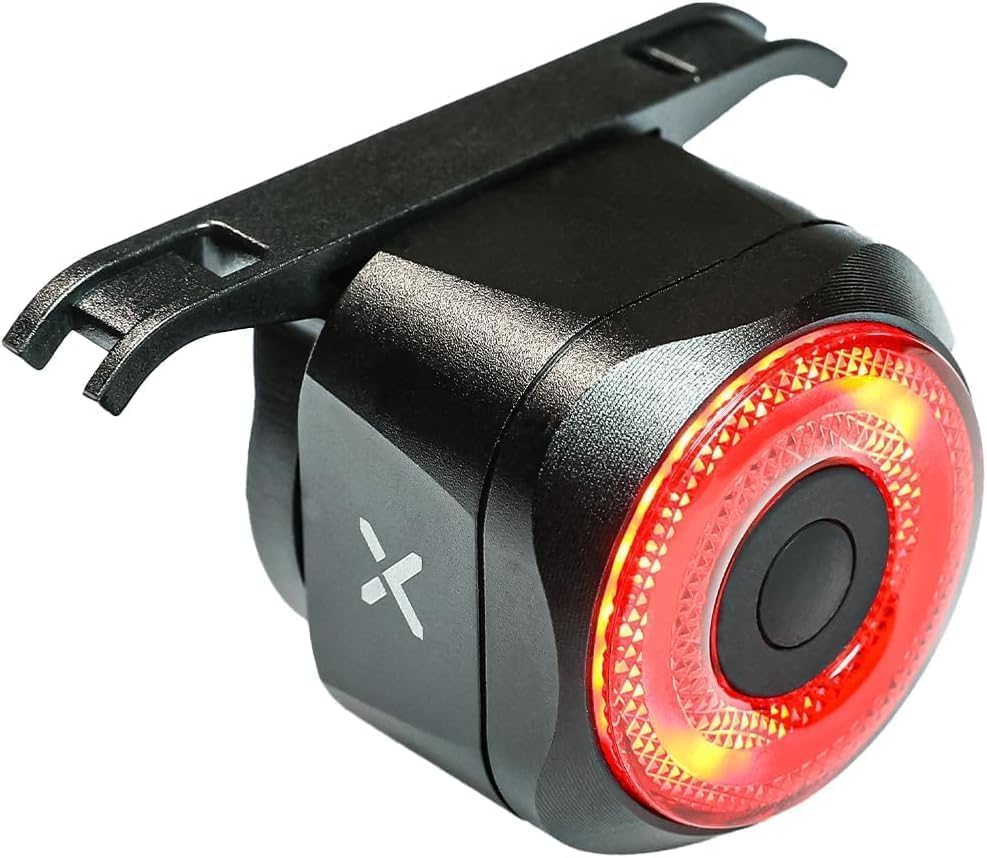
Image 1.1: The XOSS Smart Bike Tail Light XR PRO, a compact and intelligent rear light for bicycles.
2. Package Contents
Verify that all items listed below are included in your package:
- XOSS Smart Bike Tail Light XR PRO
- USB-C Charging Cable
- Saddle Mounting Bracket
- Seat Post Mounting Strap (Silicone)
- Zip Ties (for additional securing, if needed)

Image 2.1: All components included in the XOSS XR PRO package, including the tail light, charging cable, and mounting accessories.
3. Product Features
The XOSS XR PRO Smart Bike Tail Light offers several advanced features:
- Smart Brake Sensor: Automatically detects braking and increases brightness for 3 seconds to alert following traffic.
- Smart Auto On/Off: The light automatically turns off after 30 seconds of inactivity and turns on when riding vibration is detected. It also features light sensing, turning off in bright environments and on in dim conditions.
- TYPE-C Rechargeable Battery: Equipped with a 300mAh Lithium Battery, offering long operational times and convenient USB-C charging.
- IPX6 Waterproof: Designed to withstand splashes and rain, ensuring reliable performance in various weather conditions.
- Durable Aluminum Alloy Shell: Constructed with robust aluminum for enhanced durability.
- Multiple Lighting Modes: Features 4 distinct lighting modes with adjustable brightness.

Image 3.1: Close-up view of the XOSS XR PRO, highlighting its aluminum alloy construction when mounted under a saddle.
4. Installation
The XOSS XR PRO offers two primary mounting options:
4.1. Saddle Mounting
- Attach the metal saddle mounting bracket to the rails under your bicycle saddle.
- Secure the bracket firmly using the provided hardware or zip ties.
- Slide the XOSS XR PRO tail light onto the bracket until it clicks into place.
4.2. Seat Post Mounting
- Wrap the adjustable silicone strap around your bicycle's seat post.
- Attach the XOSS XR PRO tail light to the strap, ensuring it is securely fastened and facing backward.
Ensure the light is mounted securely and does not obstruct any moving parts of the bicycle.

Image 4.1: The XOSS XR PRO tail light securely mounted under a bicycle saddle, demonstrating one of the installation methods.
5. Operation
5.1. Power On/Off
- To Turn On: Press and hold the power button for approximately 2 seconds. The light will illuminate in its last used mode.
- To Turn Off: Press and hold the power button for approximately 2 seconds.
5.2. Changing Lighting Modes
Once the light is on, short press the power button to cycle through the available lighting modes:
- Normally On (Steady)
- Breathing Flash
- Fast Flash
- Slow Flash
5.3. Adjusting Brightness
When the light is off, long press the button to adjust the brightness level. The light will cycle through Low, Medium, and High brightness settings. Release the button at your desired brightness.

Image 5.1: A cyclist demonstrating the XOSS XR PRO's various lighting modes, including steady, breathing flash, fast flash, and slow flash.
6. Smart Functions
6.1. Smart Brake Sensing
The XR PRO is equipped with a smart brake sensor. When deceleration is detected, the light will automatically switch to an ultra-bright mode for 3 seconds to signal braking to riders or drivers behind you. This feature operates in all lighting modes.

Image 6.1: The XOSS XR PRO illuminating brightly for 3 seconds, indicating the activation of the smart brake sensing feature.
6.2. Smart Auto On/Off (Vibration & Light Sensing)
The light integrates both vibration and light sensors for automatic operation:
- Vibration Sensing: If no vibration is detected for 30 seconds, the light will automatically turn off to conserve battery. It will automatically turn back on when vibration (riding motion) is detected.
- Light Sensing: The light can detect ambient light conditions. It will automatically turn off in bright environments and turn on when it's dim, optimizing visibility and battery life.

Image 6.2: A visual comparison showing the XOSS XR PRO automatically turning off after 30 seconds of motionlessness and turning on when vibration is detected.
7. Charging
The XOSS XR PRO is equipped with a 300mAh rechargeable Lithium Battery and a USB-C charging port.
- Charging Process: Connect the provided USB-C cable to the light's charging port and plug the other end into a USB power source (e.g., computer, wall adapter, power bank).
- Charging Indicator: A red indicator light will show during charging. It will turn green when fully charged.
- Charging Time: A full charge typically takes approximately 1 hour.
- Battery Life: Expected battery life ranges from 18-36 hours in low lighting mode, 12-24 hours in medium lighting mode, and 8-16 hours in high lighting mode, depending on usage and mode selection.
8. Maintenance
- Cleaning: Wipe the light with a soft, damp cloth. Do not use abrasive cleaners or solvents.
- Water Exposure: While IPX6 waterproof, avoid prolonged submersion in water or liquids. Ensure the USB-C port cover is securely closed to prevent water ingress.
- Storage: Store the light in a cool, dry place when not in use. For long-term storage, charge the battery to approximately 50% every few months to maintain battery health.
- Battery Care: Avoid fully depleting the battery frequently. Charge it regularly to prolong its lifespan.
9. Troubleshooting
| Problem | Possible Cause | Solution |
|---|---|---|
| Light does not turn on. | Battery is depleted. | Charge the light using the USB-C cable. |
| Light turns off unexpectedly. | Smart Auto On/Off activated (no vibration/bright environment). | This is normal operation. The light will reactivate with motion or in dim conditions. Ensure battery is charged. |
| Brake sensing not working. | Insufficient deceleration or sensor obstruction. | Ensure the light is mounted securely and not obstructed. Test with clear deceleration. |
| Light not charging. | Faulty cable or power source. | Try a different USB-C cable or power adapter. Ensure connections are secure. |
10. Specifications
- Model: XR PRO
- Dimensions: 11 x 8 x 4.4 cm
- Weight: 110 g
- Color: Red
- Material: Aluminum Alloy
- Power Source: Battery Powered (Rechargeable)
- Battery Capacity: 300mAh Lithium Battery
- Charging Port: USB-C
- Water Resistance: IPX6 (Waterproof)
- Mounting Type: Seat Mount (Saddle or Seat Post)
- Number of Settings: 4 lighting modes with adjustable brightness
11. Safety Information
- Always ensure the tail light is securely mounted before riding.
- Do not look directly into the light when it is on, as it may cause temporary vision impairment.
- Keep out of reach of children.
- Dispose of the battery according to local regulations. Do not incinerate.
- Regularly check the light's functionality, especially before night rides.
12. Warranty and Support
For warranty information or technical support, please refer to the official XOSS website or contact your retailer. Keep your purchase receipt as proof of purchase.
Manufacturer: XOSS HONG KONG CO.,LIMITED

