
DLYFULL DH4
Dlyfull DH4 4-Bay AA AAA Battery Charger User Manual
Model: DH4 | Brand: DLYFULL
1. Introduction
Thank you for choosing the Dlyfull DH4 4-Bay AA AAA Battery Charger. This advanced charger is designed to efficiently and safely recharge your 1.5V Lithium and 1.2V NiMH/NiCd AA and AAA batteries. Featuring independent charging slots, real-time temperature monitoring, and multiple protection mechanisms, the DH4 ensures optimal battery performance and longevity. Please read this manual thoroughly before use to ensure proper operation and safety.

Figure 1: Front view of the Dlyfull DH4 charger with a battery inserted, showing the transparent casing and digital temperature display.
2. Safety Information
To prevent injury or damage to the charger and batteries, please observe the following safety precautions:
- Only charge compatible 1.5V Lithium and 1.2V NiMH/NiCd AA and AAA rechargeable batteries. Do not attempt to charge non-rechargeable batteries or other battery types.
- Ensure correct battery polarity (+/-) when inserting batteries into the charger slots.
- Do not expose the charger to water, moisture, or high humidity.
- Avoid operating the charger in direct sunlight or in environments with extreme temperatures.
- Do not disassemble, modify, or attempt to repair the charger. Refer all servicing to qualified personnel.
- Keep the charger and batteries out of reach of children and pets.
- Unplug the charger from the power source when not in use or before cleaning.
- The charger features built-in temperature monitoring and will automatically stop charging if the internal temperature exceeds 60°C to prevent overheating.
3. Package Contents
Upon opening your Dlyfull DH4 package, you should find the following items:
- Dlyfull DH4 4-Bay Battery Charger
- USB-C Cable (Note: Power adapter not included)
- User Manual (this document)
4. Product Features
The Dlyfull DH4 charger incorporates several key features designed for efficiency, safety, and user convenience:
- Transparent Design: The sleek, transparent casing allows you to observe the high-quality internal circuitry, combining modern aesthetics with practical insight into the charger's reliable construction.

Figure 2: Overhead view of the Dlyfull DH4 charger, highlighting its transparent design and internal circuitry.
- Real-time Temperature Monitoring: Equipped with multiple temperature sensors, the charger provides precise real-time internal temperature readings on its display. If the temperature exceeds 60°C, the display will flash, and charging will automatically stop, protecting the charger, batteries, and user.

Figure 3: Angled view of the Dlyfull DH4 charger with a single AA battery, showing the real-time temperature display on the screen.
- 1.2V NiMH/Cd & 1.5V Li-ion Compatibility: The charger supports both 1.2V NiMH/NiCd and 1.5V Lithium-ion AA and AAA rechargeable batteries, offering versatile charging options for various devices.
- Independent Charging Slots: With four independent slots, you can charge any combination or number of AA or AAA rechargeable batteries simultaneously without pairing requirements, ensuring optimal efficiency and flexibility.
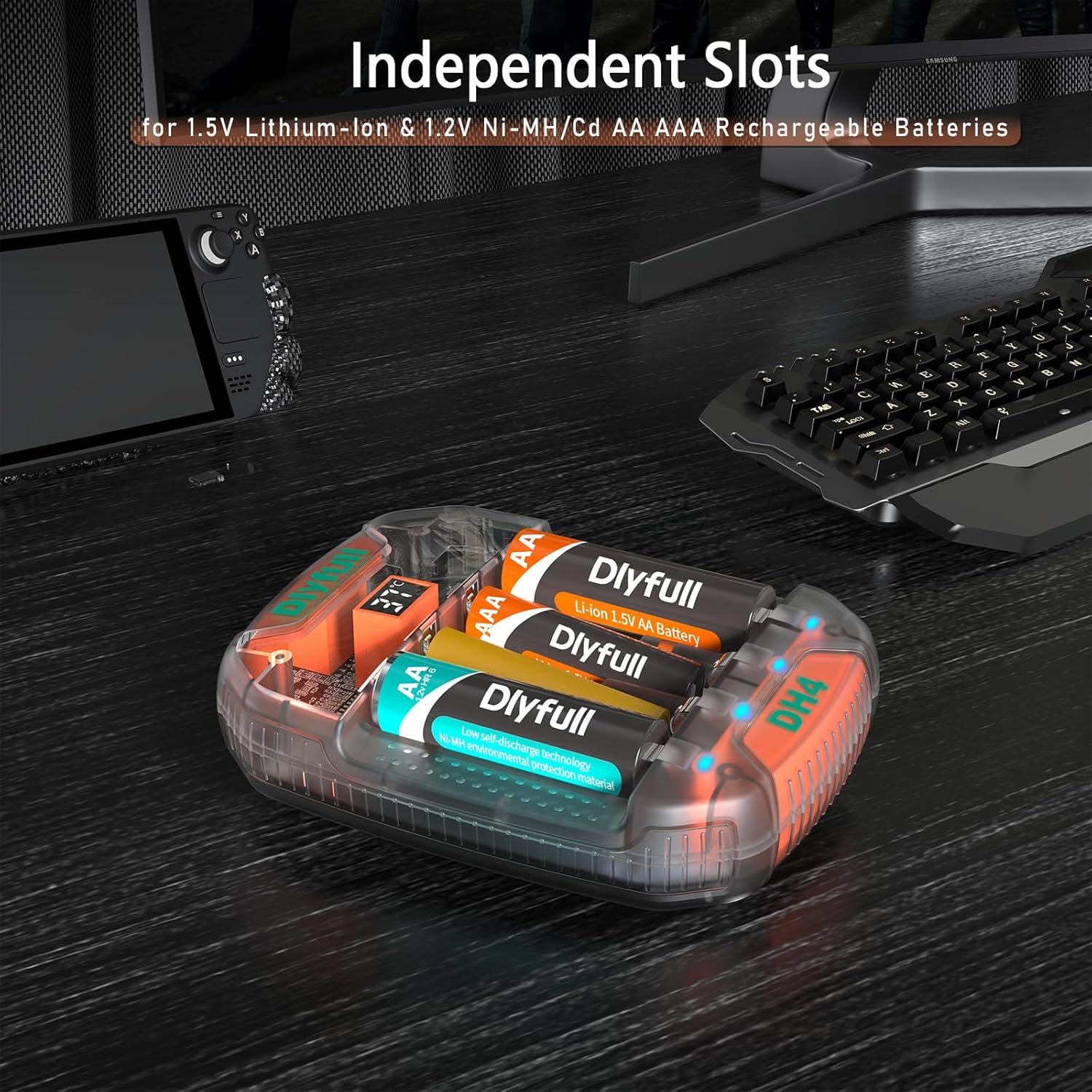
Figure 4: Dlyfull DH4 charger with multiple AA and AAA batteries inserted, demonstrating its independent charging slots.
- 500mA USB-C Fast Charging: The robust USB-C interface provides convenient and broad compatibility. It utilizes CC pulse charging for Ni-MH/Cd batteries and TC-CC-CV three-stage smart charging for 1.5V lithium-ion batteries, ensuring efficient and safe power delivery.

Figure 5: A detailed graphic explaining the USB-C Fast Charging capabilities, showing 500mA output and estimated charging times for different battery types.
- Multiple Protections: The DH4 features 0V activation and the latest DV-T detection algorithm, offering comprehensive protections against over-voltage, over-current, timeout, high temperature, defective batteries, reverse polarity, and short circuits.

Figure 6: An image detailing the 7-Point Safety System of the Dlyfull DH4 charger, including various protection mechanisms.
5. Setup
Follow these steps to set up your Dlyfull DH4 battery charger:
- Unpack: Carefully remove the charger and all accessories from the packaging.
- Connect Power: Insert the provided USB-C cable into the USB-C port on the charger. Connect the other end of the USB-C cable to a compatible USB power source (e.g., a USB wall adapter, computer USB port, or power bank). Note: A power adapter is not included.
- Initial Self-Check: Once connected to power, the charger will perform a brief self-check, indicated by the breathing light indicators. The digital display will show the current ambient temperature.
6. Operating Instructions
Charging batteries with the Dlyfull DH4 is straightforward:
- Insert Batteries: Carefully insert one or more compatible AA or AAA rechargeable batteries into the independent charging slots. Ensure the positive (+) and negative (-) ends of the batteries align correctly with the markings in the charger slots.
- Charging Process: Once batteries are correctly inserted, the charger will automatically detect the battery type and begin charging. The breathing light indicator below each slot will pulse slowly to indicate that charging is in progress. The digital display will continue to show the internal temperature.
- Charging Status Indicators:
- Power On Self-Check: All indicator lights briefly illuminate.
- Charging: The light indicator for the respective slot pulses slowly.
- Charging Finished: The light indicator for the respective slot remains steadily lit.
- Alert Indicator: If an error occurs (e.g., defective battery, reverse polarity, overheating), the light indicator for the affected slot will blink rapidly, and the temperature display may flash.

Figure 7: An illustration of the Breathing Light Indicator for Charging Status, showing different light patterns.
- Charging Completion: When a battery is fully charged, its corresponding indicator light will stop pulsing and remain solid.
- Remove Batteries: Once charging is complete, carefully remove the batteries from the slots. It is recommended to unplug the charger from the power source when not in use.
7. Maintenance
Proper maintenance ensures the longevity and optimal performance of your Dlyfull DH4 charger:
- Cleaning: Disconnect the charger from the power source before cleaning. Use a soft, dry cloth to wipe the exterior of the charger. Do not use abrasive cleaners, solvents, or immerse the charger in water.
- Storage: Store the charger in a cool, dry place away from direct sunlight, extreme temperatures, and moisture.
- Avoid Obstructions: Ensure the charger's ventilation openings are not blocked during operation to prevent heat buildup.
8. Troubleshooting
If you encounter issues with your Dlyfull DH4 charger, please refer to the following common problems and solutions:
| Problem | Possible Cause | Solution |
|---|---|---|
| Charger not powering on. | No power connection or faulty cable/adapter. | Ensure the USB-C cable is securely connected to both the charger and a working USB power source. Try a different USB-C cable or power adapter. |
| Batteries not charging. | Incorrect battery insertion, incompatible battery type, or defective battery. | Check that batteries are inserted with correct polarity (+/-). Confirm batteries are 1.5V Lithium or 1.2V NiMH/NiCd rechargeable types. Remove and reinsert the battery. If the issue persists, the battery may be defective. |
| Temperature display flashing / Charging stops. | Overheating detected. | This is a safety feature. Remove batteries and allow the charger to cool down. Ensure the charger is in a well-ventilated area and not exposed to high ambient temperatures. |
| Indicator light blinking rapidly. | Error detected (e.g., reverse polarity, short circuit, defective battery). | Remove the battery from the problematic slot. Check for correct polarity. If the battery is damaged or short-circuited, do not attempt to charge it. |
9. Specifications
Detailed specifications for the Dlyfull DH4 Battery Charger:
| Feature | Detail |
|---|---|
| Product Dimensions | 4.3 x 3.3 x 0.98 inches (10.9 x 8.4 x 2.5 cm) |
| Item Weight | 4.6 ounces (130 grams) |
| Input Voltage | 5 Volts (DC) |
| Output Voltage | 5 Volts (DC) |
| Charging Current | 500mA per slot |
| Compatible Battery Types | 1.5V Lithium-ion AA/AAA, 1.2V NiMH/NiCd AA/AAA |
| Number of Slots | 4 Independent Slots |
| Color | Transparent |
10. Warranty and Support
The Dlyfull DH4 Battery Charger comes with a 12-month warranty from the date of purchase. Dlyfull is committed to providing high-quality products and customer satisfaction.
For any questions, technical support, or warranty claims, please contact Dlyfull customer service. We offer lifetime 24-hour friendly customer service to assist you.
Contact Information:
Please refer to the contact details provided on the product packaging or the official Dlyfull website for the most up-to-date support information.
Ask a question about this manual
Ask about setup, troubleshooting, compatibility, parts, safety, or missing instructions. Manuals+ will review the question and use this page’s manual context to help answer it.