
PopSockets 807350
PopSockets PowerPack for MagSafe Instruction Manual
Brand: PopSockets | Model: 807350
Introduction
The PopSockets PowerPack for MagSafe is a compact and portable magnetic power bank designed to provide convenient wireless charging for your compatible smartphone. Featuring an integrated PopSockets grip, it enhances both charging capability and device handling. This manual will guide you through the proper use and care of your PowerPack.
Key Features
- Portable Wireless Charging: Stay powered all day with the compact 5,000 mAh power bank, providing up to one full charge.
- Integrated PopSockets Grip and Stand: Enjoy enhanced comfort, security, and convenience with the built-in PopSockets grip, which also functions as a stand.
- MagSafe Compatibility with Secure Hold: Effortlessly snap to charge with MagSafe compatibility and ultra-strong secure hold magnets. Works with MagSafe/magnetic cases and is compatible with iPhone and Android devices (with PopCase for Samsung Galaxy series).
- Fast and Versatile Charging: Supports up to 7.5W wireless charging for iOS, 15W wireless charging for Android, and 20W high-speed wired charging via USB-C.
- Compact All-Inclusive Design: Measures 103 x 66.5 x 12.4 mm, featuring advanced slim battery technology.
What's in the Box
- PopSockets PowerPack
- USB-C to USB-C Cable (0.3m / 1ft)
Setup
- Charge the PowerPack: Before first use, fully charge your PopSockets PowerPack. Connect the included USB-C to USB-C cable to the PowerPack's USB-C port and the other end to a compatible USB-C power adapter (not included). The LED indicators on the PowerPack will show charging progress.
- Prepare Your Device: Ensure your iPhone (12 and up) or Android device is compatible with MagSafe or has a MagSafe-compatible case. For Android devices, a PopSockets adapter ring or PopCase for Samsung Galaxy series may be required for optimal magnetic attachment.

Operating Instructions
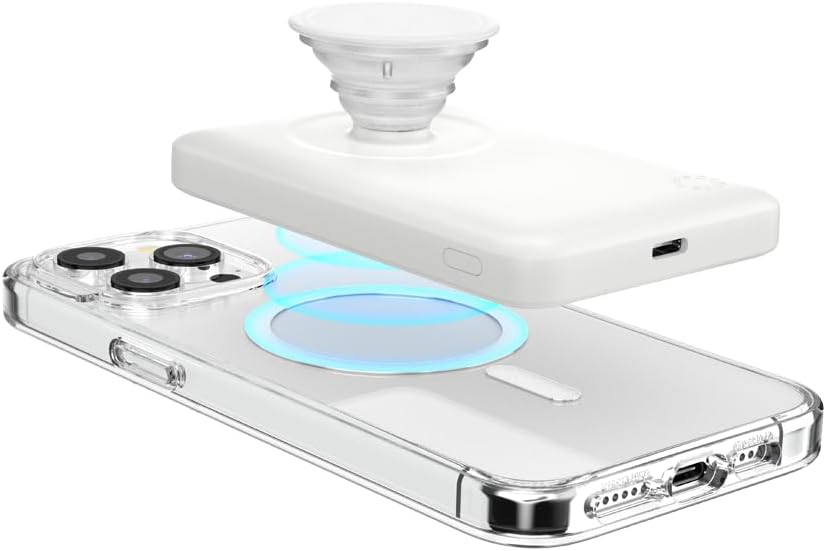
- Attaching the PowerPack: Align the PowerPack with the MagSafe area on the back of your compatible phone or MagSafe case. The magnets will snap it securely into place.
- Initiating Wireless Charging: Once attached, the PowerPack should automatically begin wirelessly charging your device. Some devices may require pressing the power button on the PowerPack to initiate charging. The LED indicators will illuminate to show the PowerPack's remaining battery level.
- Using the PopSockets Grip: Extend the PopSockets grip by pulling it outwards. Use it for a more secure hold while texting, taking photos, or as a convenient stand for hands-free viewing.
- Wired Charging (Optional): You can also charge your phone or other devices via the USB-C port on the PowerPack using a compatible USB-C cable. This supports up to 20W wired charging.
- Detaching the PowerPack: Gently pull the PowerPack away from your device to detach it.


Maintenance
- Cleaning: Wipe the PowerPack with a soft, dry, lint-free cloth. Avoid using harsh chemicals or abrasive materials.
- Storage: Store the PowerPack in a cool, dry place away from direct sunlight and extreme temperatures.
- Battery Care: To prolong battery life, avoid fully discharging the PowerPack frequently. Recharge it regularly, even if not in use for extended periods.
Troubleshooting
- PowerPack not charging: Ensure the USB-C cable is securely connected to both the PowerPack and the power adapter. Try a different cable or power adapter.
- Phone not charging wirelessly: Ensure the PowerPack is correctly aligned with your phone's MagSafe area. Remove any non-MagSafe cases or obstructions. Press the power button on the PowerPack to ensure it's active.
- Slow charging: Ensure your phone is not running power-intensive applications during charging. Check if the PowerPack itself is fully charged.
- Weak magnetic connection: Ensure your phone or case is genuinely MagSafe compatible. Clean the magnetic surfaces on both the PowerPack and your device/case.
- Interference with car key fobs: Some users have reported potential interference with keyless car key fobs when the PowerPack is actively charging a phone and in close proximity to the fob. It is recommended to keep the PowerPack and phone separate from car keys when charging to avoid this issue.
Specifications
| Feature | Detail |
|---|---|
| Product Dimensions | 4 x 0.48 x 2.6 inches |
| Item Weight | 6.7 ounces |
| Model Number | 807350 |
| Battery Type | Lithium Ion (1 included) |
| Battery Capacity | 5000 mAh |
| Connector Type | USB Type C |
| Wireless Charging Output (iOS) | Up to 7.5W |
| Wireless Charging Output (Android) | Up to 15W |
| Wired Charging Output | Up to 20W |
| Color | White |
| Special Features | Magnetic, Drop Protection, Lightweight, Ergonomic Design, Wireless Charging Compatible |
| Manufacturer | PopSockets |
| Country of Origin | China |
Warranty and Support
For warranty information and technical support, please refer to the official PopSockets website or contact their customer service directly. Keep your proof of purchase for any warranty claims.
Online Support: Visit the PopSockets Store on Amazon for product information and updates.