
Introduction
Thank you for choosing the Genérico BT Mirror S20 Wireless Earbuds. These earbuds are designed to provide a high-quality audio experience with the convenience of wireless connectivity. This manual will guide you through the setup, operation, and maintenance of your new earbuds to ensure optimal performance and longevity.
Package Contents
Please check the package for the following items:
- 2 x Wireless Earbuds (Left and Right)
- 1 x Charging Case
- 1 x Micro USB Charging Cable
- 1 x User Manual (This document)
Product Overview
The Genérico BT Mirror S20 Wireless Earbuds feature a compact design with a smart charging case that includes a digital display for battery levels. The earbuds are ergonomically designed for a comfortable and secure fit.

Image: Genérico BT Mirror S20 Wireless Earbuds in their white charging case. The case features a reflective surface and a digital display showing battery percentages for both earbuds and the case itself. The earbuds are visible inside their compartments.
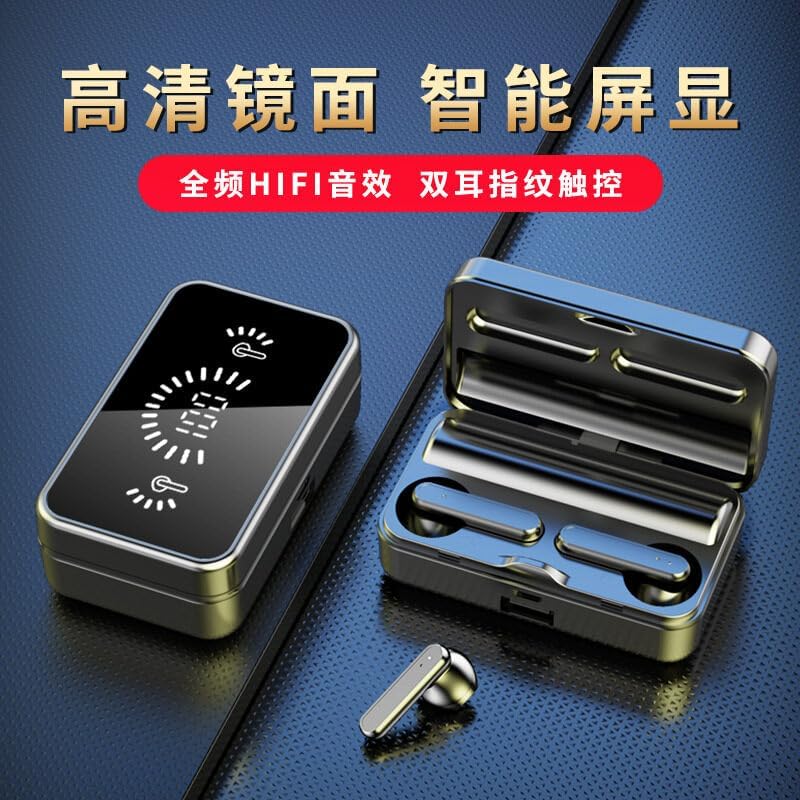
Image: A close-up view of the charging case with the lid open, revealing the earbuds. The digital display on the case clearly shows the battery level of the charging case and individual earbuds, indicated by icons and a percentage.

Image: An illustration showing one of the earbuds comfortably seated within a human ear. This highlights the ergonomic design intended for a secure and comfortable fit during use.
Setup
1. Charging the Earbuds and Case
Before first use, fully charge the earbuds and the charging case.
- Connect the Micro USB charging cable to the charging port on the case and to a USB power source (e.g., wall adapter, computer USB port).
- The digital display on the charging case will show the charging status. A full charge for the case takes approximately 1-2 hours.
- Place the earbuds into the charging case. They will automatically begin charging. Earbud charging time is approximately 1 hour. The display will show individual earbud battery levels.
2. Bluetooth Pairing
To connect your earbuds to a device:
- Ensure the earbuds are charged.
- Open the charging case. The earbuds will automatically enter pairing mode.
- On your device (smartphone, tablet, etc.), enable Bluetooth.
- Search for available Bluetooth devices and select "S20" (or similar name) from the list.
- Once connected, you will hear a confirmation tone, and the earbuds will be ready for use.
- The earbuds will automatically reconnect to the last paired device when taken out of the case, if Bluetooth is enabled on the device.
Operating Instructions (Touch Control)
The Genérico BT Mirror S20 earbuds feature touch controls for easy management of music and calls. The specific functions may vary slightly depending on your device and operating system.
| Action | Function |
|---|---|
| Single Tap (Left or Right Earbud) | Play/Pause music, Answer/End call |
| Double Tap (Right Earbud) | Next Track |
| Double Tap (Left Earbud) | Previous Track |
| Triple Tap (Left or Right Earbud) | Activate Voice Assistant (Siri, Google Assistant) |
| Long Press (Left or Right Earbud, 2 seconds) | Reject Incoming Call |
| Long Press (Left or Right Earbud, 3 seconds) | Power On/Off (when not in case) |
Note: Volume control is typically managed via your connected device.
Maintenance
To ensure the longevity and optimal performance of your earbuds:
- Cleaning: Regularly clean the earbuds and charging case with a soft, dry, lint-free cloth. Do not use harsh chemicals or abrasive materials.
- Storage: When not in use, store the earbuds in their charging case to protect them from dust and damage.
- Water Exposure: Avoid exposing the earbuds to water or excessive moisture. They are not waterproof.
- Temperature: Do not expose the product to extreme temperatures.
Troubleshooting
If you encounter issues with your Genérico BT Mirror S20 earbuds, please refer to the following common solutions:
- Earbuds not pairing:
- Ensure both earbuds are charged.
- Turn off Bluetooth on your device and turn it back on.
- Delete "S20" from your device's Bluetooth list and try pairing again.
- Place earbuds back in the case, close the lid, wait a few seconds, then open to re-enter pairing mode.
- Only one earbud working:
- Ensure both earbuds are charged.
- Try placing both earbuds back into the charging case, close the lid, and then take them out together.
- Reset the earbuds (refer to specific reset instructions if available, otherwise try re-pairing).
- No sound:
- Check the volume level on your connected device.
- Ensure the earbuds are properly connected to your device.
- Try playing audio from a different application or source.
- Charging case not charging:
- Ensure the charging cable is securely connected to both the case and the power source.
- Try a different Micro USB cable or power adapter.
Specifications
| Feature | Detail |
|---|---|
| Bluetooth Version | 5.3 |
| Earbud Speaker Size | φ13 mm |
| Earbud Battery Capacity | 40 mAh |
| Charging Case Battery Capacity | 800 mAh |
| Transmission Distance | ≤10 meters (33 feet) |
| Talk Time | Up to 6 hours |
| Playback Time | Up to 6 hours |
| Charging Case Charging Time | 1-2 hours |
| Earbud Charging Time | 1 hour |
| Charging Interface | Micro USB |
| Control Method | Touch Control |
| Model Number | CSD-20240604-562 |
Warranty and Support
This product comes with a standard manufacturer's warranty. For specific warranty details, please refer to the documentation provided at the time of purchase or contact your retailer. If you experience any issues or have questions not covered in this manual, please contact the seller or manufacturer for assistance.
For customer support, please refer to the contact information provided by your point of purchase.