
1. Introduction
This manual provides comprehensive instructions for the PERFASCIN RMCSPB1EP1 replacement voice remote control. This remote is designed to be compatible with various Samsung Smart TV models, offering a direct replacement experience without the need for complex programming or pairing. Simply install batteries to begin operation.
The RMCSPB1EP1 remote features voice control capabilities and dedicated buttons for popular streaming services, enhancing your television viewing experience.
2. Setup
2.1 Battery Installation
The PERFASCIN RMCSPB1EP1 remote control requires two AAA alkaline batteries (not included) for operation. Follow these steps to install the batteries:
- Locate the battery compartment cover on the back of the remote control.
- Slide the battery compartment cover downwards to open it.
- Insert two AAA alkaline batteries, ensuring the positive (+) and negative (-) terminals align correctly with the markings inside the compartment.
- Slide the battery compartment cover back into place until it clicks securely.

Figure 1: Back view of the remote control showing the battery compartment and battery insertion.
2.2 Initial Use
This replacement remote control is designed for immediate use with compatible Samsung Smart TVs. No programming or pairing is required. Once the batteries are correctly installed, the remote is ready to operate your television.
3. Operating Instructions
The PERFASCIN RMCSPB1EP1 remote control provides intuitive access to your Samsung Smart TV's functions. Familiarize yourself with the button layout for optimal use.
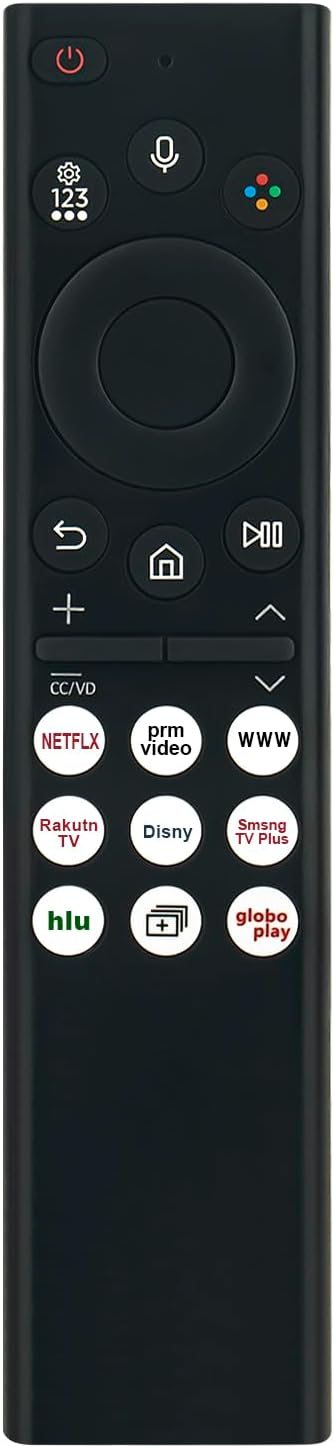
Figure 2: Front view of the remote control with key buttons labeled.
3.1 Basic Functions
- Power Button (⏻): Turns the TV on or off.
- Voice Control Button (🎙️): Activates the voice assistant for commands and search.
- Navigation Pad (Circular): Use the directional arrows (Up, Down, Left, Right) to navigate menus and select items. The center button confirms selections.
- Volume Buttons (+/-): Adjusts the TV volume up or down.
- Channel Buttons (Up/Down Arrows): Changes TV channels.
- Home Button (🏠): Returns to the Smart Hub or home screen.
- Back Button (↩): Returns to the previous screen or menu.
- Play/Pause Button (⏯): Controls media playback.
3.2 Smart TV App Access
The remote includes dedicated buttons for quick access to popular streaming applications:
- NETFLIX Button: Launches the Netflix application.
- Prime Video Button: Launches the Amazon Prime Video application.
- WWW Button: Opens the web browser.
- Rakuten TV Button: Launches the Rakuten TV application.
- Disney+ Button: Launches the Disney+ application.
- Samsung TV Plus Button: Launches the Samsung TV Plus application.
- Hulu Button: Launches the Hulu application.
- Globo Play Button: Launches the Globo Play application.

Figure 3: Remote control in use, demonstrating typical operation.
4. Maintenance
4.1 Cleaning
To maintain the remote control's appearance and functionality, clean it regularly with a soft, dry cloth. Do not use liquid cleaners, sprays, or abrasive materials, as these can damage the remote's surface or internal components.
4.2 Battery Replacement
Replace batteries when the remote control's response becomes sluggish or stops functioning. Always replace both batteries at the same time with new AAA alkaline batteries. Do not mix old and new batteries, or different types of batteries.
4.3 Storage
If the remote control will not be used for an extended period, remove the batteries to prevent leakage and potential damage to the device.
5. Troubleshooting
If you encounter issues with your PERFASCIN RMCSPB1EP1 remote control, refer to the following common solutions:
| Problem | Possible Cause | Solution |
|---|---|---|
| Remote not responding. | Dead or incorrectly installed batteries. | Replace batteries with new AAA alkaline batteries, ensuring correct polarity. |
| Remote has limited range or intermittent response. | Low battery power; Obstruction between remote and TV; Interference. | Replace batteries. Ensure a clear line of sight to the TV's IR receiver. Remove any potential sources of interference. |
| Voice control not working. | Microphone blocked; TV settings; Network connectivity issue (for Smart TV features). | Ensure the microphone on the remote is not covered. Check your TV's settings for voice control activation. Verify your TV's internet connection. |
| Specific app buttons not launching apps. | App not installed or updated on TV; TV network issue. | Ensure the app is installed and updated on your Samsung Smart TV. Check your TV's internet connection. |
Note: This remote control does not require programming or pairing. If issues persist after troubleshooting, please contact customer support.
6. Specifications
- Model Number: RMCSPB1EP1
- Brand: PERFASCIN
- Compatible Devices: Samsung Smart Television
- Special Features: Ergonomic design, Voice Search
- Color: Black
- Power Source: 2 x AAA Alkaline Batteries (not included)
- Product Dimensions: 6 x 5 x 0.55 inches (approximately)
- Item Weight: 1.4 ounces (approximately)
7. Warranty and Support
This PERFASCIN product is designed for reliability and performance. While specific warranty details are not provided in this manual, if you encounter any questions or require assistance with your RMCSPB1EP1 remote control, please do not hesitate to contact PERFASCIN customer support. Refer to the contact information provided with your purchase or on the official PERFASCIN website for support.