
1. Important Safety Instructions
Please read these instructions carefully before operating the unit and retain them for future reference. Follow all warnings and instructions.
- Water and Moisture: Do not use this apparatus near water.
- Cleaning: Clean only with a dry cloth.
- Ventilation: Do not block any ventilation openings. Install in accordance with the manufacturer's instructions.
- Heat: Do not install near any heat sources such as radiators, heat registers, stoves, or other apparatus (including amplifiers) that produce heat.
- Power Cord Protection: Protect the power cord from being walked on or pinched, particularly at plugs, convenience receptacles, and the point where they exit from the apparatus.
- Attachments/Accessories: Use only attachments/accessories specified by the manufacturer.
- Lightning/Unused Periods: Unplug this apparatus during lightning storms or when unused for long periods of time.
- Servicing: Refer all servicing to qualified service personnel. Servicing is required when the apparatus has been damaged in any way, such as power-supply cord or plug is damaged, liquid has been spilled or objects have fallen into the apparatus, the apparatus has been exposed to rain or moisture, does not operate normally, or has been dropped.
2. Package Contents
Carefully unpack your new Muse MT-107 BTO turntable and ensure all items are present and in good condition. If any items are missing or damaged, please contact your retailer.
- Muse MT-107 BTO Turntable with integrated stereo speakers
- Power Adapter
- 45 RPM Adapter
- Instruction Manual (this document)
3. Product Overview
The Muse MT-107 BTO is a versatile turntable designed for playing vinyl records, streaming audio via Bluetooth, and offering USB playback and encoding capabilities. It features an Audio-Technica moving magnet cartridge for quality sound reproduction.
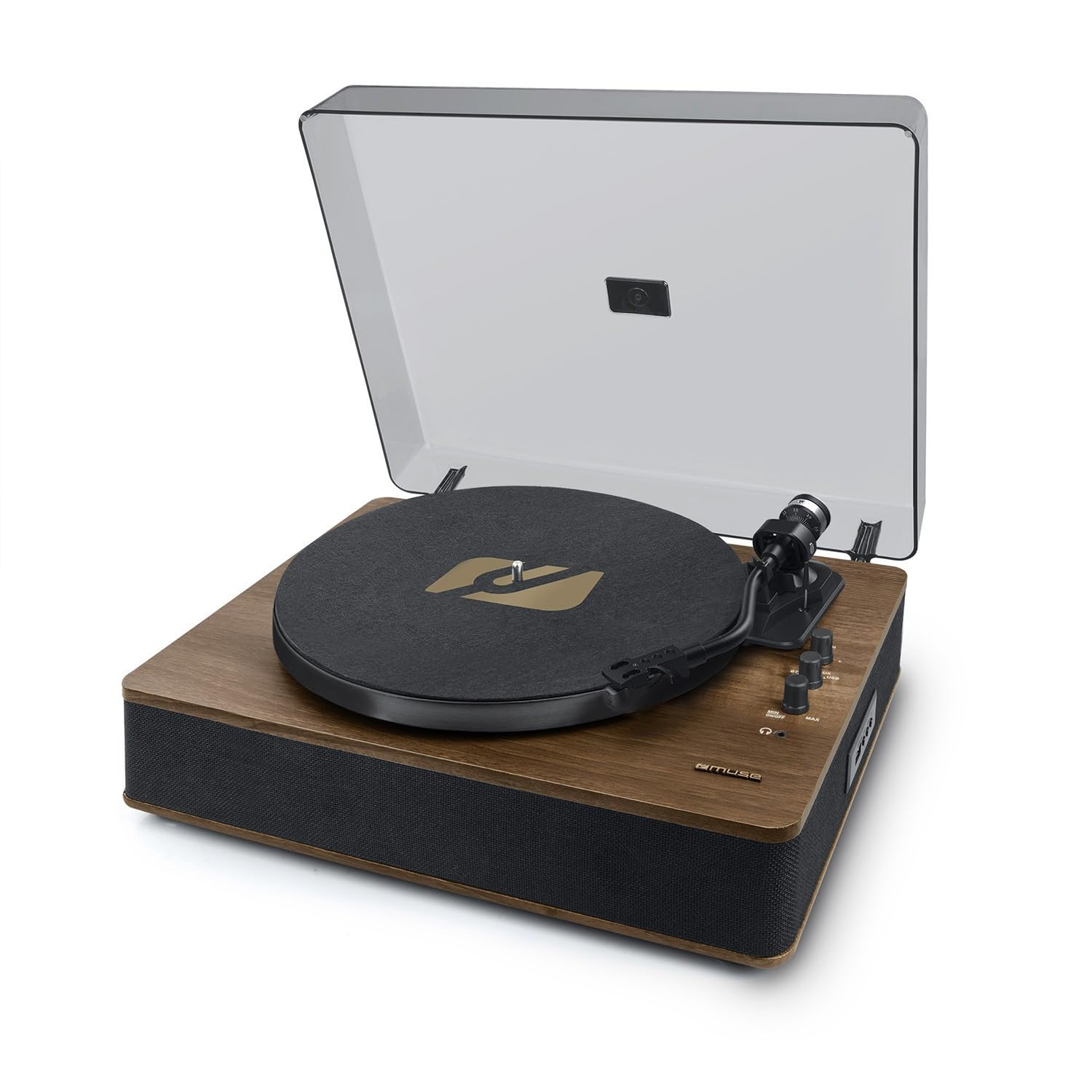
Image 1: Front-top view of the Muse MT-107 BTO Turntable, highlighting the main components.
Key Components:
- Dust Cover: Protects the platter and tonearm from dust.
- Platter: Where the record rests during playback.
- Spindle: Holds the record in place.
- Tonearm: Holds the cartridge and stylus.
- Stylus (Needle): Reads the grooves of the record.
- Tonearm Lift Lever: Raises and lowers the tonearm.
- Speed Selector: Switch between 33 and 45 RPM.
- Auto-Stop Switch: Enables or disables automatic platter stop at the end of a record.
- Power/Volume Knob: Turns the unit on/off and adjusts speaker volume.
- Function Selector: Switches between Phono, Bluetooth, and USB modes.
- USB Port: For USB playback and encoding.
- RCA Output: Connects to external amplifiers or powered speakers.
- Auxiliary Input (3.5mm): Connects external audio devices.
- Integrated Stereo Speakers: Provide direct audio output.
4. Setup
Follow these steps to set up your turntable for the first time.
- Unpack the Unit: Carefully remove the turntable from its packaging. Retain the packaging for future transport or storage.
- Placement: Place the turntable on a stable, level surface away from direct sunlight, heat sources, and excessive dust or vibration.
- Remove Stylus Protector: Gently remove the clear plastic protector from the stylus (needle) at the end of the tonearm. Be careful not to bend the stylus.
- Place Platter Mat: Place the felt platter mat onto the turntable platter.
- Connect Power: Insert the power adapter into the DC IN jack on the back of the unit, then plug the adapter into a wall outlet.
- Optional External Connections:
- RCA Output: If connecting to an external amplifier or powered speakers, use an RCA cable (not included) to connect the RCA OUT jacks on the turntable to the corresponding input on your audio system.
- Auxiliary Input: To play audio from an external device (e.g., smartphone), connect a 3.5mm audio cable (not included) from your device's headphone jack to the AUX IN port on the turntable.
5. Operating Instructions
5.1 Playing Vinyl Records
- Power On: Turn the Power/Volume knob clockwise to turn on the unit.
- Select Mode: Set the Function Selector to 'PHONO'.
- Select Speed: Set the Speed Selector to 33 or 45 RPM, matching the record you are playing. Use the 45 RPM adapter for records with a large center hole.
- Place Record: Place a vinyl record on the platter.
- Auto-Stop: Ensure the Auto-Stop switch is set to 'ON' if you want the platter to stop automatically at the end of the record. Set to 'OFF' for continuous play or for some records that may have issues with auto-stop.
- Start Playback: Lift the tonearm using the lift lever. Carefully position the tonearm over the desired track on the record. Gently lower the tonearm using the lift lever. The record will begin to play.
- Adjust Volume: Adjust the volume using the Power/Volume knob.
- End Playback: At the end of the record (if auto-stop is ON), the platter will stop. If auto-stop is OFF, or to stop playback manually, lift the tonearm, return it to the tonearm rest, and lower the lift lever.
5.2 Bluetooth Out Function
The MT-107 BTO features Bluetooth OUT, meaning it can transmit audio from the turntable to external Bluetooth-enabled speakers or headphones. It does not receive Bluetooth audio.
- Power On: Turn on the turntable and your external Bluetooth speaker/headphones.
- Select Mode: Set the Function Selector to 'BT' (Bluetooth). The Bluetooth indicator light will flash, indicating it's in pairing mode.
- Pairing: Put your external Bluetooth device into pairing mode. The turntable will automatically search for and connect to the nearest Bluetooth device. Once connected, the Bluetooth indicator light will stop flashing and remain solid.
- Play Audio: Start playing a record on the turntable. The audio will be transmitted to your connected Bluetooth device.
- Adjust Volume: Adjust the volume on your external Bluetooth device. The turntable's volume knob will control the integrated speakers, which may or may not be active depending on the Bluetooth connection.
5.3 USB Playback and Encoding
The USB port allows you to play MP3 files from a USB flash drive or encode your vinyl records directly to a USB flash drive.
5.3.1 USB Playback
- Insert USB Drive: Insert a USB flash drive (formatted to FAT32) containing MP3 files into the USB port.
- Select Mode: Set the Function Selector to 'USB'. The unit will automatically start playing the MP3 files.
- Controls: Use the control buttons (if available, typically Play/Pause, Next/Previous) to navigate tracks.
- Adjust Volume: Adjust the volume using the Power/Volume knob.
5.3.2 USB Encoding (Recording Vinyl to USB)
- Insert USB Drive: Insert a USB flash drive (formatted to FAT32) into the USB port.
- Select Mode: Set the Function Selector to 'PHONO'.
- Prepare Record: Place the record you wish to encode on the platter and set the correct speed.
- Start Recording: While the record is playing, press and hold the 'REC' button (if available, or refer to specific button on unit for recording). The recording indicator light will illuminate.
- Stop Recording: Press the 'REC' button again to stop recording. The recording indicator light will turn off. The recorded audio file will be saved on the USB drive.
6. Maintenance
Proper maintenance ensures the longevity and optimal performance of your turntable.
6.1 Cleaning the Unit
- Dust Cover: Wipe the dust cover with a soft, dry cloth. Do not use abrasive cleaners or solvents.
- Cabinet: Wipe the cabinet with a soft, dry cloth. For stubborn marks, a slightly damp cloth can be used, followed by a dry cloth.
- Platter Mat: The felt platter mat can attract dust. Gently brush it or use a lint roller to clean.
6.2 Stylus Care
- Cleaning: Use a soft brush designed for stylus cleaning, brushing gently from back to front. Do not use your fingers.
- Replacement: The stylus is a delicate component and will wear out over time (typically after 300-500 hours of play). A worn stylus can damage your records. Replace the stylus when you notice a decrease in sound quality or distortion. Consult your retailer for replacement stylus options for the Audio-Technica cartridge.
7. Troubleshooting
If you encounter any issues with your turntable, refer to the following common problems and solutions.
| Problem | Possible Cause | Solution |
|---|---|---|
| No power | Power adapter not connected; Power outlet not working; Unit not turned on. | Ensure power adapter is securely connected to the unit and a working outlet. Turn the Power/Volume knob clockwise to power on. |
| No sound from speakers | Volume too low; Function selector incorrect; Stylus protector still on; Stylus damaged. | Increase volume. Ensure Function Selector is set to 'PHONO' for records. Remove stylus protector. Check stylus for damage. |
| Record skipping | Record is dirty or scratched; Turntable not level; Stylus dirty or worn. | Clean the record. Place turntable on a level surface. Clean or replace stylus. |
| Bluetooth connection issues | External device not in pairing mode; Too far from turntable; Interference. | Ensure external Bluetooth device is in pairing mode. Move devices closer. Reduce interference from other wireless devices. |
| USB playback/encoding not working | USB drive not formatted correctly (FAT32); USB drive damaged; Incorrect mode selected. | Ensure USB drive is FAT32. Try a different USB drive. Select 'USB' mode for playback. |
8. Specifications
Technical specifications for the Muse MT-107 BTO Turntable.
- Model Name: MT-107BTO
- Brand: MUSE
- Speeds: 33 / 45 RPM
- Cartridge Type: Audio-Technica Moving Magnet
- Connectivity: Bluetooth (Out), USB (Playback/Encoding), RCA Output, 3.5mm Auxiliary Input
- Speakers: Integrated Stereo Speakers (2 x 5W Output Power)
- Power Source: AC 100-240V, 50/60Hz (Electric with cable)
- Power Consumption: 5 Watt
- Material: Aluminum, Wood
- Dimensions (H x D x L): 130 mm x 321 mm x 410 mm
- Net Weight: 4.0 kg
- Special Features: Auto-Stop Switch, 45 RPM Adapter included
- Compatible Devices: Amplifiers, external speakers, audio systems, smartphones, tablets, personal computers (for auxiliary input/output)
9. Warranty and Support
For warranty information and customer support, please refer to the warranty card included with your product or visit the official MUSE website. Specific warranty terms may vary by region and retailer.


