
1. Introduction
The Yuecoom SW900 LCD Display provides essential data for your electric bike or scooter. Its large screen offers clear visibility of various parameters, and the backlight ensures readability in low-light conditions. This manual provides detailed instructions for installation, operation, and maintenance to ensure optimal performance and longevity of your device.
Key Features:
- Durable Construction: Features a 5-pin waterproof design and durable ABS material.
- Real-Time Power Tracking: Accurately displays remaining battery power and real-time power consumption.
- Multi-Function Display: Tracks speed, mileage, Pedal Assist System (PAS) levels, and trip data.
- Easy Installation: Designed for 22.5mm/28.6-inch handlebars and compatible with most 36V/48V systems.
- User-Friendly Interface: Compact design with an adjustable backlight for day and night visibility.
2. Important Safety Information
NOTE: This product operates using the No. 2 communication protocol. It must be used with a controller that also supports the No. 2 communication protocol. Incompatibility will prevent the display from functioning correctly.

Image: The SW900 LCD display with its control buttons, highlighting the important communication protocol note.
3. Package Contents
Please check the package for the following items:
- 1 x Electric Bike LCD Display (SW900)
- 1 x Mounting Base
- 1 x Instruction Manual (this document)
4. Setup and Installation
4.1 Handlebar Mounting
The SW900 display is designed for easy mounting on handlebars with a diameter of 22.5mm or 28.6mm. Secure the display and control unit firmly using the provided mounting base and screws.

Image: The SW900 display mounted on an electric bike handlebar, illustrating its compact design.
4.2 Wiring Connection
Connect the 5-pin waterproof connector from the display to the corresponding connector on your e-bike controller. Ensure the connection is secure and fully seated to prevent water ingress and ensure reliable communication.

Image: Close-up of the 5-pin waterproof connector.
Refer to the following table and diagram for the correct wiring order:
| Order of Line | Color of Line | Function |
|---|---|---|
| 1 | Red (VCC) | Instrument power cord |
| 2 | Blue (K) | Controller power line |
| 3 | Black (GND) | Meter earth wire |
| 4 | Green (RX) | Meter data receiving line |
| 5 | Yellow (TX) | Data transmission line of instrument |
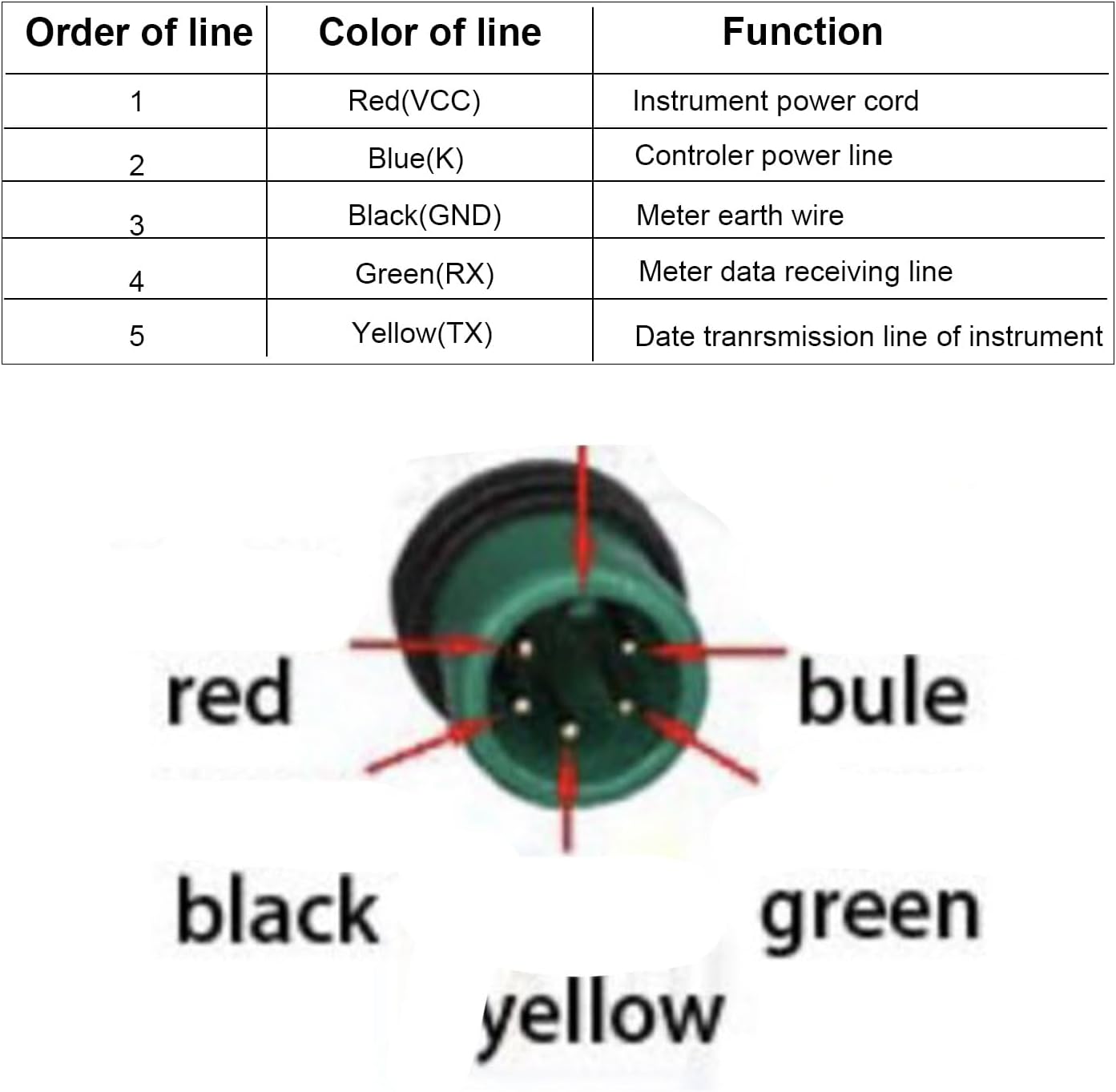
Image: Visual representation of the 5-pin connector wiring.
5. Operating Instructions
5.1 Power On/Off
- To Power On: Long press the 'Mode' button.
- To Power Off: Long press the 'Mode' button.
5.2 Display Functions
The SW900 display shows various parameters:
- Current Speed (AVG/MAX)
- Battery Level Indicator
- PAS (Pedal Assist System) Level
- Trip Distance (TRIP)
- Total Odometer (ODO)
- Trip Time
- Headlight Indicator
- Error Codes
5.3 Button Operations

Image: Close-up of the control buttons: Up, Mode, Down.
- 'Up' Button (∧): Short press to increase PAS level or navigate up in settings.
- 'Down' Button (∨): Short press to decrease PAS level or navigate down in settings.
- 'Mode' Button (M): Short press to cycle through display modes (e.g., TRIP, ODO, Time).
5.4 Combination Key Functions
- Enter/Exit Settings: Long press 'Up' + 'Down' buttons simultaneously.
- Turn Headlights On/Off: Long press 'Up' + 'Mode' buttons simultaneously.
- Activate 6KM/h Cruise Mode: Long press 'Down' + 'Mode' buttons simultaneously.
- Switch Speed Display (AVG/MAX): Short press 'Up' + 'Down' buttons simultaneously.
5.5 Parameter Settings (P01-P22)
To access settings, long press 'Up' + 'Down' buttons. Use 'Up'/'Down' to change values and 'Mode' to switch between parameters. Long press 'Mode' to save and exit.
- P01: Backlight Brightness: 1 (dimmest) to 3 (brightest).
- P02: Mileage Unit: 0 (KM), 1 (Miles).
- P03: Voltage: 24V, 36V, 48V, 60V.
- P04: Dormancy Time: 0 (no dormancy), 1-60 (minutes).
- P05: PAS Levels: 0-9.
- P06: Wheel Diameter: Set in inches.
- P07: Speed Magnetic Steel Number: 1-100.
- P08: Speed Limit: 0-100%.
- P09: Start Mode: 0 (Zero start), 1 (Non-zero start).
- P10: Drive Mode: 0 (Power drive), 1 (Electric drive), 2 (Power + Electric drive).
- P11: PAS Sensitivity: 1-24.
- P12: PAS Start Intensity: 1-5.
- P13: Current Limit: 1-20A.
- P14: Controller Undervoltage Protection Value.
- P15: Controller Overvoltage Protection Value.
- P16: ODO Reset: Long press 'Mode' for 5 seconds to reset ODO.
- P17: Cruise Control: 0 (Off), 1 (On).
- P18: Speed Ratio Adjustment: 50-150%.
- P19: Power Bit: 0 (0.0 file), 1 (no 0.0 file).
- P20: Communication Protocol: 0 (Protocol 1.5.5), 1 (Protocol 2).
- P21: Throttle Control Gear: 0 (Full throttle), 1 (No gear discrimination).
- P22: EABS Regenerative Braking: 0 (Off), 1 (On).
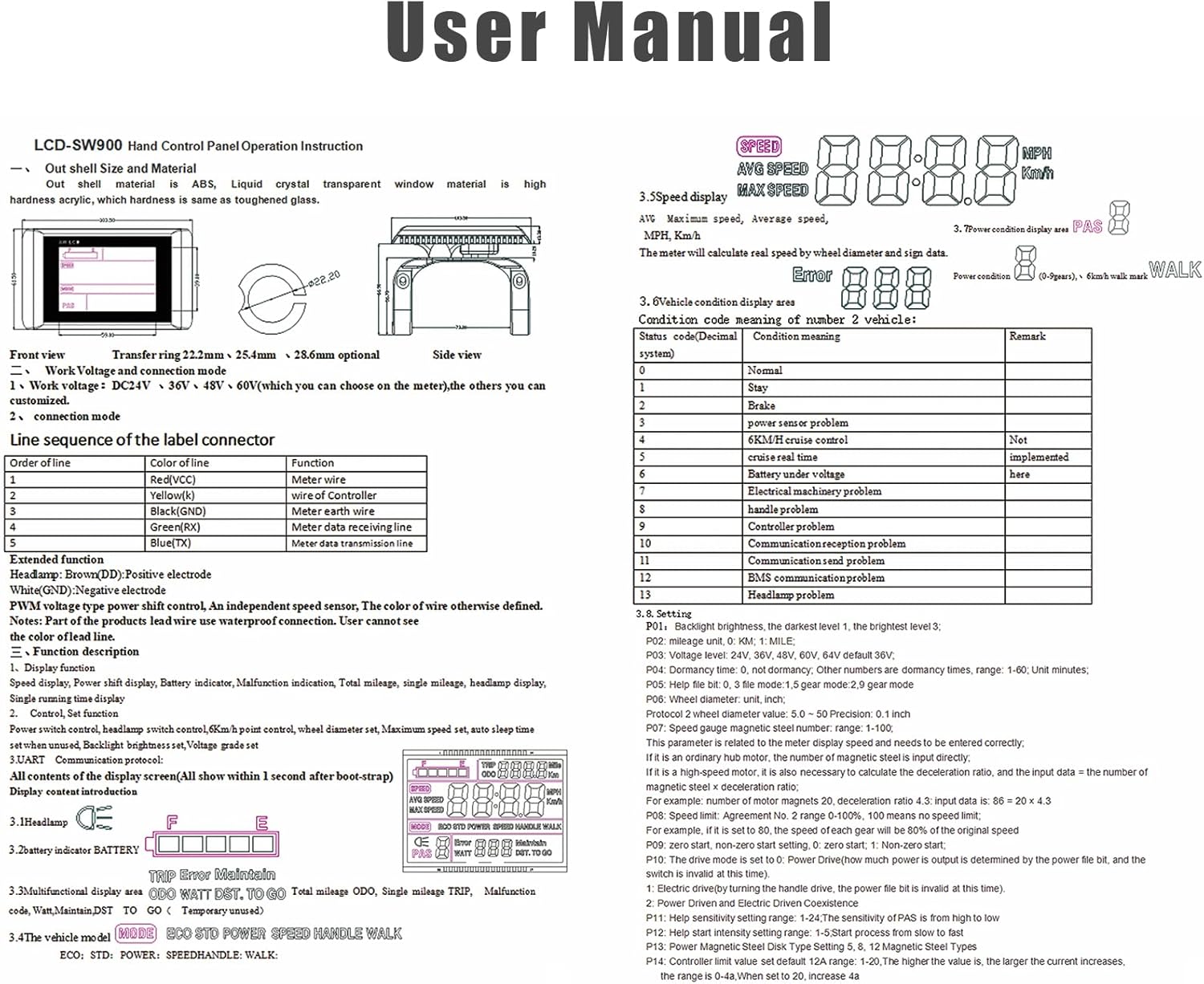
Image: Detailed user manual page showing display functions, error codes, and parameter settings.
6. Maintenance
- Cleaning: Use a soft, damp cloth to clean the display. Do not use abrasive cleaners or solvents.
- Water Exposure: While the display is waterproof, avoid prolonged submersion or high-pressure water jets. Ensure the connector is always dry before connecting.
- Storage: Store the display in a dry, cool place when not in use for extended periods.
7. Troubleshooting
Common Issues and Solutions:
- Display Not Turning On: Check battery connection and ensure the display is securely connected to the controller. Verify battery voltage.
- Incompatible Protocol: If the display shows an error related to communication, ensure your e-bike controller uses the No. 2 communication protocol.
- Incorrect Readings: Check wheel diameter (P06) and speed magnetic steel number (P07) settings.
Error Codes:
The display may show error codes to indicate specific issues:
| Code | State Meaning |
|---|---|
| E00 | Normal |
| E01 | Battery under voltage |
| E02 | Motor failure |
| E03 | Handle failure |
| E04 | Controller failure |
| E05 | Communication failure |
| E06 | Overvoltage |
| E07 | Undervoltage |
| E08 | Current anomaly |
| E09 | Temperature anomaly |
| E10 | Sensor anomaly |
8. Specifications
| Feature | Detail |
|---|---|
| Brand | Yuecoom |
| Model | SW900 |
| Material | ABS, LCD |
| Color | Black |
| Voltage Compatibility | Default 36V (Compatible with 24V, 36V, 48V, 60V) |
| Communication Protocol | No. 2 Protocol |
| Connector Type | 5-Pin Waterproof |
| Cable Length | 25cm |
| Mounting Type | Handlebar Mount (22.5mm/28.6-inch) |
| Display Type | LCD with Backlight |
| Human Interface Input | Buttons |
| Product Dimensions | 5.12"L x 3.94"W x 2.76"H |
| Item Weight | 0.22 Kilograms |
9. Warranty and Support
This product is covered by a standard manufacturer's warranty against defects in materials and workmanship. For specific warranty details, please refer to the documentation provided at the time of purchase or contact your retailer.
For technical support, troubleshooting assistance, or inquiries regarding your Yuecoom SW900 LCD Display, please contact Yuecoom customer service through your purchase platform or the official brand website.