

1. Introduction
The August AUDAR E2 is a vital sign smartwatch designed for remote health monitoring, offering advanced features for senior safety and well-being. This manual provides comprehensive instructions for setting up, operating, and maintaining your device.
Key Features:
- Emergency Fall Alerts: Automatic fall detection with instant alerts to designated contacts via SMS, phone, or email, including GPS location.
- 24/7 Health Monitoring: Continuous monitoring of heart rate, blood pressure, blood oxygen (SpO₂), and body temperature.
- Multi-User Health Dashboard: Remote management and monitoring via the Audar Health Platform, accessible by caregivers without a smartphone app.
- Integrated Cellular Connectivity: Built-in SIM for LTE-M and NB-IoT networks, enabling SOS alerts and data transmission without a phone, app, or Bluetooth.
- Long Battery Life: Up to 10 days of active use and 30 days standby.
- Durable Design: IP67-rated for water, sweat, and dirt resistance.
What's in the Box:
Upon unboxing your AUDAR E2, you should find the following items:
- AUDAR E2 Smartwatch
- Charging Cable
- Magnetic Watch Strap

Image: Contents of the AUDAR E2 package.
Product Overview:

Image: Front view of the AUDAR E2 smartwatch.

Image: Detailed views of the AUDAR E2 smartwatch, highlighting the vital sign sensor, SOS button, and magnetic strap.
The watch features a manually activated SOS button, a high-precision vital sign sensor, and a flexible magnetic strap for comfortable wear.
The AUDAR E2 is available in various stylish designs. For optimal fit, measure your wrist before use. The watch fits wrist sizes from 134mm to 210mm.
Watch the unboxing video for a visual guide to the product components:
Video: AUDAR E2 Smart Watch Unboxing. This video demonstrates the contents of the product packaging and initial physical overview of the smartwatch.
2. Setup
Follow these steps to set up your AUDAR E2 smartwatch and connect it to the Audar Health Platform.
2.1 Accessing the Caremate Cloud Platform:
- Locate the QR code on the product packaging.
- Scan the QR code using your smartphone or tablet to easily access the Caremate Cloud Platform.
- Follow the on-screen instructions to register and log in to the platform.
Refer to the video for a demonstration on accessing the Caremate Cloud Platform (02:04 - 02:16):
Video: Scanning the QR code on the package to access the Caremate Cloud Platform.
2.2 Initial Device Sync and Settings:
Once the platform setup is complete, the device can immediately sync settings via the web page. The device will automatically sync platform settings at the top of each hour.
To apply setting changes from the platform to the watch, please select the WWW screen on the device and wait until a green tick is visible. Check network connection and try again if a red cross is visible.
Refer to the video for a demonstration on syncing settings (02:44 - 02:57):
Video: Syncing platform settings to the AUDAR E2 smartwatch.
2.3 Customizing Measurement Intervals:
You can adjust the frequency of automatic vital sign measurements to suit user needs. Options typically include 30 minutes, 1 hour, 2 hours, or 4 hours.

Image: Customizing automatic measurement intervals on the Audar Health Platform.
Refer to the video for a demonstration on setting measurement intervals (02:23 - 02:29):
Video: Adjusting automatic measurement frequency on the platform.
2.4 Activating Fall Detection:
The fall detection feature can be turned on or off manually through the Caremate Cloud Platform settings.
Refer to the video for a demonstration on activating fall detection (02:29 - 02:35):
Video: Enabling or disabling fall detection.
2.5 Blood Pressure Calibration:
For accurate blood pressure readings, it is recommended to calibrate the device with professional blood pressure equipment. This helps to effectively reduce measurement errors.
Refer to the video for a demonstration on blood pressure calibration (02:35 - 02:44):
Video: Calibrating blood pressure settings for improved accuracy.
2.6 Adding Emergency Contacts:
Add emergency contacts to the platform to ensure caregivers receive alerts and can monitor the wearer's health effectively.
Refer to the video for a demonstration on adding emergency contacts (03:10 - 03:20):
Video: Adding and managing emergency contacts on the Caremate Cloud Platform.
3. Operating Instructions
3.1 Waking Up the Watch:
Lightly touch the watch screen to wake it up and view the current time and vital signs.
Refer to the video for a demonstration on waking up the watch (03:20 - 03:24):
Video: Waking up the AUDAR E2 smartwatch with a light touch.
3.2 Monitoring Vital Signs:
The AUDAR E2 monitors heart rate, blood pressure, blood oxygen (SpO₂), and body temperature. For accurate readings, keep your wrist still during measurements.

Image: Vital signs data charts and deviation setting options on the Audar Health Platform.
Refer to the video for a demonstration on monitoring blood pressure (01:24 - 01:30), blood oxygen (01:33 - 01:40), heart rate (01:43 - 01:49), and body temperature (01:52 - 01:58):
Video: Demonstrating vital sign measurements on the AUDAR E2 smartwatch.
3.3 SOS and Fall Detection Alerts:
The watch features automatic fall detection and a manually activated SOS button. When triggered, the system sends alerts to designated family members or caregivers via email, phone calls, and SMS, including GPS location.

Image: SOS alert notification process.
Refer to the video for a demonstration of fall detection and SOS alerts (00:17 - 00:38):
Video: Demonstration of fall detection and SOS button activation, showing alerts sent to emergency contacts.
3.4 Remote Monitoring via Audar Health Platform:
The Audar Health Platform allows caregivers to remotely monitor the wearer's health data in real-time. It provides a multi-user dashboard accessible via any web browser, eliminating the need for a smartphone app or Bluetooth connection.

Image: Remote monitoring across various devices via the Audar Health Platform.

Image: Overview of the Smart Cloud Telehealth Platform.

Image: Audar Health Platform is compatible with multiple web browsers.
3.5 Reviewing Historical Data:
The platform stores historical vital sign data, allowing users and caregivers to track daily, weekly, monthly, and yearly trends. This data can be viewed in charts for easy analysis.
Refer to the video for a demonstration on checking historical body temperature records (03:25 - 03:31):
Video: Reviewing historical body temperature data on the Caremate Cloud Platform.
4. Maintenance
4.1 Battery Life:
The AUDAR E2 offers up to 10 days of active use and 30 days of standby time on a single charge.

Image: Battery life indication for the AUDAR E2 smartwatch.
4.2 Water and Dust Resistance:
The device is IP67-rated, meaning it is resistant to water, sweat, and dirt. This makes it suitable for daily wear, but it is not recommended for swimming or prolonged submersion.
5. Troubleshooting
5.1 Inaccurate Readings:
- Wrist Position: Ensure your wrist remains still during vital sign measurements to obtain accurate data.
- Blood Pressure Calibration: Regular calibration with professional blood pressure equipment is essential for accuracy. Significant errors may occur without proper calibration.
- Environmental Factors: Measurement accuracy can be influenced by factors such as skin condition, hair density, and movement during the process.
5.2 Fall Detection False Alarms:
To minimize false alarms during everyday use, the Fall Detection feature is designed to trigger only after 10 seconds of inactivity following a fall. If sufficient movement is detected during this period, no alert will be sent.

Image: Fall Detection and False Alarm Confirmation process.
5.3 Network Connection Issues:
If the watch displays a red cross indicating a network issue, check your network connection and try again to sync settings or transmit data.
6. Specifications
| Feature | Specification |
|---|---|
| Product Dimensions | 1.81 x 1.69 x 0.53 inches |
| Item Weight | 1.39 ounces (39.5 Grams) |
| Screen Size | 1.09 inches |
| Battery Type | 1 Lithium Metal battery (included) |
| Battery Capacity | 280 Milliamp Hours |
| Operating System | Zephyr RTOS |
| Connectivity Technology | Cellular (NB-IoT and LTE-M eSIM) |
| GPS | Built-in GPS |
| Special Features | Audar telehealth cloud platform, Inbuilt cellular eSIM card, Low network fee, No monthly subscription (first year), Real-time & historic health monitoring |
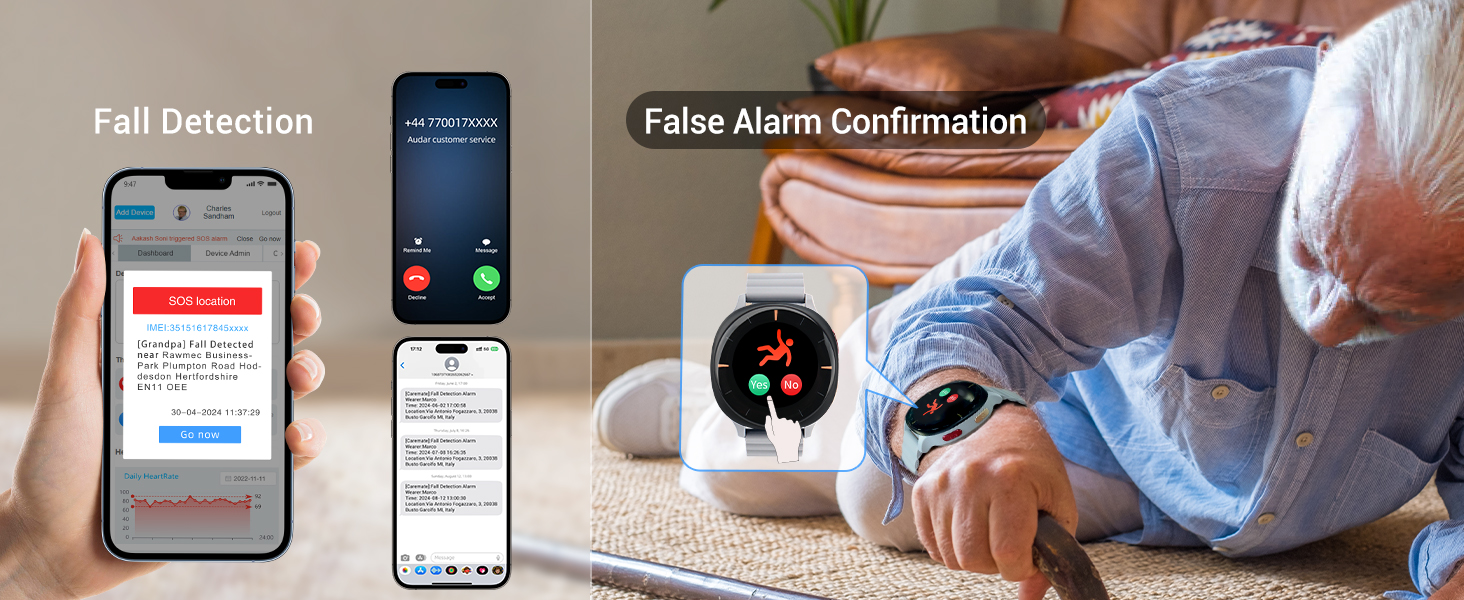
Image: Enhanced Connectivity features of the AUDAR E2.

Image: Feature comparison between Audar E2 and standard Bluetooth smartwatches.

Image: Innovative Use of IoT in the AUDAR E2.
7. Warranty and Support
7.1 Service Fee Details:
The AUDAR E2 operates with a connectivity service fee for its advanced features. The first year of connectivity is included with your purchase. Subsequent years require an optional subscription.
- Connectivity Fee: $35 annually (first year free). This covers sending and storing vital sign data and alerts.
- Deviation Alerts (Dashboard and Email): Included with connectivity.
- Deviation Alerts (SMS): $1.4 for 4 credits (consumable).
- SOS Alerts (Dashboard and Email): Included with connectivity.
- SOS Alerts (SMS and Phone Call): $1.4 for 1 token (consumable). One token is used per contact for an SMS alert plus voice message.

Image: Audar E2 Service Fee Details.

Image: Audar Health Platform Annual Fee and Deviation Alert SMS Fee Details.

Image: SOS Alert Service Fee Details.

Image: Fall Detection Service Fee Details.
7.2 Product Support:
For any questions or assistance, please refer to the Caremate Cloud Platform's help section or contact August customer service. The platform offers device and caregiver management, deviation reports, messages, and SOS records.
7.3 Warranty Information:
Specific warranty details are typically provided with your purchase documentation. Please refer to the warranty card or contact August customer support for information regarding your product's warranty coverage.


