
LEKATO LEKATO Bluetooth Page Turner Pedal
Contents
LEKATO Bluetooth Page Turner Pedal User Manual
Model: LEKATO Bluetooth Page Turner Pedal
1. Introduction
Thank you for choosing the LEKATO Bluetooth Page Turner Pedal. This device is designed to provide a hands-free solution for musicians, presenters, and readers to control digital sheet music, lyrics, presentations, and more. With its wireless Bluetooth connectivity and multiple operating modes, it enhances your performance and practice by allowing you to focus on your instrument or content without interruption.

The LEKATO Bluetooth Page Turner Pedal, shown with a tablet displaying digital sheet music, illustrating its primary use for hands-free page turning.
2. Key Features
- Wireless Bluetooth Connection: Connects seamlessly via Bluetooth to iOS, Android, and Windows devices, including iPads, iPhones, tablets, and laptops.
- Hands-Free Operation: Frees your hands for playing instruments, allowing uninterrupted practice and performance by controlling music, lyrics, or guitar tabs with your foot.
- Wide APP Compatibility: Compatible with various popular music applications such as OnSong and piaScore. Note: Incompatible with nkoda.
- Multifunctional Page Turning: Supports multiple functions including Page Up/Down, Arrow Left/Right, Arrow Up/Down, Left/Right Mouse Clicks, Space, and Enter.
- Repeat Switch: Enables continuous page switching for scrolling lyrics, music sheets, or controlling multimedia platforms.
- Easy Setup and Stable Signal: Offers quick setup and a stable signal up to 32 feet (approximately 9.75 meters) for reliable performance.
- Rechargeable Battery: Built-in large-capacity rechargeable lithium battery provides over 60 hours of continuous use on a single charge.
3. Package Contents
Please check the package contents upon unboxing to ensure all items are present:
- LEKATO Bluetooth Page Turner Pedal
- USB Type-C Charging Cable
- User Manual
4. Product Overview
Familiarize yourself with the components of your LEKATO Page Turner Pedal:

This image provides a top-down view of the pedal, highlighting the two foot pedals, mode selection buttons (1-5), power switch, repeat switch, and LED indicators.

A side view of the pedal, illustrating the Type-C charging port, the charge indicator light, and the reset switch for troubleshooting.
Controls and Indicators:
- Left Pedal: Activates the left-assigned function based on the selected mode.
- Right Pedal: Activates the right-assigned function based on the selected mode.
- Mode Buttons (1-7): Selects the desired operating mode.
- Power Switch (ON/OFF): Turns the device on or off.
- Repeat Switch (ON/OFF): Enables or disables continuous page switching.
- Bluetooth Indicator: Flashes during pairing, solid when connected.
- Charge Indicator: Shows charging status (e.g., red for charging, green for full).
- Type-C Charging Port: For connecting the USB charging cable.
- Reset Switch: Used to reset the device if it becomes unresponsive.
5. Setup
5.1 Charging the Pedal
Before first use, fully charge the pedal. A full charge provides over 60 hours of battery life.
- Connect the provided USB Type-C cable to the charging port on the side of the pedal.
- Connect the other end of the cable to a USB power adapter (not included) or a computer's USB port.
- The charge indicator light will illuminate (e.g., red) during charging. It will change color (e.g., green) or turn off when fully charged.
5.2 Powering On/Off
- To power on, slide the POWER switch to the "ON" position. The power indicator light will turn on.
- To power off, slide the POWER switch to the "OFF" position. The power indicator light will turn off.
5.3 Bluetooth Pairing
The LEKATO Page Turner Pedal connects wirelessly via Bluetooth to your device.
- Ensure the pedal is powered on. The Bluetooth indicator light will flash, indicating it is in pairing mode.
- On your device (iPad, iPhone, Android tablet, laptop, etc.), go to the Bluetooth settings.
- Search for available devices. You should see "LEKATO Page Turner" or a similar name appear in the list.
- Select the LEKATO Page Turner to pair. Once connected, the Bluetooth indicator light on the pedal will become solid.
- Your pedal is now ready for use.
6. Operating Modes
The LEKATO Page Turner Pedal offers multiple modes to suit various applications and software. Select the desired mode by pressing the corresponding numbered button (1-7) on the pedal.
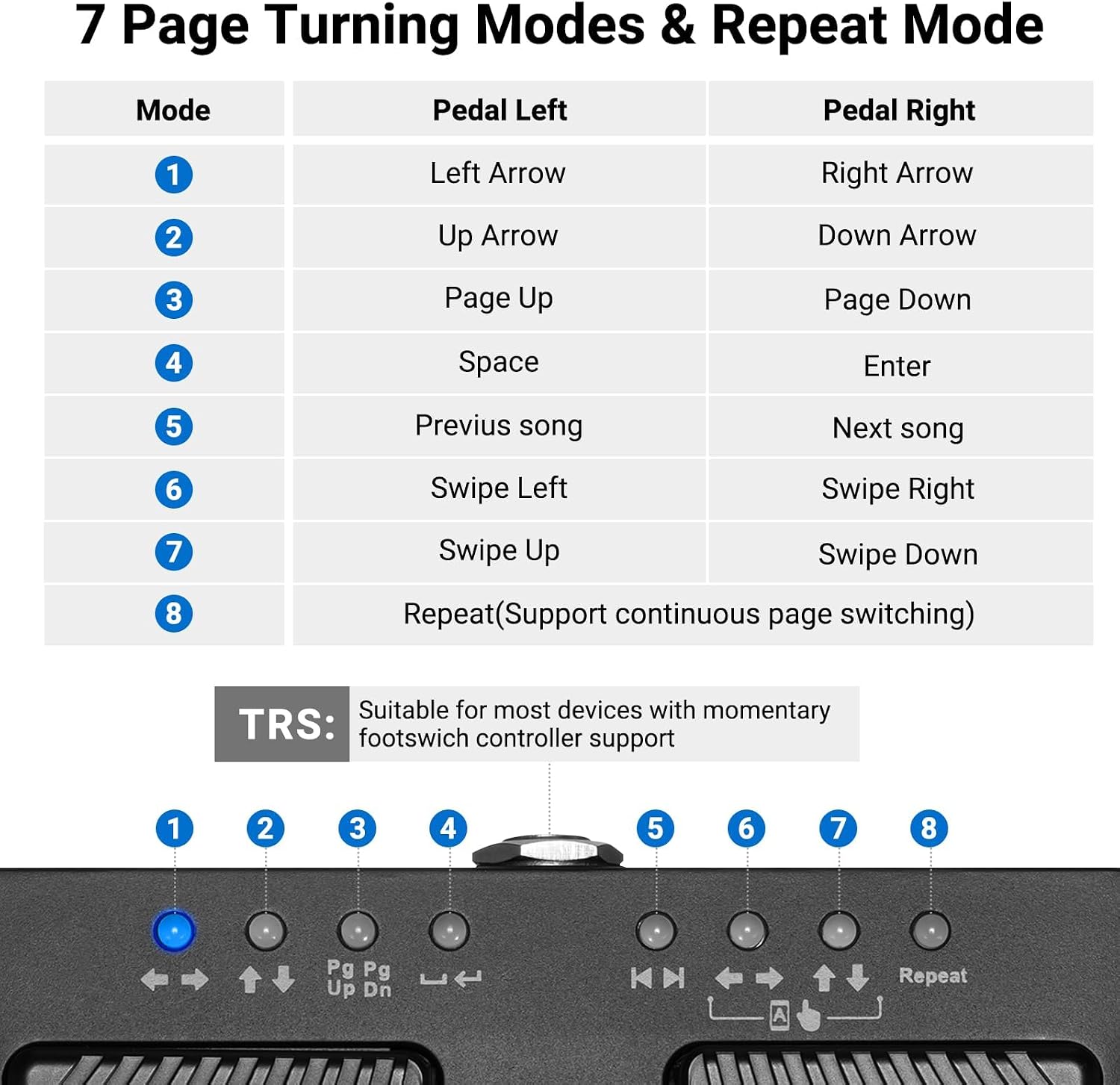
This diagram illustrates the 7 distinct operating modes of the pedal, detailing the function of the left and right pedals for each mode, including a repeat function.
| Mode | Pedal Left | Pedal Right |
|---|---|---|
| 1 | Left Arrow | Right Arrow |
| 2 | Up Arrow | Down Arrow |
| 3 | Page Up | Page Down |
| 4 | Space | Enter |
| 5 | Previous Song | Next Song |
| 6 | Swipe Left | Swipe Right |
| 7 | Swipe Up | Swipe Down |
| Repeat Mode | Supports continuous page switching when the "REPEAT" switch is ON. | |
6.1 Repeat Mode
To enable continuous page switching (scrolling), slide the REPEAT switch to the "ON" position. This is particularly useful for long documents or continuous scrolling of lyrics/scores.
6.2 App Compatibility
The LEKATO Page Turner Pedal is designed to work with a wide range of music and document viewing applications. Popular compatible apps include OnSong and piaScore. Please note that the pedal is not compatible with nkoda.

This image displays several app icons, indicating the broad compatibility of the LEKATO pedal with various music and document applications.
7. Usage
Once paired and a mode is selected, simply press the left or right pedal to perform the assigned action. This allows you to keep your hands on your instrument or presentation, enhancing focus and fluidity.

A woman and child are shown playing a piano, with the LEKATO pedal discreetly placed on the floor, demonstrating its use in a musical setting.

A man is depicted playing a digital piano, with the LEKATO pedal visible on the floor, emphasizing how it helps musicians maintain focus on their instrument.
8. Maintenance
8.1 Cleaning
To maintain the appearance and functionality of your pedal:
- Wipe the surface with a soft, dry cloth.
- Do not use harsh chemicals, abrasive cleaners, or solvents.
- Avoid getting moisture into the ports or internal components.
8.2 Storage
When not in use for extended periods:
- Store the pedal in a cool, dry place away from direct sunlight and extreme temperatures.
- Ensure the pedal is powered off to conserve battery life.
8.3 Battery Care
To prolong battery life:
- Charge the pedal regularly, even if not used frequently.
- Avoid fully discharging the battery before recharging.
- Do not expose the battery to high temperatures.
9. Troubleshooting
If you encounter issues with your LEKATO Page Turner Pedal, refer to the following common solutions:
| Problem | Possible Cause | Solution |
|---|---|---|
| Pedal does not power on. | Low battery. | Charge the pedal fully using the provided USB Type-C cable. |
| Cannot pair via Bluetooth. | Pedal not in pairing mode; Bluetooth off on device; interference. | Ensure pedal is on and indicator is flashing. Turn device Bluetooth off/on. Move closer to device. Try resetting the pedal. |
| Pedal is connected but not responding. | Incorrect mode selected; App incompatibility; Device issue. | Verify the correct mode is selected for your app. Check app compatibility. Restart the app or device. Try resetting the pedal. |
| Intermittent connection or lag. | Distance from device; Interference; Low battery. | Move closer to your device. Avoid obstacles. Ensure pedal is fully charged. |
| Pedal is unresponsive. | Software glitch. | Locate the reset switch (small hole) on the side of the pedal and gently press it with a paperclip or similar thin object. |
10. Specifications
| Feature | Detail |
|---|---|
| Brand | LEKATO |
| Model | Bluetooth Page Turner Pedal |
| Connectivity Technology | Bluetooth |
| Controller Type | Push Button |
| Compatible Devices | IOS, Android, Windows (iPad, iPhone, Tablets, Laptops) |
| Special Feature | Wireless, Rechargeable |
| Battery Life | 60+ Hours (approx.) |
| Wireless Range | Up to 32 feet (approx. 9.75 meters) |
11. Warranty and Support
11.1 Warranty Information
The LEKATO Bluetooth Page Turner Pedal comes with a one-year warranty from the date of purchase. This warranty covers manufacturing defects and ensures the product functions as intended under normal use. Please retain your proof of purchase for warranty claims.
11.2 Customer Support
For any questions, technical assistance, or warranty claims, please contact LEKATO customer support through the retailer's platform or the official LEKATO website. Provide your product model and a detailed description of the issue for faster service.
Documents and downloads
Ask a question about this manual
Ask about setup, troubleshooting, compatibility, parts, safety, or missing instructions. Manuals+ will review the question and use this page’s manual context to help answer it.