
GeeekPi Mini ITX Shelf 1U Rack
GeeekPi Mini ITX Shelf 1U Rack Instruction Manual
Comprehensive instruction manual for the GeeekPi Mini ITX Shelf 1U Rack, compatible with DeskPi RackMate T1/T0 Rackmount and 10-inch server racks, supporting Mini-ITX motherboards and DeskPi Super6C.
1. Product Overview
The GeeekPi Mini ITX Shelf 1U Rack is designed to integrate Mini-ITX motherboards and DeskPi Super6C into 10-inch server rack environments, including DeskPi RackMate T1 and T0 rackmount systems. This shelf provides a structured solution for organizing compact computing setups.
Key Features:
- Compatible with DeskPi RackMate T1/T0 Rackmounts.
- Supports standard 10-inch server racks.
- Designed for Mini-ITX motherboards and DeskPi Super6C.
- 7.87-inch depth for compact installations.
2. Package Contents
Upon opening the package, ensure all components listed below are present and undamaged. The packaging is designed to protect all parts during transit.

Included Items:
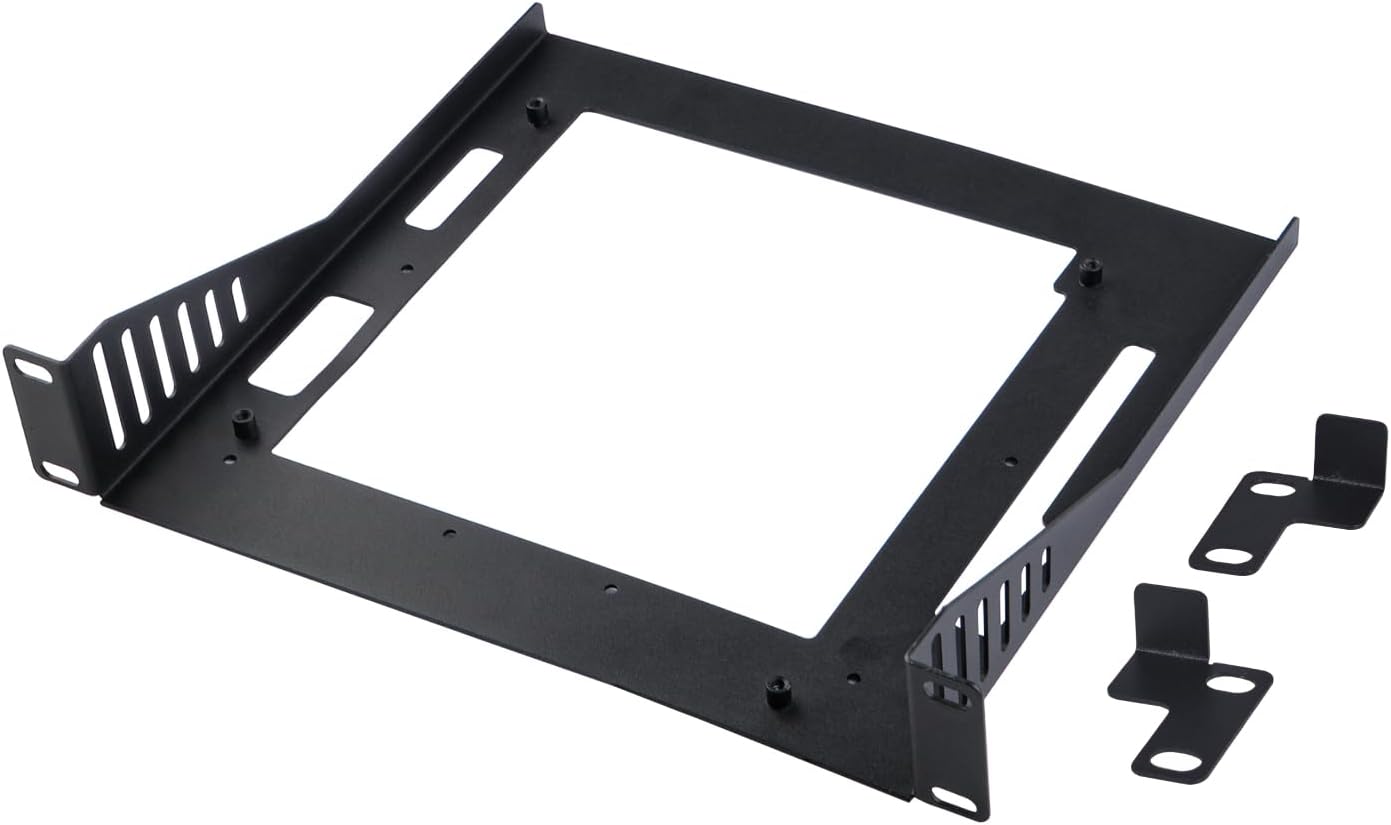
- 1x Mini ITX Shelf 1U Rack Unit
- 2x Mounting Brackets (L-shaped)
- 4x M3x5 mm Screws (for 2.5-inch mechanical hard drive or SSD)
- 8x #10-32 5/16 Screws
- 8x 5x10x1 Washers
If any items are missing or damaged, please contact GeeekPi customer support.
3. Setup and Assembly
Follow these steps to correctly assemble and install your GeeekPi Mini ITX Shelf 1U Rack.
3.1. Unpacking and Initial Inspection
Carefully remove all components from the packaging. Inspect each part for any signs of damage. The RackMate T0/T1 videos below provide a general overview of the DeskPi rack system and its components, which may include similar unpacking procedures.
3.2. Attaching Mounting Brackets
The Mini ITX shelf comes with two L-shaped mounting brackets. These brackets attach to the sides of the shelf unit and allow it to be secured within a 10-inch server rack.
- Align the L-shaped mounting brackets with the pre-drilled holes on each side of the Mini ITX shelf.
- Secure the brackets using the provided #10-32 5/16 screws and 5x10x1 washers. Ensure they are tightened securely but do not overtighten.
3.3. Mounting Motherboard or Drives (Optional)
The shelf is designed to accommodate Mini-ITX motherboards or 2.5-inch mechanical hard drives/SSDs. Use the appropriate screws for your components.
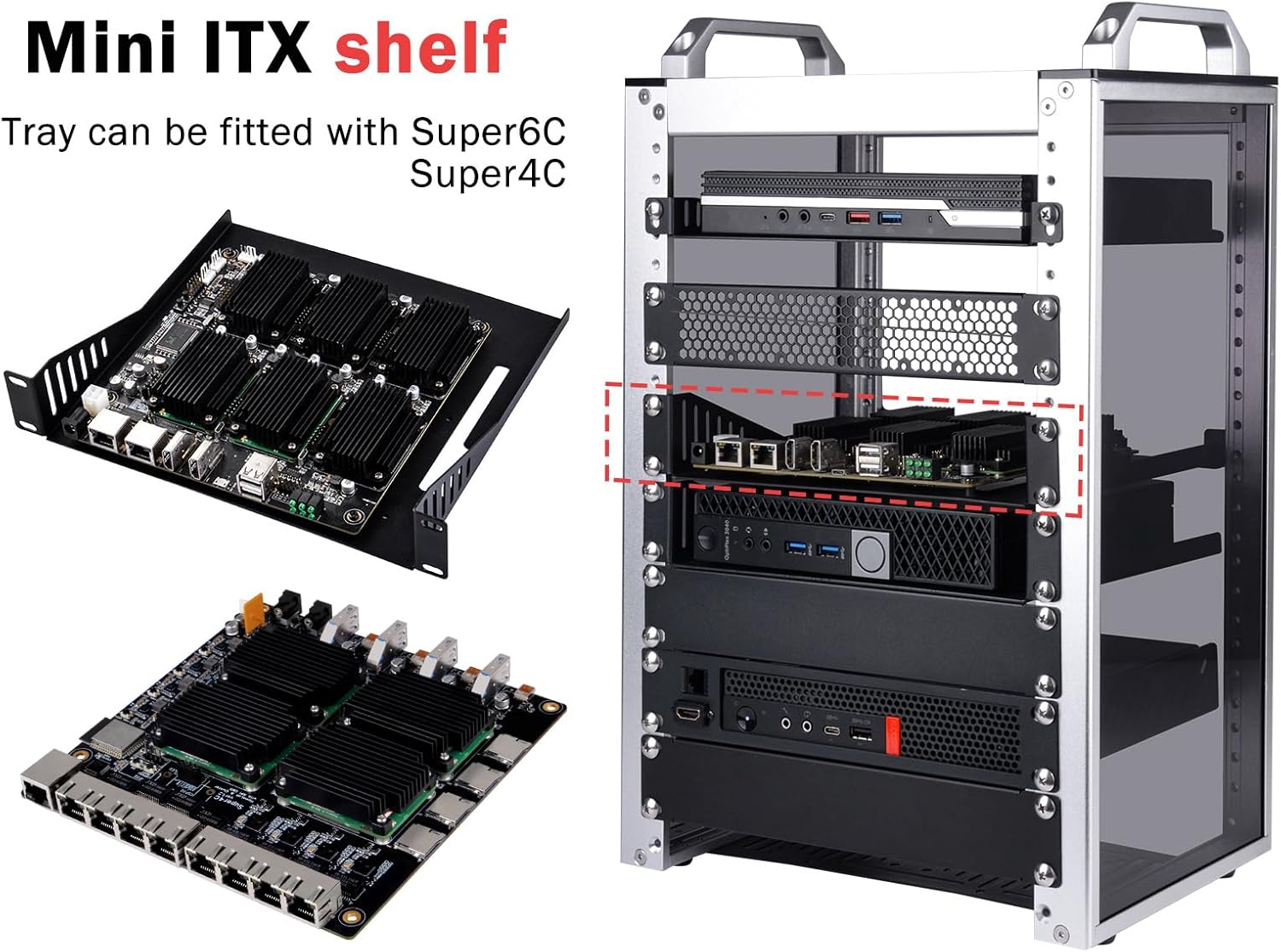
- For Mini-ITX motherboards: Align the motherboard's mounting holes with the standoffs on the shelf. Secure with appropriate motherboard screws (not included).
- For 2.5-inch drives: Place the drive on the designated area of the shelf. Use the provided M3x5 mm screws to secure the drive.

3.4. Installing Shelf into Rack
Once the shelf is assembled and components are mounted, it can be installed into your 10-inch server rack or DeskPi RackMate T1/T0.

- Slide the assembled shelf into the desired 1U slot of your 10-inch server rack or DeskPi RackMate.
- Secure the mounting brackets to the rack rails using appropriate rack screws (typically M6 cage nuts and screws, not included with this shelf but provided with the rack itself).
4. Operating Instructions
The Mini ITX Shelf is a passive component designed to securely hold your computing hardware within a rack. Ensure proper airflow and cable management for optimal performance of your devices.
Cable Management:
Utilize cable ties or Velcro straps (not included) to organize power and data cables. This prevents obstruction of airflow and maintains a tidy rack environment.
5. Product Dimensions
Refer to the diagram below for detailed measurements of the GeeekPi Mini ITX Shelf 1U Rack.
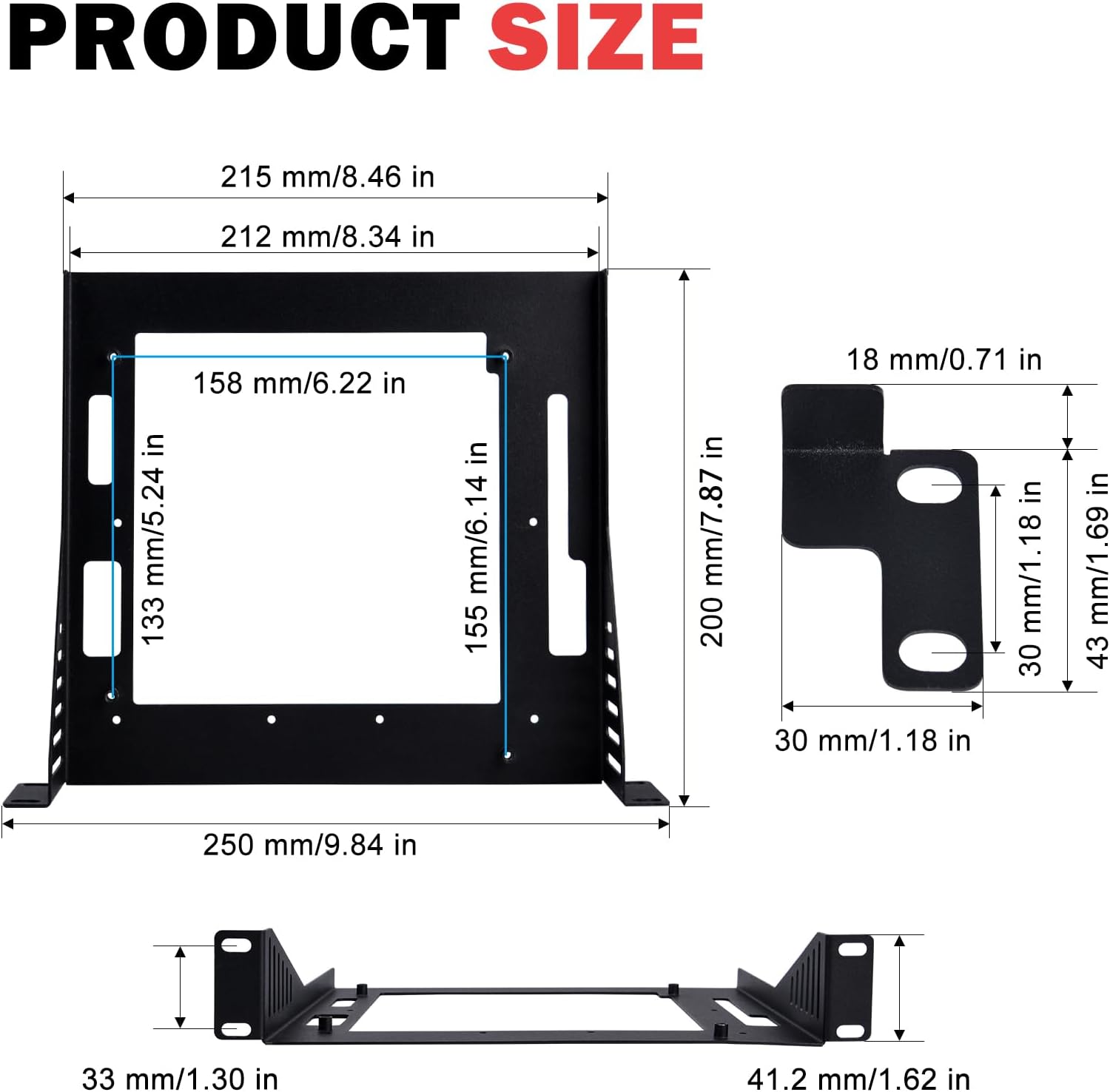
- Overall Width: 250 mm / 9.84 in
- Overall Depth: 200 mm / 7.87 in
- Motherboard Mounting Area Width: 212 mm / 8.34 in
- Motherboard Mounting Area Depth: 158 mm / 6.22 in
- Front Panel Height: 43 mm / 1.69 in
6. Specifications
| Feature | Detail |
|---|---|
| Brand | GeeekPi |
| Model Name | DeskPi Mini ITX Shelf 1U Rack |
| Motherboard Compatibility | Mini ITX |
| Rack Unit Size | 1U |
| Rack Width Compatibility | 10-inch Server Rack, DeskPi RackMate T1/T0 |
| Depth | 7.87 inches (200 mm) |
| Material | Metal |
| Color | Black |
| Item Weight | 15.8 ounces |
| Package Dimensions | 10.59 x 8.62 x 2.44 inches |
7. Maintenance
To ensure the longevity and optimal performance of your GeeekPi Mini ITX Shelf, regular maintenance is recommended.
- Cleaning: Periodically wipe down the shelf with a soft, dry cloth to remove dust and debris. Avoid using abrasive cleaners or solvents that could damage the finish.
- Inspection: Regularly check all screws and mounting points to ensure they remain tight. Loose connections can lead to instability.
- Airflow: Ensure that the ventilation slots on the shelf and any mounted components are not obstructed to maintain adequate airflow and prevent overheating.
8. Troubleshooting
This section addresses common issues you might encounter with your Mini ITX Shelf.
- Shelf does not fit in rack:
- Verify that your rack is a 10-inch server rack or a compatible DeskPi RackMate T1/T0 system.
- Ensure the mounting brackets are correctly attached to the shelf and are not inverted.
- Components are not secure on the shelf:
- Confirm that the correct screws (M3x5 mm for 2.5-inch drives) are used and fully tightened.
- For motherboards, ensure appropriate standoffs and screws are used and secured.
- Poor airflow/overheating:
- Check that no cables or other obstructions are blocking the ventilation slots on the shelf or your mounted devices.
- Consider adding optional fans to your rack system if overheating persists (refer to your rack's documentation for fan compatibility).
9. Warranty and Support
For information regarding product warranty, technical support, or replacement parts, please refer to the official GeeekPi website or contact their customer service directly. Keep your purchase receipt for warranty claims.
Ask a question about this manual
Ask about setup, troubleshooting, compatibility, parts, safety, or missing instructions. Manuals+ will review the question and use this page’s manual context to help answer it.