
GeeekPi SBC Rack Shelf
GeeekPi 10 inch 1U SBC Rack Shelf Instruction Manual
Model: SBC Rack Shelf
1. Product Overview
The GeeekPi 10 inch 1U SBC Rack Shelf is designed to organize and mount various Single Board Computers (SBCs) and 2.5-inch storage devices within a 10-inch server rack environment. It is specifically compatible with DeskPi RackMate T1, T0, T2 Rackmount systems and standard 10-inch server racks. This shelf provides a structured solution for integrating devices such as Raspberry Pi, Jetson Nano, and RockPi 5B into a compact rack setup.

Figure 1: GeeekPi 10 inch 1U SBC Rack Shelf, top-down view.
2. Package Contents
Verify that all components are present in your package:
- 1x GeeekPi 10 inch 1U SBC Rack Shelf
- M2.5x6x4mm screws (x12) - Used to secure Raspberry Pi
- M2.5x7+6mm screws (x4) - Used to fix expansion boards
- M2.5x5x5mm screws (x12) - Used to fix the bottom of Raspberry Pi
- M2.5x6x4mm copper posts (x12) - Used to fix the bottom of Raspberry Pi
- M3x5mm screws (x8) - Used to fix 2.5-inch mechanical hard drives or SSDs
- #10-32 5/16 screws (x4) - For rack mounting
- 5*10*1 washers (x4) - For rack mounting

Figure 2: Detailed view of included screws, copper posts, and washers.
3. Setup and Installation
This section details the steps for installing the SBC Rack Shelf into a compatible rack and mounting your devices.
3.1 Rack Installation
- Align the mounting ears of the SBC Rack Shelf with the desired 1U slot in your 10-inch server rack or DeskPi RackMate system.
- Secure the shelf to the rack using the provided #10-32 5/16 screws and 5*10*1 washers. Ensure the shelf is level and firmly attached.
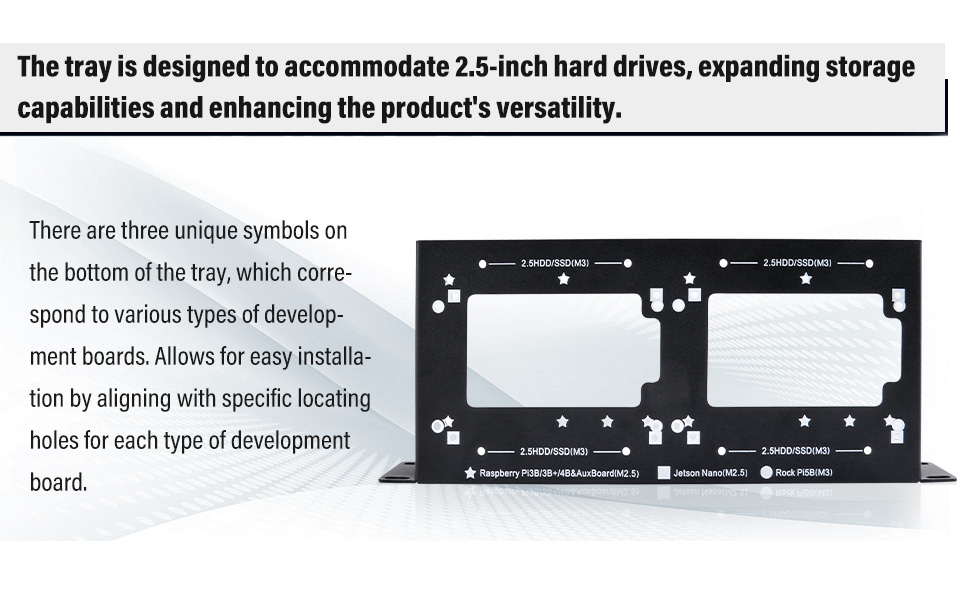
Figure 3: Visual guide for mounting the SBC Rack Shelf into a rack.
3.2 Device Mounting (SBCs and 2.5-inch Drives)
The shelf features designated mounting patterns for various SBCs and 2.5-inch storage devices. Refer to the symbols on the tray to identify the correct mounting holes for your specific device.

Figure 4: Tray bottom showing unique symbols for Raspberry Pi (star), Jetson Nano (square), RockPi 5B (circle), and 2.5-inch HDD/SSD (rectangle).
- Identify Mounting Holes: Locate the symbols on the shelf that correspond to your device (e.g., star for Raspberry Pi, square for Jetson Nano, circle for RockPi 5B, or rectangle for 2.5-inch drives).
- Position Device: Place your SBC or 2.5-inch HDD/SSD onto the shelf, aligning its mounting holes with the appropriate holes on the tray.
- Secure Device: Use the corresponding screws and copper posts from the package contents to firmly attach your device to the shelf. Ensure all connections are secure but do not overtighten.

Figure 5: An SBC mounted on the shelf within a rack enclosure.
4. Operation
Once installed, the SBC Rack Shelf functions as a stable platform for your devices. Ensure proper cable management to maintain airflow and prevent strain on connectors. The open design of the shelf facilitates passive cooling for mounted components.
5. Maintenance
- Cleaning: Periodically clean the shelf and mounted devices with a soft, dry cloth to remove dust. Avoid using liquid cleaners directly on electronic components.
- Inspection: Regularly check all screws and connections to ensure they remain secure.
- Airflow: Ensure that the rack environment maintains adequate airflow to prevent overheating of devices.
6. Troubleshooting
- Rack Mounting Issues: If the shelf does not fit standard rack mounting hardware, verify that your rack is a 10-inch server rack or a DeskPi RackMate system. The included #10-32 5/16 screws are designed for these specific systems.
- Device Mounting Issues: If screws seem too long or short for your device, ensure you are using the correct screws and copper posts as indicated in the package contents and by the symbols on the tray. Some devices may require specific standoff heights.
- Loose Connections: If a device feels unstable after mounting, re-check all screws to ensure they are tightened appropriately.
7. Specifications
| Product Dimensions | 250mm (9.84 inches) Length x 100mm (3.94 inches) Width x 41.2mm (1.62 inches) Height (at mounting ears) |
| Item Weight | 9.6 ounces (0.27 Kilograms) |
| Material | High-quality metal |
| Mounting Type | Rack Mount (1U) |
| Compatible Racks | DeskPi RackMate T1/T0/T2 Rackmount, 10 inch Server Racks |
| Compatible Devices | Raspberry Pi, Jetson Nano, RockPi 5B, other Dev Boards, 2.5 Inch HDD/SSD |

Figure 6: Product dimensions in millimeters and inches.
8. Support Information
For further assistance, technical support, or warranty inquiries, please contact GeeekPi customer service through their official website or the platform where the product was purchased.
Official GeeekPi Store: Visit GeeekPi Store on Amazon
Ask a question about this manual
Ask about setup, troubleshooting, compatibility, parts, safety, or missing instructions. Manuals+ will review the question and use this page’s manual context to help answer it.