
Rubicon DX02
Rubicon DX02 Lightweight Foldable Electric Wheelchair User Manual
Model: DX02
1. Introduction
This manual provides essential information for the safe and effective operation, maintenance, and care of your Rubicon DX02 Lightweight Foldable Electric Wheelchair. Please read this manual thoroughly before using the wheelchair to ensure proper function and to prevent injury or damage.

Image 1.1: The Rubicon DX02 Lightweight Foldable Electric Wheelchair, shown in its operational state.
The Rubicon DX02 is designed for individuals requiring mobility assistance, offering a lightweight, foldable, and airline-approved solution. It features dual 250W motors for smooth movement and a detachable battery for extended range and travel convenience.
2. Safety Information
Always prioritize safety when operating the Rubicon DX02 electric wheelchair. Failure to follow safety guidelines may result in injury or damage to the device.
- Read the Manual: Familiarize yourself with all instructions and warnings before initial use.
- Weight Capacity: Do not exceed the maximum weight capacity of 220 lbs (100 kg).
- Environmental Conditions: Avoid operating the wheelchair in extreme weather conditions, on slippery surfaces, or on steep inclines.
- Obstacles: Exercise caution when navigating over curbs, thresholds, or uneven terrain.
- Battery Safety: Use only the approved charger and battery. Do not expose the battery to extreme temperatures or puncture it.
- Anti-Tip Wheels: The wheelchair is equipped with anti-tip wheels for enhanced stability. Ensure they are properly engaged before use.

Image 2.1: Illustration highlighting the anti-tip wheels and durable aluminum frame, contributing to the wheelchair's safety and stability.
3. Setup and Assembly
The Rubicon DX02 is designed for quick and easy setup. Follow these steps to prepare your wheelchair for use.
3.1 Unfolding the Wheelchair
- Place the folded wheelchair on a flat, stable surface.
- Grasp the frame and gently pull the sides apart until the chair begins to unfold.
- Push down firmly on the seat rails until they lock into place, ensuring the chair is fully open and stable.
- Lower the backrest and adjust the footrest to the desired position.

Image 3.1: The Rubicon DX02 electric wheelchair folded and placed in the trunk of a vehicle, demonstrating its compact size for transport.
3.2 Attaching the Battery and Joystick
- Locate the battery compartment, typically under the seat or at the rear.
- Insert the detachable battery, ensuring it clicks securely into place.
- Connect the joystick controller cable to the designated port on the wheelchair.
- Mount the joystick to either the left or right armrest, as preferred, and tighten any securing mechanisms.

Image 3.2: A rear view of the Rubicon DX02, clearly showing the detachable battery pack and the dual motors.
4. Operating Instructions
The Rubicon DX02 offers both electric and manual modes for versatile use.
4.1 Electric Mode Operation
- Power On: Press the power button on the joystick controller. The battery indicator lights will illuminate.
- Speed Adjustment: Use the speed control buttons (usually + and -) to select your desired speed level. Start at the lowest setting.
- Direction Control: Gently push the joystick in the direction you wish to move (forward, backward, left, right).
- Braking: Release the joystick to engage the electromagnetic brakes, bringing the wheelchair to a smooth stop.
- Power Off: Press the power button again to turn off the wheelchair when not in use.

Image 4.1: An illustration of the user-friendly joystick control and the breathable, removable cushion designed for comfort and hygiene.
4.2 Manual Mode Operation
To operate the wheelchair manually, ensure the power is off and the motors are disengaged (refer to specific instructions on your model for motor disengagement levers, if applicable). A caregiver can then push the wheelchair using the rear handles.

Image 4.2: The Rubicon DX02 shown with a user operating it in electric mode and a caregiver pushing it in manual mode, highlighting its dual functionality.
4.3 Easy Access
The armrests can be lifted, and the footrest can be adjusted or swung away to facilitate easier entry and exit from the wheelchair, including front or side access.
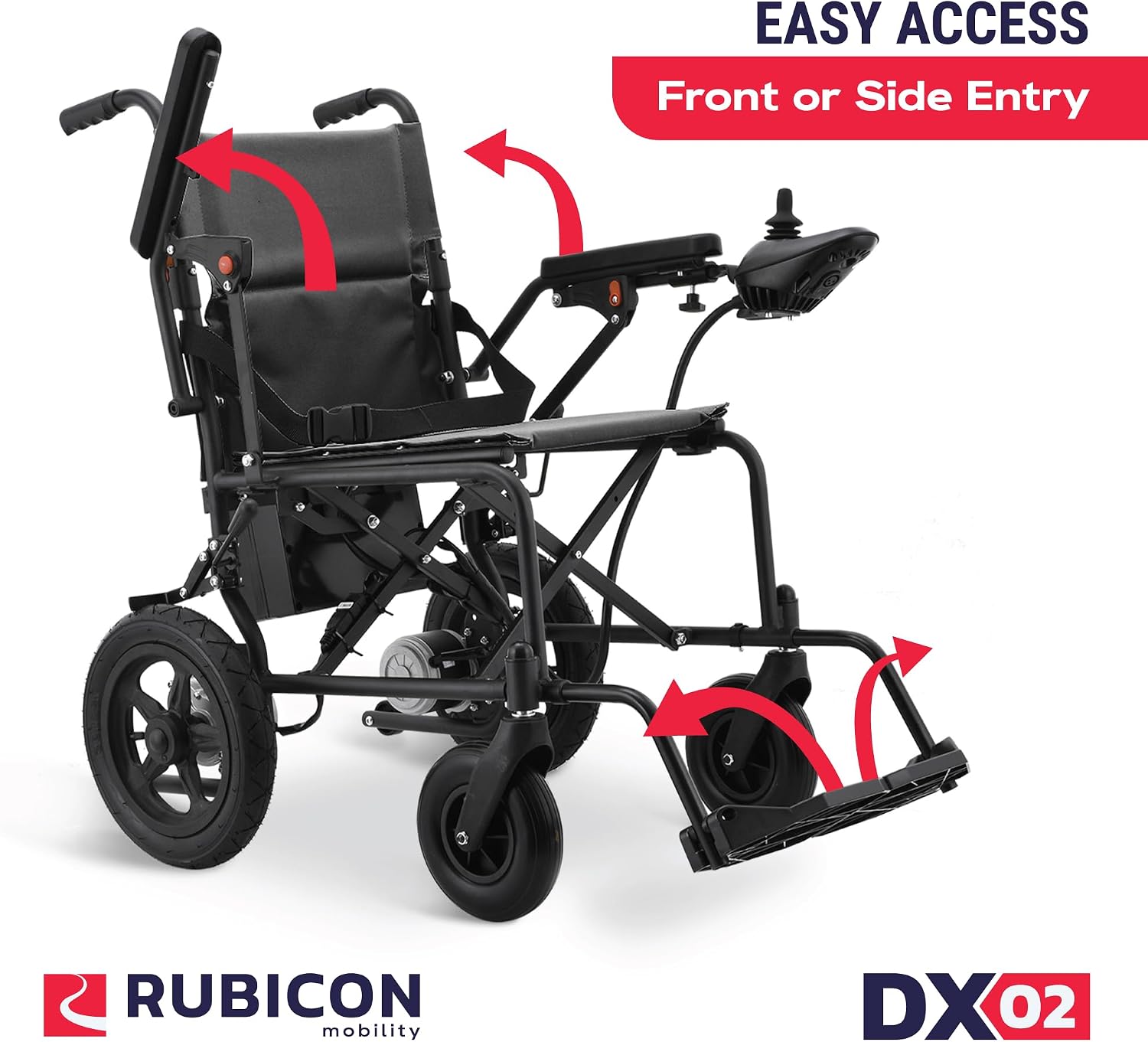
Image 4.3: Visual representation of the wheelchair's easy access features, with arrows indicating how armrests lift and footrests adjust for convenient entry and exit.
5. Maintenance
Regular maintenance ensures the longevity and optimal performance of your Rubicon DX02 wheelchair.
- Cleaning: Wipe down the frame and seat with a damp cloth. Avoid using abrasive cleaners. The cushion is removable for cleaning.
- Battery Care: Charge the battery fully after each use. Do not allow the battery to fully discharge for extended periods. Store the battery in a cool, dry place.
- Tire Pressure: Periodically check tire pressure and inflate to the recommended PSI if applicable (for pneumatic tires).
- Inspections: Regularly inspect all bolts, nuts, and connections for tightness. Check for any signs of wear or damage to cables and components.
6. Troubleshooting
If you encounter issues with your Rubicon DX02, refer to the following common troubleshooting steps:
| Problem | Possible Cause | Solution |
|---|---|---|
| Wheelchair does not power on. | Battery not connected, battery discharged, power button not pressed. | Ensure battery is securely connected. Charge the battery. Press the power button firmly. |
| Wheelchair moves erratically or not at all. | Joystick cable loose, motor disengaged, low battery. | Check joystick cable connection. Ensure motors are engaged. Charge the battery. |
| Unusual noises during operation. | Loose components, debris in wheels/motors. | Inspect for loose parts and tighten. Clear any obstructions from wheels or motors. |
7. Specifications
Key technical specifications for the Rubicon DX02 Electric Wheelchair:
- Product Dimensions (Unfolded): 38"D x 27"W x 38"H
- Product Dimensions (Folded): Approximately 39"L x 24"W x 14.5"H
- Item Weight: 40 Pounds
- Motor Power: Dual 250W Motors
- Cruise Range: Approximately 12 miles (19 kilometers)
- Weight Capacity: 220 lbs
- Airline Approved: Yes
- Frame Material: Aluminum Alloy

Image 7.1: Detailed dimensions of the Rubicon DX02 wheelchair in both its folded and unfolded states.
8. Warranty and Support
The Rubicon DX02 Electric Wheelchair typically comes with a warranty. Based on available information, a 5-year warranty may apply. For specific warranty details, claims, or technical support, please refer to the documentation included with your purchase or contact the seller directly.
Ask a question about this manual
Ask about setup, troubleshooting, compatibility, parts, safety, or missing instructions. Manuals+ will review the question and use this page’s manual context to help answer it.