1. Introduction
This manual provides comprehensive instructions for the Fockety Mini Desktop Tower Fan, Model Focketygbvn3iozq0-13. Please read this manual thoroughly before using the product to ensure proper operation, maintenance, and safety. Keep this manual for future reference.
2. Safety Instructions
- Ensure the fan is placed on a stable, flat surface to prevent tipping.
- Do not insert fingers or foreign objects into the fan's air outlets or inlets.
- Keep the fan away from water or other liquids. Do not operate with wet hands.
- Unplug the fan from the power source before cleaning or when not in use for extended periods.
- Do not use the fan near flammable materials or gases.
- This appliance is not intended for use by persons (including children) with reduced physical, sensory, or mental capabilities, or lack of experience and knowledge, unless they have been given supervision or instruction concerning use of the appliance by a person responsible for their safety.
- Use only the provided USB cable or a compatible 5V DC power source.
3. Package Contents
Verify that all items are present in the package:
- 1 x Fockety Mini Desktop Tower Fan
- 1 x USB Power Cable

Image: The included USB power cable for connecting the fan to a power source.
4. Product Overview
The Fockety Mini Desktop Tower Fan is a compact, bladeless fan designed for personal cooling. It features a tower shape, USB power, and integrated lighting.

Image: Front view of the Fockety Mini Desktop Tower Fan, showing the control buttons and air outlet.
Controls:
- Left Button: Controls the fan speed (LOW, HIGH, OFF).
- Right Button: Controls the integrated light (LOW, HIGH, OFF).
5. Setup
- Place the fan on a stable, flat, and dry surface.
- Connect the small end of the USB power cable to the power input port on the back of the fan.
- Connect the standard USB-A end of the cable to a compatible USB power source (e.g., computer USB port, USB wall adapter, power bank). Ensure the power source provides 5V DC.
6. Operating Instructions
Fan Operation:
- Press the left button once to turn the fan on at LOW speed.
- Press the left button a second time to switch to HIGH speed.
- Press the left button a third time to turn the fan OFF.
Light Operation:
- Press the right button once to turn the light on at LOW brightness.
- Press the right button a second time to switch to HIGH brightness.
- Press the right button a third time to turn the light OFF.

Image: The fan operating with its integrated light illuminated, demonstrating the lighting feature.
7. Maintenance
Regular cleaning helps maintain the fan's performance and longevity.
- Always unplug the fan before cleaning.
- Use a soft, dry cloth to wipe the exterior surfaces of the fan.
- For dust accumulation in the air inlets/outlets, use a soft brush or a vacuum cleaner with a brush attachment to gently remove dust.
- Do not use abrasive cleaners, solvents, or harsh chemicals, as these may damage the fan's finish.
- Do not immerse the fan in water or any other liquid.
8. Troubleshooting
If you encounter issues with your fan, refer to the following common problems and solutions:
- Fan does not turn on:
- Ensure the USB cable is securely connected to both the fan and the power source.
- Verify that the USB power source is functional (e.g., try plugging another device into the same port).
- Press the fan control button multiple times to cycle through settings.
- Light does not turn on:
- Ensure the fan is receiving power.
- Press the light control button multiple times to cycle through settings.
- Weak airflow:
- Ensure the fan is set to HIGH speed.
- Check for any obstructions blocking the air inlets or outlets and clean if necessary.
9. Specifications
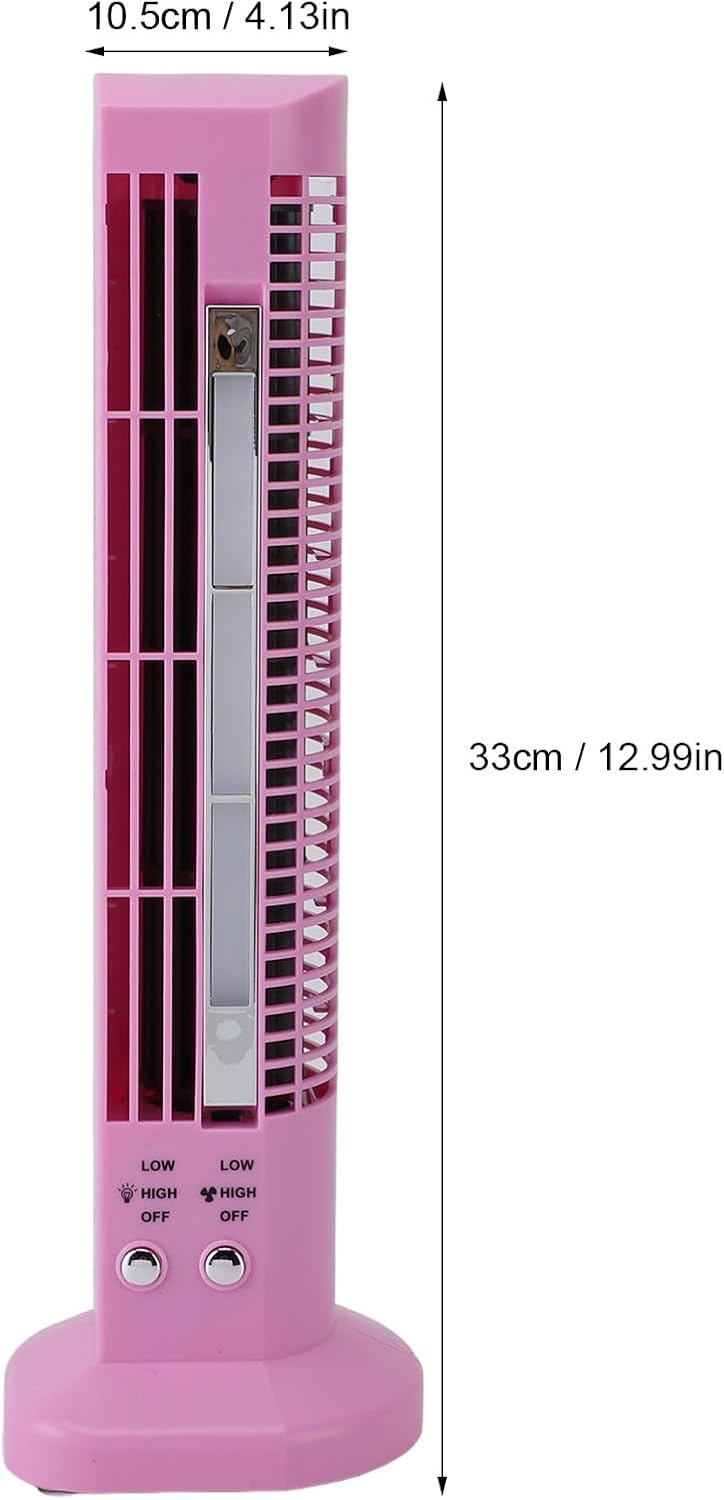
Image: Diagram showing the dimensions of the Fockety Mini Desktop Tower Fan.
| Feature | Specification |
|---|---|
| Brand | Fockety |
| Model Name | Focketygbvn3iozq0-13 |
| Color | Pink |
| Electric Fan Design | Tower Fan |
| Power Source | USB (AC/DC adapter not included) |
| Voltage | 5 Volts (DC) |
| Wattage | 5 watts |
| Product Dimensions (D x W x H) | 13.77" x 4.33" x 4.33" (approx. 35cm x 11cm x 11cm) |
| Item Weight | 15.8 ounces (approx. 448g) |
| Control Method | Touch Buttons |
| Number of Power Levels | 2 (Fan), 2 (Light) |
| Special Feature | Integrated Light |
| Indoor/Outdoor Usage | Indoor |
10. Warranty and Support
For warranty information or technical support, please refer to the documentation provided with your purchase or contact the manufacturer directly. Keep your proof of purchase for any warranty claims.


