
1. Introduction
This manual provides essential information for the safe and efficient operation of your Xiaomi Poco F6 5G smartphone. Please read this manual thoroughly before using your device to ensure proper functionality and to prevent damage. Keep this manual for future reference.

Figure 1: Xiaomi Poco F6 5G smartphone (Front and Rear View)
The Xiaomi Poco F6 5G is a high-performance smartphone featuring a Flagship Snapdragon® 8s Gen 3 processor, LiquidCool Technology 4.0 with IceLoop, and a 50MP camera system with OIS. It boasts a CrystalRes 120Hz Flow AMOLED display protected by Corning® Gorilla® Glass Victus, and is powered by a 5000mAh battery with 90W turbo charging capability.
2. What's in the Box
Verify that all items are present in the package:
- Xiaomi Poco F6 5G Smartphone
- Phone Case
- Wall Charger (90W)
- Fast Car Charger (51W)
- SIM Tray Ejector
- USB Cable

Figure 2: Retail box label with product details and included items.
3. Setup
3.1 SIM Card Installation
- Locate the SIM card tray on the side of your device.
- Insert the SIM tray ejector tool into the small hole next to the tray and press firmly until the tray ejects.
- Place your Nano-SIM cards (up to two) into the tray with the gold contacts facing down. Ensure they are correctly seated.
- Carefully reinsert the SIM card tray into the device.
3.2 Initial Power On and Configuration
- Press and hold the Power button (located on the right side of the device) until the Xiaomi logo appears.
- Follow the on-screen prompts to complete the initial setup, including language selection, Wi-Fi connection, Google account setup, and security settings (fingerprint, face unlock, PIN).
4. Operating Your Device
4.1 Display

Figure 3: Poco F6 5G Display
The Poco F6 features a 6.67-inch CrystalRes 1.5K Flow AMOLED DotDisplay. It offers a refresh rate of up to 120Hz and a touch sampling rate of up to 480Hz (2160Hz instant touch sampling). Peak brightness reaches 2400 nits, ensuring clear visibility even in bright sunlight. The display supports 100% DCI-P3 wide color gamut, 68 billion colors, 1920Hz PWM dimming, Dolby Vision, and HDR 10+. It is protected by Corning Gorilla Glass Victus.
4.2 Performance
The device is powered by the Flagship Snapdragon 8s Gen 3 Mobile Platform, built on a TSMC 4nm process. The octa-core CPU operates at up to 3.0GHz, complemented by an Adreno GPU and Qualcomm AI Engine for enhanced performance. It utilizes LPDDR5X RAM and UFS 4.0 storage for fast data access and smooth multitasking. WildBoost Optimization 3.0 enhances the gaming experience, and Super Resolution Rendering improves graphics clarity.
4.3 Camera
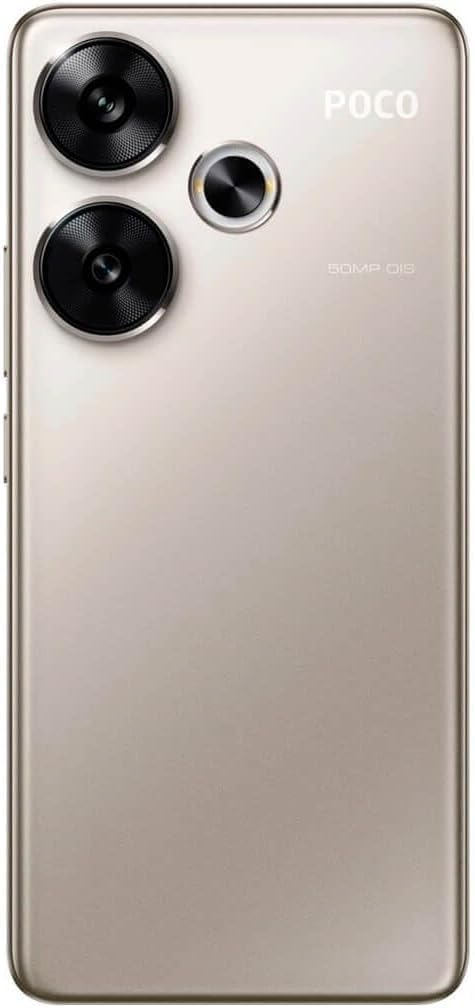
Figure 4: Poco F6 5G Rear Camera Module
The rear camera system includes a 50MP main camera (Sony IMX882) with f/1.59 aperture and Optical Image Stabilization (OIS), alongside an 8MP ultra-wide camera (IMX355). Video recording supports 4K at 30/60fps, 1080p at 30/60fps, and slow motion at 120/240fps. The front features a 20MP camera (OV20B) with f/2.2 aperture, capable of 1080p video recording at 60/30fps.
4.4 Battery & Charging
The Poco F6 is equipped with a 5000mAh (typical) battery. It supports 90W turbo charging, allowing for rapid recharging of the device. The package includes a 90W Wall Charger and a 51W Fast Car Charger.
4.5 Connectivity
The device supports 5G and 4G LTE networks globally, with dual Nano-SIM capability. It is compatible with T-Mobile, Mint, Tello, and Lyca Mobile networks in the USA. GPS, GLONASS, Beidou, Galileo, and QZSS are supported for precise positioning. Other features include dual speakers with Dolby Atmos, Hi-Res Audio certification, and various sensors like proximity, ambient light, accelerometer, electronic compass, IR blaster, and gyroscope.
4.6 Video Comparison (Poco F6 vs Poco F6 Pro)
For a detailed comparison of the Poco F6 with the Poco F6 Pro, including design, display, performance, and camera differences, please watch the official video below. This video provides insights into how the Poco F6 stands against its Pro counterpart.
Video 1: Poco F6 vs Poco F6 Pro Smartphone Comparison
5. Maintenance
- Cleaning: Use a soft, lint-free cloth to clean the screen and body of the device. Avoid using harsh chemicals or abrasive materials.
- Software Updates: Regularly check for and install system updates to ensure optimal performance, security, and access to new features.
- Battery Care: To prolong battery life, avoid extreme temperatures and do not leave the device fully charged or fully discharged for extended periods.
6. Troubleshooting
- Device Unresponsive: If the device becomes unresponsive, press and hold the Power button for approximately 10 seconds to force a restart.
- Network Issues: Check SIM card installation, ensure mobile data is enabled, or try restarting the device.
- App Malfunctions: Try clearing the app's cache and data in Settings, or uninstall and reinstall the app.
- Factory Reset: As a last resort, if software issues persist, you can perform a factory reset via Settings. Back up all important data before proceeding, as this will erase all data on the device.
7. Specifications
| Feature | Specification |
|---|---|
| Model Name | Poco F6 |
| Item Model Number | MZB0BMQEU |
| Display Size | 6.67 Inches |
| Display Type | CrystalRes 1.5K Flow AMOLED DotDisplay |
| Refresh Rate | Up to 120Hz |
| Peak Brightness | 2400 nits |
| Processor | Flagship Snapdragon 8s Gen 3 Mobile Platform |
| RAM | 12 GB |
| Memory Storage Capacity | 512 GB |
| Main Camera | 50MP (Sony IMX882) with OIS |
| Ultra-Wide Camera | 8MP (IMX355) |
| Front Camera | 20MP (OV20B) |
| Battery Capacity | 5000 Milliamp Hours |
| Charging | 90W Turbo Charging |
| Operating System | Powered by Xiaomi HyperOS |
| Wireless Carrier Compatibility | T-Mobile, Mint, Tello, Lyca Mobile (USA) |
| Item Weight | 6 ounces |
8. Warranty and Support
For warranty information and customer support, please refer to the warranty card included in your product packaging or visit the official Xiaomi website. Ensure you register your product if required to activate your warranty.


