
JMMO T209
JMMO T209 Wireless Hi-Fi Stereo Earbuds User Manual
Model: T209
Introduction
Thank you for choosing the JMMO T209 Wireless Hi-Fi Stereo Earbuds. These earbuds are designed to provide a superior audio experience with advanced features for daily use. Please read this manual carefully before using the product to ensure proper operation and maintenance.
Key features include:
- Wireless 5.3 Technology: Stable and low-latency connection for high-quality sound.
- Impressive Hi-Fi Stereo Sound: Equipped with 10mm drivers for boosted deep bass and clear midrange frequencies.
- Clear Calls with Noise Cancellation: Built-in microphone with advanced call noise cancellation.
- Long Battery Life: Over 5 hours of continuous playback, up to 20 hours with the charging case.
- IPX4 Water Resistant: Designed to withstand sweat and raindrop splashes.
Package Contents
- JMMO T209 Wireless Earbuds (Left and Right)
- Charging Case
- USB-C Charging Cable
- User Manual
Product Overview
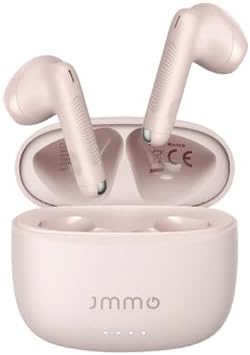
Image: The JMMO T209 Wireless Earbuds, presented in their open charging case. The earbuds are light pink, matching the case, and show their in-ear design.

Image: A person wearing one of the JMMO T209 earbuds, demonstrating its comfortable fit. On the left, icons and text describe the touch control functions: Previous Track, Play/Pause, Answer Call, Next Track, Volume, and Voice Assistant.
Setup
1. Initial Charging
Before first use, fully charge the earbuds and the charging case. Connect the USB-C cable to the charging port on the case and a power source. The indicator lights on the case will show the charging status.
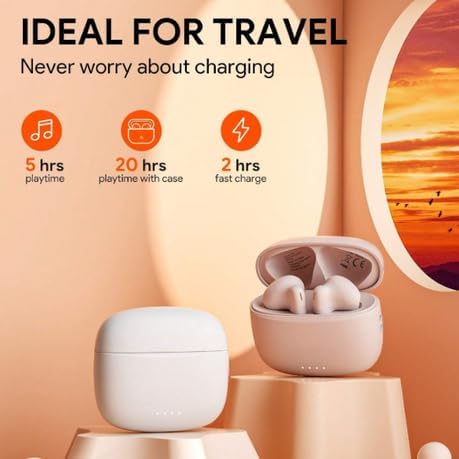
Image: The JMMO T209 charging case and earbuds, highlighting battery performance. It shows 5 hours of playtime, 20 hours of playtime with the case, and 2 hours for a fast charge of the case.
2. Pairing with Your Device
- Open the charging case. The earbuds will automatically enter pairing mode.
- On your device (smartphone, tablet, etc.), enable Bluetooth.
- Search for "JMMO T209" in the list of available Bluetooth devices.
- Select "JMMO T209" to connect. Once connected, you will hear a confirmation sound.
The earbuds feature advanced Wireless 5.3 technology for stable and low-latency transmission.

Image: A visual representation of key features: Advanced Wireless 5.3 for stable transmission, Noise Cancellation for clear calls, and IPX4 Water Resistance for protection against splashes.
3. Wearing the Earbuds
Gently insert the earbuds into your ears, ensuring a comfortable and secure fit. Adjust them until the sound is clear and the fit is snug to optimize audio quality and noise isolation.
Operating Instructions
Touch Controls
The JMMO T209 earbuds feature intuitive touch controls on each earbud:
| Action | Function |
|---|---|
| Single Tap (L/R) | Play/Pause Music, Answer/End Call |
| Double Tap (L) | Previous Track |
| Double Tap (R) | Next Track |
| Triple Tap (L) | Volume Down |
| Triple Tap (R) | Volume Up |
| Long Press (2s) (L/R) | Activate Voice Assistant, Reject Call |
Audio Quality
Experience impressive Hi-Fi stereo sound with 10mm dynamic drivers, delivering boosted deep bass and clear midrange frequencies for an immersive audio experience.
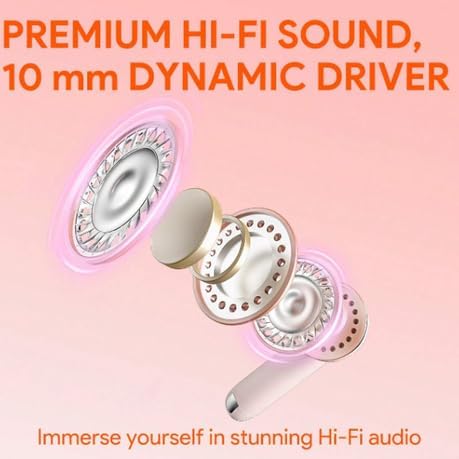
Image: An exploded diagram illustrating the internal components of a JMMO T209 earbud, highlighting the 10mm dynamic driver responsible for premium Hi-Fi sound.
Maintenance
Cleaning
Regularly clean your earbuds and charging case with a soft, dry, lint-free cloth. Do not use abrasive cleaners or immerse them in water.
Storage
When not in use, store the earbuds in their charging case to protect them and keep them charged. Store in a cool, dry place away from direct sunlight and extreme temperatures.
Water Resistance
The earbuds and charging case are IPX4 water-resistant, meaning they can withstand sweat and light rain splashes. They are not designed for swimming or submersion in water.
Troubleshooting
Earbuds Not Pairing
- Ensure both earbuds are in the charging case and have sufficient charge.
- Make sure Bluetooth is enabled on your device.
- Try forgetting "JMMO T209" from your device's Bluetooth list and re-pairing.
- Restart your device.
No Sound or Low Volume
- Check the volume level on both your device and the earbuds.
- Ensure the earbuds are properly connected to your device.
- Clean any debris from the earbud mesh.
Charging Issues
- Ensure the charging cable is securely connected to both the case and the power source.
- Try a different USB-C cable or power adapter.
- Clean the charging contacts on the earbuds and inside the case.
Specifications
| Feature | Detail |
|---|---|
| Model Name | JMMO - T209 |
| Connectivity Technology | Wireless 5.3 |
| Driver Size | 10mm Dynamic Drivers |
| Form Factor | In Ear |
| Colour | Pink |
| Earbud Playtime | Over 5 hours (single charge) |
| Total Playtime (with case) | Up to 20 hours |
| Case Fast Charge Time | 2 hours (USB-C) |
| Water Resistance Rating | IPX4 |
| Included Components | Cable, Protective Case, Wireless Charging Case |
Warranty and Support
Specific warranty information and detailed support contacts are not available in the provided product data. Please refer to the product packaging or the manufacturer's official website for warranty details and customer support information.
Related documentsT209


Ask a question about this manual
Ask about setup, troubleshooting, compatibility, parts, safety, or missing instructions. Manuals+ will review the question and use this page’s manual context to help answer it.