
XDOBO BOSS
XDOBO Boss Wireless Bluetooth Speaker User Manual
Model: BOSS
Introduction
Thank you for choosing the XDOBO Boss Wireless Bluetooth Speaker. This manual provides essential information for setting up, operating, and maintaining your speaker to ensure optimal performance and longevity. Please read this manual thoroughly before using the product and keep it for future reference.
Package Contents
Please check the package for the following items:
- XDOBO Boss Bluetooth Speaker
- 3.5mm Audio Cable
- Type-C Charging Cable
- Instruction Manual
Product Overview
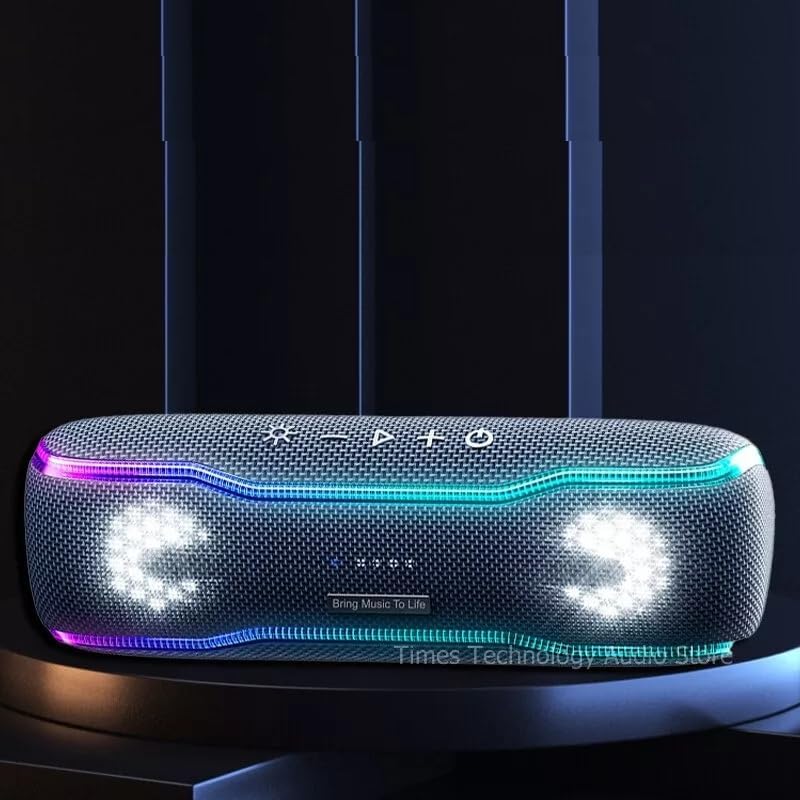
The XDOBO Boss is a portable wireless Bluetooth speaker designed for powerful audio and dynamic lighting effects, suitable for various environments, including outdoor activities.

Front view of the XDOBO Boss Bluetooth Speaker, showcasing its robust design and integrated dynamic lighting elements.
Key Features:
- Powerful Sound: Delivers 30 Watts of loud stereo audio with crisp treble, strong midrange, and deep bass.
- IPX7 Waterproofing: Designed to withstand immersion in water up to 1 meter for 30 minutes, making it ideal for outdoor use.
- Long Battery Life: Provides up to 12 hours of continuous playback on a single charge.
- Dynamic Lighting Effects: Features a variety of lighting effects that synchronize with the rhythm of your music.
- Broad Compatibility: Connects seamlessly with iPhone, iPad, iPod, HTC, computers, and televisions via Bluetooth.

The XDOBO Boss speaker highlighting its 30W loud stereo audio capability, providing clear and powerful sound.
A view of the XDOBO Boss speaker emphasizing its 30W super bass, delivering rich and deep low frequencies.

The XDOBO Boss speaker shown with water splashes, illustrating its IPX7 effective waterproofing for outdoor use.

A person hiking with the portable XDOBO Boss speaker attached to their backpack, demonstrating its suitability for outdoor activities and its 12-hour battery life.

The XDOBO Boss speaker positioned on a beach near the water, highlighting its use as a beach party speaker.
Setup
1. Charging the Speaker
- Connect the provided Type-C charging cable to the speaker's charging port.
- Connect the other end of the cable to a compatible USB power adapter (not included) or a computer's USB port.
- The charging indicator light will illuminate. A full charge takes approximately 4 hours.
- Once fully charged, the indicator light will change or turn off, depending on the model. Disconnect the charging cable.
2. Powering On/Off
- To power on, press and hold the Power button for a few seconds until you hear an audible prompt and the indicator lights activate.
- To power off, press and hold the Power button again until the speaker shuts down.
Operating Instructions
1. Bluetooth Pairing
- Ensure the speaker is powered on and in Bluetooth pairing mode (indicated by a flashing Bluetooth light).
- On your device (smartphone, tablet, computer, etc.), enable Bluetooth and search for available devices.
- Select "XDOBO BOSS" from the list of devices.
- Once paired, the Bluetooth indicator light on the speaker will become solid, and you will hear a confirmation sound.
- The speaker will automatically reconnect to the last paired device when powered on, if the device is within range and Bluetooth is enabled.
2. Audio Playback
- Play/Pause: Press the Play/Pause button to start or pause music playback.
- Volume Control: Use the '+' button to increase volume and the '-' button to decrease volume. You can also adjust volume from your connected device.
- Next/Previous Track: Press and hold the '+' button for the next track, and press and hold the '-' button for the previous track.
3. Lighting Effects
The XDOBO Boss speaker features dynamic LED lighting that can be controlled to enhance your listening experience. Refer to the speaker's control panel for specific buttons related to lighting modes. Typically, a dedicated light button allows you to cycle through different effects or turn them off.
4. Auxiliary Input (3.5mm Audio Cable)
For devices without Bluetooth, connect one end of the 3.5mm audio cable to the speaker's AUX input port and the other end to your audio source's headphone jack. The speaker will automatically switch to AUX mode.
Maintenance
- Cleaning: Use a soft, dry cloth to wipe the speaker's surface. Do not use abrasive cleaners or solvents.
- Waterproofing: While the speaker is IPX7 waterproof, ensure the charging port and AUX port covers are securely closed before exposing it to water. After exposure to water, wipe the speaker dry before charging.
- Storage: Store the speaker in a cool, dry place away from direct sunlight and extreme temperatures. If storing for an extended period, charge the battery periodically to maintain its health.
- Battery Care: Avoid fully depleting the battery frequently. For best battery longevity, charge it before it completely runs out.
Troubleshooting
| Problem | Possible Cause | Solution |
|---|---|---|
| Speaker does not power on. | Battery is low or depleted. | Charge the speaker fully. |
| No sound from speaker. | Volume is too low; Speaker not paired; Incorrect input mode. | Increase volume on speaker and device; Ensure successful Bluetooth pairing; Switch to correct input mode (Bluetooth/AUX). |
| Bluetooth connection fails. | Speaker is out of range; Device Bluetooth is off; Speaker is paired to another device. | Move speaker closer to device; Enable Bluetooth on your device; Disconnect from other devices and try pairing again. |
| Sound distortion. | Volume too high; Low battery. | Reduce volume on speaker and device; Charge the speaker. |
Specifications
| Feature | Detail |
|---|---|
| Model Name | BOSS |
| Brand | XDOBO |
| Speaker Type | Outdoor |
| Connectivity Technology | Bluetooth |
| Max Speaker Output Power | 30 Watts |
| Frequency Response | 20 Hz |
| Signal-to-Noise Ratio | 90 dB |
| Waterproof Rating | IPX7 |
| Battery Life | 12 Hours |
| Charging Time | 4 Hours |
| Power Source | Battery |
| Input Voltage | 5 Volts (DC) |
| Product Dimensions | 7D x 21W x 7H centimeters |
| Compatible Devices | Tablet, Laptop, Television, Smartphone |
| Included Components | Bluetooth Speaker, 3.5mm Audio Cable, Type-C Charging Cable, Instruction Manual |
Warranty and Support
The XDOBO Boss Wireless Bluetooth Speaker comes with a Limited Warranty. For detailed warranty terms and conditions, please refer to the warranty card included in your package or contact XDOBO customer support.
If you encounter any issues or have questions not covered in this manual, please contact our customer support team for assistance. Please have your product model and purchase information ready when contacting support.
Ask a question about this manual
Ask about setup, troubleshooting, compatibility, parts, safety, or missing instructions. Manuals+ will review the question and use this page’s manual context to help answer it.