
Altec Lansing HydraWave 2.0
Altec Lansing HydraWAVE Portable Bluetooth Speaker
Instruction Manual
Introduction
Welcome to the instruction manual for your new Altec Lansing HydraWAVE Portable Bluetooth Speaker. This speaker is engineered for outdoor use, offering powerful, room-filling sound with 8W RMS output. It features a 12-hour battery life, USB-C quick charge, and seamless Bluetooth connectivity with a range of up to 100 feet. Designed to be IP67 waterproof and to float in water, it is also shockproof, making it ideal for any environment. You can even pair over 100 Hydra speakers for an immersive audio experience.

Figure 1: Altec Lansing HydraWAVE Portable Bluetooth Speaker
Setup
Charging the Speaker
Before first use, fully charge your HydraWAVE speaker. The speaker features a USB-C quick charge function. A full charge takes approximately 3 hours and provides up to 12 hours of continuous playtime.
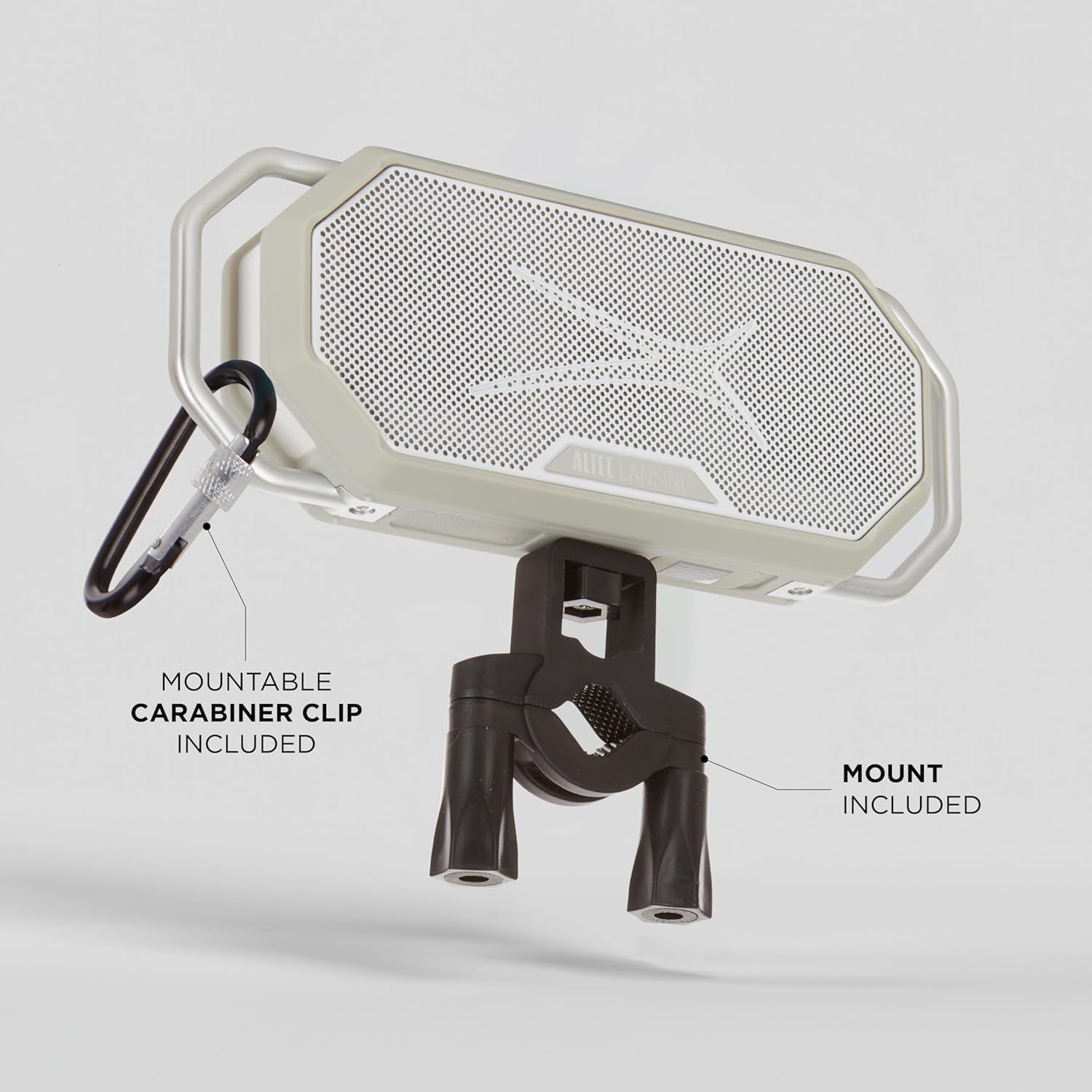
Figure 2: USB-C Charging Port
Bluetooth Pairing
To connect your device to the HydraWAVE speaker via Bluetooth:
- Ensure the speaker is charged and powered on.
- Activate Bluetooth on your smartphone, tablet, or other compatible device.
- Select "HydraWAVE" from the list of available Bluetooth devices.
- Once connected, the speaker will indicate successful pairing.
The speaker offers seamless connectivity with a Bluetooth range of up to 100 feet.
Video 1: Altec Lansing HydraWave Waterproof Bluetooth Speaker Overview. This video demonstrates the speaker's features, including quick charge and Bluetooth pairing.
Operating the Speaker
Controls
The HydraWAVE speaker features intuitive controls located on the top panel:
- Power Button: Press and hold to turn the speaker on or off.
- Volume Down (-): Decrease playback volume.
- Voice Assistant Button (Microphone Icon): Activate your device's voice assistant (e.g., Siri, Google Assistant).
- Volume Up (+): Increase playback volume.
- Pairing Button (Chain Link Icon): Initiate True Wireless Stereo pairing with another Hydra speaker.

Figure 3: Speaker Control Buttons
True Wireless Stereo (Party Sync)
Enhance your audio experience by wirelessly connecting two or more Hydra speakers for true wireless stereo sound. The Hydra 2.0 series allows you to connect over 100 speakers simultaneously for a massive sound experience, perfect for large gatherings or events.

Figure 4: The Hydra Family of Speakers, demonstrating Party Sync capability
Portability and Mounting
The HydraWAVE is designed for life on the move. It includes a handy carabiner clip and a speaker mount, allowing for versatile attachment to your gear, bike, or other surfaces.

Figure 5: Speaker Mounted on Bicycle Handlebars
Maintenance
The Altec Lansing HydraWAVE speaker is built to withstand various outdoor conditions. It is IP67 waterproof, meaning it can be submerged in water up to 1 meter for 30 minutes, and is designed to float. It is also shockproof, providing durability against accidental drops.

Figure 6: Speaker in Wet Environment
To ensure longevity, wipe the speaker clean with a damp cloth after exposure to dirt, sand, or saltwater. Ensure the USB-C port cover is securely closed when not charging to maintain its waterproof integrity.
Troubleshooting
- No Power: Ensure the speaker is fully charged. Connect it to a power source using the provided USB-C cable.
- Cannot Pair Bluetooth: Ensure Bluetooth is enabled on your device and the speaker is in pairing mode. Move the speaker closer to your device. If issues persist, try forgetting the device on your phone's Bluetooth settings and re-pairing.
- Low Volume or Distorted Sound: Check the volume levels on both the speaker and your connected device. Ensure the speaker is not obstructed and is placed on a stable surface.
- Speaker Floats but No Sound: If the speaker has been submerged, ensure all ports are sealed and allow it to dry completely before attempting to use it again.
Specifications
| Feature | Detail |
|---|---|
| Model Name | HydraWave 2.0 |
| Speaker Type | Outdoor |
| Special Features | Waterproof (IP67), Built-In Microphone, Shockproof, Floats in Water |
| Output Power | 8W RMS (4W x 2) |
| Battery Life | Up to 12 Hours |
| Charging Time | 3 Hours (USB-C Quick Charge) |
| Bluetooth Range | 100 ft |
| Connectivity Technology | Bluetooth (BT V5.3 Plus LE Audio) |
| Product Dimensions | 2.5"D x 10.5"W x 5.2"H |
| Item Weight | 1.68 pounds |
| Included Components | Bungee Cord, Speaker Mount, Carabiner |
Warranty and Support
The Altec Lansing HydraWAVE Portable Bluetooth Speaker comes with a Limited Warranty. Please refer to the warranty card included in your product packaging for specific terms and conditions. It is recommended to register your product to activate the warranty.
For technical support, troubleshooting assistance, or warranty claims, please visit the official Altec Lansing website or contact their customer service department. Contact information can typically be found on the product packaging or the Altec Lansing website.
Related documentsHydraWave 2.0

Ask a question about this manual
Ask about setup, troubleshooting, compatibility, parts, safety, or missing instructions. Manuals+ will review the question and use this page’s manual context to help answer it.