
Introduction
Thank you for choosing the Altec Lansing HydraWAVE Portable Bluetooth Speaker. This manual provides essential information for setting up, operating, and maintaining your speaker to ensure optimal performance and longevity. Please read this manual thoroughly before using the product.

The Altec Lansing HydraWAVE Portable Bluetooth Speaker in black, showcasing its rugged design and integrated handles.
What's in the Box
The Altec Lansing HydraWAVE speaker package includes the following items:
- Altec Lansing HydraWAVE Portable Bluetooth Speaker
- USB-C Charging Cable
- Carabiner Clip
- Speaker Mount
- Bungee Cord

An overview of the HydraWAVE speaker highlighting its key features and included accessories such as the carabiner clip and bungee cord.
Product Overview
Control Buttons
Familiarize yourself with the control buttons located on the top panel of the speaker:

Detailed view of the speaker's control buttons, including Power, Volume Down, Voice Assistant, Volume Up, and Bluetooth Pairing.
- Power Button (⏻): Press and hold to turn the speaker On/Off.
- Volume Down (-): Press to decrease volume.
- Voice Assistant (🎤): Press to activate your device's voice assistant.
- Volume Up (+): Press to increase volume.
- Pairing Button (Ⓢ): Press to initiate Bluetooth pairing or Party Sync.
Mounting Options
The HydraWAVE speaker offers versatile mounting options for various activities:
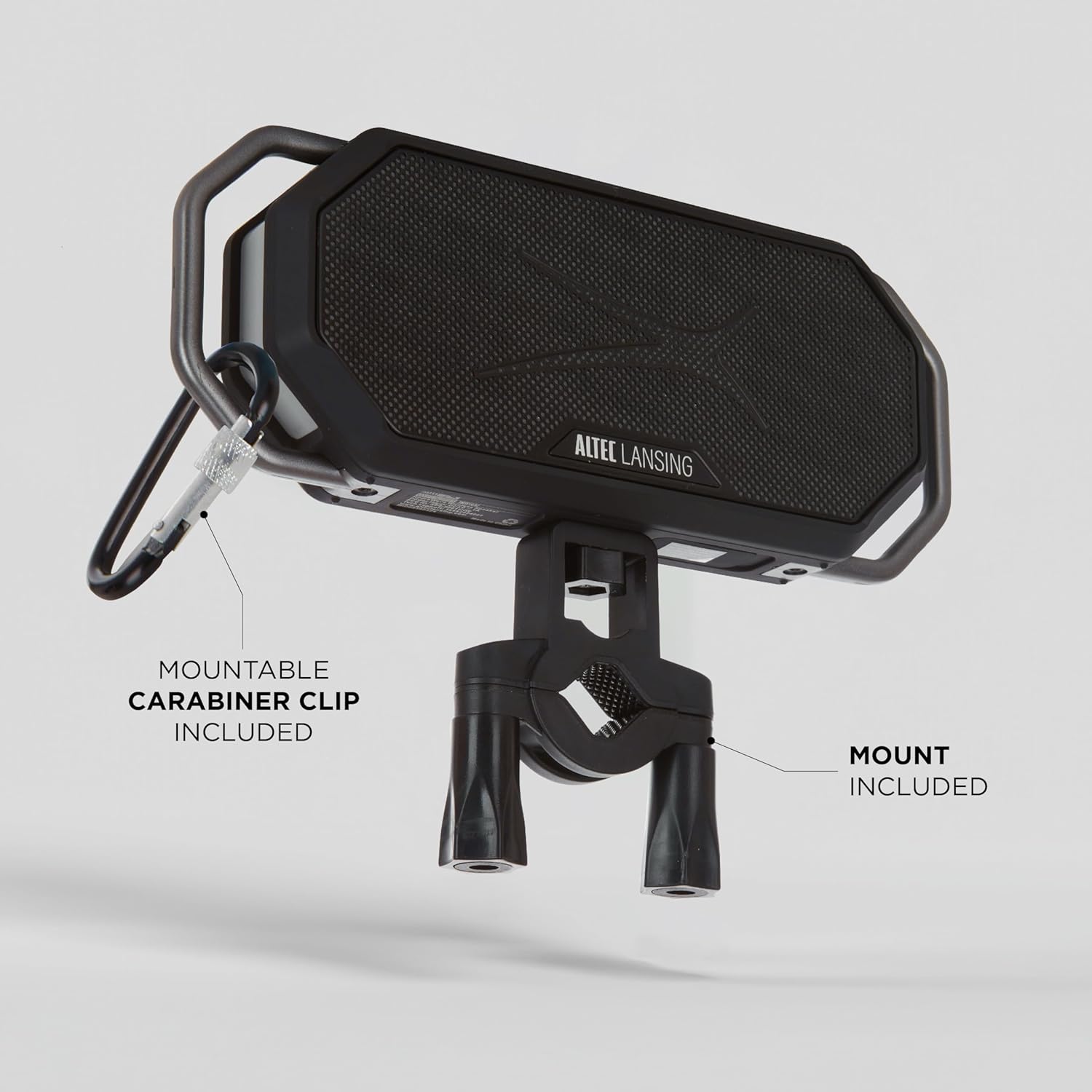
The speaker shown with its included mount and carabiner clip, demonstrating how it can be secured.

The HydraWAVE speaker securely mounted on a bicycle handlebar, ready for outdoor adventures.

The speaker secured to a watercraft using the included bungee cord, highlighting its portability and water-friendly design.
Setup
Charging the Speaker
Before first use, fully charge your HydraWAVE speaker. A full charge takes approximately 3 hours.
- Connect the supplied USB-C charging cable to the speaker's USB-C port.
- Connect the other end of the cable to a USB power adapter (not included) or a computer's USB port.
- The charging indicator light will illuminate during charging and turn off when fully charged.
The speaker provides up to 12 hours of continuous playtime on a single charge.

The HydraWAVE speaker ready for use, demonstrating its compact size and suitability for outdoor environments.
Bluetooth Pairing
Follow these steps to pair your HydraWAVE speaker with a Bluetooth-enabled device:
- Ensure the speaker is charged and powered on.
- The speaker will automatically enter pairing mode, indicated by a flashing LED light.
- On your device (smartphone, tablet, etc.), enable Bluetooth and search for available devices.
- Select "Altec Lansing HydraWAVE" from the list of devices.
- Once connected, the LED light will become solid, and you will hear an audible confirmation.
The speaker has a Bluetooth range of up to 100 feet.
Operating Instructions
Music Playback
- Play/Pause: Press the Power button once.
- Next Track: Press and hold the Volume Up button.
- Previous Track: Press and hold the Volume Down button.
- Volume Control: Press the Volume Up (+) or Volume Down (-) buttons.
Answering Calls
The HydraWAVE speaker features a built-in microphone for hands-free calling:
- Answer/End Call: Press the Power button once.
- Reject Call: Press and hold the Power button.
Voice Assistant
Activate your device's voice assistant through the speaker:
- Activate Voice Assistant: Press the Voice Assistant button once.
Party Sync (True Wireless Pairing)
Connect two HydraWAVE speakers for a true wireless stereo experience or multiple Hydra 2.0 speakers for Party Sync mode:
- Ensure both speakers are powered on and not connected to any Bluetooth device.
- On one speaker (this will be the primary speaker), press and hold the Pairing button until you hear a tone.
- On the second speaker, press the Pairing button once. The speakers will connect automatically.
- Once connected, the primary speaker's LED will flash, and the secondary speaker's LED will be solid.
- Now, connect your device to the primary speaker via Bluetooth as described in the "Bluetooth Pairing" section.
You can connect over 100 Hydra 2.0 speakers for an expansive audio experience.
Official product video demonstrating the features and durability of the Altec Lansing HydraWAVE Waterproof Bluetooth Speaker, including its IP67 rating, battery life, mounting options, Bluetooth range, and Party Sync capability.
Maintenance
To ensure the longevity and optimal performance of your HydraWAVE speaker, follow these maintenance guidelines:
- Cleaning: Use a soft, damp cloth to clean the speaker. Do not use harsh chemicals or abrasive cleaners.
- Water Exposure: While the speaker is IP67 waterproof and floats, ensure the charging port cover is securely closed before exposing it to water. After exposure to chlorinated or saltwater, rinse the speaker with fresh water and allow it to dry completely before charging.
- Storage: Store the speaker in a cool, dry place away from extreme temperatures and direct sunlight.
- Battery Care: To preserve battery life, charge the speaker regularly, even if not in frequent use. Avoid fully discharging the battery for extended periods.

The HydraWAVE speaker on wet grass, illustrating its "Everythingproof" design and suitability for various environments.
Troubleshooting
| Problem | Possible Cause | Solution |
|---|---|---|
| Speaker does not turn on. | Battery is depleted. | Charge the speaker fully using the provided USB-C cable. |
| Cannot pair via Bluetooth. | Speaker is not in pairing mode; device Bluetooth is off; speaker is already connected to another device. | Ensure speaker is in pairing mode (flashing LED). Turn off and on Bluetooth on your device. Disconnect from other devices. Move speaker closer to your device. |
| No sound or low volume. | Volume too low on speaker or device; speaker not connected; audio source issue. | Increase volume on both speaker and connected device. Re-establish Bluetooth connection. Check audio source. |
| Party Sync not working. | Speakers not in correct pairing sequence; too far apart. | Ensure both speakers are disconnected from other devices. Follow Party Sync instructions carefully. Keep speakers within range. |
Specifications
- Model Name: HydraWave 2.0
- Item Model Number: IMW1032-BLKLGRY-STK-2
- Brand: Altec Lansing
- Speaker Type: Outdoor
- Connectivity Technology: Wireless (Bluetooth)
- Wireless Communication Technology: Bluetooth
- Bluetooth Range: 100 Feet
- Power Source: Battery Powered
- Battery Life: Up to 12 Hours
- Charging Time: 3 Hours
- Water Resistance Level: IP67 Waterproof (Floats in water)
- Speaker Maximum Output Power: 8 Watts (4W x 2 RMS)
- Audio Output Mode: Stereo
- Product Dimensions: 2.5"D x 10.5"W x 5.2"H
- Item Weight: 1.85 pounds
- Special Features: Built-in Microphone, Party Sync, Shockproof, Voice Assistant Compatible
- UPC: 021331108807
Warranty and Support
The Altec Lansing HydraWAVE Portable Bluetooth Speaker comes with a limited warranty. For detailed warranty information and support, please refer to the warranty card included in your product packaging or visit the official Altec Lansing website.
For further assistance, you may contact Altec Lansing customer support through their official channels. Keep your purchase receipt as proof of purchase for warranty claims.
Manufacturer: Altec Lansing Technologies
For more products and information, visit the Altec Lansing Store on Amazon.
