
Important Safety Instructions
Please read and understand all safety instructions before assembly and use. Failure to follow these instructions may result in injury or damage to the product.
- Always unplug the vanity desk before assembly or disassembly.
- Be cautious of sharp edges and pinch points during assembly.
- Do not use the vanity desk if the charging station or lights are damaged.
- Keep the vanity desk away from water and heat sources.
- Do not place heavy objects on the vanity desk that could cause it to tip over.
Product Overview
The KAI-ROAD Girls Vanity Desk with Mirror and Lights is designed to provide a functional and organized space for personal grooming. This versatile unit includes a vanity desk, a mirror with integrated LED lighting, a comfortable stool, and convenient storage solutions.
- Vanity Mirror with Lights: Features a round mirror with built-in LED lights offering three lighting modes (Cool, Natural, Warm) and stepless brightness adjustment for optimal illumination.
- Clutter-Free Organization: Equipped with three spacious fabric drawers, a large side pocket, and two removable hooks to store makeup, accessories, and other essentials.
- Comfortable Stool: A thick-sponged PU padded stool is included for comfortable seating during use.
- Built-in Power Outlet: Includes two standard plug sockets and two USB ports for convenient charging of electronic devices and powering beauty tools.
- Versatile Design: This unit can function as a vanity desk, a workspace, or a compact computer desk, suitable for various room types.
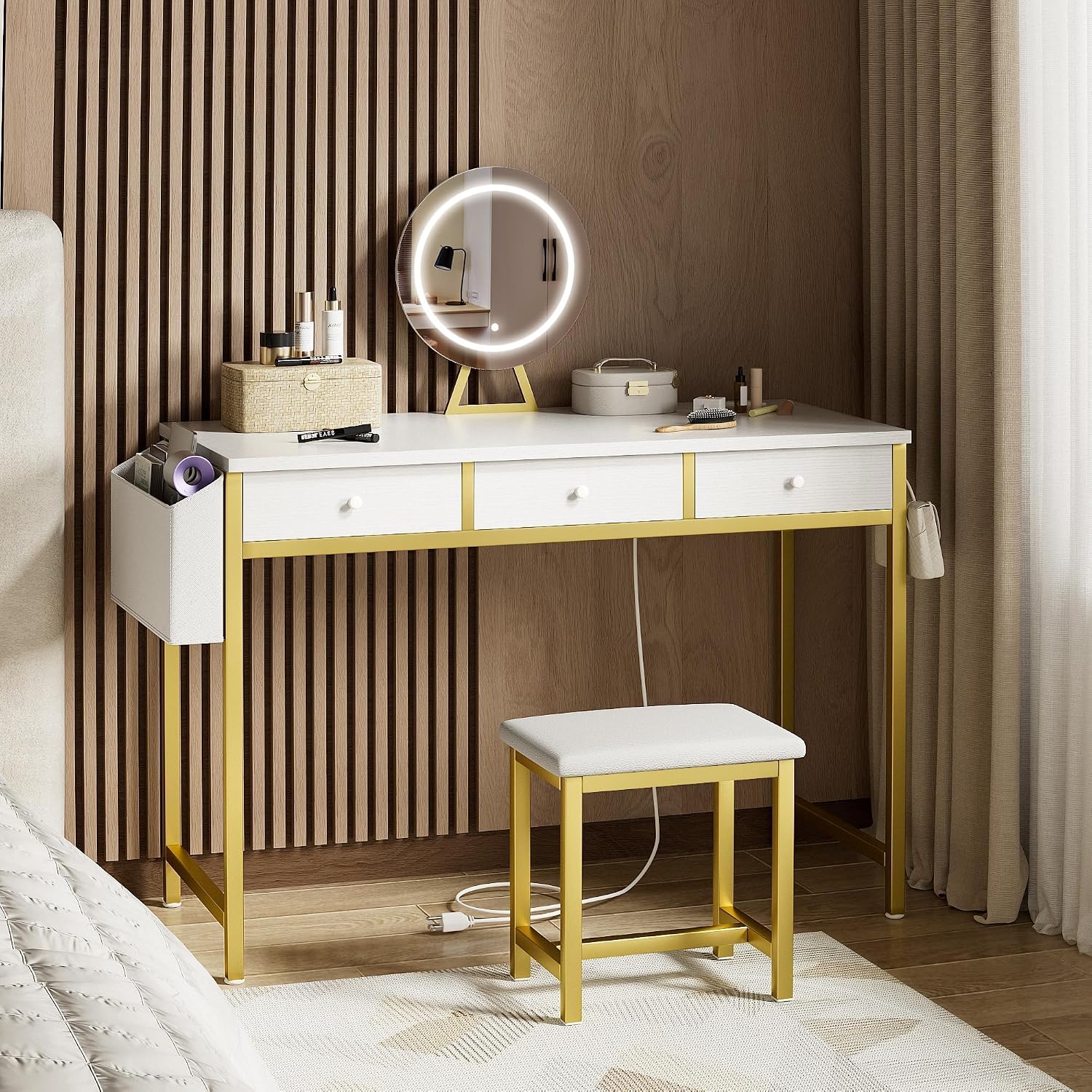
Image: KAI-ROAD Girls Vanity Desk with Mirror and Lights in a bedroom setting.
Package Contents
Please refer to the packaging list provided with your product for a complete and accurate list of all included components and hardware.
Setup and Assembly Instructions
Assembly is designed to be straightforward. Follow the step-by-step instructions provided in the included assembly manual. Ensure all parts are present before beginning assembly.
- Unpack all components and verify against the parts list.
- Assemble the desk frame by attaching the legs to the tabletop using the provided hardware.
- Insert the fabric drawers into their designated slots.
- Assemble the mirror stand and attach the mirror to the stand. It is recommended to assemble the mirror unit completely before attaching it to the vanity desk to prevent damage.
- Attach the assembled mirror unit to the vanity desk.
- Assemble the stool by attaching the legs to the seat.
- Connect the power cord for the mirror lights and power outlet to a suitable electrical source.

Image: Product dimensions and key features of the vanity desk, including the lighted mirror, heavy-duty metal design, and environmental protection.
Operating Instructions
Mirror Lights Operation
The vanity mirror features integrated LED lights with adjustable brightness and three color modes.
- Power On/Off and Color Mode Selection: Short press the double function button located on the mirror to cycle through the three light color modes (Cool Light, Natural Light, Warm Light) and to turn the lights on or off.
- Brightness Adjustment: Long press the double function button to adjust the brightness of the lights. Release the button when the desired brightness level is reached.

Image: Illustration of stepless brightness adjustment for the vanity mirror lights, showing 100%, 50%, and 10% brightness levels.

Image: Explanation of the three color light modes: Cool Light (6000K, imitating office lighting), Natural Light (97% sunlight lighting), and Warm Light (3000K, imitating dining room lighting).
Built-in Power Outlet
The vanity desk includes a built-in power strip for convenient access to power.
- The power strip features two standard 125V/12A AC outlets and two 5V/2A USB ports.
- Plug the vanity desk's main power cord into a wall outlet to activate the power strip.
- Use the AC outlets for devices requiring standard power, and the USB ports for charging compatible electronic devices.

Image: Close-up of the built-in power strip, detailing its two AC outlets and two USB ports, along with specifications for voltage, amperage, and cord length.
Maintenance
Regular maintenance helps prolong the life and appearance of your vanity desk.
- Cleaning Surfaces: Wipe down the desk surface and mirror with a soft, damp cloth. Avoid abrasive cleaners or harsh chemicals that could damage the finish or mirror coating.
- Fabric Drawers: The fabric drawers can be spot cleaned with a mild detergent and water. Allow to air dry completely before reinserting.
- Electrical Components: Ensure the vanity is unplugged before cleaning any electrical components. Do not spray liquids directly onto the power strip or mirror lights.
- Hardware: Periodically check and tighten all screws and fasteners to ensure stability.
Troubleshooting
If you encounter any issues with your vanity desk, refer to the following common troubleshooting steps:
- Mirror Lights Not Working:
- Ensure the vanity desk is properly plugged into a working electrical outlet.
- Check if the power cord is securely connected to the mirror unit.
- Press the double function button to ensure it is not simply turned off or in a different mode.
- Power Outlets/USB Ports Not Functioning:
- Verify that the vanity desk's main power cord is securely plugged into a live wall outlet.
- Test the wall outlet with another device to confirm it is working.
- Desk or Stool Instability:
- Ensure all assembly screws and fasteners for the desk and stool legs are fully tightened.
- Place the desk on a flat, even surface.
If these steps do not resolve the issue, please contact customer support.
Specifications
| Item Dimensions | 17.7 x 40 x 30.7 inches |
| Brand Name | KAI-ROAD |
| ASIN | B0D5RK6BK1 |
| Power Outlet | 2 AC outlets (125V/12A), 2 USB ports (5V/2A) |
| Mirror Lighting | LED, 3 color modes, stepless brightness adjustment |
Warranty and Support
KAI-ROAD is committed to providing quality products and customer satisfaction. For any questions, concerns, or support needs regarding your vanity desk, please contact our customer service team.
You can typically find contact information through your purchase platform or by visiting the official KAI-ROAD brand store online. When contacting support, please have your model number (B0D5RK6BK1) and purchase details readily available.

Image: General customer support information, illustrating how to find help after an order.