
1. Safety Information
Please read and understand all safety instructions before assembly and use of the KAI-ROAD Small Vanity Desk. Retain this manual for future reference.
- Always unplug the charging station when not in use to prevent electrical hazards.
- Exercise caution during assembly due to potential sharp edges and pinch points.
- Do not place heavy objects on the vanity desk to avoid tipping or structural damage.
- Ensure all connections are secure before using the power outlets and USB ports.
- Keep liquids away from electrical components to prevent short circuits.
2. Product Overview
The KAI-ROAD Small Vanity Desk is designed for makeup application and personal grooming, featuring integrated lighting and power options.
Key Features:
- Round LED Lighted Mirror: Features 3 adjustable color modes (warm, natural, cold) and dimmable brightness.
- Compact Design: Provides ample storage and desktop space suitable for smaller rooms.
- Built-in Charging Station: Includes 2 standard plug sockets and 2 USB ports for convenient device charging.
- Comfortable Seating: Comes with a thick-sponged PU padded stool.
- Storage Solutions: Includes a spacious side pocket and two removable hooks for organization.
- Durable Construction: Crafted from premium materials with a metal frame for stability.

Figure 2.1: KAI-ROAD Small Vanity Desk with Mirror and Lights, showing the desk, mirror, and stool.
Product Dimensions:

Figure 2.2: Detailed product dimensions for the vanity desk and stool.
3. Setup and Assembly
The KAI-ROAD Small Vanity Desk is designed for straightforward assembly. All necessary tools and clear instructions are included in the package. No additional tools are required.
Assembly Steps:
- Unpack all components and verify against the parts list provided in the separate assembly guide.
- Follow the step-by-step instructions in the assembly guide to construct the desk frame.
- Attach the desktop securely to the frame.
- Assemble the stool according to the instructions.
- Install the LED mirror onto the designated area on the desktop.
- Connect the power cord for the mirror and charging station to a suitable wall outlet.
- Attach the side storage pocket and removable hooks as desired.
For detailed visual instructions, refer to the included assembly manual.
4. Operating Instructions
4.1 LED Lighted Mirror
The round LED mirror features adjustable lighting to suit various needs, from home makeup to live broadcasts.
- Changing Color Mode: Lightly touch the power switch icon on the mirror surface to cycle through the three color modes: warm light (3000K), natural light (4000K), and cold light (6000K).
- Adjusting Brightness: Long press the power switch icon to continuously adjust the brightness level within the selected color mode. Release when the desired brightness is achieved.
- Power On/Off: A single short touch of the power switch icon will turn the mirror lights on or off.

Figure 4.1: Illustration of the three adjustable color lighting modes (3000K, 4000K, 6000K) and brightness adjustment for the LED mirror.
4.2 Built-in Power Outlet and USB Ports
The vanity desk includes a convenient charging station to power your electronic devices and beauty tools.
- The charging station is located on the desktop and includes two standard 125V/12A AC outlets and two 5V/2A USB ports.
- Plug in your phone, hair dryer, curling iron, or other compatible devices directly into the available ports.
- Ensure the main power cord of the vanity desk is securely plugged into a wall outlet for the charging station to function.

Figure 4.2: Close-up view of the built-in power strip, showing two standard outlets and two USB ports.
4.3 Storage Features
Utilize the integrated storage options to keep your essentials organized.
- Side Storage Pocket: The spacious fabric pocket attached to the side of the desk is ideal for magazines, tablets, or larger beauty items.
- Removable Hooks: Two hooks are provided to hang bags, headphones, or other accessories, helping to keep your desktop clear. These hooks can be positioned as needed.
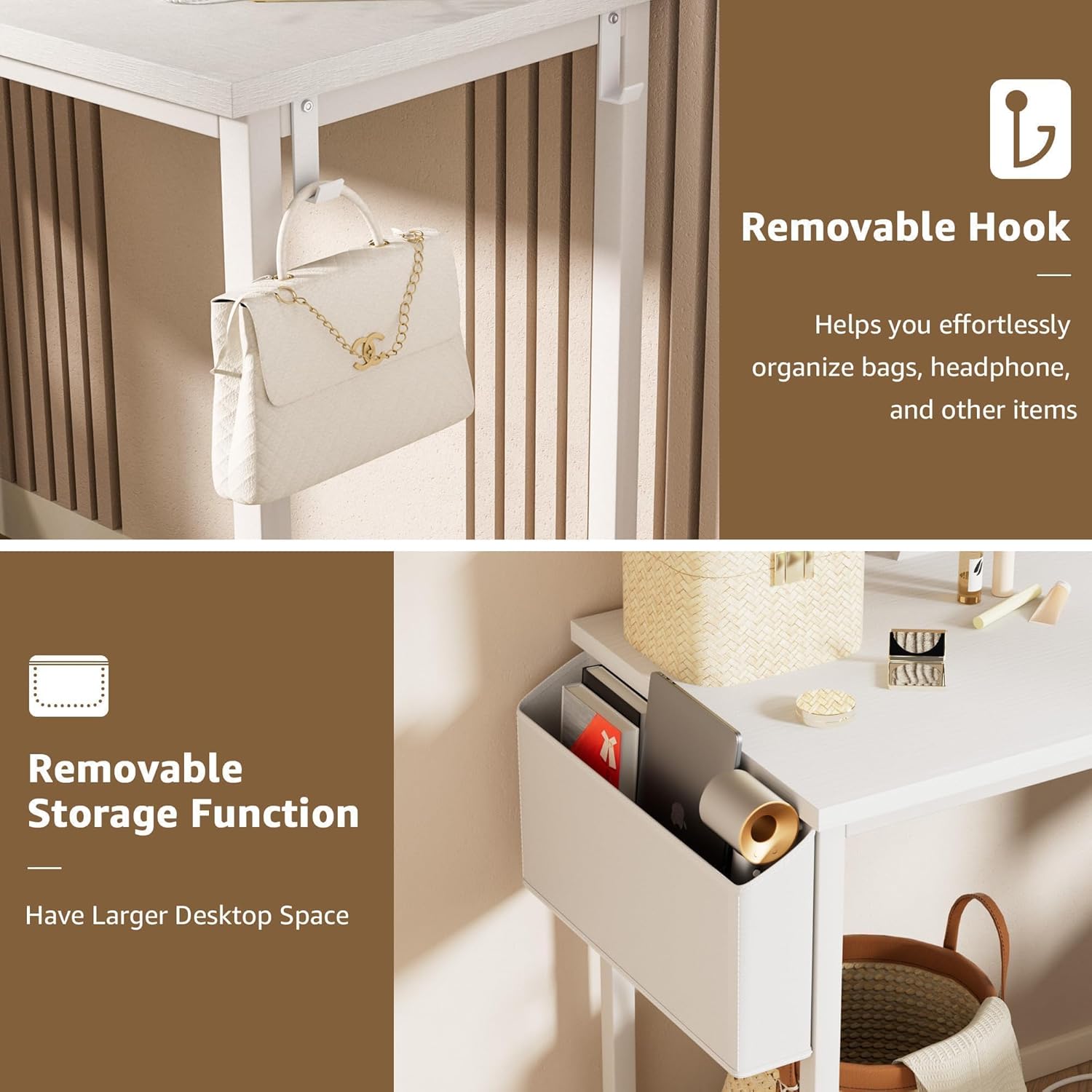
Figure 4.3: Image illustrating the removable side storage pocket and the removable hooks for organizing items.
5. Maintenance and Care
Proper care will ensure the longevity and appearance of your vanity desk.
- Cleaning the Desk: Wipe the desk surfaces with a damp cloth. Avoid harsh chemicals or abrasive cleaners that may damage the finish.
- Cleaning the Mirror: Use a soft, lint-free cloth and a glass cleaner specifically designed for mirrors. Do not spray cleaner directly onto the mirror; apply it to the cloth first.
- Stool Care: The PU padded stool can be wiped clean with a damp cloth. Avoid prolonged exposure to direct sunlight to prevent material degradation.
- Electrical Components: Ensure the charging station and mirror connections are dry and free from dust. Do not attempt to clean electrical components with liquids.
- Regular Checks: Periodically check all screws and fasteners to ensure they remain tight. Tighten if necessary.
6. Troubleshooting
This section addresses common issues you might encounter with your vanity desk.
| Problem | Possible Cause | Solution |
|---|---|---|
| LED mirror lights do not turn on. | Power cord not connected; wall outlet not functioning; mirror switch not activated. | Ensure the vanity desk's main power cord is securely plugged into a working wall outlet. Lightly touch the power switch icon on the mirror. |
| LED mirror lights are dim or not changing color. | Brightness setting is low; incorrect touch input. | Long press the power switch icon to adjust brightness. Lightly touch the icon to cycle through color modes. |
| Charging station (outlets/USB) is not working. | Main power cord disconnected; wall outlet not functioning. | Verify the vanity desk's main power cord is firmly plugged into a live wall outlet. Test the wall outlet with another device. |
| Desk feels wobbly after assembly. | Screws or fasteners are loose. | Carefully re-tighten all assembly screws and fasteners. Ensure the desk is on a level surface. |
7. Specifications
| Feature | Detail |
|---|---|
| Model Number | KLVD80W0D-RML |
| Product Dimensions | 15.7"D x 31.5"W x 30.7"H |
| Item Weight | 24.5 pounds |
| Frame Material | Metal |
| Desktop Material | FSC-Certified Wood |
| Stool Seat Material | Faux Leather |
| Stool Seat Height | 17.7 Inches |
| LED Mirror Lighting Modes | 3 Colors (Warm, Natural, Cold) |
| Power Outlet | 2 Standard AC Outlets (125V/12A) |
| USB Ports | 2 USB Ports (5V/2A) |
| Assembly Required | Yes |
8. Warranty and Support
KAI-ROAD is committed to providing high-quality products and customer satisfaction.
- Warranty: Specific warranty details are typically provided with your purchase documentation. Please refer to the information included in your product packaging or contact customer service for details.
- Customer Service: KAI-ROAD provides professional customer service. If you encounter any quality problems with the desk, an easy and fast replacement is guaranteed.
- Contact Information: For support, questions, or to report any issues, please refer to the contact information provided in your purchase details or on the official KAI-ROAD website.