
Introduction
This manual provides essential information for the installation, maintenance, and troubleshooting of your Kircuit replacement turntable coupler for GE microwaves. This component is crucial for the proper rotation of the microwave's glass turntable, ensuring even heating of food. It is designed for universal compatibility with standard microwave enclosures and specific GE JEM31 series models, helping to extend the lifespan of your appliance.
Setup and Installation
The turntable coupler connects the microwave's motor shaft to the glass turntable, allowing it to rotate. Proper installation is vital for the microwave's functionality.

Image 1: The Kircuit replacement microwave turntable coupler. This black, three-pronged component is designed to fit into the center of the microwave's turntable and engage with the motor shaft.
- Safety First: Before beginning any installation, ensure the microwave oven is unplugged from the power outlet to prevent electrical shock.
- Access the Turntable Area: Open the microwave door. Remove the glass turntable and the roller ring (if present) from the microwave cavity.
- Remove Old Coupler: The old coupler is typically located in the center of the microwave cavity, sitting on the motor shaft. Gently lift it straight up to remove it. If it is broken, carefully remove all pieces.
- Install New Coupler: Align the new Kircuit coupler with the motor shaft in the center of the microwave cavity. Press it down firmly until it seats securely on the shaft. Ensure the three prongs are facing upwards.
- Replace Components: Place the roller ring back into its groove in the microwave cavity. Then, carefully place the glass turntable onto the roller ring, ensuring the center indentation of the turntable aligns with the prongs of the new coupler. The turntable should sit flat and stable.
- Test Functionality: Close the microwave door, plug the microwave back into the power outlet, and perform a test run with a cup of water to ensure the turntable rotates smoothly.
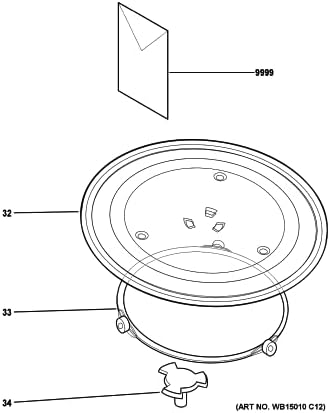
Image 2: An exploded diagram illustrating the microwave turntable assembly. Item 32 represents the glass turntable, item 33 is the roller ring, and item 34 clearly indicates the position and shape of the turntable coupler, showing how it connects the turntable to the motor.
Operating Principle
The turntable coupler acts as the mechanical link between the microwave's turntable motor and the glass turntable. When the microwave is in operation, the motor rotates the coupler, which in turn rotates the turntable. This continuous rotation ensures that microwave energy is distributed evenly across the food, preventing hot spots and promoting uniform cooking.
Maintenance
To ensure the longevity and proper function of your turntable coupler and microwave:
- Regular Cleaning: Periodically remove the turntable and roller ring to clean the microwave cavity, including the area around the motor shaft and coupler. Use a damp cloth and mild detergent. Ensure all parts are dry before reassembling.
- Inspect for Damage: Occasionally inspect the coupler for any signs of wear, cracks, or damage. A damaged coupler can lead to uneven turntable rotation or complete stoppage.
- Avoid Overloading: Do not place excessively heavy items on the turntable, as this can put undue stress on the coupler and motor.
Troubleshooting
If you experience issues with your microwave's turntable, consider the following:
- Turntable Not Spinning:
- Ensure the turntable and roller ring are correctly seated and aligned with the coupler.
- Check if the coupler itself is damaged or broken. Replace if necessary.
- Verify that there are no obstructions (food debris, etc.) preventing the turntable from rotating freely.
- If the coupler is intact and correctly installed, the issue might be with the turntable motor, which may require professional service.
- Unusual Noises During Rotation:
- Check for debris under the turntable or roller ring.
- Ensure the roller ring wheels are clean and not damaged.
- Inspect the coupler for any signs of wear that might cause friction.
Specifications
- Product Type: Microwave Turntable Coupler
- Brand: Kircuit
- Compatibility: Designed for GE Microwave Models JEM31CF01, JEM31CF02, JEM31SF001, JEM31SF01, JEM31SF02, JEM31WF001, JEM31WF01, JEM31WF02. Universal fit for standard microwave enclosures.
- Material: Durable plastic
- ASIN: B0D5QNJTFT
- Date First Available: May 31, 2024
Warranty Information
This product is subject to the seller's return policy. As of the date of purchase, a return policy of 30 days for refund or replacement is typically offered. Please refer to your purchase documentation or contact the seller directly for specific warranty details and return procedures.
Support
For further assistance or inquiries regarding this replacement part, please contact the seller directly through the platform where the purchase was made. Provide your order number and a detailed description of the issue for prompt support.