
Introduction
Welcome to the RLQA Fitness Tracker Band 2 user manual. This guide provides essential information to help you set up, operate, and maintain your new fitness tracker. Please read these instructions carefully to ensure optimal performance and longevity of your device.

The RLQA Fitness Tracker Band 2, showcasing its sleek design and display.
1. Setup
1.1 Unboxing and Initial Charge
Upon unboxing, ensure all components are present:
- RLQA Fitness Tracker Band 2
- Charging Cable
- User Manual
Before first use, fully charge the device. Connect the charging cable to the charging port on the back of the tracker and plug the USB end into a standard USB power adapter (not included) or a computer USB port. A full charge typically takes approximately 2 hours.
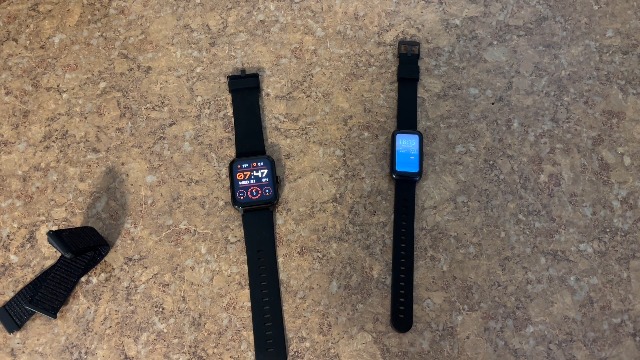
Comparison of two fitness trackers, highlighting the compact size of the RLQA Fitness Tracker Band 2.
1.2 App Installation and Pairing
The RLQA Fitness Tracker Band 2 operates with a dedicated mobile application compatible with Android and iOS devices. Follow these steps to pair your device:
- Download the official RLQA fitness app from your device's app store (Google Play Store for Android, Apple App Store for iOS).
- Ensure Bluetooth is enabled on your smartphone.
- Open the RLQA app and follow the on-screen instructions to create an account or log in.
- Navigate to the 'Device' or 'Add Device' section within the app.
- Select 'RLQA Band 2' from the list of available devices.
- Confirm the pairing request on both your phone and the fitness tracker.
Once paired, the tracker will synchronize data with the app, and you can customize settings such as notifications, alarms, and watch faces.
2. Operating Instructions
2.1 Basic Navigation
The RLQA Fitness Tracker Band 2 features a 1.47-inch touchscreen display for easy navigation. Swipe up, down, left, or right to access different functions and menus. Tap to select an option, and typically swipe right or press the side button (if present) to go back.
2.2 Key Features
Your fitness tracker offers a range of functions to monitor your health and activity:
- Activity Tracking: Records steps taken, distance covered, and calories burned throughout the day.
- Heart Rate Monitoring: Continuously monitors your heart rate. Access real-time data on the device or detailed historical data in the app.
- Blood Pressure Measurement: Provides an estimate of your blood pressure. Note: This feature is for reference only and should not be used for medical diagnosis.
- Blood Oxygen (SpO2) Monitoring: Measures your blood oxygen saturation levels. Note: This feature is for reference only and should not be used for medical diagnosis.
- Sleep Tracking: Monitors your sleep patterns, including deep sleep, light sleep, and awake times.
- Notifications: Receive call, text message, and app notifications directly on your wrist when connected to your smartphone.
- Weather: View current weather conditions and forecasts (requires app synchronization).
- Reminders & Alarms: Set custom reminders for activities or silent alarms.
- Multisport Tracker: Select specific workout modes (e.g., running, walking, cycling) for more accurate tracking during exercise.
- Music Control: Control music playback on your connected smartphone directly from the tracker.

The RLQA Fitness Tracker Band 2 worn on a wrist, demonstrating its comfortable fit and clear display.
2.3 Official Product Videos
For visual guidance on using your RLQA Fitness Tracker Band 2, please refer to the following official videos:
This video provides an overview of the RLQA Fitness Tracker Band 2, highlighting its key features and considerations for potential users.
A comparative video discussing factors to consider when choosing a fitness tracker, featuring the RLQA Fitness Tracker Band 2.
An introductory video showcasing the RLQA Fitness Tracker Band 2 and its various functions.
This video demonstrates the thin wristband design and functionality of the RLQA Fitness Tracker Band 2 on a user's wrist.
3. Maintenance
3.1 Cleaning Your Device
To maintain hygiene and ensure accurate sensor readings, regularly clean your fitness tracker:
- Wipe the screen and band with a soft, damp, lint-free cloth.
- Avoid using harsh chemicals or abrasive materials, as these can damage the device.
- Ensure the charging contacts are clean and dry before charging.
3.2 Water Resistance
The RLQA Fitness Tracker Band 2 is waterproof up to 1.5 meters. It is suitable for daily use, such as washing hands or light rain. However, it is not recommended for swimming, diving, or prolonged exposure to water. Avoid hot water, steam, or high-pressure water jets.
3.3 Battery Care
To prolong battery life:
- Charge the device fully when the battery is low.
- Avoid extreme temperatures, which can affect battery performance.
- If storing the device for an extended period, charge it to about 50% before storage.
4. Troubleshooting
If you encounter issues with your RLQA Fitness Tracker Band 2, refer to the following common solutions:
| Problem | Possible Solution |
|---|---|
| Device not turning on/charging | Ensure the charging cable is securely connected to both the tracker and a working USB power source. Clean charging contacts. Allow device to charge for at least 10 minutes before attempting to power on. |
| Cannot pair with smartphone | Ensure Bluetooth is enabled on your phone. Restart both the tracker and your phone. Make sure the tracker is within Bluetooth range. Check the app for pairing instructions. |
| Inaccurate heart rate/blood pressure/blood oxygen readings | Ensure the tracker is worn snugly on your wrist, not too tight or too loose. Clean the sensor on the back of the device. Avoid excessive movement during measurement. Remember these readings are for reference and not medical grade. |
| Sleep tracking issues | Ensure the tracker is worn consistently during sleep. Verify that the correct sleep tracking settings are enabled in the app. |
| Step count inaccuracies (e.g., on treadmill) | Fitness trackers primarily use arm movement for step detection. Lack of arm swing (e.g., holding handrails on a treadmill) may result in undercounting. Ensure natural arm movement during activities. |
| Notifications not appearing | Check that the tracker is connected via Bluetooth. Verify notification permissions are granted to the RLQA app in your phone's settings. Ensure notification settings are enabled within the RLQA app. |
5. Specifications
| Feature | Detail |
|---|---|
| Model Name | Band 2 |
| Brand | RLQA |
| Operating System | Android & iOS compatible |
| Screen Size | 1.47 Inches |
| Display Type | LCD |
| Connectivity Technology | Bluetooth |
| Battery Capacity | 200 Milliamp Hours |
| Battery Average Life | Up to 15 days |
| Battery Charge Time | 2 Hours |
| Water Resistance Level | Waterproof (1.5 Meters) |
| Metrics Measured | Heart Rate, Blood Pressure, Blood Oxygen, Sleep Duration, Calories Burned, Step Count |
| GPS | Built-in GPS |
| Band Material Type | Silicone |
| Item Dimensions | 10.2 x 1.06 x 0.67 inches |
| Item Weight | 85 Grams |
6. Warranty Information
The RLQA Fitness Tracker Band 2 comes with a 1-year warranty from the date of purchase. This warranty covers manufacturing defects and malfunctions under normal use. It does not cover damage caused by misuse, accidents, unauthorized modifications, or normal wear and tear. Please retain your proof of purchase for warranty claims.
7. Customer Support
For further assistance, technical support, or warranty inquiries, please refer to the contact information provided on the product packaging or the official RLQA website. Our customer service team is available to help you with any questions or concerns regarding your RLQA Fitness Tracker Band 2.