
1. Introduction
This manual provides detailed instructions for the installation, operation, and maintenance of your JOYLIT RGBCCT COB LED Strip Light. Please read this manual thoroughly before use to ensure proper function and safety.

Image 1.1: JOYLIT RGBCCT COB LED Strip Light demonstrating various color and white light options.
Product Features:
- Dual Lighting Modes: Offers vibrant RGB colors (16 million hues) and adjustable white light from warm 2700K to cool 6500K.
- Advanced COB Technology: Features 840 LEDs per meter for a smooth, uniform, and dot-free light output.
- Easy Installation: Equipped with strong pre-applied adhesive backing for simple peel-and-stick mounting.
- Flexibility: Can be cut at marked points (every 1.38 inches / 3.5 cm) for custom lengths.
- High Brightness & Reliability: Operates on 24V low-voltage for safety, reduced heat, and stable output.
- Indoor Use: Designed for indoor, dry locations only.
2. Setup and Installation
Follow these steps to properly install your LED strip light. Please note that a 24V DC power supply (rated at least 4A for 16.4ft length) and a compatible RGBCCT controller are required and sold separately.
2.1 Components Required (Sold Separately):
- JOYLIT RGBCCT COB LED Strip Light (included)
- 24V DC Power Supply (e.g., 24V 150W Power Supply)
- Compatible RGBCCT LED Controller (e.g., Zigbee LED Controller, RGBCCT LED Controller with Remote)
- Power cords (not included)
- Cables (not included)
- Flathead Screwdriver (not included)

Image 2.1: Connection diagram for the LED strip, controller, and power supply.
2.2 Installation Steps:
- Preparation: Gather all necessary components including the LED strip, power supply, controller, cables, and a screwdriver.
- Cutting (Optional): If a shorter length is desired, cut the LED strip only at the designated cut marks, which occur every 1.38 inches (3.5 cm). Use sharp scissors to ensure a clean cut.
- Connecting the Power Input: Connect the AC power input wires to your 24V DC power supply. Ensure correct polarity (positive to '+' and negative to '-'). Refer to the power supply's manual for specific instructions.
- Connecting the Power Output to Controller: Connect the DC output from the power supply to the input terminals of your RGBCCT LED controller. Pay close attention to polarity: '+' to '+' and '-' to '-'.
- Connecting the LED Strip to Controller: Connect the wires from the RGBCCT LED strip to the corresponding output terminals on the controller. Match the colors (e.g., Red to R, Green to G, Blue to B, Warm White to WW, Cold White to CW, and V+ to V+).
- Mounting the Strip: Peel off the protective backing from the adhesive tape on the back of the LED strip. Press the strip firmly onto a clean, dry, and flat surface.
- Safety Check: Before powering on, double-check all connections to ensure they are secure and correctly wired.

Image 2.2: Illustration of cutting the LED strip at marked points and applying it using the peel-and-stick adhesive.
Video 2.1: A visual guide demonstrating the connection process for the JOYLIT RGBCCT COB LED Strip, controller, and power supply.
Video 2.2: Important safety information regarding handling the wire at the end of the LED strip, advising not to touch the PCB directly.
3. Operating Instructions
Once installed, operate your JOYLIT RGBCCT COB LED Strip Light using a compatible controller (not included). The controller allows for various lighting adjustments.
3.1 Power On/Off:
Use the power button on your controller or remote to turn the LED strip on or off.
3.2 Color and White Light Adjustment:
- RGB Colors: Select from 16 million vibrant colors to create various moods and effects.
- Tunable White: Adjust the white light temperature from warm 2700K to cool 6500K to suit different tasks or times of day.

Image 3.1: Demonstrating the wide range of RGB and CCT white light colors available.
3.3 Brightness Control:
Adjust the brightness level from 1% to 100% using your controller. The COB technology ensures smooth dimming without flickering.
3.4 Lighting Uniformity:
The advanced COB (Chip-on-Board) technology with 840 LEDs per meter provides a seamless, uniform ribbon of light, eliminating the dotted appearance often seen with traditional SMD LED strips.
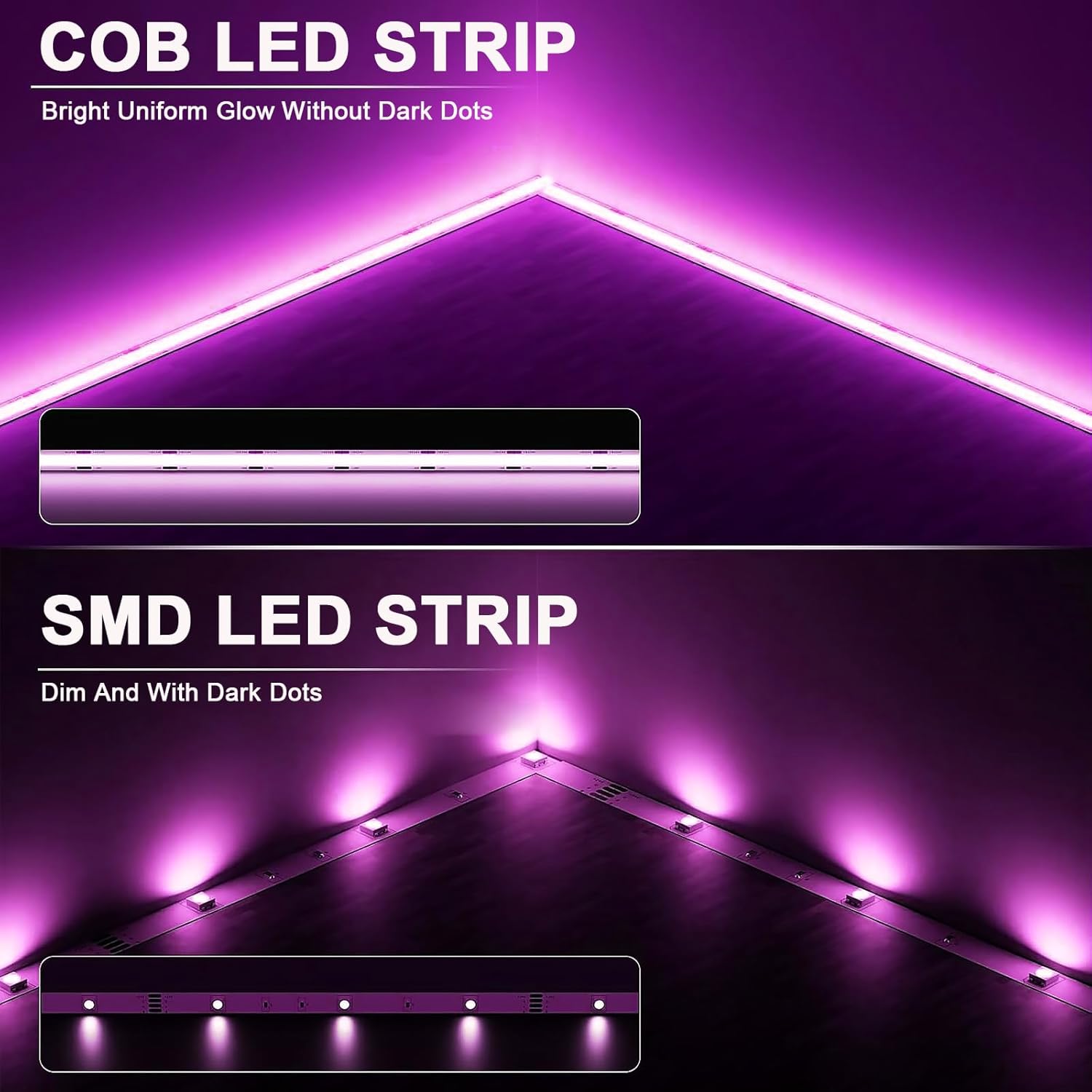
Image 3.2: Visual comparison of COB LED strip (dot-free) versus SMD LED strip (with visible dots).
Video 3.1: Demonstration of the JOYLIT 24V RGBCCT COB LED Strip Lights, highlighting their brightness and color capabilities.
4. Maintenance
Proper maintenance ensures the longevity and optimal performance of your LED strip light.
4.1 Cleaning:
Gently wipe the LED strip with a soft, dry cloth to remove dust. Do not use liquid cleaners or abrasive materials, as these can damage the strip or its components.
4.2 Environmental Conditions:
This LED strip is designed for indoor, dry locations only. Avoid exposure to moisture, high humidity, or extreme temperatures, as this can lead to malfunction or damage.
4.3 Inspection:
Periodically inspect the strip and connections for any signs of wear, damage, or loose wiring. Address any issues promptly to prevent further problems.
5. Troubleshooting
If you encounter issues with your LED strip light, refer to the following common problems and solutions:
| Problem | Possible Cause | Solution |
|---|---|---|
| LED strip does not light up. |
|
|
| Incorrect colors or flickering. |
|
|
| Adhesive not holding. |
|
|
6. Specifications
| Feature | Detail |
|---|---|
| Model Number | COB-24V-840-5M-RGBCCT |
| Brand | JOYLIT |
| Color | RGB+CCT |
| Indoor/Outdoor Usage | Indoor |
| Special Features | Color Changing, Cuttable, Dimmable, Dotless, Energy Efficient |
| Light Source Type | LED |
| Power Source | DC 24V (Power supply sold separately) |
| Light Color | RGB+2700-6500K CCT |
| Material | Copper |
| Color Temperature | 2700 Kelvin - 6500 Kelvin |
| Controller Type | Remote Control, Voice Control (Controller sold separately) |
| Number of Light Sources | 4200 (840 LEDs/meter) |
| Voltage | 24 Volts (DC) |
| Wattage | 90 watts (Max compatible) |
| Ingress Protection Code Rating | IP20 |
| Item Length | 16.4 Feet (5 Meters) |
| Color Rendering Index (CRI) | 90.0 |
| Package Dimensions | 7.95 x 7.28 x 0.67 inches |
| Item Weight | 4.6 ounces |
For more detailed product information, including energy efficiency data, please refer to the EPREL database (QR code link).
7. Warranty Information
JOYLIT products are manufactured to high-quality standards. For specific warranty details, including coverage and duration, please refer to the warranty information provided at the time of purchase or contact JOYLIT customer support directly. Keep your proof of purchase for warranty claims.
8. Customer Support
If you have any questions, require technical assistance, or need further support regarding your JOYLIT RGBCCT COB LED Strip Light, please contact JOYLIT customer service through the official JOYLIT Store on Amazon or via their designated support channels.
Visit the JOYLIT Store for more products and support resources.