
1. Introduction
The LD Systems ANNY 10 BPH 2 is a portable, battery-powered PA system designed for versatile audio applications. It features a 10-inch woofer, 1-inch tweeter, integrated 6-channel mixer, Bluetooth 5.0 connectivity, and includes two headset microphones with bodypack transmitters. This manual provides essential information for the safe and efficient operation of your ANNY 10 BPH 2 system.
Key features include:
- Integrated 6-channel mixer with 3-band EQ, reverb, and delay effects.
- Long battery life: up to 25 hours in ECO mode, 5 hours at maximum volume.
- Two headset microphones with bodypack transmitters (B47 470-490 MHz frequency band).
- Bluetooth 5.0 with AAC codec for wireless audio streaming.
- True Wireless Stereo (TWS) functionality for linking two ANNY 10 units.
- DynX® DSP (Gen. 2) for clear, distortion-free sound.
- Versatile inputs: 2x microphone/line combo, 1x stereo (3.5mm jack/RCA).
- Priority/ducking mode for microphone announcements.
- Integrated wheels and telescopic handle for easy transport.
- USB-C port for charging external devices and integrated tablet/smartphone holder.
- Footswitch input for hands-free effect control.
2. Safety Instructions
Please read and follow all safety instructions to prevent damage to the device or personal injury. Keep this manual for future reference.
- Power Source: Only use the specified power adapter and ensure the voltage matches the device requirements.
- Batteries: Use only the specified battery types for bodypacks (AA) and ensure correct polarity. Do not expose batteries to excessive heat or direct sunlight.
- Water and Moisture: Do not expose the device to rain, moisture, or liquids. Do not place objects filled with liquids on the device.
- Heat: Keep the device away from heat sources such as radiators, heat registers, stoves, or other heat-producing appliances.
- Ventilation: Ensure adequate ventilation. Do not block any ventilation openings.
- Cleaning: Disconnect the device from the power supply before cleaning. Use a dry, soft cloth. Do not use liquid cleaners or aerosols.
- Servicing: Do not attempt to service this product yourself. Refer all servicing to qualified service personnel.
- Placement: Place the device on a stable, level surface. Avoid placing it in locations where it could fall or be knocked over.
- Hearing Protection: Prolonged exposure to high volume levels can cause permanent hearing damage. Adjust volume to a comfortable level.
- Radio Frequency: The wireless microphones operate within specific frequency bands. Ensure compliance with local regulations for wireless device usage.
3. Package Contents
Carefully unpack your ANNY 10 BPH 2 system and verify that all items are present and in good condition:
- 1x ANNY 10 Portable PA System
- 2x Wireless Receiver Modules (integrated)
- 2x Bodypack Transmitters
- 2x Headset Microphones
- AA Batteries (for bodypacks)
- Power Cable
- User Manual (this document)
4. Product Overview
Familiarize yourself with the main components and controls of your ANNY 10 BPH 2 system.
4.1 Front and Rear Panels
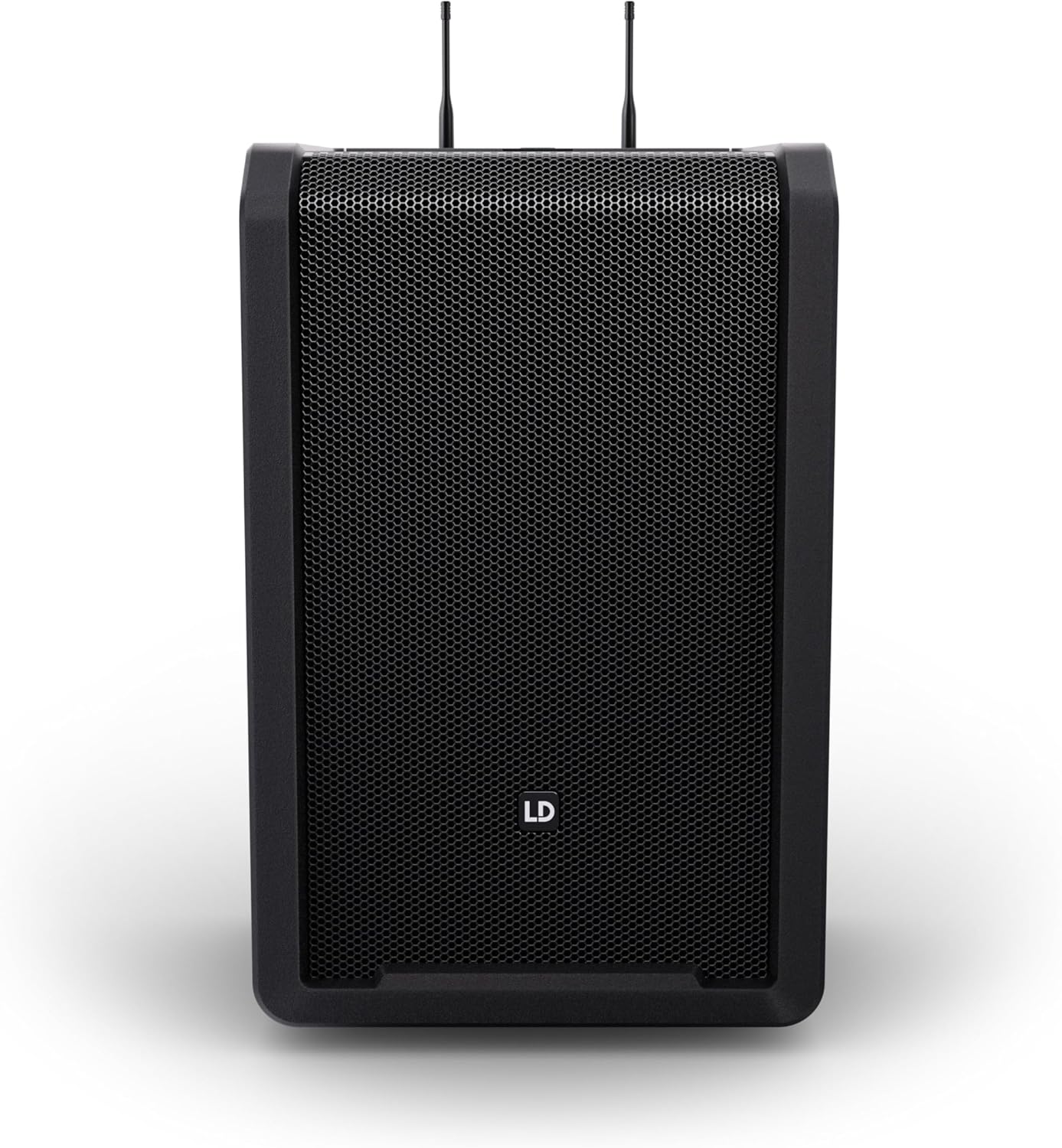
The front panel features the main speaker grille, protecting the 10-inch woofer and 1-inch tweeter.

The rear panel houses the integrated 6-channel mixer, input/output connections, wireless receiver modules, and power controls.
4.2 Transport Features

The ANNY 10 is equipped with integrated wheels and a telescopic handle, allowing it to be easily pulled like a trolley. Two sturdy handles are also provided for lifting.
4.3 Wireless Components

The BPH 2 variant includes two headset microphones and two bodypack transmitters, which wirelessly connect to the integrated receivers on the ANNY 10 unit.
5. Setup
5.1 Initial Power-Up and Charging
- Connect the supplied power cable to the ANNY 10's power input and a suitable AC outlet.
- The internal battery will begin charging. A full charge is recommended before first use for optimal battery life.
- The ANNY 10 can be operated while charging.
5.2 Headset Microphone and Bodypack Setup
- Open the battery compartment of each bodypack transmitter.
- Insert the included AA batteries, observing correct polarity.
- Connect the headset microphone to the bodypack transmitter's input.
- Power on the bodypack transmitter. The integrated receiver modules on the ANNY 10's rear panel will automatically detect and pair with the transmitters.
- Adjust the volume for each wireless microphone using the dedicated controls on the ANNY 10's rear panel.
5.3 Connecting Audio Sources
- Microphone/Line Inputs (Channels 1 & 2): Use XLR or 1/4-inch TRS cables to connect wired microphones or line-level instruments/devices. Adjust input gain as needed.
- Stereo Input (Channel 3/4): Connect devices like smartphones, laptops, or media players using a 3.5mm stereo jack or RCA cables.
- Bluetooth Pairing:
- Activate Bluetooth on your source device (e.g., smartphone, tablet).
- On the ANNY 10, select the Bluetooth input. The display will indicate pairing mode.
- Search for "ANNY 10" in your device's Bluetooth settings and select it to pair.
- Once paired, audio from your device will stream wirelessly to the ANNY 10.
5.4 True Wireless Stereo (TWS) Setup
To link two ANNY 10 units for stereo sound:
- Ensure both ANNY 10 units are powered on and not currently paired with any Bluetooth device.
- On one ANNY 10 (this will be the master unit), activate TWS pairing mode (refer to the unit's display or specific button if available).
- On the second ANNY 10 (slave unit), activate TWS pairing mode.
- The units will automatically connect. Once connected, pair your Bluetooth source device to the master ANNY 10.
- Audio will now play in stereo across both units.
6. Operating Instructions
6.1 Mixer Controls
The ANNY 10 features an intuitive 6-channel mixer on its rear panel:
- Input Gain: Adjust the input sensitivity for each channel (Mic/Line 1, Mic/Line 2, Stereo 3/4, Wireless 1, Wireless 2, Bluetooth).
- 3-Band EQ: Use the HIGH, MID, and LOW controls to shape the tone of your overall mix.
- Reverb & Delay: Apply spatial effects to your audio. Adjust the effect level for individual channels and the overall effect send.
- Master Volume: Controls the overall output level of the PA system.
6.2 Application Presets
The ANNY 10 offers 5 DSP presets to optimize sound for different scenarios:
- MUSIC: Optimized for general music playback, providing a balanced and full sound.
- LIVE: Suitable for live performances, enhancing vocal and instrument clarity.
- VOCAL: Specifically tuned to make vocals stand out, ideal for speeches or singing.
- ECO: Energy-saving mode, extending battery life for background music or voice-only applications (up to 25 hours).
- FLAT: Provides a neutral frequency response, useful for precise sound engineering or when using external processors.
Select the desired preset via the dedicated button or menu option on the control panel.
6.3 Priority Function (Ducking)
The "Priority" function automatically attenuates background music when a selected microphone input is active. This ensures clear announcements.
- Access the priority settings on the ANNY 10's control panel.
- Select the microphone input(s) you wish to prioritize.
- When audio is detected on the prioritized microphone, other audio sources will be automatically lowered.
6.4 Footswitch Control
Connect an external footswitch (not included) to the footswitch input to toggle reverb and delay effects hands-free during performances.
6.5 USB-C Charging Port
An integrated USB-C port is available on the rear panel for charging smartphones or tablets. Place your device in the integrated holder for convenience.
7. Maintenance
7.1 Cleaning
- Always disconnect the ANNY 10 from the power supply before cleaning.
- Use a soft, dry, lint-free cloth to wipe down the exterior surfaces.
- For stubborn dirt, a slightly damp cloth with mild soap can be used, followed by a dry cloth.
- Do not use abrasive cleaners, solvents, or chemical sprays, as these can damage the finish.
- Keep the speaker grille free of dust and debris. Use a soft brush or vacuum cleaner with a brush attachment if necessary.
7.2 Battery Care
- For the main ANNY 10 unit, fully charge the internal battery regularly, especially if storing the unit for extended periods.
- If the unit will not be used for a long time, store it with a partial charge (around 50%) in a cool, dry place.
- For the bodypack transmitters, remove AA batteries if they will not be used for an extended period to prevent leakage.
- Replace bodypack batteries promptly when the low battery indicator appears.
7.3 Storage
When not in use, store the ANNY 10 BPH 2 system in a dry, dust-free environment, away from extreme temperatures and direct sunlight. Consider using an optional transport bag for added protection.
8. Troubleshooting
If you encounter issues with your ANNY 10 BPH 2 system, refer to the following common problems and solutions:
| Problem | Possible Cause | Solution |
|---|---|---|
| No sound output |
|
|
| Wireless microphone not working |
|
|
| Bluetooth pairing issues |
|
|
| Distorted sound |
|
|
9. Specifications
| Feature | Detail |
|---|---|
| Model | ANNY 10 BPH 2 |
| Item Model Number | LDS-ANNY10BPH2B47US |
| Manufacturer | LD Systems |
| Product Dimensions (L x W x H) | 12 x 14 x 22 inches |
| Item Weight | 53 pounds |
| Speaker Configuration | 10-inch Woofer, 1-inch Tweeter |
| Mixer Channels | 6 |
| Wireless Microphones | 2x Headset Microphones with Bodypack Transmitters |
| Wireless Frequency Band | B47 (470-490 MHz) |
| Bluetooth Version | 5.0 (with AAC codec) |
| Battery Life (Main Unit) | Up to 25 hours (ECO mode), 5 hours (max. volume) |
| Bodypack Batteries | AA batteries (included) |
| USB-C Port | For charging external devices |
| Mounting Type | Tabletop, Speaker Stand (35mm pole mount) |
| Compatible Devices | Headset, various audio sources via inputs |
10. Warranty and Support
10.1 Warranty Information
LD Systems products are designed for reliability and performance. This product is covered by a manufacturer's warranty against defects in materials and workmanship. Specific warranty terms and duration may vary by region and retailer. Please retain your proof of purchase for warranty claims.
For detailed warranty information, please refer to the warranty card included with your product or visit the official LD Systems website.
10.2 Customer Support
Should you require technical assistance, troubleshooting, or have questions regarding your ANNY 10 BPH 2 system, please contact LD Systems customer support or your authorized dealer.
You can typically find support contact information on the official LD Systems website: www.ld-systems.com
When contacting support, please have your product model number (ANNY 10 BPH 2) and serial number ready.


