
VAYDEER X3 Plus
Vaydeer Smart Mouse Jiggler X3 Plus Instruction Manual
Introduction
Thank you for choosing the Vaydeer Smart Mouse Jiggler X3 Plus. This device is designed to keep your computer active by simulating mouse movement, preventing screen timeouts and status changes without requiring software installation. It features innovative pass-through technology, smart activation, and multiple movement modes for seamless integration into your workflow.
Key Features
- Innovative Pass-Through Technology: Ensures your computer detects only the connected mouse, making the jiggler 100% undetectable by IT systems.
- Smart Activation: Automatically activates if the mouse remains stationary for a customizable period (0-30 minutes), preventing screen timeouts.
- 3 Movement Modes with LED Display: Choose from small, wide, or barely noticeable jiggle tracks, indicated by an LED display.
- Plug & Play: No drivers or software required for operation. Simply connect and use.
- Refined Aesthetics and Durability: Features a robust metal casing with an elegant black finish.
- User-Friendly Functionality: Operates as a USB extension for your mouse, ensuring no electronic handshakes with your PC.
Package Contents
- 1 x Vaydeer Smart Mouse Jiggler X3 Plus
- 1 x USB Cable (for connecting your mouse)
Setup Instructions
- Connect the Jiggler: Plug the Vaydeer Smart Mouse Jiggler X3 Plus into an available USB port on your computer.
- Connect Your Mouse: Plug your wired or wireless mouse's USB receiver/cable into the USB port on the Vaydeer Smart Mouse Jiggler X3 Plus.
- Power On: The device will power on automatically. No additional drivers or software installation is required.

Image: The Vaydeer Smart Mouse Jiggler X3 Plus connected between a laptop and a mouse, illustrating the auto-start when the mouse is not in use and auto-stop when the mouse is in use. The device ensures your mouse is always connected.
Operating Instructions
The Vaydeer Smart Mouse Jiggler X3 Plus features an LED display and three control buttons for easy operation.

Image: A close-up view of the Vaydeer Smart Mouse Jiggler X3 Plus, highlighting its HD digital display showing current track, countdown timer, and mouse status. The three buttons for Track Switch, Timer Adjustment, and ON/OFF are also visible.
Controls and Display:
- LED Display: Shows the current movement track, countdown timer (in seconds or minutes), and mouse status (active/inactive).
- Track Switch Button: Cycles through the three available movement modes.
- Timer Adjustment Button: Adjusts the delay before automatic activation (0-30 minutes).
- ON/OFF Button: Activates or deactivates the device. When deactivated, the mouse pointer will not move.
Movement Modes:
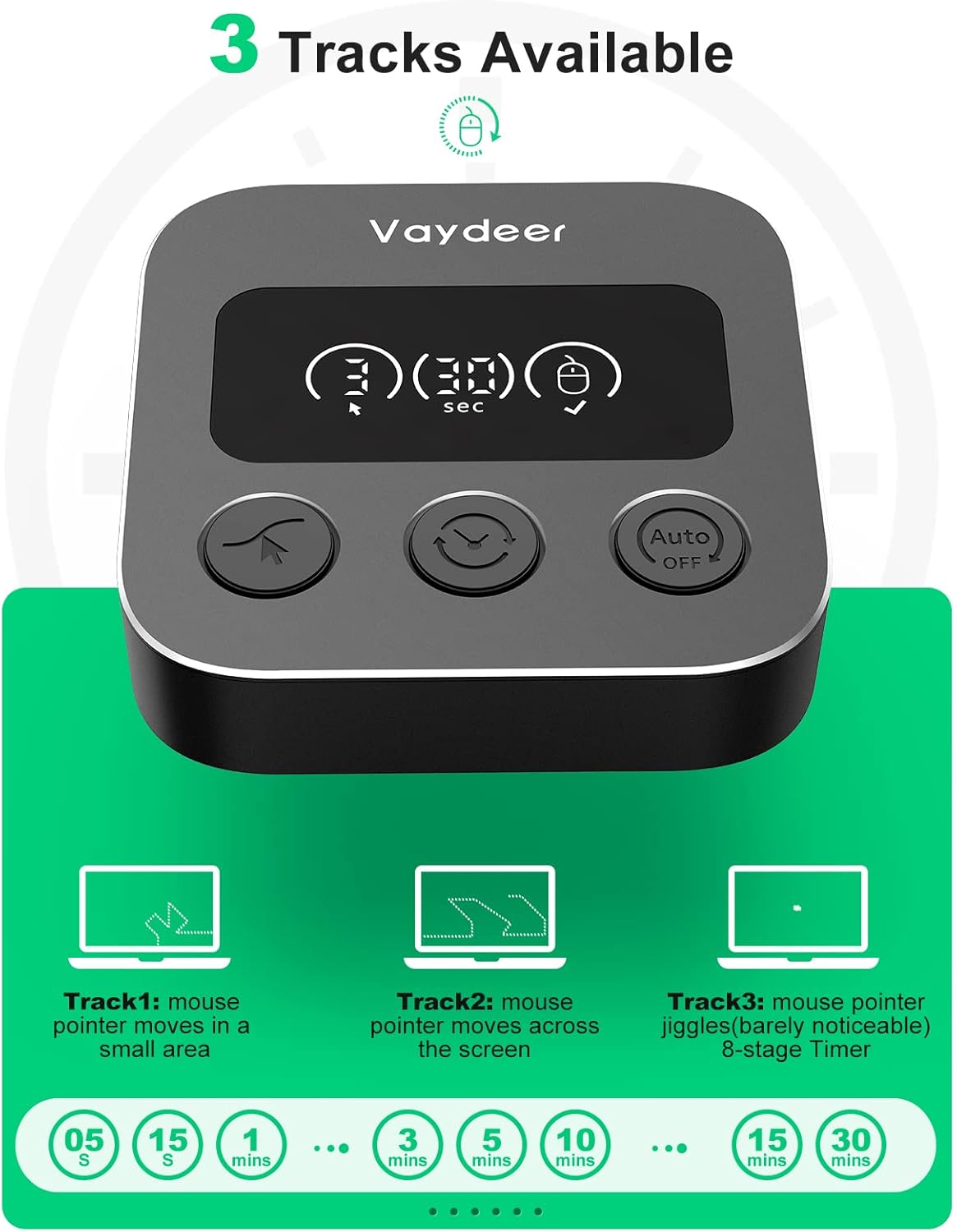
Image: An illustration detailing the three available movement tracks: Track 1 (mouse pointer moves in a small area), Track 2 (mouse pointer moves across the screen), and Track 3 (mouse pointer jiggles, barely noticeable). It also shows timer options from 5 seconds to 30 minutes.
- Track 1: Mouse pointer moves in a small, localized area.
- Track 2: Mouse pointer moves across the screen.
- Track 3: Mouse pointer jiggles slightly, making the movement barely noticeable.
Smart Activation and Timer:
The device can be programmed to activate automatically if your mouse remains stationary for a set period. Use the Timer Adjustment button to cycle through delay options from 0 to 30 minutes. This feature prevents screen timeouts without manual intervention. The cursor movement pattern is randomized to mimic natural usage.
Maintenance
- Keep the device dry and away from liquids.
- Clean the device with a soft, dry cloth. Do not use harsh chemicals or abrasive materials.
- Avoid dropping or subjecting the device to strong impacts.
Troubleshooting
| Problem | Possible Cause | Solution |
|---|---|---|
| Device not working / Mouse not moving | Incorrect connection, device is off, or timer not set. | Ensure the jiggler is properly connected to your computer and your mouse is connected to the jiggler. Press the ON/OFF button to activate. Check timer settings. |
| Computer detects the jiggler as a separate device | This should not occur due to pass-through technology. | The Vaydeer X3 Plus is designed to be 100% undetectable by IT systems. Ensure you are using the Vaydeer X3 Plus model. If issues persist, contact support. |
| LED display is off | Device is not powered or is off. | Check USB connection to your computer. Press the ON/OFF button to turn on the device. |

Image: A comparison showing the Vaydeer Smart Mouse Jiggler X3 Plus connected to a laptop, where the device manager only recognizes the user's mouse. In contrast, another jiggler is shown being identified as an unknown device by the system, highlighting the Vaydeer's undetectable feature.
Specifications
| Manufacturer | VAYDEER |
| Model Number | X3 Plus |
| Connectivity Technology | USB |
| Special Features | 100% IT Undetectable, Smart Activation, LED Display, Lightweight |
| Motion Detection Technology | Optical |
| Number of Buttons | 3 |
| Hand Orientation | Ambidextrous |
| Recommended Uses | Office, Gaming |
| Compatible Devices | Personal Computer, Laptop |
| Operating System | Windows, macOS, Linux |
| Power Source | Wired |
| Internal Material | Plastic |
| UPC | 769044078832 |
Warranty and Support
Information regarding specific warranty terms and customer support contact details is not available in the provided product data. Please refer to the product packaging or the official VAYDEER website for the most up-to-date warranty information and support options.
Related documentsX3 Plus

Ask a question about this manual
Ask about setup, troubleshooting, compatibility, parts, safety, or missing instructions. Manuals+ will review the question and use this page’s manual context to help answer it.