
1. Introduction
This manual provides essential information for the safe and effective use of the JKBMS Smart BMS JK-B2A24S20P. This Battery Management System is designed for Li-ion, LiFePO4, and LTO battery packs, offering active balancing and comprehensive protection features. Please read this manual thoroughly before installation and operation.

Image 1: JKBMS Smart BMS JK-B2A24S20P unit.
2. Package Contents
Verify that all items listed below are present in your package:
- Smart BMS (JK-B2A24S20P) x 1
- Wires (70cm) x 1 set
- Switch (50cm) x 1
- NTC Temperature Sensor (40cm) x 1
- Operation Manual x 1
- (RS485 converter not included)
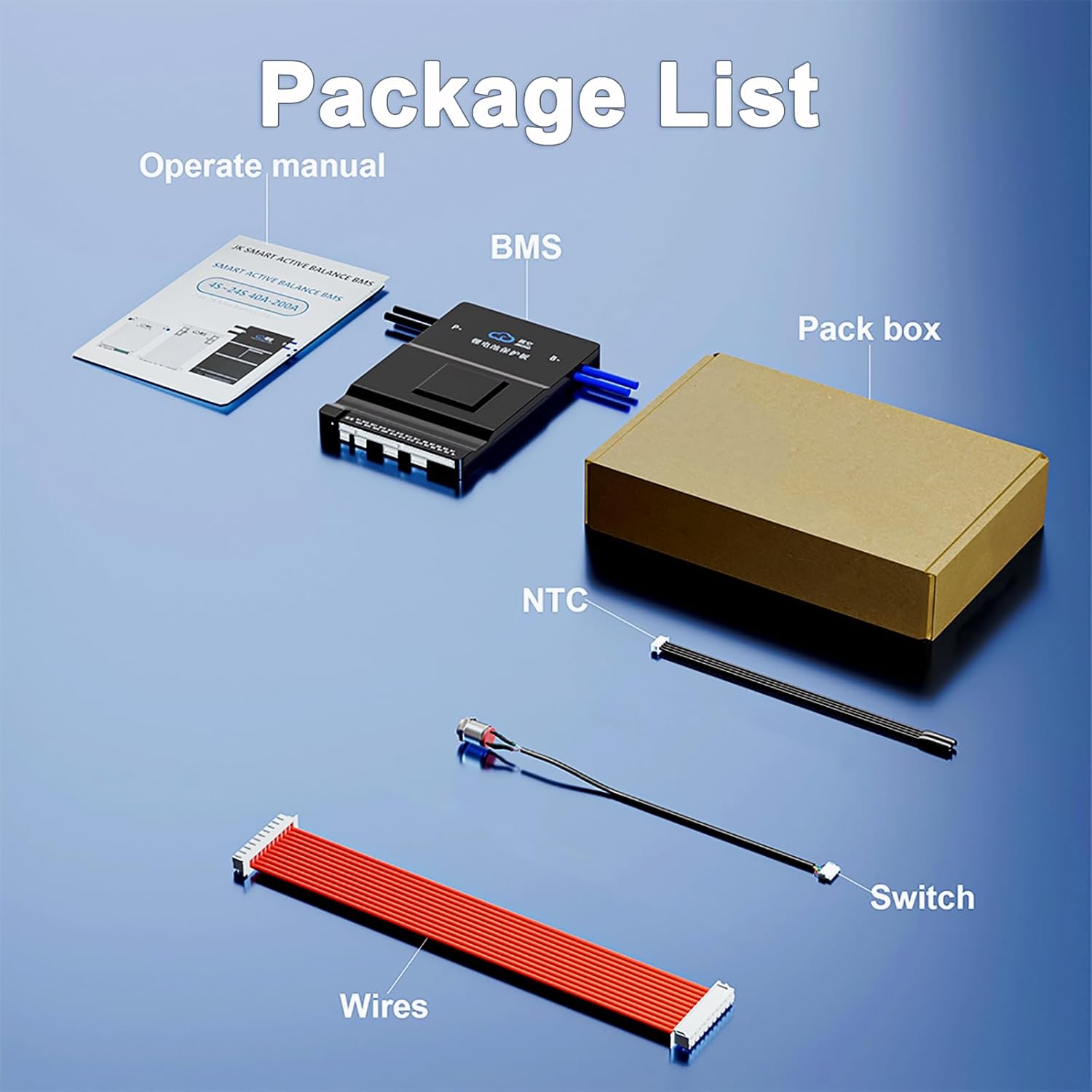
Image 2: Contents included in the JKBMS Smart BMS package.
3. Specifications
The following table details the technical specifications of the JKBMS Smart BMS JK-B2A24S20P:

Image 3: Detailed specifications for the JKBMS Smart BMS JK-B2A24S20P.
| Feature | Value |
|---|---|
| Model | JK-B2A24S20P |
| Balance Current | 2A |
| Continuous Discharge Current | 200A |
| Maximum Instantaneous Current | 350A |
| Functions | Bluetooth (standard), CAN/RS485 (optional) |
| Overcharge Current | 1.2-4.4V (adjustable) |
| Overdischarge Current | 1.2-4.4V (adjustable) |
| Single Cell Collection Range | 1V-5V |
| Voltage Acquisition Accuracy | ±3mV |
| Power Requirements | 20V-100V |
| Dimensions (L x W x H) | 6.38 x 4.02 x 0.8 inches (162 x 102 x 20.4 mm) |
| Item Weight | Approx. 430g (15.2 ounces) |
4. Setup and Installation
4.1 Wiring Diagram
Proper wiring is crucial for the safe and correct operation of the BMS. Refer to the diagram below for connection instructions. Ensure all connections are secure and correctly polarized.

Image 4: Wiring diagram illustrating connections for the JKBMS Smart BMS with a battery pack, load, and charger.
Important Wiring Notes:
- Connect the balance leads to each cell group accurately, from B1 to the last string.
- Ensure the B- (total negative electrode) and P- (load/charger negative) connections are correct.
- The BMS requires an initial voltage higher than the battery pack's current voltage to "wake up" and begin operation.
- Power cables are not included and must be sourced separately.
4.2 Initial Connection and Activation
After wiring, the BMS may need to be activated. Apply a charging voltage to the battery pack to initiate the BMS. Once active, you can proceed with app connection.
5. Operating Instructions
5.1 Smart Bluetooth App
The JKBMS features built-in Bluetooth connectivity, allowing real-time monitoring and control via a mobile application available for Android and iOS devices.

Image 5: Screenshot of the JKBMS Smart Bluetooth App displaying battery data and control options.
App Functions:
- Monitor battery data in real-time (voltage, current, temperature, cell balance).
- Adjust various BMS parameters and settings.
- Control charging and discharging functions.
- Record charge/discharge data.
5.2 Active Balancing
The JKBMS utilizes active equalization technology to optimize battery performance and lifespan. This system transfers energy from higher voltage cells to lower voltage cells, ensuring all cells remain balanced without wasting energy as heat.
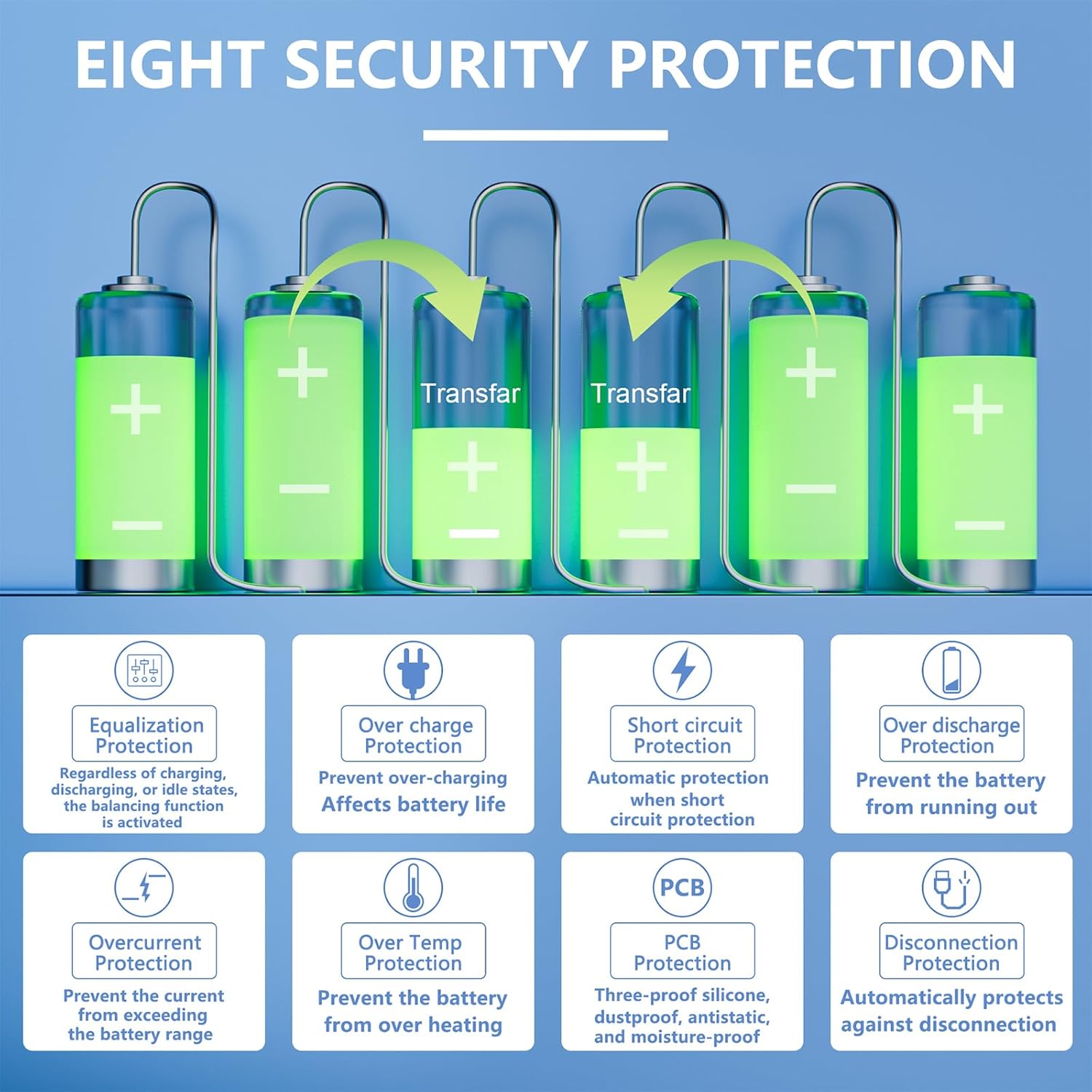
Image 6: Illustration of the eight security protection features and active balancing process.
The balancing function is activated regardless of charging, discharging, or idle states.
5.3 Protection Features
The BMS provides comprehensive protection for your battery pack, including:
- Overcharge Protection: Prevents cells from being charged beyond their safe voltage limit.
- Overdischarge Protection: Prevents cells from being discharged below their safe voltage limit.
- Overcurrent Protection: Safeguards against excessive current during charge and discharge.
- Short Circuit Protection: Automatically protects the battery in case of a short circuit.
- Temperature Protection: Monitors battery temperature and prevents operation outside safe temperature ranges.
- Equalization Protection: Maintains cell voltage balance.
- Disconnection Protection: Automatically protects against unexpected disconnections.
- PCB Protection: Features a three-proof silicone coating for dustproof, antistatic, and moisture-proof properties.
6. Maintenance
To ensure the longevity and optimal performance of your JKBMS and battery pack:
- Regularly monitor battery cell voltages and temperatures via the Bluetooth app.
- Keep the BMS clean and free from dust and moisture.
- Ensure all connections remain tight and free from corrosion.
- Avoid operating the battery pack outside its specified temperature and current limits.
7. Troubleshooting
This section addresses common issues and their potential solutions.
7.1 BMS Not Activating / No Power
- Ensure all wiring connections are correct according to the wiring diagram (Image 4).
- Verify that the battery pack voltage is within the operational range (20V-100V).
- The BMS often requires an initial charging voltage to "wake up." Connect a charger to the battery pack.
- Check the main switch connection and ensure it is in the ON position.
7.2 Cell Imbalance Issues
- Confirm that the active balancing function is enabled in the mobile application.
- Allow sufficient time for the active balancing to work, especially if cells are significantly out of balance. The 2A balance current will gradually equalize cells.
- Inspect balance leads for proper connection and integrity. Damaged or loose balance leads can prevent effective balancing.
7.3 Heating Function Activation (if applicable)
For models equipped with a heating function, activation conditions are as follows:
- Condition 1: Battery temperature is below the charging low-temperature protection threshold.
- Condition 2 (Manual Activation): Heating is manually activated via the APP. This will consume battery power.
- Condition 3 (Charger Detection): The charger is detected as being plugged in. This function depends on the hardware of the protection board and the charger.
The heating film selection requires careful calculation based on maximum battery pack voltage and desired current (e.g., Resistance (Ω) = Maximum Total Voltage ÷ 3A).
7.4 Safety Warning: Potential for Malfunction
WARNING: While JKBMS products are designed for safety, malfunctions can occur. There have been isolated reports of severe incidents, including balance wires overheating and causing fires, even with experienced users. It is imperative to:
- Thoroughly inspect all wiring before applying power. Double-check every balance lead connection.
- Ensure robust electrical insulation for all components and connections.
- Monitor the system closely during initial operation and after any changes.
- Have appropriate fire suppression equipment readily available when working with high-power battery systems.
- If any unusual heat, smoke, or error is detected, immediately disconnect power from the battery pack.
If you suspect a faulty unit, cease use immediately and contact support.
8. Application Scenarios
The JKBMS Smart BMS is versatile and suitable for a wide range of applications, including:

Image 7: Examples of applications for the JKBMS Smart BMS, such as E-bikes, electric tricycles, RV energy storage, and power banks.
- E-bikes and Electric Tricycles
- Low Speed Quads and Electric Cars
- Forklifts and Industrial Drones
- Cleaning Cars and Tourist Cars
- RV Energy Storage and Home Energy Storage Systems
- Power Banks and Power Tools
9. Warranty and Support
JKBMS is committed to customer satisfaction. This product comes with a 1-year support period.
If you encounter any questions or concerns regarding your JKBMS Smart BMS, please contact us through your order page. Our support team is available to provide assistance.


