
Introduction
The VSITOO S1 Max is a 33oz insulated stainless steel water bottle featuring advanced self-cleaning technology, app and touchscreen controls, and a temperature display. Designed for convenience and hygiene, it helps maintain water purity and temperature for extended periods.
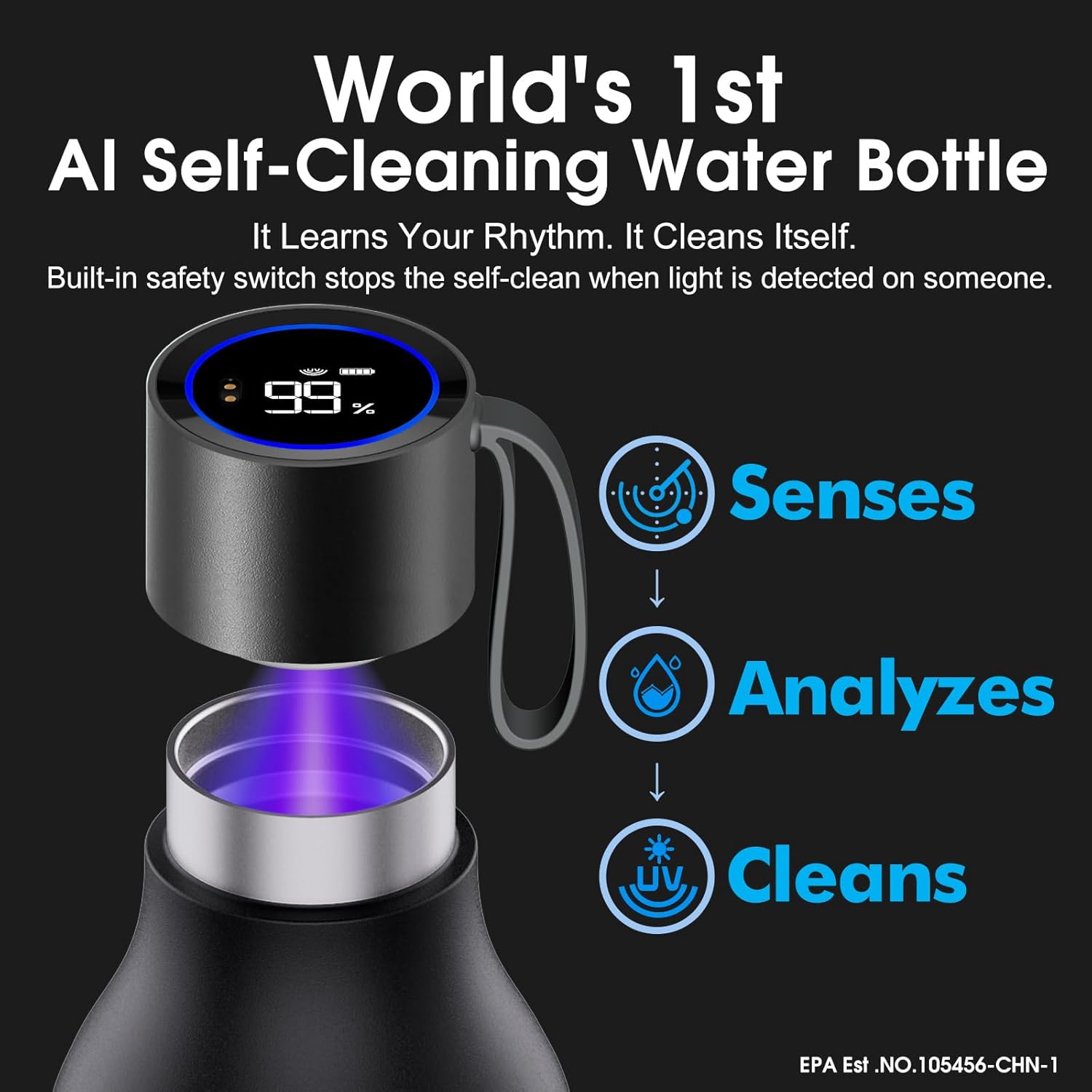
Image: The VSITOO S1 Max bottle cap with its integrated UV-C light, demonstrating the three-step process of sensing, analyzing, and cleaning water for optimal hygiene.
Setup
- Initial Charge: Before first use, fully charge the bottle cap using the provided USB magnetic charging cable. Connect the magnetic end to the charging port on the cap and the USB end to a compatible power source. The display will indicate charging status.
- Wash Before Use: Hand wash the bottle and cap thoroughly with warm, soapy water. Do not submerge the cap in water. Rinse well.
- App Download (Optional): For enhanced features, download the VSITOO App from your device's app store. Follow the in-app instructions to pair your S1 Max bottle via Bluetooth.

Image: An exploded view of the VSITOO S1 Max bottle, highlighting its key components such as the HD LED touchscreen, USB magnetic charging port, and durable stainless steel construction.
Operating Instructions
Self-Cleaning Function
- Automatic Cleaning: The AI sensing system initiates cleaning cycles based on usage patterns.
- Manual Cleaning: Long-press the button on the touchscreen display to manually start a self-cleaning cycle.
- Safety Feature: The UV-C light automatically shuts off if the cap is opened or if the light is pointed towards a person, protecting skin and eyes. Cleaning resumes when the cap is closed and the bottle is upright.
Temperature Display
- Tap the touchscreen display to view the current liquid temperature.
- The display uses color cues: Green for cool (<95°F), Orange for warm (97°F-122°F), and Red for hot (>122°F).
App Control
- Use the VSITOO App to customize cleaning schedules, activate auto-cleaning, and set hydration reminders.
- The app allows for detailed monitoring and control of your bottle's functions.

Image: The VSITOO S1 Max bottle's display showing temperature with color-coded indicators and a smartphone screen illustrating a hydration reminder from the app.

Image: The VSITOO S1 Max bottle alongside a smartphone displaying the VSITOO app, highlighting the dual control options available through both the bottle's touchscreen and the mobile application.
Video: An official product video demonstrating the features and usage of the VSITOO S1 Max Travel Bottle, including its self-cleaning capabilities and smart functions.
Maintenance
- Cleaning the Bottle: The bottle body should be hand washed only. Do not use abrasive cleaners or scrubbers that could damage the finish.
- Cleaning the Cap: Wipe the cap with a damp cloth. Do not submerge the cap in water or place it in a dishwasher, as this can damage the electronic components.
- Drying: Ensure all parts are completely dry before reassembling and storing.
- Storage: Store the bottle with the cap slightly ajar to allow for air circulation, preventing odors.
Troubleshooting
| Issue | Possible Cause | Solution |
|---|---|---|
| Bottle not charging | Loose magnetic connection; faulty cable; power source issue. | Ensure the magnetic cable is firmly attached to the cap. Try a different USB power adapter or port. Use the original charging cable. |
| App not connecting to bottle | Bluetooth off; app glitch; bottle not in pairing mode. | Ensure Bluetooth is enabled on your phone. Restart the app and your phone. Try restarting the bottle (if applicable, by holding the button). Reinstall the app. |
| UV-C light flickering or not working | Low battery; sensor obstruction; internal malfunction. | Ensure the bottle cap is fully charged. Check for any debris obstructing the UV-C sensor. If the issue persists, contact customer support. |
| Temperature display inaccurate or only in Celsius | Firmware issue; regional setting. | Check the VSITOO App for any available firmware updates. Some models may have fixed temperature units; consult the app settings or contact support for clarification on changing units. |
Specifications
- Brand: VSITOO
- Model Name: S1 Max
- Capacity: 33oz (approximately 975ml)
- Material: Double-Wall Stainless Steel (SUS304+316), BPA-Free
- Insulation: Vacuum Insulated, keeps cold for up to 24 hours
- Self-Cleaning: Automatic AI sensing and manual UV-C purification
- Control: App or Touchscreen
- Battery Life: Up to 30 days per magnetic charge
- Water Resistance: IPX7 (cap)
- Dimensions: 3.52"W x 11.14"H
- Item Weight: 0.53 kg
- Care Instructions: Hand Wash Only
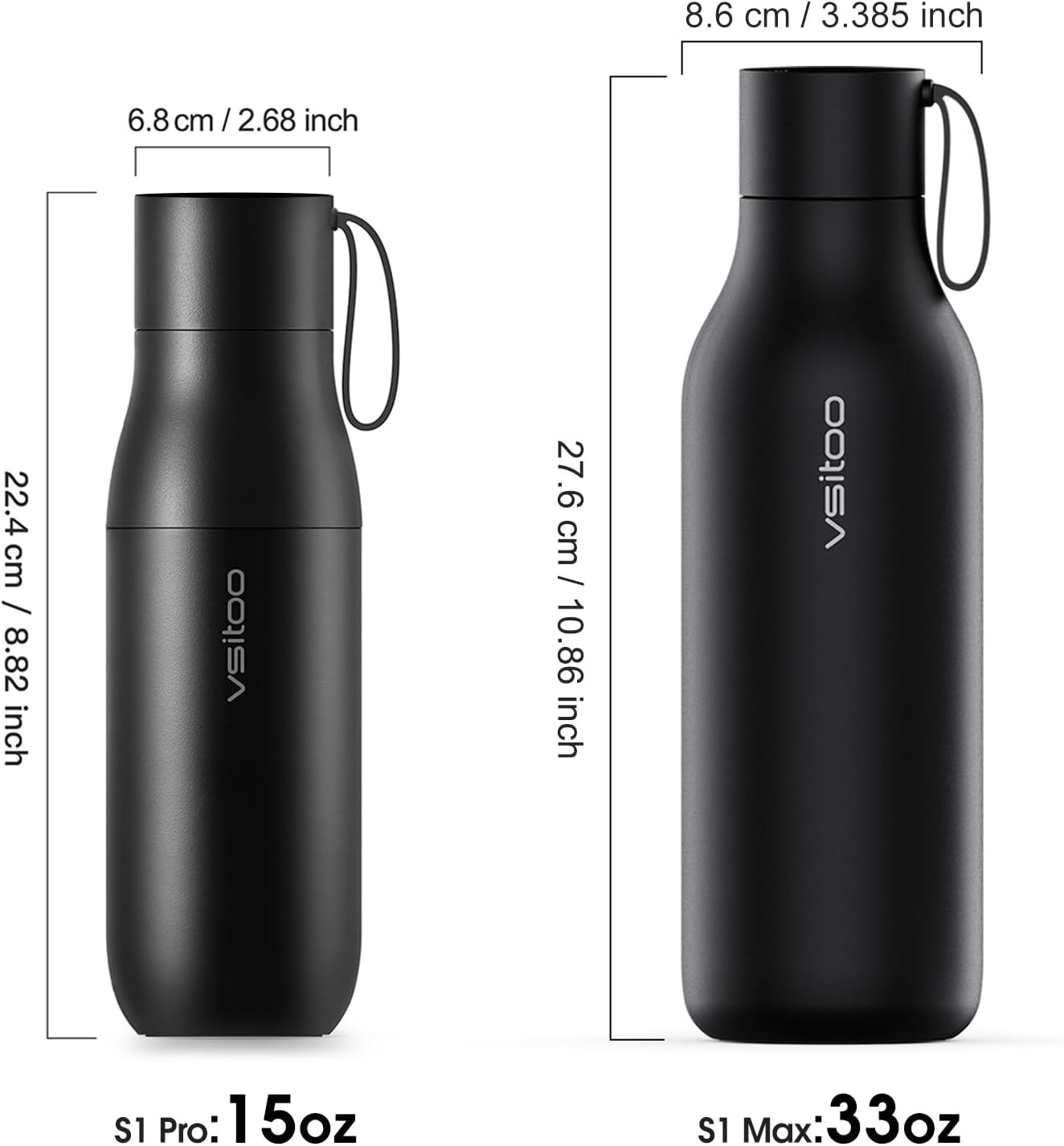
Image: A visual comparison of the VSITOO S1 Pro (15oz) and the VSITOO S1 Max (33oz) bottles, detailing their respective dimensions.
Warranty and Support
For warranty information, product support, or to report any issues, please refer to the official VSITOO website or contact their customer service directly. Keep your purchase receipt for warranty claims.
- Online Support: Visit the VSITOO Store on Amazon for product information and contact options.
- Customer Service: Refer to the contact details provided in your product packaging or on the official VSITOO website.

