
1. Introduction
The PIKOY Night Light Projector T02 is designed to create a soothing and engaging environment for children's rooms. It features 15 vibrant color options, 15 built-in white noise sounds, and 3 interchangeable projection films to transform any space into a starry sky, ocean, or snowflake wonderland. This device is rechargeable, portable, and includes a remote control for convenient operation.
2. Package Contents
Please check the package for the following items:
- PIKOY Night Light Projector T02
- Remote Control
- USB Charging Cable
- 3 Projection Films (Stars+Unicorn, Snowflakes, Ocean Animals)
- User Manual
3. Product Overview
Familiarize yourself with the main components of your PIKOY Night Light Projector T02.
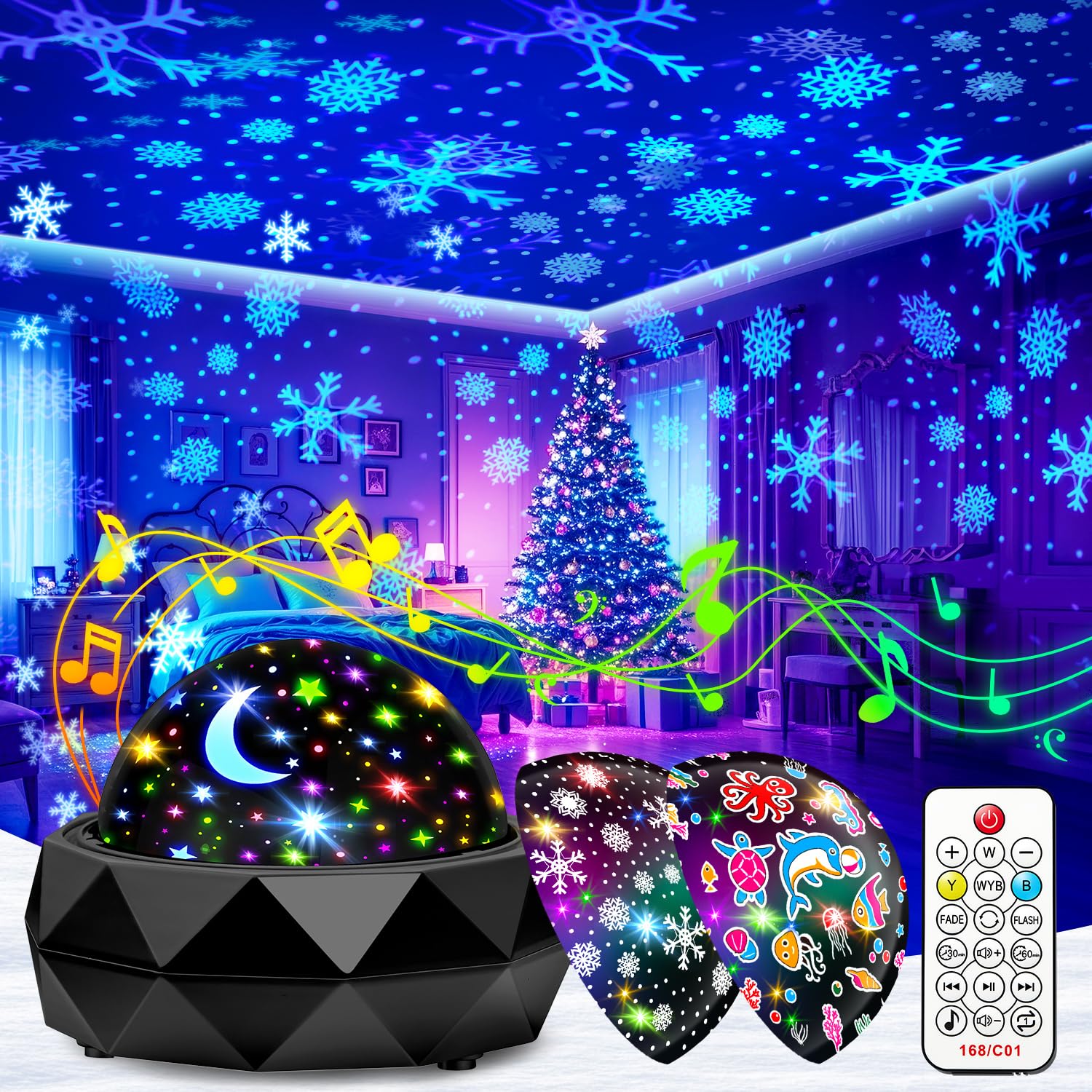
Image 3.1: The PIKOY Night Light Projector T02 displaying a starry night sky projection.
The projector features a dome-shaped top for light projection, a base containing controls and a speaker, and a charging port. The remote control allows for easy adjustment of settings from a distance.
4. Setup
4.1 Charging the Projector
The PIKOY Night Light Projector T02 has a built-in 1800mAh rechargeable battery, providing up to 12 hours of operation on a full charge. Before first use, fully charge the device.
- Locate the USB charging port on the side of the projector.
- Connect the provided USB charging cable to the projector and a compatible USB power adapter (not included) or computer USB port.
- The charging indicator light will illuminate. Once fully charged, the indicator light may change color or turn off.

Image 4.1: Connecting the USB charging cable to the projector.
4.2 Installing Projection Films
The projector comes with 3 interchangeable films: Stars+Unicorn, Snowflakes, and Ocean Animals. To change the projection theme:
- Gently twist and remove the top dome cover of the projector.
- Carefully place your desired film onto the film holder inside the projector, ensuring it sits flat.
- Replace the dome cover, aligning it properly and twisting to secure.

Image 4.2: Examples of projections from the three different films.
4.3 Placement
Place the projector on a flat, stable surface in the room where you wish to use it. For optimal projection clarity, ensure the room is dark.
5. Operating Instructions
The PIKOY Night Light Projector T02 can be operated using the buttons on the device or the included remote control.
5.1 Power On/Off
- On Device: Press and hold the power button on the projector's base.
- Remote Control: Press the Power button.
5.2 Light Modes and Brightness
The projector offers 15 colors and over 300 lighting effects. You can adjust the brightness to 7 different levels.
- Change Colors: Use the color buttons on the remote control to cycle through single colors or mixed color modes.
- Adjust Brightness: Use the Brightness +/- buttons on the remote control to increase or decrease the light intensity.

Image 5.1: Remote control functions for brightness and timer settings.
5.3 Rotation Function
The projector features a 360° silent rotation mode for dynamic projection effects.
- Activate/Deactivate Rotation: Press the Rotation button on the remote control.

Image 5.2: The 360° silent rotation feature in action.
5.4 White Noise Sounds
The projector includes 15 built-in soothing sounds, such as lullabies, white noises, and nature sounds (rain, sea wave, fan, bird singing).
- Cycle Sounds: Use the Music button on the remote control to switch between sounds.
- Adjust Volume: Use the Volume +/- buttons on the remote control.

Image 5.3: Overview of the 15 built-in soothing sounds.
5.5 Timer Settings
Set an automatic shut-off timer for 30 or 60 minutes.
- Set Timer: Press the 30min or 60min button on the remote control. The projector will automatically turn off after the selected duration.
- Cancel Timer: Press the timer button again or turn off the projector manually.
5.6 Official Product Video
Watch this official video from PIKOY for a demonstration of the projector's features, including its 15 colors, 15 music options, 3 films, remote control, and rechargeable functionality.
Video 5.4: Official PIKOY video showcasing the Night Light Projector's features.
6. Maintenance
6.1 Cleaning
To maintain the projector's performance and appearance:
- Ensure the device is turned off and unplugged before cleaning.
- Wipe the exterior with a soft, dry cloth. Do not use abrasive cleaners or solvents.
- Gently clean the projection lens and films with a soft, lint-free cloth to ensure clear projections.
6.2 Storage
When not in use, store the projector in a cool, dry place, away from direct sunlight and extreme temperatures. Keep it out of reach of small children.
7. Troubleshooting
If you encounter any issues with your PIKOY Night Light Projector T02, please refer to the following common solutions:
| Problem | Possible Cause | Solution |
|---|---|---|
| Projector does not turn on. | Low battery or no power. | Ensure the projector is fully charged. Connect to a power source using the USB cable. |
| Projection is dim or unclear. | Room is too bright, lens/film is dirty, or brightness setting is low. | Use in a dark room. Clean the lens and film. Increase brightness using the remote control. |
| Remote control is not working. | Battery in remote is dead or remote is out of range. | Replace the remote control battery. Ensure the remote is pointed at the projector within effective range. |
| Rotation function is not working. | Rotation feature is turned off. | Press the Rotation button on the remote control to activate. |
| Battery does not hold charge. | Battery degradation or defect. | Ensure proper charging procedures are followed. If the issue persists, contact customer support for warranty assistance. |
8. Specifications
| Feature | Detail |
|---|---|
| Model Number | T02 |
| Brand | PIKOY |
| Product Dimensions | 4.84"D x 4.65"W x 3.86"H |
| Item Weight | 0.34 Kilograms |
| Power Source | Battery Powered (1800mAh) |
| Light Source Type | LED |
| Number of Colors | 15 |
| Built-in Sounds | 15 Soothing Sounds |
| Projection Films | 3 (Stars+Unicorn, Snowflakes, Ocean Animals) |
| Control Method | Remote Control |
| Timer Settings | 30/60 minutes |
| Rotation | 360° Silent Rotation |
| Material Type | Plastic |
| Connectivity Technology | USB |
| Room Type | Bedroom |
9. Warranty and Support
PIKOY offers a 3-year quality promise for this Night Light Projector T02. If you encounter any issues or have questions regarding your product, please do not hesitate to contact PIKOY customer support. Our team is committed to providing the best possible service and assistance.
For support, please refer to the contact information provided on the product packaging or the official PIKOY website.