
1. Introduction
This manual provides detailed instructions for the safe operation, setup, maintenance, and troubleshooting of your FLYCOLOR C138 RC Helicopter. Please read this manual thoroughly before operating the helicopter to ensure proper function and to prevent damage or injury. The C138 features a single blade aileron-free design, a 6-axis electronic gyroscope for enhanced stability, and a barometer for altitude control, making flight more stable and easier to manage.
2. Safety Precautions
- Always operate the helicopter in an open area, away from people, animals, buildings, and power lines.
- Do not fly near crowds or in windy conditions.
- Ensure the battery is fully charged before each flight.
- Keep fingers and loose clothing away from rotating propellers.
- Never attempt to modify the helicopter or its components.
- Supervise children during operation. This product is recommended for adults (Age Range Description: Adult, Manufacturer Minimum Age: 168 months).
- In case of a crash, immediately power off the helicopter and remote control. Inspect for damage before the next flight.
- Avoid flying indoors unless you have sufficient space and experience, as the product is rated for indoor use.
3. Package Contents
Verify that all items are present in your package:

Image: FLYCOLOR C138 RC Helicopter and its included accessories.
- 1 x C138 RC Helicopter
- 1 x Lithium Battery (7.4V 350mAh)
- 1 x Remote Control
- 1 x USB Charger
- 4 x Main Propellers (spare)
- 1 x Tail Propeller (spare)
- 1 x Screwdriver
- 1 x Hex Wrench
- 1 x Instruction Manual (this document)
- 1 x Color Box Packaging
4. Product Overview

Image: The FLYCOLOR C138 RC Helicopter.
The FLYCOLOR C138 RC Helicopter is designed for stable and enjoyable flight experiences. Key features include:
- Aileron-Free Design: Incorporates aerodynamic principles for strong power and body stability.
- 6-Axis Gyroscope: Ensures ultra-stable flight, particularly beneficial for beginners.
- Barometer for Altitude Hold: Maintains a stable altitude, simplifying control.
- 6-Channel Control: Offers comprehensive control with 3 digital servos, enabling advanced maneuvers like 3D rolling.
- 6G Mode: Provides stable flight, ideal for new users.
- Main Seat Remote Control: Designed for delicate touch and precise control.
- Special Stunts: Capable of ascent, descent, forward, backward, left/right flight, left/right rotation, route flight, and pot brushing.
- Safety Features: Includes low voltage alarm, stall protection, and loss of control protection.
- User-Friendly Functions: Features large and small rudder conversion, one-click takeoff, and one-click landing.
- Efficient Charging: Equipped with a dedicated USB charger for fast and stable battery charging.

Image: Intelligent anti-stuck protection mechanism of the helicopter.
5. Setup
5.1 Charging the Helicopter Battery
- Connect the helicopter's 7.4V 350mAh Lithium Polymer battery to the dedicated USB charger.
- Plug the USB charger into a compatible USB power source (e.g., computer USB port, USB wall adapter).
- The charging indicator light will show the charging status. Refer to the charger's specific instructions for light indications.
- Charging time is approximately 50 minutes for a single battery. Do not overcharge.
5.2 Installing Remote Control Batteries
- Open the battery compartment on the back of the remote control.
- Insert 4 x 1.5V AA batteries (not included), ensuring correct polarity.
- Close the battery compartment securely.
5.3 Binding the Remote Control to the Helicopter
- Ensure the helicopter battery is fully charged and installed.
- Place the helicopter on a flat, level surface.
- Turn on the helicopter's power switch. The indicator light on the helicopter will flash.
- Turn on the remote control.
- Push the throttle stick (left stick) all the way up, then all the way down.
- The indicator light on the helicopter will become solid, indicating successful binding.
- If binding fails, repeat the steps.
6. Operating Instructions
6.1 Basic Controls
Familiarize yourself with the remote control functions:
- Left Stick (Throttle/Yaw): Up/Down controls altitude (throttle). Left/Right controls yaw (rotation around vertical axis).
- Right Stick (Pitch/Roll): Up/Down controls pitch (forward/backward movement). Left/Right controls roll (sideways movement).

Image: Illustration of various flight movements and controls.

Image: The helicopter demonstrating multidirectional flight capabilities.
6.2 One-Key Takeoff and Landing
- After binding, press the one-key takeoff button (refer to your remote control diagram for location). The helicopter will automatically ascend to a stable altitude.
- To land, press the one-key landing button. The helicopter will automatically descend and land gently.
6.3 Altitude Hold
The built-in barometer enables automatic altitude holding. Once the helicopter reaches a desired height, it will maintain that altitude without continuous throttle input, allowing you to focus on directional control.
6.4 Flight Modes (6G Mode)
The C138 features a 6G mode, which utilizes the 6-axis gyroscope for enhanced stability. This mode is highly recommended for beginners as it provides a more forgiving and easier-to-control flight experience. Refer to your remote control for switching between flight modes.
6.5 Performing Stunts
The 6-channel design and 3 digital servos allow for various stunts:
- 3D Rolling: Engage 3D mode (if available on your remote) and use the right stick to perform rolls.
- Route Flight: The helicopter can follow pre-programmed flight paths. Consult your remote control's specific instructions for activating and customizing route flight.
- Pot Brushing: A maneuver involving precise control to simulate brushing a pot. Practice in open spaces.
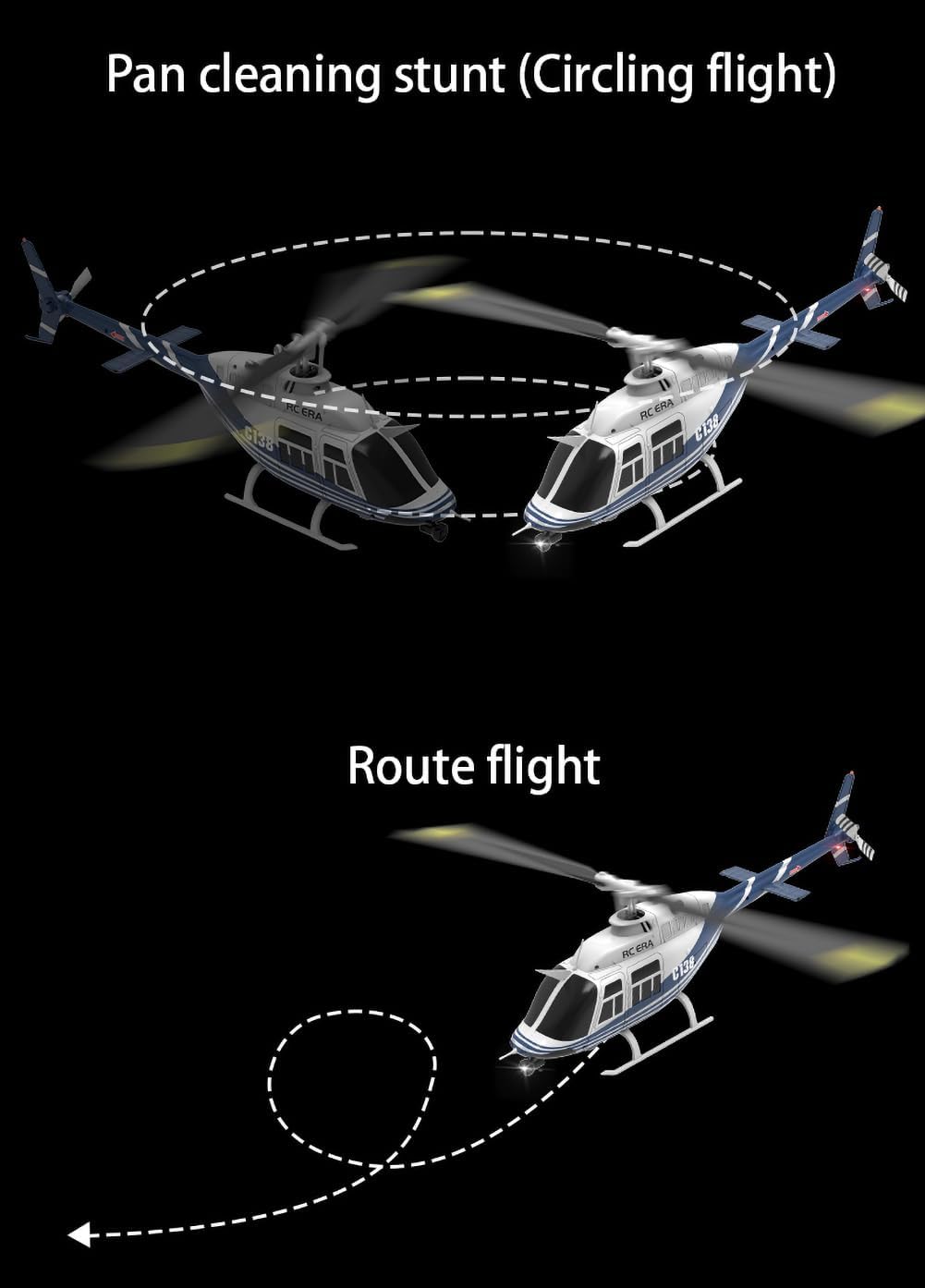
Image: Visual representation of circling and route flight stunts.
7. Maintenance
7.1 Cleaning
Regularly clean the helicopter with a soft, dry cloth. Avoid using water or solvents that could damage electronic components.
7.2 Propeller Replacement
If propellers are damaged, replace them immediately using the provided spare parts and hex wrench/screwdriver. Ensure the new propellers are installed correctly according to their orientation (A and B blades).
7.3 Battery Care and Storage
- Store batteries in a cool, dry place, away from direct sunlight and heat.
- Do not store fully charged or completely depleted batteries for extended periods. Charge them to approximately 50% for long-term storage.
- If the battery shows signs of swelling, leakage, or damage, discontinue use immediately and dispose of it properly.
8. Troubleshooting
| Problem | Possible Cause | Solution |
|---|---|---|
| Helicopter does not respond to remote control. | Not bound, low remote battery, low helicopter battery. | Re-bind the helicopter. Replace remote batteries. Charge helicopter battery. |
| Helicopter flies erratically or drifts. | Uncalibrated gyroscope, damaged propeller, strong wind. | Recalibrate the gyroscope (refer to remote instructions). Replace damaged propellers. Fly in calm conditions. |
| Short flight time. | Battery not fully charged, aging battery. | Ensure full charge. Consider replacing the battery if performance degrades significantly. |
| Propellers do not spin. | Obstruction, motor issue, connection problem. | Check for obstructions. Ensure all connections are secure. Contact support if motor is faulty. |
| Helicopter crashes frequently. | Lack of experience, improper trim settings. | Practice in 6G mode. Adjust trim settings on the remote control. |
9. Specifications

Image: Key dimensions of the FLYCOLOR C138 RC Helicopter.
| Feature | Detail |
|---|---|
| Brand | FLYCOLOR |
| Model Name | C138-B |
| Color | Helicopter-blue |
| Product Material | PA/PC (Plastic) |
| Helicopter Battery | 7.4V 350mAh Lithium Polymer (included) |
| Remote Control Battery | 4*1.5AA Battery (Not included) |
| Maximum Flight Time (single battery) | 12 minutes |
| Charging Time (single battery) | 50 minutes |
| Remote Control Range | 80-100 meters |
| Helicopter Rotation Diameter | 306 mm |
| Helicopter Fuselage Length | 312 mm |
| Helicopter Height | 101 mm |
| Flight Weight | 105g (0.3 Pounds) |
| Scale | 1:33 |
| Operation Mode | Remote Control |
| Indoor/Outdoor Usage | Indoor |
| Assembly Required | No |
10. Warranty and Support
For warranty information, technical support, or replacement parts, please contact FLYCOLOR customer service through your retailer or the official FLYCOLOR website. Keep your purchase receipt as proof of purchase.