
1. Important Safety Information
Please read this entire manual before assembling and using the LABGREY Stationary Exercise Bike. Keep this manual for future reference. Failure to follow these instructions could result in injury or damage to the product.
- Consult your physician before starting any exercise program.
- Keep children and pets away from the equipment during use.
- Place the exercise bike on a level, stable surface. Ensure adequate space around the bike for safe operation.
- Inspect the bike for loose or worn parts before each use. Do not use if any components are damaged.
- Wear appropriate exercise clothing and footwear. Avoid loose clothing that could get caught in moving parts.
- The maximum user weight capacity for this bike is 158 kg (348 lbs).
- Use the emergency brake to stop the flywheel quickly if needed.
2. Product Overview
The LABGREY Stationary Exercise Bike is designed for effective home cardio workouts. It features a magnetic resistance system, a silent belt drive, and smart connectivity for an enhanced training experience.

Image: The LABGREY Stationary Exercise Bike, showcasing its robust frame and design, with a user demonstrating its use. The bike supports a maximum weight capacity of 158 kg, featuring a thickened frame and multi-triangle structure for stability.
Key Features:
- Magnetic Resistance System: Provides smooth and quiet operation with adjustable intensity.
- Silent Belt Drive: Ensures a quiet and fluid cycling experience (less than 20 dB).
- LCD Multifunction Display: Tracks time, speed, distance, odometer, heart rate, and calories burned.
- Heart Rate Sensor: Integrated into the handlebars for real-time heart rate monitoring.
- Adjustable Seat and Handlebars: Customizable for users between 152 cm (5') and 185 cm (6'1").
- Smart App Connectivity: Compatible with Kinomap and Zwift for virtual training and challenges.
- Emergency Brake: For immediate stopping of the flywheel.
- Transport Wheels: For easy relocation of the bike.
3. Setup and Assembly
The LABGREY Stationary Exercise Bike is designed for straightforward assembly. While a printed manual is included, many users find a video guide helpful for visual clarity.
Assembly Steps:
- Unpack all components and verify against the parts list in your included manual.
- Attach the front and rear stabilizers to the main frame.
- Install the pedals, ensuring the left and right pedals are correctly oriented (L for left, R for right).
- Mount the seat post and seat, then adjust to your desired height.
- Install the handlebar post and handlebars, then adjust to your desired height.
- Connect any necessary sensor cables as indicated in the manual.
- Ensure all bolts and nuts are securely tightened before first use.
For a visual guide, scan the QR code in your physical manual or search for official LABGREY assembly videos online.

Image: Flexible adjustment points for the seat (4 directions) and handlebars (2 directions) are highlighted, demonstrating how the bike can be adapted for users between 152 cm and 185 cm in height.
4. Operating Instructions
4.1 Adjusting Resistance
The bike features a micro-resistance adjustment knob located on the main frame. Turn the knob clockwise to increase resistance and counter-clockwise to decrease it. This allows for precise control over your workout intensity, simulating various terrains from warm-up to intense climbs.

Image: A detailed view of the micro-resistance knob, showing percentage indicators for resistance levels, and the emergency stop function. Illustrations below show different cycling postures for varying resistance levels (0-30% warm-up, 40-70% seated climb, 80-100% standing climb).
To engage the emergency brake, press the resistance knob down firmly. This will quickly stop the flywheel.
4.2 Using the LCD Display and Heart Rate Sensor
The integrated LCD display provides real-time feedback on your workout. It typically activates when you start pedaling or press a button.

Image: The enhanced heart rate sensor and multifunction LCD screen are shown, displaying metrics such as Speed (SPD), Distance (DST), Odometer (ODO), Pulse (PUL), Time, and Calories (CAL). The handlebars feature integrated heart rate sensors.
- Display Functions: The screen cycles through various metrics: Time, Speed, Distance, Odometer (total distance), Heart Rate, and Calories Burned.
- Heart Rate Monitoring: Place both hands firmly on the heart rate sensors located on the handlebars. Your pulse will be displayed on the LCD screen after a few seconds.
- Device Holders: The bike includes two device holders for your smartphone or tablet, allowing you to stay entertained or follow guided workouts.
4.3 Smart App Connectivity (Kinomap & Zwift)
Enhance your cycling experience by connecting your LABGREY bike to popular fitness applications like Kinomap and Zwift.

Image: The exercise bike's smart app connectivity is demonstrated, showing integration with Kinomap and Zwift. Screenshots illustrate virtual training environments and paired device interfaces for power source, resistance, cadence, controls, and heart rate.
- Download Apps: Download Kinomap or Zwift from the App Store (iOS) or Google Play (Android).
- Pairing: Follow the in-app instructions to pair your LABGREY exercise bike. This typically involves enabling Bluetooth on your device and selecting the bike from the app's device list.
- Virtual Training: Enjoy virtual routes, structured workouts, and competitive challenges offered by these platforms.
5. Maintenance
Regular maintenance ensures the longevity and optimal performance of your LABGREY Stationary Exercise Bike.
- Cleaning: Wipe down the bike with a damp cloth after each use to remove sweat and dust. Avoid abrasive cleaners.
- Inspection: Periodically check all bolts, nuts, and moving parts for tightness and wear. Tighten any loose fasteners.
- Belt Drive: The silent belt drive system is generally maintenance-free. If you notice any unusual noise, consult customer support.
- Storage: Store the bike in a dry, cool place away from direct sunlight and moisture.
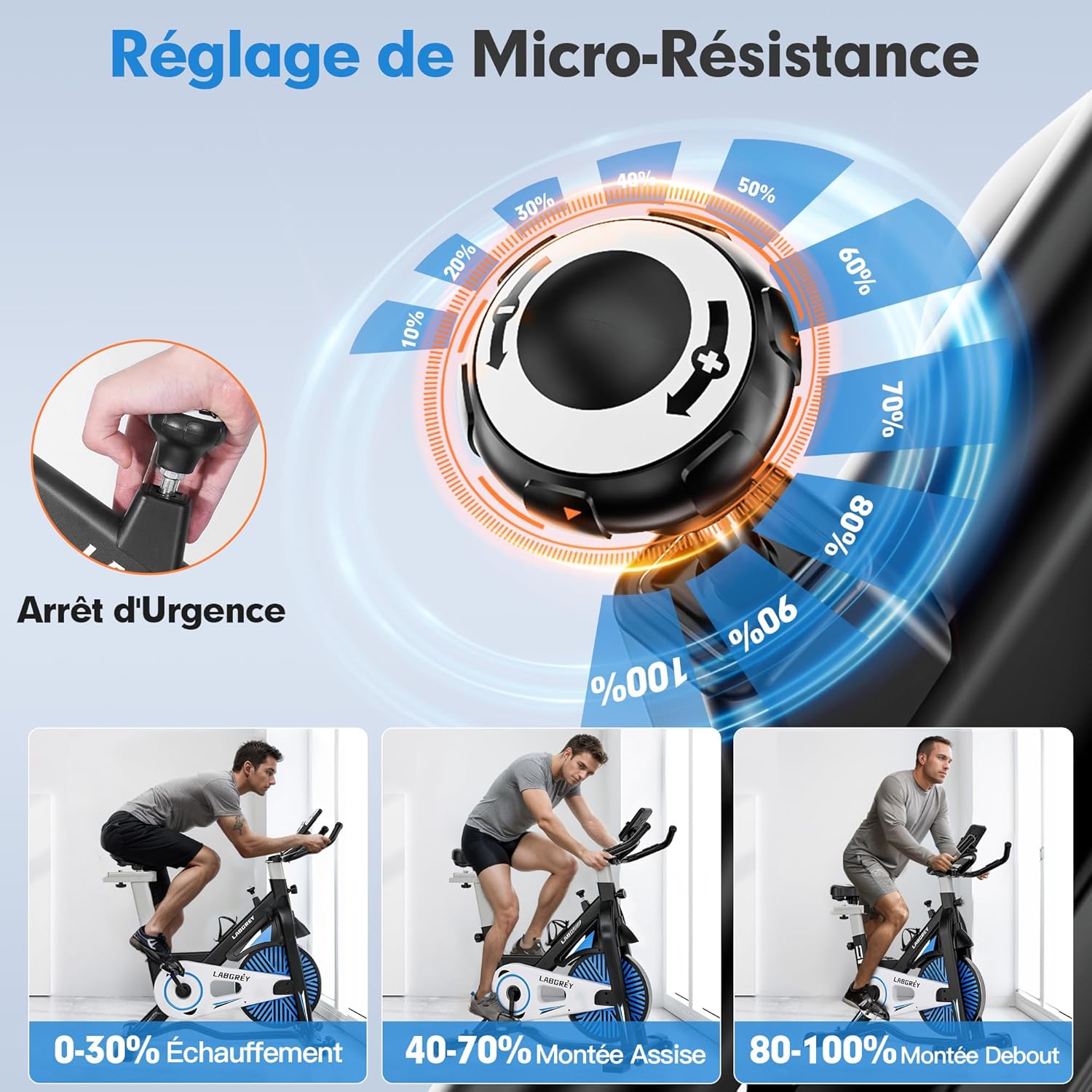
Image: An internal view of the LABGREY exercise bike highlighting its silent and fluid belt drive system, low-friction bearings, and quiet operation (under 20 dB).
6. Troubleshooting
If you encounter any issues with your exercise bike, refer to the following common troubleshooting tips:
- Display Not Working: Ensure the console batteries (if applicable) are correctly installed and not depleted. Some displays activate only when pedaling.
- Unusual Noise: Check all bolts and connections for tightness. Ensure the bike is on a level surface. If noise persists, contact customer support.
- Heart Rate Reading Inaccurate/Absent: Ensure your hands are firmly and completely on both heart rate sensors. Skin contact is essential.
- App Connectivity Issues: Ensure Bluetooth is enabled on your device and the app is updated. Try restarting both your device and the exercise bike (if it has a power source).
- Resistance Not Changing: Check if the resistance knob is functioning correctly. Ensure no debris is obstructing the magnetic mechanism.
7. Specifications
| Brand | LABGREY |
| Model Number | LABGREY |
| Color | Black |
| Material | Alloy Steel |
| Drive System | Belt |
| Resistance Mechanism | Magnetic |
| Display Type | LCD |
| Monitor Functions | Calories Burned, Distance, Heart Rate, Time, Speed |
| Special Features | App Connectivity, Kinomap, Zwift |
| Max User Weight Capacity | 158 Kilograms (348 lbs) |
| Recommended Max Height | 185 Centimeters (6'1") |
| Product Dimensions (L x W x H) | 90 x 52 x 116 cm (35.4 x 20.5 x 45.7 inches) |
| Item Weight | 30 Kilograms (66 lbs) |
8. Warranty and Support
For warranty information or technical support, please refer to the documentation included with your purchase or contact LABGREY customer service directly. Contact details can typically be found on the product packaging or the official LABGREY website.
Please have your product model number and purchase date ready when contacting support.