
1. Introduction
This manual provides detailed instructions for the safe and efficient operation of your Aoxun 11,500 BTU Portable Air Conditioner and Heater. This versatile 4-in-1 unit offers Cooling, Heating, Dehumidifying, and Fan functions, designed to provide a comfortable environment in rooms up to 400 sq.ft. Please read this manual thoroughly before use and retain it for future reference.

Image: Aoxun Portable AC unit highlighting its 11,500 BTU cooling capacity, 360m³/h airflow, and suitability for 400 sq.ft. areas, along with its dimensions (33"H x 16.5"W x 9.5"D).
2. Safety Information
Always observe the following safety precautions to reduce the risk of fire, electric shock, or injury.
- Read all instructions before using the appliance.
- Ensure the power supply matches the voltage specified on the unit's rating label.
- Do not operate the unit with a damaged cord or plug. If damaged, contact customer service.
- Do not block air inlets or outlets. Maintain at least 12 inches of clearance around the unit.
- Do not insert fingers or foreign objects into the air inlets/outlets.
- Always unplug the unit before cleaning or servicing.
- Do not use the unit in wet or damp environments, such as bathrooms or laundry rooms.
- Keep the unit away from heat sources and direct sunlight.
- This appliance is not intended for use by persons (including children) with reduced physical, sensory or mental capabilities, or lack of experience and knowledge, unless they have been given supervision or instruction concerning use of the appliance by a person responsible for their safety.
- Children should be supervised to ensure that they do not play with the appliance.
3. Product Overview
Your Aoxun Portable Air Conditioner and Heater comes with the main unit, a remote control, and all necessary installation tools for window kits.
3.1 Main Unit and Components
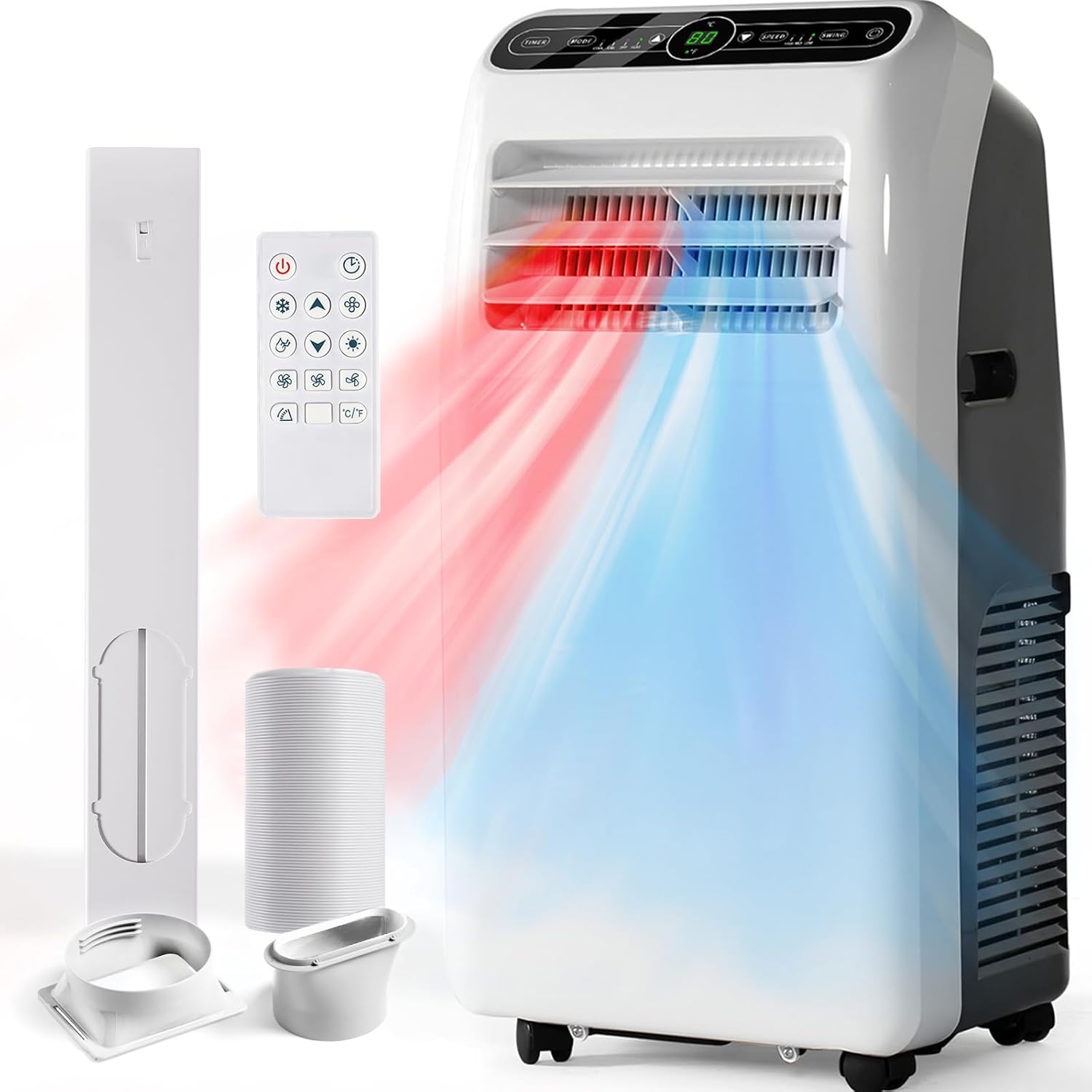
Image: The Aoxun Portable AC unit shown with its remote control, exhaust hose, and window sealing plate components.
3.2 Control Panel
The control panel is located on the top of the unit and features an LED display and touch buttons for various functions.

Image: Detailed view of the unit's control panel, showing buttons for Timer, Mode, Temperature Adjustment (Up/Down), Fan Speed, Sleep, Power, and Swing, along with the digital display.
3.3 Remote Control
The remote control provides convenient access to all functions from a distance.

Image: Illustration of both the remote control and the unit's control panel, detailing the function of each button, including Mode, Timer, Up/Down for temperature, Power, Swing, and Fan Speed.
4. Setup
The Aoxun Portable AC is designed for easy installation, typically taking 15 minutes or less. It can be rolled into any room thanks to its integrated wheels.
4.1 Window Kit Installation
Follow these steps to install the window exhaust kit:
- Connect the exhaust hose to the unit's exhaust outlet.
- Attach the window adapter to the other end of the exhaust hose.
- Adjust the window sealing plate to fit your window opening (suitable for both vertical and horizontal slide windows).
- Secure the window adapter into the opening of the window sealing plate.
- Close the window securely against the sealing plate to prevent air leakage.
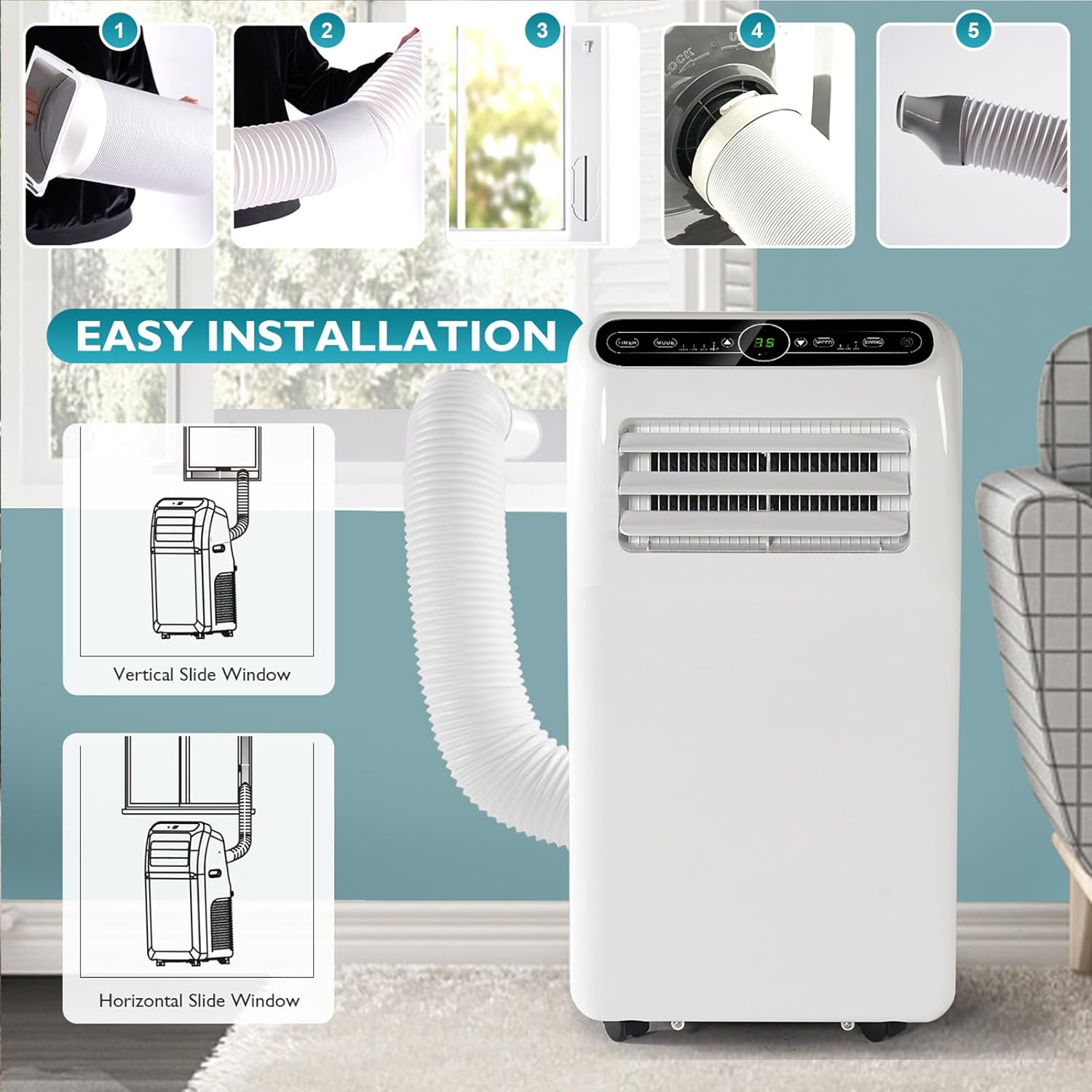
Image: Visual guide demonstrating the five steps for easy installation of the portable AC's exhaust hose and window kit for both vertical and horizontal sliding windows.
5. Operation
Your Aoxun Portable AC offers four primary operating modes and several convenient features.
5.1 Operating Modes
Press the MODE button on the control panel or remote to cycle through the following modes:
- Cool Mode: Provides cooling between 60°F-86°F (16°C-30°C).
- Heat Mode: Provides heating.
- Dry Mode (Dehumidifier): Removes moisture from the air (up to 29 L/day).
- Fan Mode: Circulates air without cooling or heating.

Image: Diagram illustrating the four operational modes of the Aoxun Portable AC: Cooling (60°F-86°F), Dry (29 L/Day), Fan (450m³/h Air Flow), and Heating (380m³/h Air Flow).
5.2 Other Functions
- Power (On/Off): Press the POWER button to turn the unit on or off.
- Temperature Adjustment (UP/DOWN): Use the UP and DOWN buttons to set the desired temperature in Cool or Heat mode.
- Timer: Set the unit to turn on or off automatically within a 24-hour period. Press the TIMER button to set ON time in standby mode or OFF time when operating.
- Fan Speed: In Cool, Heat, or Fan mode, press the SPEED button to select High, Medium, or Low fan speed.
- Sleep Mode: Activates quiet operation for comfortable sleep. Operating noise levels are ≤54dB.
- Swing: Press the SWING button to automatically swing the air louvers for wider air distribution.
- Temperature Unit Switch: Press the °C/°F button on the remote to switch between Celsius and Fahrenheit.
6. Maintenance
Regular maintenance ensures optimal performance and longevity of your unit.
6.1 Cleaning the Air Filter
The unit features a removable and washable double-layer air filter. It is recommended to clean the air filter every two weeks of operation to maintain performance and protect against dust and pet dander.
- Turn off and unplug the unit.
- Locate and remove the air filter from the back of the unit.
- Wash the filter with warm, soapy water. Rinse thoroughly.
- Allow the filter to air dry completely before reinserting it into the unit. Do not use a dryer or direct heat.

Image: Visual guide showing the high-density filtration system and the easy removal and washing process for the double-layer air filter.
6.2 Water Drainage
During Dehumidifier mode or in high humidity conditions, the unit will collect water. The unit may require manual drainage. Prepare a container to collect the water from the drainage port located at the bottom rear of the unit.
7. Troubleshooting
Before contacting customer service, please refer to the following common issues and solutions:
| Problem | Possible Cause | Solution |
|---|---|---|
| Unit does not turn on. | No power supply; Power cord not plugged in; Circuit breaker tripped. | Ensure unit is plugged in; Check power outlet; Reset circuit breaker. |
| Unit does not cool/heat effectively. | Air filter is dirty; Room size too large; Doors/windows open; Exhaust hose not properly installed. | Clean air filter; Ensure room size is within 400 sq.ft.; Close all doors/windows; Check exhaust hose connection. |
| Unit is noisy. | Unit is not on a flat surface; Air filter is dirty. | Place unit on a flat, stable surface; Clean air filter. |
| Remote control not working. | Batteries are dead or incorrectly inserted; Obstruction between remote and unit. | Replace batteries; Ensure clear line of sight to the unit's receiver. |
| Water leakage. | Drainage plug is loose or missing; Water tank is full (if applicable). | Check and secure drainage plug; Drain water from the unit. |
8. Specifications
| Feature | Detail |
|---|---|
| Brand Name | Aoxun |
| Model Info | A15005WH-AX2 |
| Item Weight | 68 pounds |
| Product Dimensions | 13.4 x 17.4 x 32.7 inches (D x W x H) |
| Efficiency | Energy Efficient |
| Capacity | 57.3 Pounds |
| Annual Energy Consumption | 773 Kilowatt Hours Per Year |
| Noise Level | 54 dB |
| Installation Type | Window |
| Form Factor | Portable |
| Special Features | Dehumidifier, Heating And Cooling Function, Remote Controlled |
| Heating Elements | 1 |
| Color | White |
| Voltage | 115 Volts |
| Wattage | 1380 watts |
| Material Type | Plastic |
| Included Components | All installation tools, Remote Control |
| Floor Area Coverage | 400 Square Feet |
| Cooling Power | 11500 British Thermal Units |
| Seasonal Energy Efficiency Ratio (SEER) | 15 |
9. Warranty and Support
Aoxun is committed to providing premium products and thoughtful service. While specific warranty details are not provided in this manual, if you encounter any issues with your Aoxun Portable Air Conditioner and Heater, please do not hesitate to contact Aoxun customer service. They will assist you in resolving any concerns as soon as possible.
For customer support, please refer to the contact information provided with your product packaging or visit the official Aoxun website.