
1. Introduction
This manual provides essential information for setting up, operating, and maintaining your MeLE Fanless Mini PC Quieter 4C N150. Please read it thoroughly before using the device to ensure optimal performance and longevity.
Video: MeLE Mini PC for Multi Applications. This video demonstrates various applications of the MeLE Mini PC, including document editing, online video streaming, astrophotography, and digital signage.
2. What's in the Box
Carefully unpack your MeLE Fanless Mini PC Quieter 4C N150 and ensure all items are present:
- 1x Quieter 4C N150 Mini PC
- 1x 12V/2A Power adapter
- 1x VESA Mount
- 1x User Manual
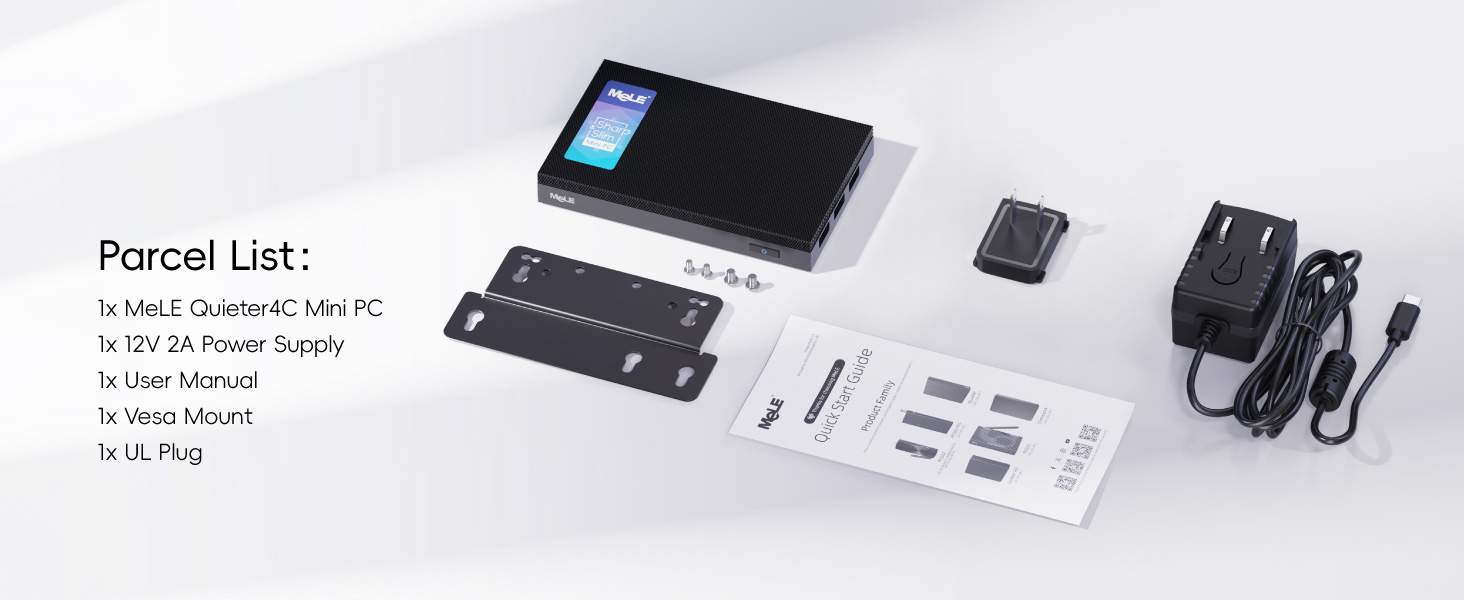
Image: Package Contents. This image displays all items included in the MeLE Quieter 4C N150 package.
Video: MeLE Quieter 4C Unbox. This video provides an unboxing experience for the MeLE Quieter 4C, showing the contents of the package.
3. Product Overview
3.1. Device Layout and Ports
The MeLE Quieter 4C N150 features a compact design with various ports for connectivity:
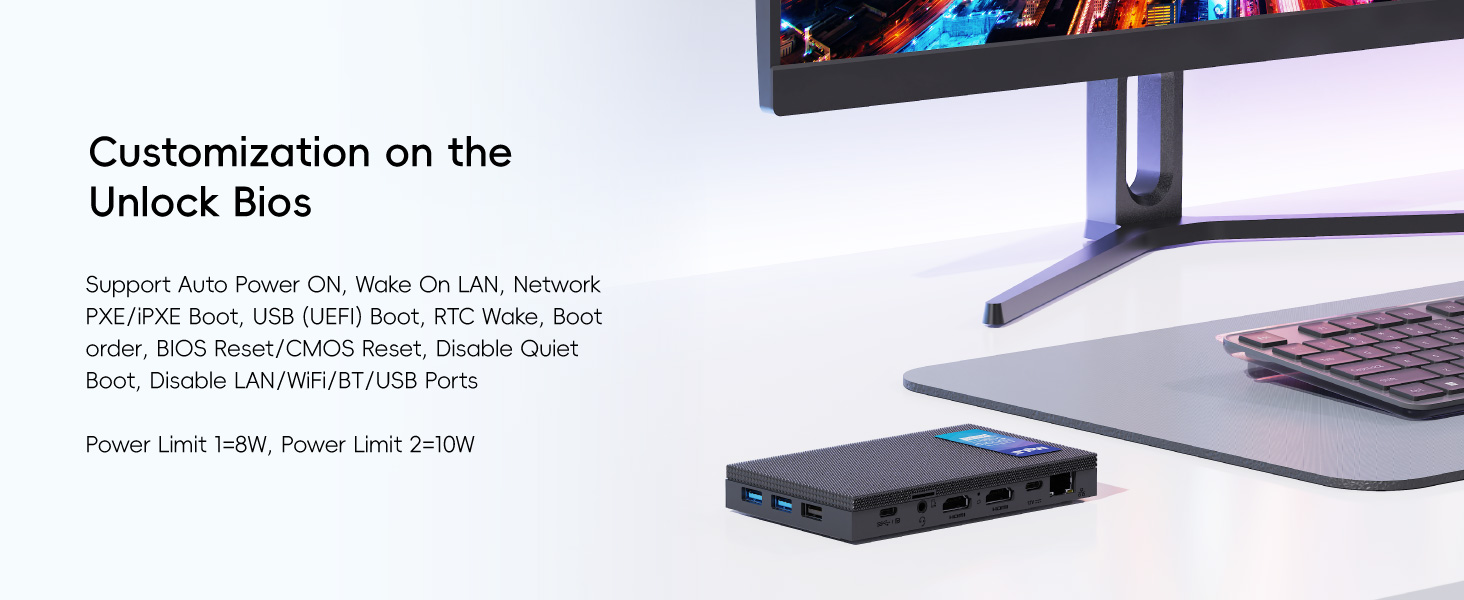
Image: Multi-Port Functionality. This image highlights the various ports available on the MeLE Quieter 4C N150, including USB 3.2 (10Gbps)*2, USB 2.0 (480Mbps), USB Type-C (10Gbps, Data Transfer, Video Display, USB PD3.0), 2x HDMI 2.0 (4K 60Hz), Micro-SD Slot, 3.5mm Audio Combo Jack, Gigabit Ethernet Port, Power Input (12V/2A), Kensington Lock Slot, Power Button, and Reset Button.
3.2. Dimensions
The device is designed to be ultra-slim and portable:
- Dimensions: 13.1 cm (5.2 inches) x 8.1 cm (3.2 inches) x 1.83 cm (0.7 inches)
- Weight: 203g (0.45 lbs)
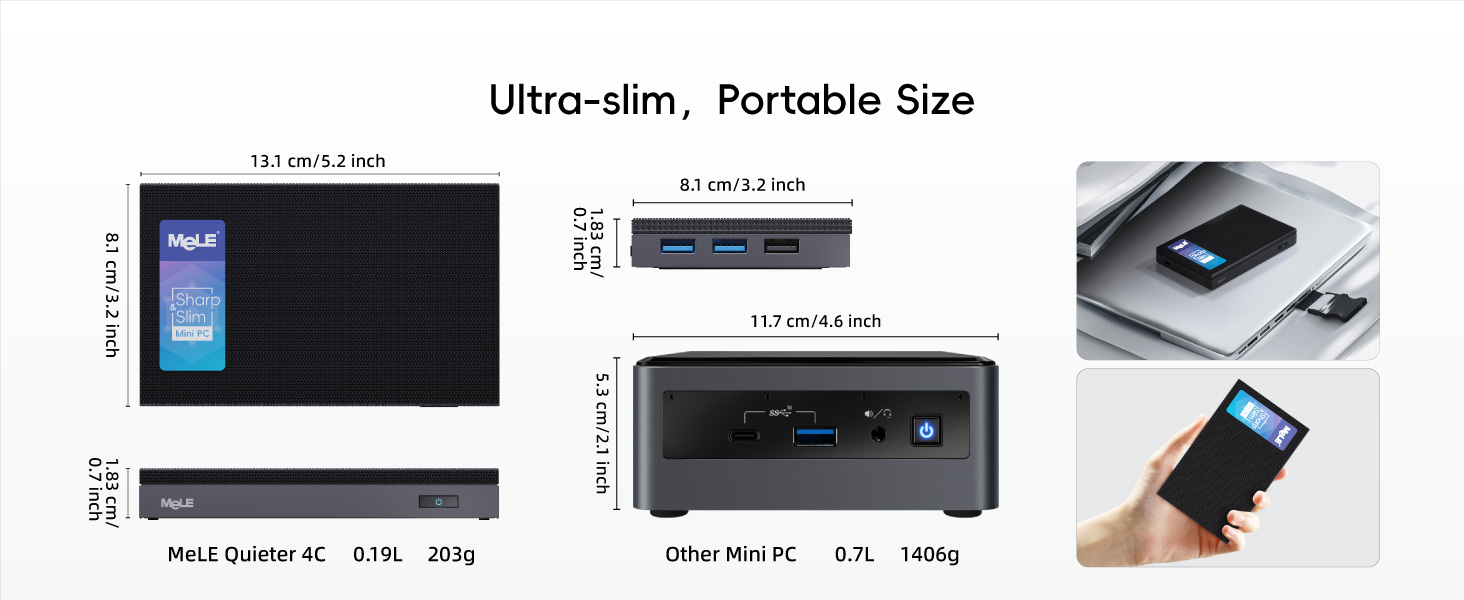
Image: Ultra-slim, Portable Size. This image illustrates the compact dimensions of the MeLE Quieter 4C N150 compared to other mini PCs.
3.3. Internal Components
The Quieter 4C N150 is powered by:
- Processor: Intel N150 CPU (4 Cores, 4 Threads, 6MB cache, up to 3.6GHz)
- RAM: 16GB LPDDR5 (4800MHz)
- Storage: 512GB M.2 2280 SSD (expandable up to 4TB)

Image: Intel N150 Processor. This image shows the Intel N150 processor, highlighting its role in accessible high performance for daily applications.

Image: LPDDR5 RAM. This image illustrates the high-speed LPDDR5 RAM operating at 4800MHz, offering improved performance over previous DDR generations.
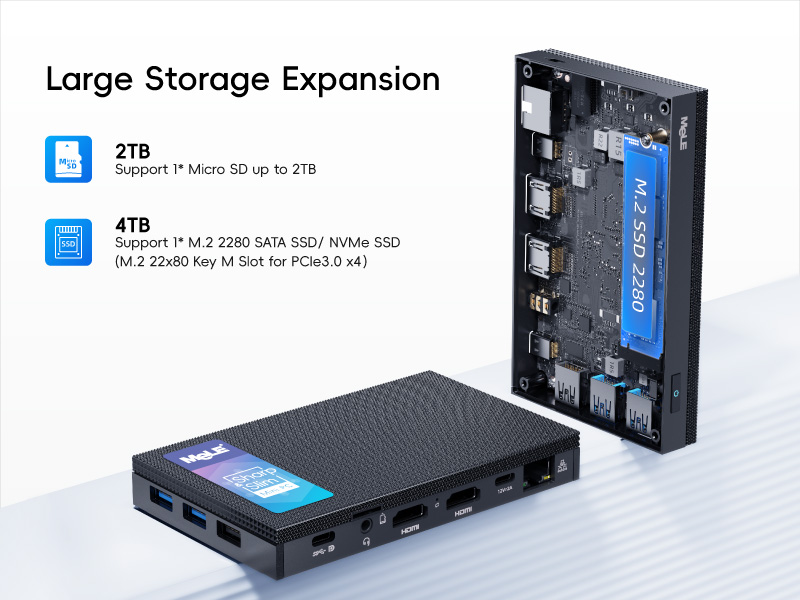
Image: Large Storage Expansion. This image shows the internal M.2 2280 SSD slot (supporting up to 4TB NVMe/SATA) and the Micro SD card slot (up to 2TB) for flexible storage expansion.
4. Setup Instructions
4.1. Initial Connection
- Connect the 12V/2A power adapter to the Mini PC's power input port.
- Connect your display(s) using the HDMI ports or the full-function USB-C port.
- Connect your keyboard and mouse to the available USB ports.
- Press the power button to turn on the device.
4.2. VESA Mount Installation
The MeLE Quieter 4C N150 can be mounted to the back of a VESA-compatible monitor for a clutter-free setup.
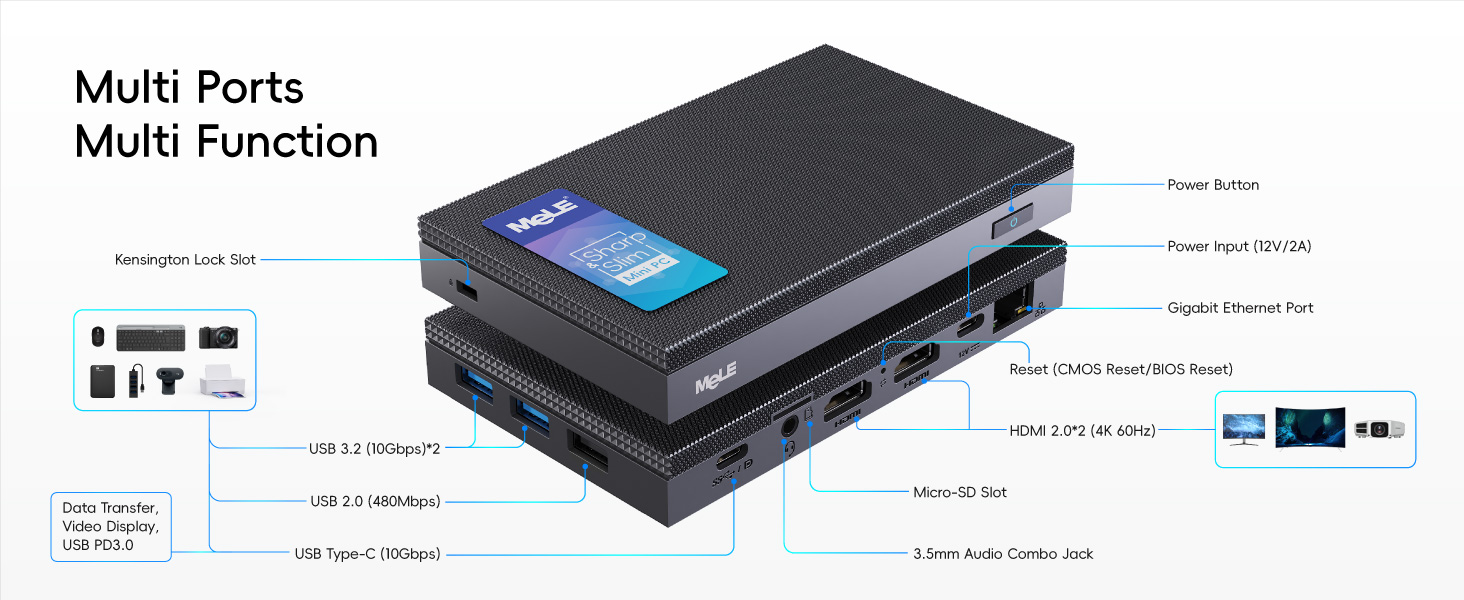
Image: Two Ways of Easy Installation. This image illustrates both VESA installation and standard desktop placement options for the mini PC.
Video: How to install a VESA-mounted bracket. This video provides a step-by-step guide on how to install the VESA mount for your MeLE Mini PC.
5. Operating Instructions
5.1. Power On/Off
To power on the device, press the power button located on the front panel. To power off, use the operating system's shutdown function or press and hold the power button for a few seconds.
5.2. Auto Power On
You can configure the Mini PC to automatically power on when power is supplied. This setting is managed in the BIOS.
Video: How to enable Auto Power On. This video guides you through the BIOS settings to enable the Auto Power On feature on your MeLE Mini PC.
5.3. Network Reset
If you encounter network connectivity issues, you may need to reset your network settings to their default configuration.
Video: How to reset network settings. This video demonstrates the process of resetting network settings on your MeLE Mini PC.
6. Storage Expansion
The MeLE Quieter 4C N150 offers flexible storage expansion options:
- Micro SD Card Slot: Supports up to 2TB Micro SD cards.
- Internal M.2 2280 SSD Slot: Supports up to 4TB M.2 SSDs (both NVMe and SATA M.2 SSDs are compatible).
7. Display Configuration
Maximize your visual experience with support for triple displays:
- Two HDMI ports (4K@60Hz)
- One full-function USB-C port (4K display, data transfer, and power input)
These ports allow for simultaneous triple display output, enhancing productivity.
8. Connectivity
The Mini PC includes advanced wireless and wired connectivity options:
- Wi-Fi: Wi-Fi 5 (802.11ac) for reliable dual-band connectivity (2.4GHz and 5GHz).
- Bluetooth: Bluetooth 5.1 for connecting wireless peripherals.
- Ethernet: Gigabit Ethernet port for stable wired network connections.
9. Thermal Management
The MeLE Quieter 4C N150 features an elegant fanless cooling design, providing a quiet and stable computing environment suitable for 24/7 operation. This design also ensures dust resistance.
Important Note:
Due to its fanless design, the surface temperature of the mini PC may reach between 55°C to 70°C under load. This is normal and meets the safety standards of the International Electrotechnical IEC62368-1:2018. Avoid touching the surface during operation to prevent discomfort.

Image: Elegant Fanless Cooling Design. This image details the thermal engineering and heat dissipation area of the Quieter 4C N150, explaining its fanless operation and expected surface temperatures.
10. Specifications
| Feature | Specification |
|---|---|
| Processor | Intel N150 (4 Cores, 4 Threads, up to 3.6GHz) |
| RAM | 16 GB LPDDR5 (4800 MHz) |
| Storage | 512 GB M.2 2280 SSD (expandable up to 4TB) |
| Graphics | Integrated Intel UHD Graphics |
| Max Screen Resolution | 3840 x 2160 (4K) |
| Video Output | 2x HDMI 2.0 (4K@60Hz), 1x Full-function USB-C (4K Display) |
| USB Ports | 2x USB 3.0, 1x USB 2.0, 1x Full-function USB-C |
| Wireless Connectivity | Wi-Fi 5 (802.11ac), Bluetooth 5.1 |
| Wired Connectivity | Gigabit Ethernet |
| Operating System | Windows 11 (pre-installed) |
| Dimensions | 13.1 x 8.1 x 1.83 cm (5.2 x 3.2 x 0.7 inches) |
| Weight | 0.48 lbs (203g) |
| Power Input | 12V/2A (PD 3.0 compatible, 12V-20V, min 36W) |
11. Troubleshooting
11.1. No Display Output
- Ensure the display cable (HDMI or USB-C) is securely connected to both the Mini PC and the monitor.
- Verify the monitor is set to the correct input source.
- Try a different display cable or monitor if possible.
11.2. Network Connectivity Issues
- For Wi-Fi, ensure the Wi-Fi adapter is enabled in Windows settings and you are connected to the correct network.
- For Ethernet, ensure the cable is securely connected to both the Mini PC and your router/modem.
- If issues persist, consider resetting network settings as shown in the Operating Instructions section.
11.3. Device Not Powering On
- Check that the power adapter is correctly connected to the Mini PC and a working power outlet.
- Ensure the power button is pressed firmly.
- If using a USB-C power source, ensure it meets the minimum 36W requirement and supports PD 3.0.
12. Safety Information
- Do not expose the device to water or excessive humidity.
- Avoid placing the device in direct sunlight or near heat sources.
- Use only the provided power adapter or a compatible PD 3.0 power source (minimum 36W).
- As a fanless device, the exterior may become warm during operation. This is normal. Avoid prolonged direct skin contact when the device is under heavy load.
- Do not attempt to open or repair the device yourself. Refer to qualified service personnel.
13. Warranty and Support
Your MeLE Fanless Mini PC Quieter 4C N150 comes with a standard manufacturer's warranty. For detailed warranty information, technical support, or service inquiries, please refer to the official MeLE website or contact MeLE customer service directly. Keep your purchase receipt for warranty claims.


