

1. Introduction
Thank you for choosing the Riversong AirFly L2 True Wireless Stereo (TWS) Earbuds. These earbuds are designed to provide a high-quality audio experience with the convenience of wireless connectivity. Featuring deep bass, clear treble, sensitive touch controls, and a sweat-resistant microphone, they are suitable for various activities, including making calls and enjoying music. The charging case supports both Type-C and wireless charging for enhanced flexibility.
2. Package Contents
Please check the package for the following items:
- Riversong AirFly L2 True Wireless Earbuds (Left and Right)
- Wireless Charging Case
- USB Type-C Charging Cable
- User Manual

Image: The Riversong AirFly L2 earbuds and their charging case, typically found in the product package.
3. Product Diagram
Familiarize yourself with the components of your AirFly L2 earbuds:
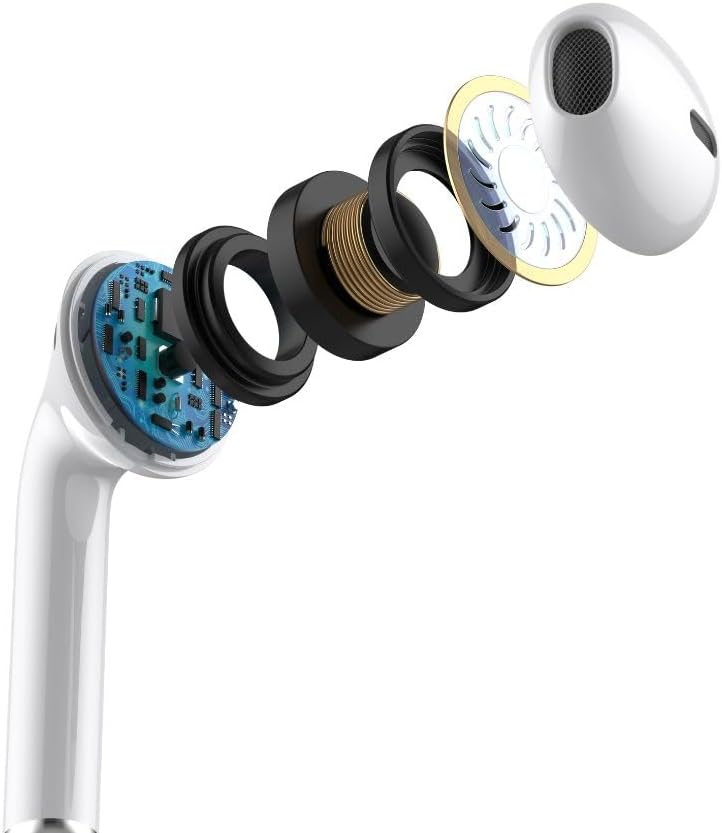
Image: An exploded view illustrating the internal components of a Riversong AirFly L2 earbud, including the driver, battery, and circuit board.
- Touch Control Area: For managing playback, calls, and voice assistant.
- Microphone: For hands-free calls.
- Charging Contacts: For charging the earbuds inside the case.
- LED Indicator: Shows charging status and pairing mode.
- Charging Case: Stores and charges the earbuds.
- Type-C Charging Port: For wired charging of the case.
4. Setup
4.1 Charging the Earbuds and Case
Before first use, fully charge the earbuds and the charging case.
- Charging the Earbuds: Place the earbuds into the charging case. They will automatically begin charging. The LED indicators on the earbuds will show their charging status.
- Charging the Case (Wired): Connect the provided USB Type-C cable to the charging port on the case and to a USB power adapter (not included). The case's LED indicator will show charging progress.
- Charging the Case (Wireless): Place the charging case on a compatible wireless charging pad. The case's LED indicator will show charging progress.
A full charge takes approximately 2 hours. The earbuds provide up to 30 hours of total playtime with multiple charges from the case.
4.2 Pairing with a Device
To connect your AirFly L2 earbuds to your smartphone or other Bluetooth-enabled device:
- Ensure the earbuds are charged.
- Open the charging case. The earbuds will automatically enter pairing mode, and their LED indicators will flash.
- On your device, go to Bluetooth settings and enable Bluetooth.
- Search for available devices and select "Riversong AirFly L2" from the list.
- Once connected, the earbud LEDs will stop flashing, indicating successful pairing.
The earbuds will automatically reconnect to the last paired device when removed from the case, if Bluetooth is enabled on the device.
5. Operating Instructions
5.1 Power On/Off
- Power On: Open the charging case, or long-press the touch control area on both earbuds for 3 seconds.
- Power Off: Place the earbuds back into the charging case and close the lid, or long-press the touch control area on both earbuds for 5 seconds.
5.2 Touch Controls
The AirFly L2 earbuds feature sensitive touch controls. Specific functions may vary slightly depending on your device and application.
| Action | Function |
|---|---|
| Single Tap (Left/Right) | Play/Pause Music, Answer/End Call |
| Double Tap (Right) | Next Track |
| Double Tap (Left) | Previous Track |
| Triple Tap (Left/Right) | Activate Voice Assistant (Siri, Google Assistant) |
| Long Press (2 seconds) | Reject Incoming Call |
5.3 Calling
The built-in microphone allows for hands-free calling.
- Answer/End Call: Single tap either earbud.
- Reject Call: Long press either earbud for 2 seconds.
5.4 Music Playback
Enjoy high-quality audio with deep bass and clear treble.
- Play/Pause: Single tap either earbud.
- Next Track: Double tap the right earbud.
- Previous Track: Double tap the left earbud.
6. Maintenance
- Cleaning: Regularly clean the earbuds and charging case with a soft, dry cloth. Do not use abrasive cleaners or solvents.
- Water Resistance: The earbuds are water-resistant. Avoid submerging them in water or exposing them to heavy rain. Dry them thoroughly if they get wet.
- Storage: Store the earbuds in their charging case when not in use to protect them and keep them charged. Avoid extreme temperatures.
- Battery Care: To prolong battery life, avoid fully discharging the earbuds and case frequently. Charge them regularly.
7. Troubleshooting
If you encounter issues with your AirFly L2 earbuds, try the following solutions:
- Earbuds not pairing:
- Ensure both earbuds are charged.
- Turn off Bluetooth on your device, then turn it back on.
- Forget/delete "Riversong AirFly L2" from your device's Bluetooth list and try pairing again.
- Place earbuds back in the case, close the lid, wait a few seconds, then open to re-enter pairing mode.
- No sound from one earbud:
- Ensure both earbuds are charged.
- Place both earbuds back in the charging case, close the lid, and then take them out again.
- Try resetting the earbuds (refer to the full product manual for specific reset instructions if available).
- Charging case not charging:
- Check the Type-C cable connection and ensure the power adapter is working.
- If using wireless charging, ensure the case is correctly positioned on the charging pad.
- Touch controls not responding:
- Ensure your fingers are clean and dry.
- Restart the earbuds by placing them in the case and taking them out again.
8. Specifications
| Feature | Detail |
|---|---|
| Brand | Riversong |
| Model Name | AirFly L2 (EA238) |
| Color | White |
| Ear Placement | In Ear |
| Headphones Form Factor | In Ear |
| Impedance | 140 Ohm |
| Noise Control | None |
| Frequency Response | 20 Hz - 20,000 Hz |
| Sensitivity | 88 dB |
| Headphone Jack | No Jack |
| Included Components | Wireless Charging Case |
| Age Range Description | Adult |
| Number of Items | 1 |
| Manufacturer | Riversong |
| Connectivity Technology | Wireless |
| Wireless Communication Technology | Bluetooth |
| Bluetooth Version | 5.2 |
| Style | Classic |
| Carrying Case Color | White |
| Unit Count | 1 Count |
| Audio Driver Type | Dynamic Driver |
| Special Features | Wireless Charging |
| Material | Plastic |
| Specific Uses For Product | Business |
| Recommended Uses For Product | Making calls |
| Compatible Devices | Laptops, Tablets, Smartphones, Smart Speakers, and other Bluetooth-enabled devices |
| Cable Feature | Without Cable |
| Water Resistance Level | Water Resistant |
| Electric | No |
| Ear Tip Form | Circular Tip |
| Control Type | Voice Control |
| Control Method | Touch |
| Controller Type | Touch |
| Battery Charge Time | 2 hours |

Image: Riversong AirFly L2 earbuds showcasing key features like 30H playtime, Type-C connector, Bluetooth 5.3 (note: specifications state 5.2), ENC, HD sound, and comfort-fit design.
9. Warranty and Support
Warranty: This product comes with a limited warranty. Please refer to your purchase documentation or contact your retailer for specific warranty terms and conditions.
Support: For technical assistance or customer service inquiries, please contact the retailer where you purchased the product or visit the official Riversong website for support resources.