
1. Introduction
Welcome to the user manual for your Nilox Sport Trailround Smartwatch. This guide provides essential information to help you set up, operate, and maintain your device, ensuring you get the most out of its features. The Nilox Sport Trailround is designed to be a versatile companion for your daily activities, offering health monitoring, fitness tracking, and smart notifications.
Please read this manual carefully before using your smartwatch and keep it for future reference.
2. Product Overview
The Nilox Sport Trailround Smartwatch features a robust design with a 1.43-inch full-touch display. It integrates various sensors for comprehensive health and fitness tracking, along with smart connectivity features.
2.1 Key Features
- 1.43-inch Full Touch Display: Clear and responsive interface for easy navigation.
- Health Monitoring: Tracks heart rate, blood pressure, blood oxygen saturation (SpO2), and sleep patterns.
- Fitness Tracking: Records steps, calories burned, distance, and workout duration.
- Smart Notifications: Receives alerts for calls, messages, and app notifications directly on your wrist.
- Remote Control: Manage music playback and camera shutter on your connected smartphone.
- Durability: IP67 water and dust resistance for various environments.
- Battery Life: Up to 6 days of typical use.
- Compatibility: Works with both Android and iOS smartphones.
2.2 Components
Familiarize yourself with the main components of your Nilox Sport Trailround Smartwatch:
- Display: 1.43-inch full-touch screen.
- Power Button: Located on the side, used for powering on/off and screen activation.
- Back Button: Located on the side, used for navigating back in menus.
- Sensors: Located on the back for heart rate, blood pressure, and SpO2 monitoring.
- Charging Contacts: Magnetic contacts on the back for charging.
- Strap: Adjustable silicone strap for comfortable wear.

Figure 2.1: Front view of the Nilox Sport Trailround Smartwatch displaying the time, step count, and heart rate.

Figure 2.2: Angled view of the smartwatch, showcasing a watch face with weather information, step count, and heart rate data.
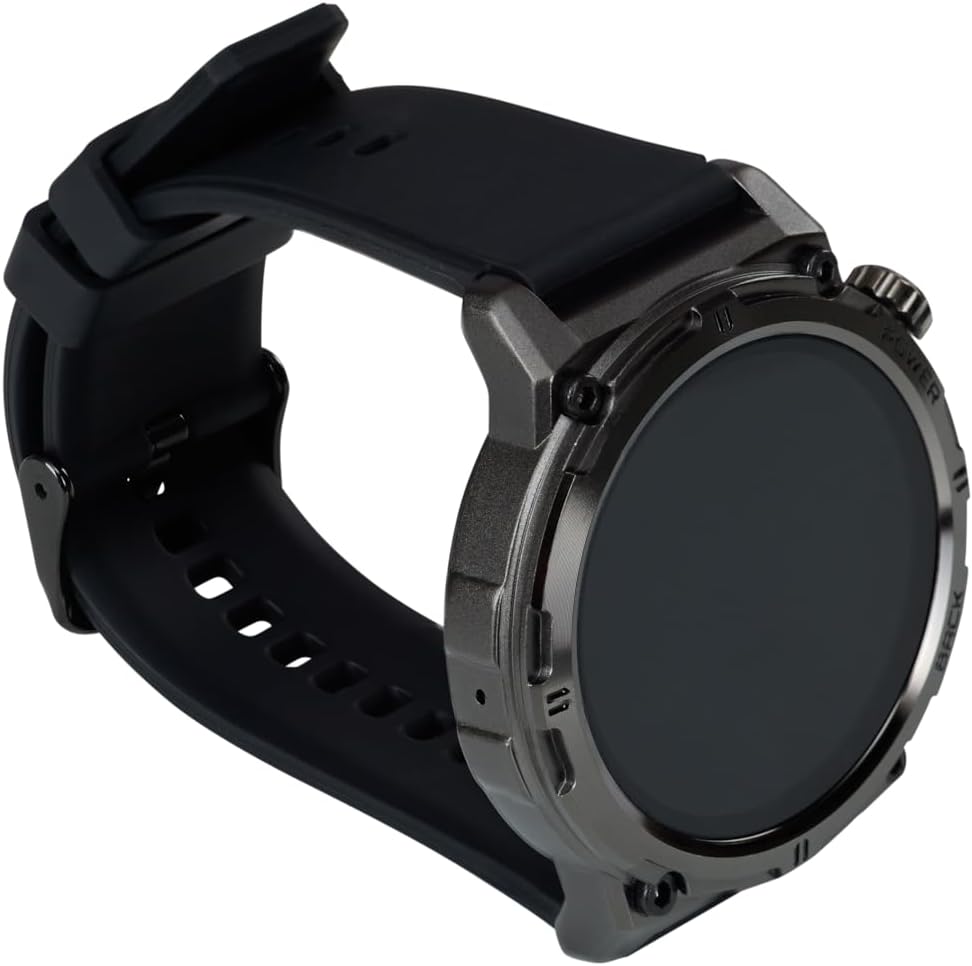
Figure 2.3: Side view of the smartwatch, highlighting the power and back buttons and the comfortable silicone strap.

Figure 2.4: Rear view of the smartwatch, displaying the optical health sensors and magnetic charging contacts.
3. Setup
3.1 Charging the Smartwatch
- Connect the magnetic charging cable to a USB power source (e.g., computer USB port, USB wall adapter).
- Align the magnetic end of the charging cable with the charging contacts on the back of your smartwatch. The cable will snap into place.
- The smartwatch display will show a charging indicator. A full charge typically takes approximately 2 hours.
Ensure the charging contacts are clean and dry before charging to prevent corrosion.
3.2 Powering On/Off
- To Power On: Press and hold the Power button (top right button) for a few seconds until the Nilox logo appears.
- To Power Off: From the watch face, swipe down to access quick settings, or navigate to the 'Settings' menu. Select 'Power Off' and confirm. Alternatively, press and hold the Power button until the power-off option appears, then select it.
3.3 App Installation and Pairing
To unlock the full potential of your Nilox Sport Trailround Smartwatch, you need to pair it with your smartphone using the companion app.
- Download the App: Search for "Smart Time Pro" in the Apple App Store (for iOS) or Google Play Store (for Android) and install it on your smartphone.
- Enable Bluetooth: Ensure Bluetooth is enabled on your smartphone.
- Open the App: Launch the "Smart Time Pro" app and follow the on-screen instructions to create an account or log in.
- Add Device: In the app, navigate to the device management section (usually indicated by a '+' icon or 'Add Device'). The app will search for nearby smartwatches.
- Select Your Smartwatch: From the list of found devices, select "Nilox Trailround" or a similar identifier.
- Confirm Pairing: A pairing request will appear on both your smartphone and the smartwatch. Confirm the pairing on both devices.
- Grant Permissions: The app will request various permissions (e.g., location, notifications, contacts). Grant the necessary permissions for full functionality.
Once paired, your smartwatch will synchronize data with the app, and you can customize settings, watch faces, and view detailed health and fitness data.
4. Operating Instructions
4.1 Basic Navigation
- Touchscreen: Swipe left/right to navigate through different functions (e.g., activity, heart rate, weather). Swipe up from the watch face to view notifications. Swipe down from the watch face to access quick settings. Tap to select an option or enter a menu.
- Power Button: Press once to wake the screen or return to the watch face. Press and hold to power on/off.
- Back Button: Press once to go back to the previous screen or exit a menu.
4.2 Health Monitoring
The smartwatch provides various health tracking features:
- Heart Rate: Swipe to the heart rate interface and wait for the measurement to complete. For continuous monitoring, enable it in the app settings.
- Blood Pressure: Swipe to the blood pressure interface to initiate a measurement. Ensure the watch is snug on your wrist.
- Blood Oxygen (SpO2): Swipe to the SpO2 interface to measure your blood oxygen level. Remain still during measurement.
- Sleep Tracking: The smartwatch automatically detects your sleep patterns when worn during sleep. View detailed sleep data (deep sleep, light sleep, awake time) in the "Smart Time Pro" app.
Note: The health data provided by this device is for reference only and should not be used for medical diagnosis or treatment.
4.3 Fitness Tracking
Track your daily activity and workouts:
- Steps, Calories, Distance: These metrics are automatically tracked throughout the day. View your progress on the watch face or in the activity summary.
- Workout Modes: The smartwatch offers various sport modes (e.g., walking, running, cycling). Select a mode to start tracking specific workout data, including duration, heart rate, and calories burned.
- GPS via Smartphone: For accurate distance and route tracking during outdoor activities, ensure your smartwatch is connected to your smartphone with GPS enabled. The app will use your phone's GPS data.

Figure 4.1: The smartwatch being worn on a wrist during a fitness activity, demonstrating its use for tracking workouts.

Figure 4.2: A close-up of the smartwatch display showing real-time workout statistics, including duration and progress.

Figure 4.3: The smartwatch on a user's wrist during strength training, illustrating its suitability for various exercise types.
4.4 Notifications
Once paired with your smartphone and app permissions are granted, your smartwatch can display notifications:
- Receiving Notifications: When your phone receives a call, message, or app alert, the smartwatch will vibrate and display the notification content.
- Viewing Notifications: Swipe up from the watch face to access your notification history.
- Managing Notifications: You can enable or disable specific app notifications through the "Smart Time Pro" app settings.
4.5 Music and Camera Control
Control your smartphone's music player and camera remotely:
- Music Control: Navigate to the music control interface on your smartwatch. You can play/pause, skip tracks, and adjust volume for music playing on your connected phone.
- Camera Control: Open the camera control feature on your smartwatch. This will typically open your phone's camera app, allowing you to tap the watch screen to remotely trigger the shutter.
5. Maintenance
5.1 Cleaning
- Regularly clean your smartwatch and strap with a soft, damp cloth.
- Avoid using harsh chemicals, abrasive cleaners, or solvents, as these can damage the device.
- Ensure the charging contacts on the back of the watch are clean and free of debris to maintain proper charging.
5.2 Water and Dust Resistance (IP67)
The Nilox Sport Trailround Smartwatch is rated IP67, meaning it is resistant to dust and can withstand immersion in water up to 1 meter for 30 minutes. This makes it suitable for daily use, including:
- Washing hands
- Rain and splashes
- Brief, shallow immersion
Important Considerations:
- Do not use the smartwatch for swimming, diving, or high-pressure water activities.
- Avoid exposing the watch to hot water, steam, or detergents.
- Water resistance is not a permanent condition and may decrease over time with normal wear and tear.
- If the watch gets wet, dry it thoroughly before charging or using the buttons.
5.3 Battery Care
- Charge the battery fully before first use.
- Avoid completely draining the battery frequently, as this can reduce its lifespan.
- Store the smartwatch in a cool, dry place when not in use for extended periods.
6. Troubleshooting
If you encounter issues with your Nilox Sport Trailround Smartwatch, refer to the following common problems and solutions:
| Problem | Possible Solution |
|---|---|
| Smartwatch won't turn on | Ensure the device is fully charged. Press and hold the Power button for at least 10 seconds. |
| Unable to pair with smartphone | 1. Ensure Bluetooth is enabled on your phone and the smartwatch is powered on. 2. Make sure the smartwatch is within range of your phone. 3. Restart both your phone and the smartwatch. 4. Clear Bluetooth cache on your phone (Android) or forget the device and try pairing again. 5. Ensure the "Smart Time Pro" app has necessary permissions. |
| Notifications are not received | 1. Check if the smartwatch is successfully paired with the app. 2. Ensure notification permissions are granted to the "Smart Time Pro" app on your phone. 3. Verify that app notifications are enabled within the "Smart Time Pro" app settings. 4. Make sure your phone's notification settings allow the app to display alerts. |
| Inaccurate health/fitness data | 1. Ensure the smartwatch is worn snugly on your wrist, not too loose or too tight. 2. Clean the sensors on the back of the watch. 3. For GPS-dependent activities, ensure your phone's GPS is active and the watch is connected to the phone. |
| Short battery life | 1. Reduce screen brightness. 2. Disable continuous heart rate monitoring if not needed. 3. Limit the number of apps sending notifications to the watch. 4. Ensure the watch is fully charged. |
If the problem persists, please contact Nilox customer support for further assistance.
7. Specifications
| Feature | Detail |
|---|---|
| Brand | Nilox |
| Model | Trailround |
| Display Size | 1.43 Inches |
| Display Type | Full Touch |
| Operating System | Wear OS (as per specification, though app is 'Smart Time Pro') |
| Connectivity | Bluetooth |
| Water Resistance | IP67 (Dust and water resistant) |
| Battery Composition | Lithium-polymer |
| Battery Life | Up to 6 days (typical use) |
| Compatible Devices | Smartphones (Android, iOS) |
| Special Features | Health monitoring (HR, BP, SpO2, Sleep), GPS via smartphone, Notifications, Music/Camera control |
| Color | Black |
| Model Number | 177f34f6-2de0-4995-88fc-ff81e0b07a26 |
8. Warranty and Support
Information regarding the specific warranty period and detailed support procedures for the Nilox Sport Trailround Smartwatch is not available in this manual. For warranty claims, technical support, or service inquiries, please refer to the official Nilox website or contact your local retailer where the product was purchased.
Please retain your proof of purchase for any warranty-related requests.


