1. Introduction
The Depusheng AG8 is an 8-channel professional audio mixer designed for both professional and beginner users. It features an integrated MP3 player, USB recording capabilities, grouping functions, and two AUX interfaces. With 99 built-in DSP effects, this mixer provides comprehensive control for various audio applications, from live performances to studio recording.
2. Safety Information
- Power Supply: Use only the specified power adapter. Ensure the voltage matches your local power supply.
- Ventilation: Do not block ventilation openings. Ensure adequate airflow around the unit to prevent overheating.
- Moisture: Keep the unit away from water, rain, and excessive humidity. Do not operate with wet hands.
- Placement: Place the mixer on a stable, flat surface. Avoid placing it near heat sources or in direct sunlight.
- Cleaning: Disconnect power before cleaning. Use a dry, soft cloth. Do not use liquid cleaners or aerosols.
- Servicing: Do not attempt to service this unit yourself. Refer all servicing to qualified service personnel.
3. Product Overview
The Depusheng AG8 mixer is built with a rugged metal chassis and sealed rotary controls for durability. It offers a comprehensive set of features for versatile audio mixing.

Figure 3.1: Front view of the Depusheng AG8 Professional Audio Mixer, showcasing its control layout and display.
3.1. Key Features
- 8-Channel Input: Includes 6 XLR line input jacks for microphones or guitars, and 1/4'' (6.35mm) INSERT and LINE mic inputs on channels 7/8.
- +48V Phantom Power: Each XLR channel is equipped with individual +48V phantom power switches to support condenser microphones.
- USB Interface: Allows direct connection of a USB stick for MP3 music playback and audio recording. Can also connect to a computer via USB for recording.
- Bluetooth Connectivity: Supports wireless high-speed connection for playing music from Bluetooth-enabled devices.
- 99 DSP Effects: A built-in 24-bit DSP effects processor provides 99 types of reverberation effects, adjustable via a dedicated knob.
- 7-Band Stereo Graphic Equalizer: For precise frequency adjustments of the main output.
- Dual AUX Outputs: Two auxiliary outputs (AUX1 and AUX2) for connecting external effects processors or monitoring systems.
- Grouping Function: Allows for grouping of channels for easier control.

Figure 3.2: Rear panel of the Depusheng AG8 mixer, showing XLR, 1/4-inch, and RCA input/output connections, along with individual phantom power switches.
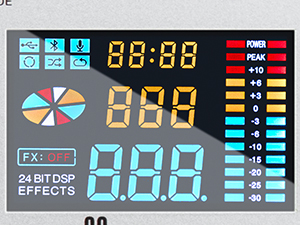
Figure 3.3: Close-up of the LED high-definition display, showing effect numbers and level meters.
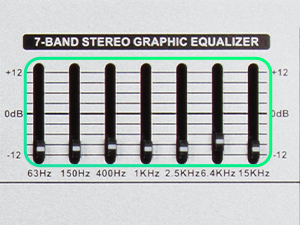
Figure 3.4: Detail of the 7-band stereo graphic equalizer, allowing fine-tuning of audio frequencies.
4. Setup
4.1. Power Connection
Connect the provided power cable to the AC INPUT on the rear panel of the mixer and then to a suitable power outlet.
4.2. Audio Input Connections
- Microphones (XLR): Connect dynamic or condenser microphones to the XLR inputs (channels 1-6). For condenser microphones, activate the +48V PHANTOM POWER switch for the respective channel.
- Instruments/Line Level Devices (6.35mm Jack): Connect instruments like guitars, keyboards, or other line-level devices to the 1/4'' (6.35mm) LINE inputs. Channels 7/8 also feature INSERT inputs for additional flexibility.
4.3. Audio Output Connections
- Main Output: Connect the MAIN OUTPUT (XLR or 6.5mm/1/4'') to your amplifier, powered speakers, or recording interface.
- AUX Outputs: Use AUX1 and AUX2 to send signals to external effects processors, stage monitors, or headphones.
- Headphones: Connect headphones to the PHONES output for monitoring.

Figure 4.1: Diagram illustrating various compatible devices and connection methods for the Depusheng AG8 mixer, including microphones, instruments, and output devices.
4.4. USB and Bluetooth Setup
- USB Stick: Insert a USB stick into the dedicated USB port for MP3 playback or recording.
- Computer Connection: Connect the mixer to your computer via a USB cable for direct audio recording.
- Bluetooth Pairing: Activate Bluetooth on your mobile device and search for the mixer. Select the mixer from the list to pair.

Figure 4.2: Close-up of the USB port, demonstrating its plug-and-play functionality for media playback and recording.

Figure 4.3: Image showing the mixer's Bluetooth connectivity, enabling wireless audio streaming from compatible devices.
5. Operation
5.1. Channel Control
- GAIN Knob: Adjusts the input sensitivity for each channel. Set it to an appropriate level to avoid clipping.
- EQ Controls (HIGH, MID, LOW): Adjust the treble, midrange, and bass frequencies for each channel.
- PAN Knob: Positions the sound of the channel within the stereo field (left to right).
- AUX Knobs: Control the amount of signal sent from each channel to the AUX outputs.
- Channel Faders: Adjust the individual volume level of each channel.
- ON/OFF Buttons: Mute or unmute individual channels.
5.2. DSP Effects
The AG8 features 99 DSP effects. Use the PROGRAM knob to select the desired effect number, which will be displayed on the LED screen. Adjust the FX level knob to control the amount of effect applied to the mix.

Figure 5.1: The DSP effects section, highlighting the knob for selecting from 99 different reverb and other effects.
5.3. USB Playback and Recording
- Playback: Insert a USB stick containing MP3 files. Use the transport controls (Play/Pause, Next, Previous) on the mixer to manage playback.
- Recording: To record audio to a USB stick, ensure a formatted USB stick is inserted. The mixer can record the main mix directly to the USB stick. For computer recording, connect the mixer via USB and use your preferred digital audio workstation (DAW) software.
5.4. Bluetooth Operation
Once paired, audio from your Bluetooth device will be routed through channels 7/8. Adjust the volume for these channels using their respective controls.
5.5. Video Demonstration
Video 5.1: An official overview of the Depusheng AG8 Professional Audio Mixer, demonstrating its features and functionality.
6. Specifications
| Feature | Specification |
|---|---|
| Number of Channels | 8 |
| Power Source | Corded Electric |
| Voltage | 110 Volts |
| Connectivity Technology | RCA, Auxiliary, XLR |
| Item Weight | 8.58 pounds (3.9 Kilograms) |
| Package Dimensions | 17.5 x 16 x 7.5 inches |
| DSP Effects | 99 types (24-bit) |

Figure 6.1: Physical dimensions and net weight of the Depusheng AG8 mixer.
7. Troubleshooting
- No Power: Ensure the power cable is securely connected to both the mixer and the power outlet. Check the power switch on the rear panel.
- No Sound Output: Verify all input and output cables are correctly connected. Check channel faders and main output faders are raised. Ensure channel ON/OFF buttons are engaged. Check connected speakers/amplifiers are powered on and functioning.
- Distorted Sound: Reduce the GAIN knob for the affected channel. Check that input levels are not clipping (indicated by PEAK LEDs). Ensure output levels are not too high.
- Phantom Power Issue: Confirm the +48V PHANTOM POWER switch is activated for condenser microphones.
- USB Playback/Recording Issues: Ensure the USB stick is properly inserted and formatted. Check file compatibility for playback (MP3).
- Bluetooth Connection Failure: Ensure Bluetooth is enabled on your device and the mixer. Try unpairing and re-pairing the device.
8. Maintenance
- Cleaning: Regularly wipe the surface of the mixer with a soft, dry, lint-free cloth. Avoid using abrasive cleaners or solvents.
- Storage: When not in use for extended periods, store the mixer in a cool, dry place, away from direct sunlight and extreme temperatures.
- Dust Protection: Consider using a dust cover to protect the controls and faders from dust and debris.
9. Warranty and Support
This product comes with a standard manufacturer's warranty. For detailed warranty information or technical support, please refer to the warranty card included with your purchase or visit the official Depusheng website. Keep your proof of purchase for warranty claims.


